Comms & network security focuses on the CIA of data in motion
One of the largest domains in the CBK, and also one of the most technically deep; the ability to understand this domain is critical for exam success
Network architecture & design
How networks should be designed and the controls they may contain.
Focuses on deploying defence-in-depth strategies and weighing the cost & complexity of a network control against the benefit provided.
Fundamental network concepts
Simplex, half-duplex & full-duplex communication
Simplex communication is one-way, like a car radio tuned to a station
Half-duplex communication sends or receives one at a time (like a walkie-talkie), not simultaneously
Full-duplex communication sends & receives simultaneously, like two people having a face-to-face conversation
PANs, LANs & beyond
A local-area network (LAN) is a comparatively small network, typically confined to a building (or an area within a building)
A metropolitan area network (MAN)is typically confined to a city, postcode, campus or business park
A wide-area network (WAN) typically covers cities, states or countries; a global area network (GAN) is a global collection of WANs
At the other end of the spectrum are personal area networks (PANs), with a range of up to 100m (sometimes much less). Low-power wireless technologies such as Bluetooth create PANs
Internet, intranet & extranet
The Internet is a global collection of peered networks running TCP/IP and providing best-effort service
An intranet is a privately-owned network running TCP/IP, such as a company network
An extranet is a connection between private intranets, such as connections between business partner networks
Circuit-switched & packet-switched networks
The original voice networks were circuit-switched, with a circuit or channel (portion of a circuit) was dedicated between two nodes.
Circuit-switchednetworks can provide dedicated bandwidth to point-to-point connections, such as a T1 connecting two office
One drawback of circuit-switched networks is that once a channel or circuit is connected, it is dedicated to that purpose, even if no data is being transferred.
Packet-switched networks were designed to address this issue, as well as handle network failures more robustly.
Instead of using dedicated circuits, packet-switched networks break data into packets, each sent individually.
If multiple routes are available between two points on a network, packet switching can choose the best route, and fall back to secondary routes in case of failure.
Packets may take any path across a network, and are then reassembled by the receiving node; missing packets can be re-transmitted, and out-of-order packets can be resequenced
Unlike circuit-switched networks, packet-switched networks make unused bandwidth available for other connections; this can give packet-switched networks a cost advantage
Making unused bandwidth for other applications presents a challenge: What happens when all bandwidth is consumed? Which applications “win” the required bandwidth? (Not an issue with circuit-switched networks, where applications have exclusive access to dedicated circuits or channels)
Packet-switched networks may use quality of service (QoS) to give specific traffic precedence over other traffic. For example, QoS is often applied to VOIP traffic to avoid interruption of phone calls, while less time-sensitive traffic such as SMTP often receives a lower priority (small delays in email exchange are less likely to be noticed than dropped phone calls!)
The OSI model
The OSI (Open Systems Interconnection) reference model is a layered network model
The model is abstract; we do not directly run the OSI model on our systems, but it is used as a reference point, so “Layer 1” is universally understood when you are running Ethernet or ATM
The OSI model has seven layers and may be listed in top-to-bottom or bottom-to-top order:
Top-to-bottom (7-1): Application, Presentation, Session, Transport, Network, Data-Link, Physical (APSTNDP = All People Seem To Need Domino’s Pizza)
Bottom-to-top (1-7): Physical, Data Link, Network, Transport, Session, Presentation, Application (PDNTSPA = Please Do Not Throw Sausage Pizza Away)
Protocol data units of the OSI model are:
Layer 7-5: Data
Layer 4: Segment (or Datagram)
Layer 3: Packet
Layer 2: Frame
Layer 1: Bit
i.e. “Don’t Don’t Don’t Stop Pouring Free Beer“
Layer 1: Physical
Describes units of data such as bits represented by energy (such as light, electricity or radio waves) and the medium used to carry them, such as copper or fibre optic cables.
WLANs have a physical layer, even though we cannot physically touch it
Cabling standards such as thinnet, thicknet and unshielded twisted pair (UTP) exist in Layer 1, among many other devices (including hubs & repeaters)
Layer 2: Data Link
Handles access to the physical layer as well as LAN communication
An Ethernet card and its MAC address are at layer 2, as are switches & bridges
Layer 2 is divided into two sub-layers:
The media access control (MAC) layer transfers data to & from the physical layer (Layer 1)
The logical link control (LLC) layer handles LAN communication, and touches Layer 3
Layer 3: Network
Describes routing, which is moving data from a system on one LAN to a system on another
IP addresses & routers exist at layer 3, along with protocols such as IPv4 and IPv6
Layer 4: Transport
The transport layer handles packet sequencing, flow control & error detection
TCP & UDP are Layer 4 protocols
Layer 4 makes a number of features available, such as re-sending or re-sequencing packets.
Taking advantage of these features is a protocol implementation decision
TCP uses these features for reliabilility, at the expense of speed
UDP does not as it favours speed over reliability
Layer 5: Session
Manages sessions, which provide maintenance on connections
Mounting a file share via a network requires a number of maintenance sessions, such as remote procedure calls (RPCs), which exist at the session layer
The session layer provides connections between applications using simplex, half-duplex & full-duplex communication
Warning: The transport & session layers are often confused
For example, is “maintenance of connections” a transport or session issue?
Packets are sequenced at the transport layer, and network file shares can be remounted at the session layer, both of which you may consider to be “maintenance”
However, words like maintenance imply more work than simple packet sequencing or retransmission – it requires a certain amount of “heavy lifting”, so session layer is the best answer (as the higher layer)
Layer 6: Presentation
Presents data to the application & user in a comprehensible way
Presentation layer concepts include data conversion, character sets such as ASCII, and image formats such as GIF, JPEG & TIFF.
Layer 7: Application
The application layer is where you interface with your computer application
Web browsers, word processors and IM clients all exist at layer 7
The protocols Telnet and FTP are application layer protocols
The TCP/IP model
The TCP/IP model is a popular network model created by DARPA in the 1970s
TCP/IP is an informal name for what is officially called the Internet Protocol Suite, and it’s a suite of protocols including TCP, IP, UDP and ICMP, amongst many others
Simpler than the OSI model, and maps onto it as shown below:
The OSI model vs TCP/IP model
Network access layer
Combines OSI Layer 1 (Physical) and Layer 2 (Data-Link)
Describes Layer 1 issues such as energy, bits and the medium used to carry them, as well as Layer 2 issues like converting bits into protocol data units such as Ethernet frames, MAC addresses & NICs.
Internet layer
The Internet layer aligns with OSI Layer 3 (Network)
This is where IP addresses & routing live
When data is transmitted from a node on one LAN to a node, the Internet layer (think “inter-network”) is used
The Host-to-host transport layer is sometimes called either “Host-to-Host”, or more commonly, “Transport”
It connects the Internet layer to the Application layer
It is where applications are addressed on a network via ports
TCP & UDP are the two transport layer protocols of TCP/IP
Application layer
Combines OSI Layers 5-7 (session, presentation & application)
Most application-layer protocols use a client-server architecture where a client connects to a server or daemon
The clients and servers use either TCP or UDP (sometimes both) as a transport layer protocol
TCP/IP application layer protocols include SSH, Telnet & FTP, among others
MAC addresses
A MAC address is the unique hardware address of an Ethernet NIC, typically “burned in” at the factory, but may be changed in software
MAC addresses are 48 bits long, and have two halves:
The first 24 bits form the Organisationally Unique Identify (OUI), identifying the manufacturer or vendor
The final 24 bits form a serial number (formally called an Extension Identifier) assigned by the manufacturer
The IEEE created the EUI-64 (extended unique identifier) standard for 64-bit MAC addresses
The OUI is still 24 bits, but the serial number is now 40 bits
This allows for far more MAC addresses, compared with the original 48-bit standard
IPv6 auto-configuration is compatible with both types of MAC address
IPv4
IPv4 is Internet protocol version 4, commonly called just “IP”
Simple protocol designed to carry data across networks – in fact, so simple that it requires a “helper protocol” called ICMP
IP is connectionless and unreliable; it provides “best effort” delivery of packets
If connections or reliability are required, they must be provided by a higher-level protocol carried by IP, such as TCP
IPv4 uses 32-bit source & destination addresses, usually shown in “dotted quad” format (e.g. 192.168.2.4)
Allows nearly 4.3 billion (232) addresses
IPv6
The successor to IPv4, featuring a far larger (128-bit) address space
Also provides simpler routing and simpler address assignment
A lack of IPv4 addresses was the primary factor that led to the creation of IPv6
Allows many billions (2128) of addresses
Most modern systems are “dual stack”, meaning they use IPv4 & IPv6 simultaneously
Hosts may also access IPv6 networks via IPv4 by using tunnelling
TCP
A reliable Layer 4 protocol
Uses a three-way handshake (SYN, SYN-ACK, ACK) in order to create reliable connections across a network
TCP can re-order segments that arrive out of order, and re-transmit missing segments
TCP uses ports or sockets, connecting from a source port (e.g. 51178) to a destination port (e.g. 22)
The TCP port field is 16 bits, allowing port numbers from 0 to 65,535 (a total of 65,536 possible ports)
There are two types of ports: reserved and ephemeral
A reserved port is 1023 or lower. Most OSes require super-user privileges to open a reserved port.
Ephemeral ports are 1024-65,535, and can be opened by any user
UDP
UDP is a simpler and faster cousin to UDP
It is commonly used for applications that are “lossy” (can handle some packet loss) such as streaming audio & video
It is also used for query-response applications, such as DNS queries
ICMP
Internet Control Message Protocol (ICMP) is a helper protocol that assists Layer 3
It is used to troubleshoot & report error conditions; without ICMP to help, IP would fail when faced with routing loops, ports, hosts or networks that are down, among other issues
ICMP has no concept of ports, as TCP and UDP do, but instead uses types and codes
Application-layer TCP/IP protocols & concepts
Telnet
Telnet provides terminal (text-based VT100-style) emulation over a network
Telnet servers listen on TCP port 23
Telnet was the standard way to access an interactive command shell over a network for over 20 years
Telnet is weak because it provides no confidentiality; all data transmitted during a Telnet session (including the username & password used to authenticate to the system) is plaintext
FTP
File Transfer Protocol (FTP) is used to transfer files to and from servers
Like Telnet, FTP has no confidentiality or integrity, and should not be used to transfer sensitive data over insecure channels
FTP uses two ports:
The control connection (where commands are sent) is TCP port 21
“Active FTP” uses a data connection (where data is transfers) originating from TCP port 20
Here are two socket pairs (using arbitrary ephemeral ports):
Client: 1025 → Server: 21 (Control)
Server: 20 → Client: 1026 (Data)
Notice that the data connection originates from the server, in the opposite direction of the control channel.
This breaks classic client-server data flow direction; many firewalls will block the active FTP data connection for this reason
“Passive FTP” addresses this issued by keeping all communication from client to server:
Client: 1025 → Server: 21 (Control)
Client: 1026 → Client: 1025 (Data)
Passive FTP is more likely to pass through firewalls cleanly, since it flows in classic client-server direction
SSH
Secure Shell (SSH) was designed as a secure replacement for Telnet, FTP, and the Unix “R” commands (rlogin, rshell etc.)
It provides confidentiality, integrity & secure authentication, among other features
SSH includes SFTP (secure FTP) and SCP (secure copy) for transferring files
SSH can also be used to securely tunnel other protocols, such as SSH
SSH servers listen on TCP port 22 by default
SMTP, POP & IMAP
Simple Mail Transfer Protocol (SMTP) is used to transfer email between servers. SMTP servers listen on TCP port 25.
Post Office Protocol v3 (POP3) and IMAP are used for client-server email access, and use TCP ports 110 and 143 respectively.
DNS
DNS is the domain name system, a distributed global hierarchical database that translates names to IP addresses, and vice vera
DNS uses UDP port 53 for small responses (such as lookups), while large responses (including zone transfers) use TCP port 53.
HTTP & HTTPS
HyperText Transfer Protocol (HTTP) transfers unecrypted Web-based data
HTTPS transfers encrypted web-based data using SSL/TLS
HTTP uses TCP port 80, and HTTPS uses TCP port 443
Ethernet operates at layer 2 and is a dominant LAN technology that transmits network data via frames
Ethernet is baseband (i.e one channel) so it must address issues such as collisions, where two nodes attempt to transmit data simultaneously
Early versions of Ethernet used a technique called CSMA/CD (carrier sense multiple access with collision detection)
With modern switch-based Ethernet, collisions are no longer an issue as each station has a dedicated cable to the switch
Wi-Fi uses CSMA/CA (carrier sense multiple access with collision avoidance) to avoid collisions in the first place, rather than detecting them when they occur
WAN technologies & protocols
ISPs and other “long-haul” network providers, whose networks span from cities to countries, often use WAN technologies
International circuit standards
There are a number of international WAN circuit standards, the most prevalent being T Carriers (US) and E Carriers (Europe):
A T1 is a dedicated 1.544-megabit circuit made up of 24 DS0 (Digital Signal 0) channels (each 64 kbit/s)
A T3is 28 bundled T1s, forming a 44.736-megabit circuit
An E1 is a dedicated 2.048-megabit circuit carrying 30 channels
An E3 is 16 bundled E1s, forming a 34.368-megabit circuit
Frame Relay
Frame Relay is a packet-switched Layer 2 WAN protocal that focuses on speed, and provides no error recovery; higher-layer protocols carried by Frame Relay, such as TCP/IP, can be used to provide reliability
It multiplexes multiple logical connections over a single physical connection, which creates virtual circuits
This shared-bandwidth model is an alternative to dedicated circuits such as T1
A PVC (permanent virtual circuit) is always connected and is analogous to a real dedicated circuit like a T1
An SVC (switched virtual circuit) sets up each “call”, transfer data, and terminates the connection after an idle timeout
MPLS
MultiProtocol Label Switching (MPLS) provides a way to forward WAN data using labels via a shared MPLS cloud network
Decisions are based on the labels, not on encapsulated header data (such as an IP header)
MPLS can carry voice & data, and can be used to simplify WAN routing
Converged protocols
Convergence means providing services such as industrial controls, storage & voice (that were typically delivered via non-IP devices & networks) via Ethernet and TCP
DNP3
The distributed network protocol (DNP3) provides an open standard used primarily within the energy sector for interoperability between various vendors’ SCADA and smart grid applications.
Some protocols, such as SMTP, fit into one layer. DNP3 is a multilayer protocol and may be carried via TCP/IP (another multilayer protocol).
Recent improvements in DNP3 allow for “Secure Authentication,” which addresses challenges with the original specification that could have allowed, for example, spoofing or replay attacks.
DNP3 became an IEEE standard in 2010, called IEEE 1815-2010 (now deprecated). It allowed pre-shared keys only. IEEE 1815-2012 is the current standard; it supports public key infrastructure (PKI).
Storage protocols
Fibre Channel over Ethernet (FCoE) and Internet small computer system interface (iSCSI) are both storage area network (SAN) protocols that provide cost-effective ways to leverage existing network infrastructure technologies and protocols to interface with storage.
A SAN allows block-level file access across a network, just like a directly attached hard drive.
FCoE leverages Fibre Channel, which has long been used for storage networking but dispenses with the requirement for completely different cabling and hardware.
Instead, FCoE is transmitted across standard Ethernet networks.
In FCoE, Fibre Channel’s host bus adapters (HBAs) is able to be combined with the NIC for economies of scale.
FCoE uses Ethernet, but not TCP/IP. Fibre Channel over IP (FCIP) encapsulates Fibre Channel frames via TCP/IP.
Like FCoE, iSCSI is a SAN protocol that allows for leveraging existing networking infrastructure and protocols to interface with storage.
While FCoE simply uses Ethernet, iSCSI makes use of higher layers of the TCP/IP suite for communication and is routed like any IP protocol; the same is true for FCIP.
By employing protocols beyond layer 2 (Ethernet), iSCSI can be transmitted beyond just the local network.
iSCSI uses logical unit numbers (LUNs) to provide a way of addressing storage across the network. LUNs are also useful for basic access control for network accessible storage.
VoIP
Voice over Internet protocol (VoIP) carries voice via data networks, a fundamental change from analog POTS (Plain Old Telephone Service), which remains in use after over 100 years.
VoIP brings the advantages of packet-switched networks, such as lower cost and resiliency, to the telephone.
Common VoIP protocols include real-time transport protocol (RTP), designed to carry streaming audio and video.
VoIP protocols such as RTP rely upon session and signaling protocols including session initiation protocol (SIP, a signaling protocol) and H.323.
SRTP (secure real-time transport protocol) is able to provide secure VoIP, including confidentiality, integrity, and secure authentication.
SRTP uses AES for confidentiality and SHA-1 for integrity.
While VoIP can provide compelling cost advantages, especially for new sites without a large legacy voice investment, there are security concerns; many VoIP protocols, such as RTP, provide little or no security by default.
Software-defined networks
Software-defined networking (SDN) separates a router’s control plane from the data (forwarding) plane.
The control plane makes routing decisions.
The data plane forwards data (packets) through the router.
With SDN routing, decisions are made remotely instead of on each individual router.
The most well-known protocol in this space is OpenFlow, which can, among other capabilities, allow for control of switching rules to be designated or updated at a central controller.
OpenFlow is a TCP protocol that uses transport layer security (TLS) encryption.
WLANs
Wireless local-area networks (WLANs) transmit information via light or electromagnetic waves, such as radio.
The most common form of wireless data networking is the 802.11 wireless standard, and the first 802.11 standard that provides reasonable security is 802.11i.
FHSS, DSSS & OFDM
Frequency-hopping spread spectrum (FHSS) and direct-sequence spread spectrum (DSSS) are two methods for sending traffic via a radio band.
Some bands, like the 2.4GHz ISM band, experience a great amount of interference; Bluetooth, some cordless phones, some 802.11 wireless, baby monitors, and even microwaves can broadcast or interfere with this band.
Both DSSS and FHSS can maximize throughput while minimizing the effects of interference.
DSSS uses the entire band at once, “spreading” the signal throughout the band.
FHSS uses a number of small frequency channels throughout the band and “hops” through them in pseudo-random order.
Orthogonal frequency-division multiplexing (OFDM) is a newer multiplexing method, allowing simultaneous transmissions to use multiple independent wireless frequencies that do not interfere with each other.
802.11 a/b/g/n
802.11 wireless has many standards, using various frequencies and speeds.
The original mode is simply called 802.11 (sometimes 802.11-1997, based on the year it was created), which operated at 2 megabits per second (Mbps) using the 2.4 GHz frequency.
It was quickly supplanted by 802.11b; at 11 Mbps.
802.11g was designed to be backwards compatible with 802.11b devices, offering speeds up to 54 Mbps using the same 2.4 GHz frequency.
802.11a offers the same top speed, but uses the 5 GHz frequency.
802.11n uses both 2.4 and 5 GHz frequencies and is able to use multiple antennas with multiple-input multiple-output (MIMO). This allows speeds up to 600 Mbps.
Finally, 802.11ac uses the 5 GHz frequency only, offering speeds up to 1.3 Gbps.
Types of 802.11 wireless
WEP
The Wired-Equivalent Privacy protocol (WEP) was an early (1999) attempt to provide 802.11 wireless security.
WEP has proven to be critically weak, and new attacks can break any WEP key in minutes.
Due to these attacks, WEP effectively provides little integrity or confidentiality protection. In fact, many consider WEP to be broken and strongly discourage its use.
The encryption algorithms specified in 802.11i and/or other encryption methods such as virtual private networks (VPNs) should be used in place of WEP.
802.11i (WPA2)
802.11i is the first 802.11 wireless security standard that provides reasonable security.
802.11i describes a robust security network (RSN), which allows pluggable authentication modules. RSN allows changes to cryptographic ciphers as new vulnerabilities are discovered.
RSN is also known as WPA2 (Wi-Fi Protected Access 2), a full implementation of 802.11i.
By default, WPA2 uses AES encryption to provide confidentiality, and CCMP (counter mode CBC MAC protocol) to create a message integrity check (MIC), which provides integrity.
The less secure WPA (without the “2”) is appropriate for access points that lack the power to implement the full 802.11i standard, providing a better security alternative to WEP; WPA uses RC4 for confidentiality and TKIP (Temporal Key Integrity Protocol) for integrity.
Bluetooth
Bluetooth, described by IEEE standard 802.15, is a PAN wireless technology, operating in the same 2.4 GHz frequency as many types of 802.11 wireless devices.
Small, low-power devices such as mobile phones use Bluetooth to transmit data over short distances.
Bluetooth versions 2.1 and older operate at 3 Mbps or less; Versions 3 and 4 offer far faster speeds.
Sensitive devices should disable automatic discovery by other Bluetooth devices.
The “security” of discovery relies on the secrecy of the 48-bit MAC address of the Bluetooth adapter.
Even when disabled, Bluetooth devices are easily discovered by guessing the MAC address.
The first 24 bits are the OUI, which can be easy to guess, while the last 24 bits may be determined via brute-force attack.
RFID
Radio frequency identification (RFID) is a technology used to create wirelessly readable tags for animals or objects. There are three types of RFID tags: active, semi-passive, and passive.
Active and semi-passive RFID tags have a battery. An active tag broadcasts a signal, while semi-passive RFID tags use the battery only to power its own circuitry and to give a longer read range than purely passive tags,
Passive RFID tags have no battery and must rely on the RFID reader’s signal for power.
Secure network devices & protocols
Repeaters & hubs
Repeaters and hubs are layer 1 devices.
A repeater receives bits on one port, and “repeats” them out the other port. The repeater has no understanding of protocols; it simply repeats bits. Repeaters can extend the length of a network.
A hub is a repeater with more than two ports. It receives bits on one port and repeats them across all other ports.
Bridges
Bridges and switches are layer 2 devices.
A bridge has two ports and two collision domains, and it connects network segments together.
Each segment typically has multiple nodes, and the bridge learns the MAC addresses of nodes on either side.
Traffic sent from two nodes on the same side of the bridge will not be forwarded across the bridge. Traffic sent from a node on one side of the bridge to the other side will forward across.
The bridge provides traffic isolation and makes forwarding decisions by learning the MAC addresses of connected nodes.
Switches
A switch is a bridge with more than two ports. It is best practice to connect only one device per switch port.
Otherwise, everything that is true about a bridge is also true about a switch. The switch provides traffic isolation by associating the MAC address of each connected device with its port on the switch.
A switch shrinks the collision domain to a single port. You will normally have no collisions, assuming that each port has only one connected device. Trunks connect multiple switches.
A switched network
VLANs
A VLAN is a virtual LAN, which is like a virtual switch.
Imagine you have desktops and servers connected to the same switch, and you would like to create separate desktop and server LANs.
One option is to buy a second switch in order to dedicate one for desktops and one for servers.
Another option is to create two VLANs, a desktop VLAN and a server VLAN, on the original switch.
One switch may support multiple VLANs, and one VLAN can span multiple switches.
VLANs may also add defence-in-depth protection to networks; for example, VLANs can segment data and management network traffic.
Routers
Routers are layer 3 devices that route traffic from one LAN to another.
IP-based routers make routing decisions based on the source and destination IP addresses.
Firewalls
Firewalls filter traffic between networks.
TCP/IP packet filter and stateful firewalls make decisions based on Layers 3 and 4 (IP addresses and ports).
Proxy firewalls can also make decisions based on Layers 5–7.
Firewalls are multi-homed: they have multiple NICs connected to multiple different networks
Packet filter
A packet filter is a simple and fast firewall.
It has no concept of “state”: each filtering decision is made on the basis of a single packet. There is no way to refer to past packets to make current decisions.
The packet filtering firewall shown below allows outbound ICMP echo requests and inbound ICMP echo replies.
Computer 1 can ping bank.example.com.
The problem: an attacker at evil.example.com can send unsolicited echo replies, which the firewall will allow.
Packet filter firewall design
Stateful firewalls
Stateful firewalls have a state table that allows the firewall to compare current packets to previous ones.
Stateful firewalls are slower than packet filters, but are far more secure.
Computer 1 sends an ICMP echo request to bank.example.com as shown below.
The firewall is configured to ping Internet sites, so the stateful firewall allows the traffic and adds an entry to its state table.
An echo reply is received from bank.example.com at Computer 1.
The firewall checks to see if it allows this traffic (it does), then it checks the state table for a matching echo request in the opposite direction.
The firewall finds the matching entry, deletes it from the state table, and passes the traffic. Then evil.example.com sends an unsolicited ICMP echo reply.
The stateful firewall sees no matching state table entry and denies the traffic.
Stateful firewall design
Proxy firewalls
Proxies are firewalls that act as intermediary servers.
Both packet filter and stateful firewalls pass traffic through or deny it; they are another hop along the route.
Proxies terminate connections.
Application-layer proxy firewalls operate up to layer 7.
Unlike packet filter and stateful firewalls that make decisions based on layers 3 and 4 only, application-layer proxies can make filtering decisions based on application-layer data, such as HTTP traffic, in addition to layers 3 and 4.
Modem
A modem (modulator/demodulator) takes binary data and modulates it into analogue sound carried on phone networks designed for the human voice.
The receiving modem then demodulates the analog sound back into binary data.
Secure communications
The Internet provides cheap global communication with little or no built-in confidentiality, integrity, or availability
Safeguards must be put in place to protect data in motion
This is one of the most complex challenges we face
Authentication protocols & frameworks
An authentication protocol authenticates an identity claim over the network
Good security design assumes that a network eavesdropper may sniff all packets sent between the client and authentication server, so the protocol should remain secure.
802.1x & EAP
802.1x is port-based network access control (PNAC) and includes extensible authentication protocol (EAP).
EAP is an authentication framework that describes many specific authentication protocols.
It provides authentication at layer 2 (it is port-based, like ports on a switch) before a node receives an IP address.
It is available for both wired and wireless, but is more commonly deployed on WLANs.
An EAP client is called a supplicant, which requests authentication to an authentication server (AS).
There are many types of EAP; we will focus on LEAP, EAP-TLS, EAP-TTLS, and PEAP:
LEAP (lightweight extensible authentication protocol) is a Cisco-proprietary protocol released before 802.1x was finalized.
LEAP has significant security flaws and should not be used.
EAP-TLS (EAP Transport Layer Security) uses PKI, requiring both server-side and client-side certificates.
EAP-TLS establishes a secure TLS tunnel used for authentication.
EAP-TLS is very secure due to the use of PKI but is complex and costly for the same reason.
The other major versions of EAP attempt to create the same TLS tunnel without requiring a client-side certificate.
EAP-TTLS (EAP Tunneled Transport Layer Security) simplifies EAP-TLS by dropping the client-side certificate requirement, allowing other authentication methods (such as passwords) for client-side authentication.
EAP-TTLS is thus easier to deploy than EAP-TLS, but less secure when omitting the client-side certificate.
PEAP (Protected EAP), developed by Cisco Systems, Microsoft, and RSA Security, is similar to (and a competitor of) EAP-TTLS, as they both do not require client-side certificates.
VPNs
Virtual private networks (VPNs) secure data sent via insecure networks like the Internet.
The goal is to virtually provide the privacy afforded by a circuit, such as a T1.
The basic construction of VPNs involves secure authentication, cryptographic hashes such as SHA-1 to provide integrity, and ciphers such as AES to provide confidentiality.
PPP
PPP (point-to-point protocol) is a layer 2 protocol that provides confidentiality, integrity, and authentication via point-to-point links.
PPP supports synchronous links, such as T1s, in addition to asynchronous links, such as modems.
IPsec
IPv4 has no built-in confidentiality; higher-layer protocols like TLS provide security.
To address this lack of security at layer 3, IPsec (Internet Protocol Security) was designed to provide confidentiality, integrity, and authentication via encryption for IPv6.
IPsec is ported to IPv4.
IPsec is a suite of protocols; the major two are encapsulating security protocol (ESP) and authentication header (AH). Each has an IP protocol number; ESP is protocol 50 and AH is protocol 51.
TLS is the latest version of SSL, equivalent to SSL version 3.1.
The current version of TLS is 1.2.
Though initially focused on the web, SSL or TLS may be used to encrypt many types of data and can be used to tunnel other IP protocols to form VPN connections.
SSL VPNs can be simpler than their IPsec equivalents: IPsec makes fundamental changes to IP networking, so installation of IPsec software changes the operating system, which requires super-user privileges. SSL client software does not require altering the operating system.
Also, IPsec is difficult to firewall, while SSL is much simpler.
Remote access
In an age of telecommuting and the mobile workforce, secure remote access is a critical control.
DSL
Digital subscriber line (DSL) is a “last mile” solution that uses existing copper pairs to provide digital service to homes and small offices.
Common types of DSL are symmetric digital subscriber line (SDSL, with matching upload and download speeds); asymmetric digital subscriber line (ADSL), featuring faster download speeds than upload speeds; and very high-rate digital subscriber line (VDSL, featuring much faster asymmetric speeds). Another option is high-data-rate DSL (HDSL), which matches SDSL speeds using two copper pairs.
HDSL provides inexpensive T1 service. As a general rule, the closer a site is to the Central Office (CO), the faster the available service will be.
DSL speed & distances
Cable modems
Cable modems are used by cable TV providers to offer Internet access via broadband cable TV.
Unlike DSL, cable modem bandwidth can be shared with neighbours on the same network segment.
Remote desktop console access
Two common modern protocols providing for remote access to a desktop are virtual network computing (VNC), which typically runs on TCP 5900, and remote desktop protocol (RDP), which typically runs on TCP port 3389.
VNC and RDP allow for graphical access of remote systems, as opposed to the older terminal-based approach to remote access.
RDP is a proprietary Microsoft protocol.
Desktop & application virtualisation
Desktop virtualisation is an approach that provides a centralized infrastructure that hosts a desktop image that the workforce can leverage remotely.
Desktop virtualization is often referred to as VDI (virtual desktop infrastructure or interface).
As opposed to providing a full desktop environment, an organization can simply virtualise key applications that are centrally served.
Like desktop virtualisation, the centralized control associated with application virtualisation allows the organization to employ strict access control and perhaps more quickly patch the application.
Additionally, application virtualisation can run legacy applications that would otherwise be unable to run on the systems employed by the workforce.
Screen scraping
Screen scraping presents one approach to graphical remote access to systems.
Screen scraping protocols packetize and transmit information necessary to draw the accessed system’s screen on the display of the system being used for remote access.
VNC, a commonly used technology for accessing remote desktops, is fundamentally a screen scraping style approach to remote access. However, not all remote access protocols are screen scrapers. For example, Microsoft’s popular RDP does not employ screen scraping to provide graphical remote access
Instant messaging
Instant messaging allows two or more users to communicate with each other via realtime “chat.” Chat may be one-to-one or many-to-many, as in chat groups. In addition to chatting, most modern instant messaging software allows file sharing and sometimes audio and video conferencing.
An older instant messaging protocol is IRC (Internet relay chat), a global network of chat servers and clients created in 1988 that remains very popular even today.
Other chat protocols and networks include AOL instant messenger (AIM), ICQ (short for “I seek you”), and extensible messaging and presence protocol (XMPP) (formerly known as Jabber).
Chat software may be subject to various security issues, including remote exploitation, and must be patched like any other software.
The file sharing capability of chat software may allow users to violate policy by distributing sensitive documents; there are similar issues with the audio and video sharing capability of many of these programs.
Remote meeting technology
Remote meeting technology is a newer technology that allows users to conduct online meetings via the Internet, including desktop sharing functionality.
These technologies usually include displaying PowerPoint slides on all PCs connected to a meeting, sharing documents such as spreadsheets, and sometimes sharing audio or video.
Many of these solutions can tunnel through outbound SSL or TLS traffic, which can often pass via firewalls and any web proxies.
It is important to understand and control remote meeting technologies in order to remain compliant with all applicable policy.
PDAs
Personal digital assistants (PDAs) are small networked computers that can fit in the palm of your hand.
PDAs have evolved over the years, beginning with first- generation devices such as the Apple Newton (Apple coined the term PDA) and Palm Pilot. These early PDAs offered features such as a calendar and note-taking capability.
PDA operating systems include Apple iOS, Windows Mobile, Blackberry, and Google’s Android, among others.
Two major issues regarding PDA security are the loss of data due to theft or loss of the device, and wireless security.
Sensitive data on PDAs should be encrypted, or the device itself should store minimal amount of data.
A PIN should lock the device, and the device should offer remote wipe capability, which is the ability to remotely erase the device in case of loss or theft.
Content distribution networks
Content distribution networks (CDNs), also called content delivery networks, use a series of distributed caching servers to improve performance and lower the latency of downloaded online content.
They automatically determine the servers closest to end users, so users download content from the fastest and closest servers on the Internet.
Examples include Akamai, Amazon CloudFront, CloudFlare, and Microsoft Azure.
Summary of exam objectives
This is a large & complex domain, regarding broad understanding of technical issues
It is important to understand why we use concepts like packet-switched networks and the OSI model, as well as how we implement those concepts to secure the network on which our modern relies
We have improved our network defence-in-depth every step of the way, as well as increased the CIA of our network data
Firewalls were created and evolved from packet filter to stateful
Physical network design evolved from buses to stars, adding fault tolerance & hardware isolation
Hubs have been replaced with switches that provide traffic isolation
Insecure protocols have been replaced with secure protocols such as SSH, TLS & IPsec
Which of the following is true for digital signatures? (a) The sender encrypts the hash with a public key (b) The sender encrypts the hash with a private key (c) The sender encrypts the plaintext with a public key (d) The sender encrypts the plaintext with a private key
Under which type of cloud service level would Linux hosting be offered? (a) IaaS (b) IDaaS (c) PaaS (d) SaaS
A criminal deduces that an organisation is holding an offsite meeting and there are few people in the building, based on the low traffic volume to and from the car park. The criminal uses the opportunity to break into the building and steal laptops. What type of attack has been launched? (a) Aggregation (b) Emanations (c) Inference (d) Maintenance Hook
EMI issues such as crosstalk primarily impact which aspect of security? (a) Confidentiality (b) Integrity (c) Availability (d) Authentication
You receive the following signed email from Roy. You determine that the email is not authentic, or it has changed since it was sent. In the diagram below, dentify the locally-generated message digest that proves the email lacks non-repudiation.
Provide “rules of the road” for security in operating systems
Many governments are primarily concerned with confidentiality, while most businesses desire to ensure that the integrity of information is protected at the highest level.
Reading down & writing up
The concepts of reading down and writing up apply to mandatory access control (MAC) models such as Bell-LaPadula
Reading down occurs when a subject reads an object at a lower sensitivity level, such as a top-secret object reading a secret object
There are instances when a subject has information and passes it up to an object with a higher sensitivity than the subject has permission to access – this is called writing up
Bell-LaPadula model
Originally developed for the US DoD
Focused on maintaining the confidentiality of objects
Protecting confidentiality means users at a lower security level are denied access to objects at a higher security level
Includes the following rules & properties:
Simple Security Property: “No read up”: a subject at a specific clearance level cannot read an object at a higher classification level (subjects with a Secret clearance cannot access Top Secret objects, for example) – “simple” because it is clear why subjects should not be able to “read up”
*-Security (Star-Security) Property: “No write down”: a subject at a higher clearance level cannot write to a lower classification level (subjects who are logged into a Top Secret system cannot send emails to a Secret system) – prevents leakage of information to a lower classification level
Strong Tranquility Property: Security labels will not change while the system is operating
Weak Tranquility Property: Security labels will not change in a way that conflicts with defined security properties.
Lattice-based access controls
Allow security controls for complex environments
For every relationship between a subject and an object, there are defined upper and lower access limits implemented by the system
This lattice, which allows reaching higher and lower data classification, depends on the need of the subject, the label of the object & the role the subject has been assigned
Subjects have a least upper bound (LUB) and greatest lower bound (GLB) of access to the objects based on their lattice position
Integrity models
Models such as Bell-LaPadula focus on confidentiality, sometimes at the expense of integrity: the “no write down” rule means subjects can write up (e.g. a Secret subject can write to a Top Secret object). What if a Secret subject writes erroneous information to a Top Secret object? Integrity models such as Biba address this issue.
Biba model
The model of choice when integrity protection is vital
Often used where integrity is more important than confidentiality
Has two primary rules (note axioms, not properties):
Simple Integrity Axiom: “No read down”: a subject at a specific clearance level cannot read data at a lower classification. This prevents subjects from accessing information at a lower integrity level; protecting integrity by preventing bad information from moving up from lower integrity levels
* Integrity Axiom: “No write up”: a subject at a specific clearance level cannot write data to a higher classification. This prevent subjects from passing information up to a higher integrity level that they have clearance to change; protecting integrity by prevening bad information from moving up to higher integrity levels
Extends the concepts of Bell-LaPadula into the integrity domain – in fact, it takes the Bell-LaPadula rules and reverses them, showing how confidentiality & integrity are often at odds
If you understand Bell-LaPadula (no read up, no write down), you can extrapolate Biba by simply reversing the rules (no read down, no write up)
To remember that Biba is related to integrity, imagine the “i” in “Biba” stands for “integrity” (it doesn’t!)
Clark-Wilson
A real-world integrity model that protects integrity by requiring subjects to access objects via programs
Because the programs have specific limitations to what they can and cannot do to objects, Clark-Wilson effectively limits the capabilities of the subject
Clark-Wilson uses two primary concepts to ensure that security policy is enforced:
Well-formed transactions: a series of operations that transition a system from one consistent state to another
Separation of duties: the certifier and a transaction and the implementer must be different entities
The process is comprised of what is known as the access control triple:
User
Transformation procedure (TP)
Constrained data item (CDI)
A TP takes as input a CDI or an Unconstrained Data Item (UDI) and produces a CDI
UDIs represent system input (such as that provided by a user or adversary)
A TP must guarantee (via certification) that it transforms all possible values of a UDI to a “safe” CDI
An integrity verification procedure (IVP) ensures that all CDIs in the system are valid at a certain state
Brewer-Nash
Also known as the Chinese Wall model
Is designed to avoid conflicts of interest by prohibiting one person, such as a consultant, from accessing multiple conflict of interest categories (COIs)
For example, a database containing data for multiple clients: AmEx, Mastercard & Visa. The first time a user access the system, they will be able to access data for any of the three clients, but the first time they access a record for one of the clients (e.g. for Mastercard), they will be locked out from ever reading any of the other client records (i.e. Visa & AmEx)
Useful in legal offices employing multiple solicitors – consider the theoretical situation of a divorce, where the husband engages the services a solicitor and the wife chooses a different solicitor working for the same firm. Although the paperwork is all held on the same electronic system, once a solicitor accesses a piece of data belonging to the husband, he will be prevented from ever accessing any of the wife’s data.
Access control matrix
An access control matrix is a table that defines the access permissions that exist between specific subjects & objects
Acts as a lookup table for the operating system
The table’s rows, or capability list, show the capabilities of each subject (i.e. which objects each subject can access)
The columns of the table show the access control list (ACL) for each object/application (i.e. which subjects can access each object)
Secure system design concepts
Secure system design represents universal best practices, and is agnostic of specific hardware & software implementations.
Layering
Separates hardware & software into modular tiers
The complexity of an issue, such as reading a sector from a disk, is contained to one layer (in this case, the hardware layer)
One layer is not directly affected by a change to another
A generic list of security architecture layers is as follows:
Hardware
Kernel & device drivers
Operating system (OS)
Applications
Abstraction
Hides unnecessary details from the user
“Complexity is the enemy of security” (Schneier) – the more complex a process, the less secure it is
Computers are tremendously complex machines, and abstraction provides a way to manage that complexity
Security domains
A security domain is the list of objects a subject is allowed to access
More broadly defined, domains are groups of subjects & objects with similar security requirements
Confidential, Secret & Top Secret are three security domains used by the US DoD, for example
Ring model
The ring model is a form of CPU hardware layering that separates & protections domains (such as kernel mode & user mode) from each other
Many CPUs, such as the Intel x86 family, have four (theoretical) rings:
Ring 0: Kernel
Ring 1: Other OS components that do not fit into Ring 0
Ring 2: Device drivers
Ring 3: User applications
The innermost ring is the most trusted, and each successive outer ring is less trusted
Processes communicate between rings via system calls, which allow processes to communicate with the kernel & provide a window between the rings
Most x86 operating systems, including Linux & Windows, use Rings 0 & 3 only
A new mode called hypervisor mode (and informally called “Ring -1”) allows virtual guests to operate in Ring 0, controlled by the hypervisor one ring “below”
Intel VT (Virtualisation Technology) and AMD-V (Virtualisation) both support a hypervisor
The ring model
Open & closed systems
An open system uses open hardware & standards, using standard components from a variety of vendors
An IBM-compatible PC is an open system, using a standard motherboard, memory, BIOS, CUP etc
You may build an IBM-compatible PC by purchasing components from a multitude of vendors
A closed system uses proprietary hardware or software
Note that an open system is not the same as open source, and does not necessarily make source code publicly available.
Secure hardware architecture
Focuses on the physical computer hardware required to have a secure system
The hardware must provide CIA for processes, data and users
System unit & motherboard
The system unit is the computer’s case, which contains the motherboard, internal disk drivers, power supply etc
The motherboard contains hardware including the CPU, memory slots, firmware & peripheral slots, such as PCI Express slots
Bus
A computer bus is the primary communication channel on a computer system
Communication between the CPU, memory and I/O devices such as keyboard, mouse & display occurs via the bus
Simplified computer bus
CPU
The CPU is the brains of the computer, capable of controlling & performing mathematical calculations
Ultimately, everything a computer does is mathematical:
Adding numbers (which can be extended to subtraction, multiplication, division etc)
Performing logical operations
Accessing memory locations by address
etc.
CPUs are rated by the number of clock cycles per second: a 3 GHz CPU has three billion clock cycles per second
Arithmetic logic unit & control unit
The arithmetic logic unit (ALU) performs mathematical calculations; it is the part that computes
It is fed instructions by the control unit, which acts as a “traffic cop”, sending instructions to the ALU
Fetch & execute
CPUs fetch machine language instructions (such as “add 1 + 1”) and execute them (add the numbers, for an answer of “2”)
The “fetch and execute” process (also called the fetch-decode-execute cycle, or FDX) actually takes four steps:
Fetch instruction 1
Decode instruction 1
Execute instruction 1
Write (save) result 1
These four steps take one clock cycle to complete
Pipelining
Pipelining combines multiple CPU steps into one process, allowing simultaneous FDX & write steps for different instructions
Each part is called a pipeline stage; the pipeline depth is the number of simultaneous stages that may be completed at once
Give our previous fetch-execute example of adding 1 + 1, a CPU without pipelining would have to wait an entire cycle before performing another computation.
A four-stage pipeline can combine the stages of four other instructions:
Fetch Instruction 5, Decode Instruction 4, Execute Instruction 3, Write (save) result 2, etc.
Pipelining is like a car assembly line; instead of building one car at a time, from start to finish, lots of cars enter the assembly pipeline, and discrete phases (like installing tyres) occur on one car after another, increasing the throughput.
Interrupts
An interrupt indicates that an asynchronous event has occurred
A CPU interrupt is a form of hardware signal that causes the CPU to stop processing its current task, save the state & begin processing a new request
When the new task is complete, the CPU will complete the prior task
Processes & threads
A process is an executable program & its associated data, loaded & running in memory
A heavyweight process (HWP) is also called a task
A parent process may spawn additional child processes called threads
A thread is a lightweight process (LWP)
Threads are able to share memory, resulting in lower overhead compared to HWPs
Multitasking & multiprocessing
Applications run as processes in memory, comprised of executable code & data
Multitasking allows multiple tasks (HWPs) to run simultaneously on one CPU
Older and simpler OSes, such as MS-DOS, are non-multitasking (run one process at a time), but most modern OSes (including Linux, Windows & OS X) support multitasking
Multiprocessing has a fundamental difference from multitasking: it runs multiple processes on multiple CPUs
Two types of multiprocessing are:
symmetric multiprocessing (SMP), with one OS to manage all CPUs
asymmetric multiprocessing (AMP or ASMP), with one OS per CPU, essentially acting as independent systems
CISC & RISC
CISC (complex instruction set computer) and RISC (reduced instruction set computer) are two forms of CPU design
CISC uses a large set of complex machine language instructions
RISC uses a reduced set of simpler instructions
x86 CPUs, among many others, are CISC
ARM (used in many mobile devices), PowerPC & Sparc are examples of RISC
Memory protection
Prevents one process from affecting the confidentiality, integrity or availability of another
This is a require for secure multi-user (i.e. more than one user logged in simultaneously) and multi-tasking (i.e. more than one process running simultaneously) systems
Process isolation
A logical control that attempts to prevent one process from interfering with another
This is a common feature among multi-user OSes such as Linux, Unix or recent versions of Windows
Older OSes such as MS-DOS and early versions of Windows provide no process isolation, meaning a crash in any one application could take down the entire system
Hardware segmentation
Takes process isolation one step further by mapping processes to specific memory locations
This provides more security than logical process isolation alone
Virtual memory
Provides virtual address mapping between applications & physical memory
Provides many functions, including multi-tasking, swapping, and allowing multiple processes to access the shared library in memory, among others
Swapping uses virtual memory to copy contents of primary memory (RAM) to or from secondary memory (on disk and not directly addressable by the CPU)
Swap space is often a dedicated disk partition that is used to extend the amount of available memory
If the kernel accepts to access a page (a fixed-length block of memory) stored in swap space, a page fault occurs and the page is “swapped” from disk to RAM
BIOS
The IBM PC-compatible basic input/output system (BIOS) contains code in firmware that is executed when a PC is powered on
It first runs the power-on self-test (POST) which performs basic tests including verifying the integrity of the BIOS itself, testing the memory & identifying system devices, among other tasks
Once the POST process is successfully completed, it locations the boot sector (for systems that boot from disk), which contains the machine code for the OS kernel. The kernel then loads & executes, and the OS boots up
WORM storage
WORM (write-once, read-many) storage, as its name suggests can be written to once and read many times
It is often used to support record retention for legal/regulatory compliance
Helps assure the integrity of the data it contains, since there is some confidence that it has not been (and cannot be) altered, short of destroying the media itself
Trusted platform module
A trusted platform module (TPM) chip is a processor that can provide additional security capabilities at the hardware level, and is typically found on a system’s motherboard
Not all computer manufacturers employ TPM chips, but adoption has steadily increased
Allows for hardware-based cryptographic operations:
Random number generation
Use of symmetric, asymmetric & hashing algorithms
Secure storage of crypto keys & message digests
The most common use case for the TPM chip is to ensure boot integrity: by operating at the HW level, it can reduce the likelihood of kernel-mode rootkits being able to undermine OS security
TPMs are also commonly associated with some implementations of full-disk encryption
DEP & ASLR
One of the main goals in attempting to exploit software vulnerabilities is to achieve some form of code execution capability
The two most prominent protections against this attack are data execution prevention (DEP)and address space location randomisation (ASLR)
DEP, which can be enabled within hardware and/or software, aims to prevent code execution in memory locations that are not pre-defined to contain executable content
ASLR seeks to make exploitation more difficult by randomising memory addresses. For example, imagine an adversary develops a successful working exploit on his or her own test machine. When the code is run on a different system using ASLR, the addresses will change, probably causing the exploit to fail.
Secure operating system & software architecture
Secure OS & software architecture builds upon the secure hardware described in the previous section, providing a secure interface between hardware and the applications, as well as users, that access the hardware
OSes provide memory, resource & process management
The kernel, which usually runs in ring 0, is the heart of the OS
It provides the interface between hardware & the rest of the OS, including applications
As discussed previously, when a PC is started/rebooted, the BIOS locates the boot sector of a storage device, such as a hard drive, and executes the kernel from there
The reference monitor is a core function of the kernel
Mediates all access between subjects & objects
Enforces the system’s security policy, such as preventing a normal user from writing to a restricted file (like a system password file)
Virtualisation & distributed computing
Virtualisation
Adds a software layer between an OS and the underlying hardware
Allows multiple “guest” OSes to run simultaneously on one physical “host” computer
The key to virtualisation security is the hypervisor, which controls access between virtual guests & host hardware
A Type 1 hypervisor (also called bare metal) runs directly on host hardware
A Type 2 hypervisor runs as an application on a normal OS such as Windows
Many virtualisation exploits target the hypervisor, including hypervisor-controlled resources shared between host and guests, or guest and guest (such as copy-and-paste, shared drives & shared network connections)
Remembering that “complexity is the enemy of security”, the sheer complexity of virtualisation software may cause security problems
Combining multiple guests onto one host may also raise security issues. Virtualisation is no replacement for a firewall; never combine guests with different security requirements (such as DMZ & internal) onto one host.
The risk of virtualisation escape is called VMEscape, where an attacker exploits the host OS or a guest from another guest
Many network-based security tools, such as network intrusion detection systems, can be blinded by virtualisation
Cloud computing
Public cloud computing outsources IT infrastructure, storage or applications to a third-party provider
A cloud also implies geographic diversity of computer resources
The goal of cloud computing is to allow large providers to leverage their economies of scale to provide computing resources to other companies that typically pay for these services based on their usage
Three commonly-available levels of service offered by cloud providers are:
Infrastructure as a Service (IaaS)
Provides an entire virtualised OS, which the customer configures from OS up
e.g. Linux server hosting
Platform as a Service (PaaS)
Provides a preconfigured OS, and the customer configures the applications
e.g. Web service hosting
Software as Service (SaaS)
Completely configured, from the OS to applications, and the system simply uses the application
e.g. Web mail
In all three cases, the cloud provider manages hardware, virtualisation software, network, backups etc.
Private clouds house data for a single organisation and may be operated by a third party or by the organisation itself
Government clouds keep data & resources geographically contained within the borders of one country, and are designed for the government of the respective country
Benefits of cloud computing include:
Reduced maintenance costs
Robust levels of service
Overall operational cost savings
From a security perspective, taking advantage of public cloud computing services requires strict SLAs and an understanding of new sources of risk. One concern is that if multiple organisations’ guests are running on the same host, the compromise of one cloud customer could lead to the compromise of others
Organisations should also negotiate specific rights before signing a contract with a cloud provider, including:
The right to audit
The right to conduct a vulnerability assessment
The right to conduct a pen test, both electronic & physical, of data & systems placed in the cloud
Grid computing
Represents a distributed computing approach that attempts to achieve high computational performance by non-traditional means
Rather than achieving high-performance computational needs by having large clusters of similar computing resources or a single high-performance system, grid computing attempts to harness the computational resouces of a large number of dissimilar devices
Large-scale parallel data systems
The primary purpose of large-scale parallel systems is to allow for increased performance through economies of scale
One of the key security concerns with parallel systems is ensuring the maintenance of data integrity throughout the processing
Often, parallel systems will leverage some degree of shared memory on which they operate. If not appropriately managed, this can expose potential race conditions that introduce integrity challenges.
Peer-to-peer networks
Peer-to-peer (P2P) networks alter the classic client/server computer model
Any system may act as a client, a server or both, depending on the data needs
Decentralised P2P networks are resilient; there are no central servers that can be taken offline
Integrity is a key concern: with no central repository of data, what assurance do users have of receiving legitimate data? Cryptographic hashes are a critical control and should be used to verify the integrity of data downloaded from a P2P network.
Thin clients
Thin clients are simpler than normal computer systems which have hard drives, full OSes, locally installed applications etc
They rely on central servers to serve applications and store the associated data
Thin clients allow centralisation of applications & their data, as well as the associated security costs of upgrades, patching, data storage etc.
Thin clients may be hardware based (such as diskless workstations) or software based (such as thin client applications)
System vulnerabilities, threats & countermeasures
System threats & vulnerabilities describe security architecture & design weaknesses, as well as the corresponding exploits that may compromise system security. Countermeasures are mitigating actions that reduce the associated risk.
Covert channels
A covert channel is any communication that violates security policy
The communication channel used by malware installed on a system that locates PII such as credit card information and sends it to a malicious server is an example of a covert channel
Two specific types of covert channels are storage channels and timing channels
Backdoors
A backdoor is a shortcut in a system that allows a user to bypass security checks, such as username/password authentication, to log in
Attackers will often install a backdoor after compromising a system
Maintenance hooks are a type of backdoor; they are shortcuts installed by system designers & programmers to allow developers to bypass normal system checks (such as requiring users to authenticate) during development
Malware
Malicious code or malware are generic terms for any type of software that attacks an application or system
Zero-day exploits are malicious code threats for which there is no vendor-supplied patch (i.e. there is an unpatched vulnerability)
Some common types of malware include
Viruses: Malware that does not spread automatically; they require a host (such as a file) and a carrier (usually a human) to spread the virus from system to system. Types of viruses include:
Macro virus: Virus written in macro language (e.g. Word/Excel macros)
Boot sector virus: Virus that infects the boot sector of a PC, ensuring that the virus loads upon system startup
Stealth virus: A virus that hides itself from the OS & other protective software, such as AV software
Polymorphic virus: A virus that changes its signature upon infection of a new system, in an attempt to evade signature-based AV software
Multipartite (or multi-part) virus: A virus that spreads via multiple vectors
Worms: Malware that self-propagates (spreads independently). Worms typically cause damage in two ways: first by the malicious code they carry, and then the loss of network availability due to aggressive self-replication across the network
Trojans (or Trojan horses): Malware that performs two functions: one benign (such as a game) and one malicious.
Rootkits: Malware that replaces portions of the kernel and/or OS.
A user-mode rootkit operates in ring 3 on most systems, replacing OS components in “userland”
A kernel-mode rootkit operates in ring 0 on most systems, and either replaces the kernel or loads malicious kernel modules.
Packers: Provide runtime compression of executables. The original executable is compressed, and a small decompressor is prepended to it. Upon execution, the decompressor unpacks the compressed executable code at runs it. Packers in themselves are not malicious, but many types of malware use them to evade signature-based malware detection.
Logic bombs: A malicious program that is triggered when a logical condition is met, such as after a number of transactions have been processed, or on a specific data (also called a time bomb). Malware such as worms often contain logic bombs, first behaving in one manner, then changing tactics on a specific date & time.
Antivirus software: AV software is designed to prevent & detect malware infections.
Signature-based AV software uses static signatures of known malware.
Heuristic-based AV software uses anomaly-based detection to attempt to identify behavioural characteristics of malware, such as altering the boot sector
Server-side attacks
Server-side attacks (also called service-side attacks) are launched directly from an attacker (the client) to a listening service
Can be mitigated by patching, system hardening, firewalls & other forms of defence-in-depth
Organisations should not allow direct access to server ports from untrusted networks such as the Internet, unless the systems are hardened & placed on DMZ networks
Client-side attacks
Client-side attacks occur when a user downloads malicious content
The flow of data is reversed compared to server-side attacks: client-side attacks initiate from the victim, who downloads content from the attacker
Clients include word processing software, spreadsheets, media players and more, not just Web browsers
Client-side attacks are difficult to mitigate for organisations that allow Internet access
Most firewalls are far more restrictive inbound than outbound – they were designed to “keep the bad guys out” and mitigate server-side attacks originating from untrusted networks, while often failing to prevent client-side attacks.
Web architecture & attacks
The Web of 10+ years ago was much simpler: most web pages were static, rendered in HTML
The advent of “Web 2.0”, with dynamic content, multimedia and user-created data has increased the attack surface of the Web, creating more attack vectors
Applets
Applets are small pieces of executable code that are embedded in other software such as Web browsers
The primary security concern is that applets are downloaded from servers, then run locally: malicious applets may be able to compromise the security of the client
Applets can be written in a variety of programming languages; two prominent applet languages are Java (by Oracle, and formerly Sun Microsystems) and ActiveX (by Microsoft)
Java is an object-oriented language used not only for applets, but also as a general-purpose programming language
Platform-independent bytecode is interpreted by the Java Virtual Machine (JVM), which is available for a variety of OSes (including Linux, FreeBSD & Windows)
Java applets run in a sandbox, which segregates the code from the OS. The sandbox is designed to prevent an attacker, who is able to comprise a Java applet, from accessing system files.
ActiveX controls are the functional equivalent of Java applets
The use digital certificates instead of a sandbox to provide security
ActiveX is a Microsoft technology that works on Windows only
OWASP
The Open Web Application Security Project (OWASP) provides a tremendous number of free resources dedicated to improving organisations’ application security posture
One of their best-known project is the OWASP Top 10 project, which provides guidance on what are considered to be the ten most significant application security risks, currently:
Injection
Broken Authentication
Sensitive Data Exposure
XML External Entities (XXE)
Broken Access Control
Security Misconfiguration
Cross-Site Scripting (XSS)
Insecure Deserialisation
Using Components with Known Vulnerabilities
Insufficient Logging & Monitoring
In addition to the wealth of info about app security threats, vulns & defences, OWASP also provides a number of free security tools free, including a leading interception proxy called the Zed Attack Proxy (ZAP)
XML
Extensible Markup Language (XML) is a markup language designed as a stadnard way to encode documents & data
Similar to HTML, but is more universal and not tied to the Web – it can be used to store application config, and output from auditing tools, for example.
SOA
Service-oriented architecture (SOA) attempts to reduce application architecture down to a functional unit of a service
It is intended to allow multiple heterogeneous apps to be consumer of services
The service can be used and reused throughout an organisation rather than bult with each individual app that needs the functionality
Services are expected to be platform independent and able to be called in a generic way that is also independent of a particular programming language; the intent is that any app may leverage the service simply by using standard means available within their programming language of choice
Services are typically published in some form of directory that provides details about how the service can be used and what it provides
Web services are the most common example of SOA model usage:
XML or JSON (JavaScript Object Notation) is commonly used for the underlying data structures of web services
SOAP (originally an acronym of Simple Object Access Protocol) or REST (Representational State Transfer) provides the connectivity
WSDL (Web Services Description Language) provides details about how the web services are to be invoked
Database security
DBs present unique security challenges and require special consideration due to the sheer amount of data that may be housed in them
The logical connections database users may make by creating, viewing & comparing records may lead to inference and aggregation attacks, which occur when users are able to use lower-level access to learn restricted information
Inference requires deduction: there is a mystery to be solved, and lower-level details provide the clues
Aggregation is a mathematical process: a user asks every question, receives every answer and thereby derives restricted information
Polyinstantation allows two different objects to have the same name. When applied to databases, it means that two rows may have the same key. This can be used to defend against inference and aggregation.
Data mining searches large amounts of data to determine patterns that would otherwise get “lost in the noise”
Credit card issuers have become experts in data mining, searching millions of transactions to uncover signs of fraud
Simple data mining rules, such as “X or more purchases, in Y time, in Z places” are useful in discovering stolen credit cards
Mobile device attacks
A recent info sec challenge is the number of mobile devices ranging from USB flash drives to laptops that are infected with malware outside of a security perimeter, then carried into an organisation
Traditional network-based protection, such as firewalls and NIDSs, are powerless to prevent the initial attack
Defences include:
Administrative controls such as restricting the use of mobile devices via policy
Technical controls to mitigate infected mobile computers include requiring authentication at OSI Layer 2 (Data Link) via 802.1x, and additional security functionality such as verification of current patches and AV signatures
Another concern is the loss or theft of a mobile device, which threatens the CIA of the device and the data that resides on it
Backups can assure the availability & integrity of mobile data, and full-disk encryption ensures its confidentiality
Another critical control is remote wipe, which describes the ability to erase and sometimes disable a mobile device that is lost or stolen
Cryptographic concepts
Cryptography is a type of secure communication understood by the sender & intended recipient only
While it may be known that the data is being transmitted, the content of that data should remain unknown to third parties
Data in motion & data at rest may be encrypted for security
Key terms
Cryptology is the science of secure communications, and encompasses both cryptography and cryptanalysis
Cryptography creates messages with hidden meaning; cryptanalysis is the science of breaking those encrypted messages to uncover their meaning
A cipher is a cryptographic algorithm
A plaintext is an unencrypted message
Encryption converts a plaintext to a ciphertext
Decryption turns a ciphertext back into a plaintext
CIA & non-repudiation
Cryptography can provide confidentiality and integrity, but does not directly provide availability
Can also provide authentication (i.e. proving an identity claim)
Additionally, crypto can provide non-repudation (an assurance that specific user performed a specific transaction that did not change)
Confusion, diffusion, substitution & permutation
Diffusionmeans the order of the plaintext should be “diffused” or dispersed in the ciphertext
Confusion means that the relationship between the plaintext & ciphertext should be as confused (or random) as possible)
Cryptographic substitution replaces one character for another; this provides the confusion
Caesar cipher (ROT3) shifts each letter three places to the right to encrypt (A -> D, B -> E, X -> A etc) , and three places to the left to decrypt – vulnerable to frequency analysis
Encryption function for the Caesar cipher is: C = (P + 3) mod 26 The “mod 26” accounts for the wrap-around at the end of the alphabet.
Corresponding decryption function is: P = (C + 3) mod 26
In formulas, C means ciphertext and P means plaintext
Vigenère cipher is a polyalphabetic substitution cipher uses a single encryption decryption chart:
 A B C D E F G H I J K L M N O P Q R S T U V W X Y Z
 A B C D E F G H I J K L M N O P Q R S T U V W X Y Z
 B C D E F G H I J K L M N O P Q R S T U V W X Y Z A
 <snip>
 Y Z A B C D E F G H I J K L M N O P Q R S T U V W
 Z A B C D E F G H I J K L M N O P Q R S T U V W X
Note that the chart is simply the alphabet written 26 times under the master heading, shifting by one letter each time. The steps for encrypting using Vigenère are as follows (using the key “secret” and the plaintext “attack at dawn”):
Write out the plaintext
Underneath, write out the encryption key, repeating the key as many times as needed to establish a line of text that is the same length as the plaintext
Convert each letter position from plaintext to ciphertext:
Locate the column headed by the first plaintext character (a)
Next, locate the row headed by the first character of the key (s)
Finally, locate where these two items intersect, and write down the letter that appears there (s). This is the ciphertext for that letter position.
Repeat steps 1-3 for each letter in the plaintext version:
Plaintext:    a t t a c k a t d a w n
Key:          s e c r e t s e c r e t
Ciphertext:   s x v r g d s x f r a g
Polyalphabetic substitution ciphers are protected against direct frequency analysis, but vulnerable to a second-order form called period analysis, which is an examination of frequency based on the repeated use of the key.
One-time pads (aka Vernam ciphers) are an extremely powerful type of substitution cipher using a different substitution alphabet for each letter of the plaintext message: C = (P + K) mod 26
Usually, one-time pads are written as very long series of numbers to be plugged into the function
They are ususually written as very long series of numbers to be plugged into the formula
Considered unbreakable as long as:
The one-time pad must be randomly generated – not a phrase/passage from a book, and also should not have a pattern (this is what caused the Russian VENONA cryptosystem to be broken!)
The one-time pad must be physically protected against disclosure
Each one-time pad must be used only once
The key must be at least as long as the message to be encrypted
Caesar shift cipher, Vigenère and one-time pads are very similar – the only difference is the key length. Caesar cipher uses a key of length one, Vigenère using a longer key (usually a word or sentence) and one-time pad uses a key as long as the message.
Running key cipher uses a passage from a book or newspaper as the key. It assigns a numeric value to the plaintext and the key and performs modulo 26 addition to determine the ciphertext.
Permutation, or transposition, provides diffusion by rearranging the characters of the plaintext, as in an anagram. For example, “ATTACKATDAWN” can be rearranged to “CAAKDTANTATW”
Columnar transposition:
Select a key word: example “ATTACKER”
Take the letters of the keyword and number them in alphabetical order (the first appearance of A receives number 1, the second appearance receives 2, C receives 3 etc)
Write down the letters of the message (example “Strike enemy bases at midday”) underneath the letters/numbers of the keyword
A T T A C K E R
1 7 8 2 3 5 4 6
S T R I K E E N
E M Y B A S E S
A T M I D D A Y
The sender enciphers the message by reading down each column in the order corresponding to the numbers assigned in the first step: “SEATMTRYMIBIKADESDEEANSY”
The recipient is able to reverse the process at the other end.
Historical/basic encryption
Cryptographic strength
Good encryption is strong
For key-based encryption, it should be difficult (ideally impossible) to convert a ciphertext back to a plaintext without a key; the work factor describes how long it will take to break a cryptosystem (i.e. decrypt a ciphertext without a key)
Secrecy of the cryptographic algorithm does not provide strength; in fact, secret algorithms are often proven quite weak. Kerckhoff’s principle states that only the key (not the algorithm) should be secret. Strong crypto relies on maths, not secrecy, to provide strength. Ciphers that have stood the test of time are public algorithms such as 3DES (also known as TDES, the Triple Data Encryption Standard) and AES.
Strong encryption destroys patterns. If a single bit of plaintext changes, the odds of every bit of resulting ciphertext changing should be 50/50. Any signs of non-randomness can be clues for a cryptanalyst, hinting at the underlying order of the original plaintext or key.
Monoalphabetic & polyalphabetic ciphers
A monoalphabetic cipher uses one alphabet, in which a specific letter substitutes for another
A polyalphabetic cipher uses multiple alphabets; for example, E substitutes for X in one round, then S the next round
Monoalphabetic ciphers are susceptible to frequency analysis, an issue which polyalphabetic ciphers attempt to address through their use of multiple alphabets
XOR
Exclusive OR is the basis of modern encryption
Combining a key with a plaintext via XOR creates a ciphertext; XORing the same key to the ciphertext restores the original plaintext
XOR maths is fast and simple: the result of XORing two bits is true (or 1) if one or the other (exclusively, not both) is 1, as depicted in the truth table below:
XOR truth table
Data at rest & data in motion
Crypto protects data at rest and data in motion (or data in transit)
Full-disk encryption of a hard drive using software such as BitLocker or PGP Whole Disk Encryption is an example of encrypting data at rest
An SSL or IPsec VPN is an example of encrypting data in motion.
Protocol governance
Cryptographic protocol governance describes the process of selecting the right method (i.e. cipher) and implementation for the right job, typically on an organisation-wide scale
For example, a digital signature provides authentication & integrity, but not confidentiality; symmetric ciphers are primarily used for confidentiality, with AES preferred over DES due to its strength & performance
Types of cryptography
There are three primary types of modern encryption: symmetric, asymmetric & hashing. Symmetric uses a single key to encrypt and decrypt; asymmetric uses two keys (one to encrypt, the other to decrypt). Hashing is a one-way cryptographic transformation using an algorithm, but no key.
Symmetric encryption
Symmetric encryption uses a single key to encrypt and decrypt. If you encrypt a ZIP file, then decrypt with the same key, you are using symmetric encryption.
Symmetric encryption is also called “secret key” encryption because the key must be kept secret from third parties.
Strengths of this method include speed and cryptographic strength per bit of key; however, the major weakness is that the key must be securely shared before two parties may communicate securely.
Stream & block ciphers
Symmetric encryption may have stream and block modes.
Stream mode means each bit is independently encrypted in a “stream.”
Block mode ciphers encrypt blocks of data each round; for example, 64 bits for the Data Encryption Standard (DES), and 128 bits for AES.
Some block ciphers can emulate stream ciphers by setting the block size to 1 bit; they are still considered block ciphers.
Initialisation vectors & chaining
Some symmetric ciphers use an initialisation vector (IV) to ensure that the first encrypted block of data is random. This ensures that identical plaintexts encrypt to different ciphertexts.
Also, as Schneier notes, “two messages that begin the same will encrypt the same way up to the first difference. Some messages have a common header: a letterhead, or a ‘From’ line…” – IVs solve this problem
Chaining (called feedback in stream modes) seeds the previous encrypted block into the next block ready for encryption. This destroys patterns in the resulting ciphertext.
DES Electronic Code Book mode (as described below) does not use an IV or chaining, and patterns can be clearly visible in the resulting ciphertext.
DES
DES is the Data Encryption Standard, which describes the data encryption algorithm (DEA) – remember for exam that DES is the standard and DEA is the algorithm!
IBM designed DES, based on their older Lucifer symmetric cipher, which uses a 64-bit block size (ie, it encrypts 64 bits each round) and a 56-bit key.
DES can use five different modes to encrypt data, the main differences being block vs (emulated) stream, the use of IVs, and whether errors in encryption will propagate to subsequent blocks
Electronic code book (ECB) is the original, simplest and weakest form of DES.
Uses no initialization vector or chaining.
Identical plaintexts with identical keys encrypt to identical ciphertexts.
Two plaintexts with partial identical portions, such as the header of a letter, encrypted with the same key will have partial identical ciphertext portions.
Cipher block chaining (CBC) is a block mode of DES that XORs the previous encrypted block of ciphertext to the next block of plaintext to be encrypted.
The first encrypted block is an IV vector that contains random data. This “chaining” destroys patterns.
One limitation of the CBC mode is that encryption errors will propagate; an encryption error in one block will cascade through subsequent blocks due to the chaining, therefore destroying their integrity.
Cipher feedback (CFB) mode is very similar to CBC, but the primary difference is that CFB is a stream mode.
It uses feedback (the name for chaining when used in stream modes)
Like CBC, CFB uses an IV, and destroys patterns, and so errors propagate.
Output feedback (OFB) differs from CFB in the way feedback is accomplished.
CFB uses the previous ciphertext for feedback. The previous ciphertext is the subkey XORed to the plaintext.
OFB uses the subkey before it is XORed to the plaintext. Since the subkey is not affected by encryption errors, errors will not propagate.
Counter (CTR) is the newest mode, described in NIST Special Publication 800-38a.
Similar to OFB; the difference again is the feedback.
CTR mode uses a counter, so this mode shares the same advantages as OFB in that patterns are destroyed and errors do not propagate.
However, there is an additional advantage: since the feedback can be as simple as an ascending number, CTR mode encryption can be executed in parallel.
Summary of DES modes
Single DES is the original implementation of DES, encrypting 64-bit blocks of data with a 56-bit key, using 16 rounds of encryption.
The work factor required to break DES was reasonable in 1976, but advances in CPU speed and parallel architecture have made DES weak to a brute-force key attack today, where every possible key is generated and attempted.
Triple DES applies single DES encryption three times per block.
Formally called the “triple data encryption algorithm” (TDEA) and commonly called “TDES” (or “3DES”) it became a recommended standard in 1999.
IDEA
The International Data Encryption Algorithm (IDEA) is a symmetric block cipher designed as an international replacement to DES.
It uses a 128-bit key and 64-bit block size. The IDEA has patents in many countries.
AES
The Advanced Encryption Standard (AES) is the current US standard in symmetric block ciphers.
AES uses 128-bit (with 10 rounds of encryption), 192-bit (with 12 rounds of encryption), or 256-bit (with 14 rounds of encryption) keys to encrypt 128-bit blocks of data.
NIST solicited input on a replacement for DES in the Federal Register in January 1997. Fifteen AES candidates were announced in August 1998, and the list was reduced to five in August 1999. Rijndael was chosen and became AES.
AES has four functions: SubBytes, ShiftRows, MixColumns, and AddRoundKey.
The five AES finalists
Blowfish & Twofish
Blowfish and Twofish are symmetric block ciphers created by teams lead by Bruce Schneier
Blowfish uses keys from 32- to 448-bit keys (the default is 128-bit) to encrypt 64-bit blocks of data.
Twofish was an AES finalist, encrypting 128-bit blocks using 128- to 256-bit keys and employing pre- & post-whitening techniques.
Both Bluefish & Twofish are open algorithms, meaning they are unpatented & freely available.
RC5 & RC6
RC5 and RC6 are symmetric block ciphers by RSA Laboratories.
RC5 uses 32-bit (testing purposes), 64-bit (replacement for DES), or 128-bit blocks. The key size ranges from zero to 2040 bits.
RC6 was an AES finalist. RC6 is based on RC5 and is altered to meet the AES requirements. It is also stronger than RC5, encrypting 128-bit blocks using 128-, 192-, or 256-bit keys.
Asymmetric encryption
Asymmetric encryption uses two keys, one for encryption and the other for decryption.
The public key, as its name indicates, is made public, and asymmetric encryption is also called public key encryption for this reason.
Anyone who wants to communicate with you may simply download your posted public key and use it to encrypt their plaintext.
Once encrypted, your public key cannot decrypt the plaintext, but your private key can do so. As the name implies, your private key must be kept private and secure.
Additionally, any message encrypted with the private key may be decrypted with the public key, as it is for digital signatures, as we will see shortly.
Asymmetric methods
Maths lie behind the asymmetric breakthrough.
Asymmetric methods use one-way functions, which are easy to compute one way but are difficult to compute in the reverse direction.
Factoring prime numbers: An example of a one-way function is factoring a composite number into its primes.
Multiplying the prime number 6269 by the prime number 7883 results in the composite number 49,418,527. That way is quite easy to compute, as it takes just milliseconds on a calculator.
However, answering the question “Which prime number times which prime number equals 49,418,527” is much more difficult. That computation is called factoring, and no shortcut has been found for hundreds of years. Factoring is the basis of the RSA algorithm.
Discrete logarithm: A logarithm is the opposite of exponentiation.
Computing 7 to the 13th power (exponentiation) is easy on a modern calculator: 96,889,010,407.
Asking the question “96,889,010,407 is 7 to what power,” which means to find the logarithm, is more difficult.
Discrete logarithms apply logarithms to groups, which is a much harder problem to solve.
This one-way function is the basis of the Diffie-Hellman and ElGamal asymmetric algorithms.
Diffie-Hellman key agreement protocol: Key agreement allows two parties the security with which to agree on a symmetric key via a public channel, such as the Internet, with no prior key exchange. An attacker who is able to sniff the entire conversation is unable to derive the exchanged key.
Whitfield Diffie and Martin Hellman created the Diffie-Hellman Key Agreement Protocol (also called the Diffie-Hellman Key Exchange) in 1976.
Diffie-Hellman uses discrete logarithms to provide security.
Elliptic curve cryptography: ECC leverages a one-way function that uses discrete logarithms as applied to elliptic curves.
Solving this problem is harder than solving discrete logarithms, so algorithms based on elliptic curve cryptography (ECC) are much stronger per bit than systems using discrete logarithms (and also stronger than factoring prime numbers).
ECC requires fewer computational resources because it uses shorter keys comparison to other asymmetric methods. Lower-power devices often use ECC for this reason.
Tradeoff: Asymmetric encryption is far slower than symmetric encryption, and it is weaker per bit of key length (a 64-bit symmetric key is as strong as a 512-bit asymmetric key).
The strength of asymmetric encryption is the ability to communicate securely without pre-sharing a key.
Hash functions
A hash function provides encryption using an algorithm and no key.
They are called one-way hash functions because there is no way to reverse the encryption.
A variable-length plaintext is “hashed” into a fixed-length hash value, which is often called a “message digest” or simply a “hash.” Hash functions are primarily used to provide integrity: if the hash of a plaintext changes, the plaintext itself has changed.
Common older hash functions include secure hash algorithm 1 (SHA-1), which creates a 160-bit hash and Message Digest 5 (MD5), which creates a 128-bit hash.
There are weaknesses in both MD5 and SHA-1, so newer alternatives such as SHA-2 are recommended.
Collisions:
Hashes are not unique because the number of possible plaintexts is far larger than the number of possible hashes.
Assume you are hashing documents that are a megabit long with MD5. Think of the documents as strings that are 1,000,000 bits long, and think of the MD5 hash as a string 128 bits long. The universe of potential 1,000,000- bit strings is clearly larger than the universe of 128-bit strings.
Therefore, more than one document could have the same hash’: this is called a collision.
MD5 is now fairly vulnerable to collisions. MD6, published in 2008, is the newest version of the MD family of hash algoriths.
Secure Hash Algorithm (SHA) is a series of hash algorithms
SHA-1 creates a 160-bit hash value
SHA-2 includes SHA-224, SHA-256, SHA-384, and SHA-512, each named after the length of the message digest it creates.
Cryptographic attacks
Cryptanalysts use cryptographic attacks to recover the plaintext without the key.
Remember that recovering the key (which is sometimes called “stealing” the key) is usually easier than breaking modern encryption.
This is what law enforcement officials typically do when tracking a suspect who used cryptography: they obtain a search warrant and attempt to recover the key.
Brute force
Generates the entire key space, which is every possible key.
Given enough time, the plaintext will be recovered.
Social engineering
Uses the human mind to bypass security controls.
This technique may recover a key by tricking the key holder into revealing the key.
Techniques are varied; one way is to impersonate an authorized user when calling a help desk to request a password reset.
Known plaintext
Relies on recovering and analysing a matching plaintext and ciphertext pair; the goal is to derive the key that was used.
You may be wondering why you would need the key if you already have the plaintext, but recovering the key would allow you to also decrypt other ciphertexts encrypted with the same key.
Chosen plaintext/adaptive chosen plaintext
A cryptanalyst chooses the plaintext to be encrypted in a chosen plaintext attack; the goal is to derive the key.
Encrypting without knowing the key is accomplished via an encryption oracle, or a device that encrypts without revealing the key.
Adaptive-chosen plaintext begins with a chosen plaintext attack in the first round. The cryptanalyst then “adapts” further rounds of encryption based on the previous round.
Chosen ciphertext/adaptive chosen ciphertext
Chosen ciphertext attacks mirror chosen plaintext attacks; the difference is that the cryptanalyst chooses the ciphertext to be decrypted.
This attack is usually launched against asymmetric cryptosystems, where the cryptanalyst may choose public documents to decrypt that are signed (encrypted) with a user’s private key.
Adaptive-chosen ciphertext also mirrors its plaintext cousin: it begins with a chosen ciphertext attack in the first round. The cryptanalyst then adapts further rounds of decryption based on the previous round.
Known key
The term “known-key attack” is misleading, becuase if the cryptanalyst knows the key, the attack is over
Known key actually means the cryptanalyst knows something about the key, and can use that knowledge to reduce the efforts needed to attack it.
For example, if the cryptanalyst knows that the key is an uppercase letter followed by a number, other characters can be omitted in the attack.
Differential cryptanalysis
Differential cryptanalysis seeks to find the difference between related plaintexts that are encrypted; the plaintexts may differ by a few bits
It launches as an adaptive chosen plaintext attack; the attacker chooses the plaintext to be encrypted though he or she does not know the key and then encrypts related plaintexts
Linear cryptanalysis
Linear cryptanalysis is a known-plaintext attack where the cryptanalyst finds large amounts of plaintext/ciphertext pairs created with the same key
The pairs are studied to derive info about the key used to create them
Both differential & linear analysis can be combined as differential linear analysis
Side-channel attacks
Side-channel attacks use physical data to break a cryptosystem, such as monitoring CPU cycles or power consumption used while encrypting or decrypting
Implementing cryptography
Symmetric, asymmetric & hash-based cryptography all have real-world applications, often in combination with each other, in which they can provide CIA as well as non-repudiation.
Digital signatures
Digital signatures are used to cryptographically sign documents.
They provide non-repudiation, which includes authentication of the identity of the signer, and proof of the document’s integrity (proving the document did not change). This means the sender cannot later deny or repudiate signing the document.
Scenario: Roy wants to send a digitally signed email to Rick.
Roy writes the email, which is the plaintext. He then uses the SHA-1 hash function to generate a hash value of the plaintext. He then creates the digital signature by encrypting the hash with his RSA private key. Roy then attaches the signature to his plaintext email and hits send. See diagram “Creating a digital signature”
Rick receives Roy’s email and generates his own SHA-1 hash value of the plaintext email. Rick then decrypts the digital signature with Roy’s RSA public key, recovering the SHA-1 hash Roy generated. Rick then compares his SHA-1 hash with Roy’s. See diagram “Verifying a digital signature”
If the two hashes match, Rick knows two things:
Roy must have sent the email (only Roy knows his private key) – this authenticates Roy as the sender
The email did not change – this proves the integrity of the email
If the hashes match, Roy cannot later deny having signed the email – this is non-repudiation.
If the hashes do not match, Rick knows that either Roy did not send it, or that the email’s integrity was violated.
Creating a digital signatureVerifying a digital signature
Public key infrastructure
Public Key Infrastructure (PKI) leverages all three forms of encryption to provide & manage digital certificates.
A digital certificate is a public key signed with a digital signature.
Digital certs may be server- or client-based.
If client & server certificates are used together, they provide mutual authentication & encryption.
Digital certificates are issued by certificate authorities (CAs)
Organisational registration authorities authenticate the identity of a certificate holder before issuing a certificate to them
An organisation may operate as a CA or ORA, or both.
Certificate revocation lists
CAs maintain certificate revocation lists (CRLs) – lists of revoked certificates
Certs may be revoked if the private key has been stolen, an employee is terminated etc.
However, a CRL is a flat file and does not scale well
The Online Certificate Status Protocol (OCSP) is a replacement for CRLs, using a client-server design that scales better
Key management issues
CAs issue certificates & distribute them to cert holders. The confidentiality & integrity of the holder’s private key must be assured during the distribution process.
Public/private key pairs used in PKI should be stored centrally & securely. Users may lose their private key as easily as they may forget their password. A lost private key means that anything encrypted with the matching public key will be lost, short of cryptanalysis.
Key storage means that the organisation that issued the public/private key pairs retains a copy. Key escrow means that a copy is retained by a third-party organisation (or sometimes multiple organisations), often for law enforcement purposes.
A retired key may not be used for new transactions, but one may be used to decrypt previously encrypted plaintexts. A destroyed key no longer exists, and therefore cannot be used for any purpose.
SSL & TLS
Secure Sockets Layer (SSL) brought the power of PKI to the web, using it to authenticate & provide confidentiality to web traffic.
Transport Layer Security (TLS) is the successor to SSL.
Both were commonly used as part of HTTPS (although all versions of SSL and some early TLS versions are now deprecated)
SSL was developed for the Netscape browser in the 1990s. SSL 2.0 was the first released version, and SSL 3.0 fixed a number of security issues with v2.
TLS was based on SSL 3.0, and is very similar to that version, with some security improvements.
Although typically used for HTTPS, TLS may also be used for other applications, such as Internet chat & email access.
IPsec
Internet Protocol Security (IPsec) is a suite of protocols that provide a cryptographic layer to both IPv4 and IPv6.
It is one of the methods used to provide virtual private networks (VPN), which allow you to send private data over an insecure network, such as the Internet; the data crosses a public network, but is “virtually private.”
IPsec includes two primary protocols: Authentication Header (AH) and Encapsulating Security Payload (ESP). AH and ESP provide different and sometimes overlapping functionality.
AH provides authentication and integrity for each packet of network data.
It provides no confidentiality; it acts as a digital signature for the data.
It also protects against replay attacks, where data is sniffed off a network and re-sent, often in an attempt to fraudulently reuse encrypted authentication credentials.
ESP primarily provides confidentiality by encrypting packet data. It may also optionally provide authentication and integrity.
AH & ESP may be used separately or in combination
Supporting IPsec protocols include Internet Security Association and Key Management Protocol (ISAKMP) and Internet Key Exchange (IKE).
An IPsec Security Association (SA) is a simplex (one-way) connection that may be used to negotiate ESP or AH parameters.
If two systems communicate via ESP, they use two SAs, one for each direction. If the systems leverage AH in addition to ESP, they use two more SAs for a total of four.
A unique 32-bit number called the security parameter index (SPI) identifies each simplex SA connection.
ISAKMP manages the SA creation process.
IPsec is used in tunnel mode or transport mode
Security gateways use tunnel mode because they can provide point-to-point IPsec tunnels. Remember that if one end (or both ends) of a connection is a gateway (as opposed to a host), tunnel mode MUST be used
ESP tunnel mode encrypts the entire packet, including the original packet headers. ESP transport mode only encrypts the data, not the original headers; this is commonly used when the sending and receiving system can “speak” IPsec natively.
In transport mode, the original IP headers are not encrypted, so AH is often used (along with ESP) to authenticate the original headers; in tunnel mode, ESP is typically used alone, as the original headers are already encrypted and thus protected.
IPsec can use a variety of encryption algorithms, such as MD5 or SHA-1 for integrity, and 3DES or AES for confidentiality.
IKE (Internet Key Exchange) negotiations the algorithm selection process.
Two sides of an IPsec tunnel will typically use the highest & fastest level of security, e.g. selecting AES over single DES for confidentiality, if both sides support AES
PGP
Pretty Good Privacy (PGP), created by Phil Zimmerman in 1991, brought asymmetric encryption to the masses.
PGP provides the modern suite of cryptography: confidentiality, integrity, authentication, and nonrepudiation.
PGP can encrypt emails, documents, or an entire disk drive.
PGP uses a web of trust model to authenticate digital certificates, instead of relying on a central CA.
S/MIME
MIME (Multipurpose Internet Mail Extensions) provides a standard way to format email, including characters, sets, and attachments.
Secure MIME (S/MIME) leverages PKI to encrypt and authenticate MIME-encoded email.
The client or client’s email server, called an S/MIME gateway, may perform the encryption.
Escrowed encryption
Escrowed encryption means a third-party organization holds a copy of a public/private key pair.
The private key is often divided into two or more parts, each held in escrow by different trusted third-party organizations, which will only release their portion of the key with proper authorization, such as a court order.
This provides separation of duties.
Perimeter defences
Perimeter defences help prevent, detect, and correct unauthorised physical access.
Buildings, like networks, should employ defence in depth. Any one defence can fail, so critical assets should be protected by multiple physical security controls, such as fences, doors, walls, locks, etc.
The ideal perimeter defence is safe, prevents unauthorized ingress, and offers both authentication and accountability, where applicable.
Fences
Fences may range from simple deterrents (such as 3-4ft tall fences, enough to deter casual trespassers) to preventive devices, such as an 8ft tall fence with barbed wire on top.
Fences should be designed to steer ingress and egress to controlled points, such as exterior doors and gates.
Gates
The four strength classes of gates are:
Class I: Residential (home use, considered ornamental)
Class II: Commercial/General Access (e.g. parking garage)
Class III: Industrial/Limited Access (e.g. truck loading dock)
Class IV: Restricted Access (e.g. airport, prison – designed to prevent a car crashing through)
Lights
Lights are the most common physical control and can act as both a detective and deterrent control (their presence alone can deter potential attackers, but they can also be used to enable a guard to see an intruder)
Fresnel lights use lenses to aim light in a specific direction (originally used in lighthouses)
Some light measurement terms include:
Lumen: the amount of light created by one candle
Foot-candles: one foot-candle = one lumen per square foot
Lux: based on the metric system and more commonly used now – one lux = one lumen per square metre
NIST recommendation is that lighting be at least 8ft high and provide 2 foot-candles (approx 21.5 lumen)
CCTV
Closed-circuit television (CCTV) is a detective device used to aid guards in detecting the presence of intruders in restricted areas.
CCTVs using the normal light spectrum require sufficient visibility to illuminate the field of view that is visible to the camera.
Infrared devices can “see in the dark” by displaying heat.
Older “tube cameras” are analogue devices. Modern cameras use charge-coupled discharge (CCD), which is digital.
Cameras have mechanical irises that act as human irises, controlling the amount of light that enters the lens by changing the size of the aperture.
Key issues include depth of field, which is the area that is in focus, and field of view, which is the entire area viewed by the camera.
More light allows a larger depth of field because a smaller aperture places more of the image in focus. Correspondingly, a wide aperture (used in lower light conditions) lowers the depth of field.
CCTV cameras may also have other typical camera features such as pan and tilt (moving horizontally and vertically).
Locks
Locks are a preventive physical security control, used on doors and windows to prevent unauthorised physical access.
May be mechanical, such as key locks or combination locks, or electronic locks which are often used with smart cards or magnetic stripe cards.
Key locks require a physical key to unlock.
Keys are shared or sometimes copied, which lowers the accountability of key locks.
A common type is the pin tumbler lock, which has driver pins and key pins. The correct key makes the pins line up with the shear line, allowing the lock tumbler (plug) to turn.
Ward or warded locks must turn a key through channels, or wards. A skeleton (master) key can open varieties of warded locks.
Combination locks have dials that must be turned to specific numbers in a specific order (i.e. alternating clockwise and counterclockwise turns) to unlock. Button or keypad locks also use numeric combinations.
Limited accountability due to shared combinations is the primary security issue concerning these types of locks.
Smart cards & magnetic stripe cards
A smart card is a physical access control device that is often used for electronic locks, credit card purchases, or dual-factor authentication systems.
“Smart” means the card contains a computer circuit; another term for a smart card is integrated circuit card (ICC).
Smart cards may be “contact” or “contactless.” Contact cards use a smart card reader, while contactless cards are read wirelessly.
One type of contactless card technology is radio-frequency identification (RFID). These cards contain RFID tags (also called transponders) that are read by RFID transceivers.
A magnetic stripe card contains a magnetic stripe that stores information.
Unlike smart cards, magnetic stripe cards are passive devices that contain no circuits.
These cards are sometimes called swipe cards because they are read when swiped through a card reader.
Tailgating & piggybacking
Tailgating or piggybacking occurs when an unauthorised person follows an authorised person into a building.
Piggybacking implies that the authorised person has given consent for the unauthorised person to follow them, while tailgating means that it occurs without the authorised person’s knowledge
Policy should forbid employees from allowing tailgating or piggybacking, and security awareness should describe this risk.
Mantraps & turnstiles
A mantrap is a preventive physical control with two doors.
The first door must close and lock before the second door may be opened.
Each door typically requires a separate form of authentication to open, such as biometrics or a personal identification number (PIN).
Without authentication, the intruder is trapped between the doors after entering the mantrap.
Turnstiles are designed to prevent tailgating by enforcing a “one person per authentication” rule, just as they do in train stations and the Tube.
Secure data centers often use floor-to-ceiling turnstiles with interlocking blades to prevent an attacker from going over or under the turnstile. Secure revolving doors perform the same function.
Contraband checks
Contraband checks seek to identify objects that prohibited from entering a secure area.
These checks often detect metals, weapons, or explosives.
Contraband checks are casually thought to be detective controls, but their presence makes them a viable deterrent to actual threats.
Motion detectors & other perimeter alarms
Ultrasonic and microwave motion detectors work like Doppler radar used to predict the weather.
A wave of energy is emitted, and the “echo” is returned when it bounces off an object.
A motion detector that is 20 ft away from a wall will consistently receive an echo in the time it takes for the wave to hit the wall and bounce back to the receiver, for example. The echo will return more quickly when a new object, such as a person walking in range of the sensor, reflects the wave.
A photoelectric motion sensor sends a beam of light across a monitored space to a photoelectric sensor. The sensor alerts when the light beam is broken.
Ultrasonic, microwave, and infrared motion sensors are active sensors, which means they actively send energy.
Consider a passive sensor as a “read-only” device; an example is a passive infrared (PIR) sensor, which detects infrared energy created by body heat.
Doors & windows
Always consider the relative strengths and weaknesses of doors, windows, walls, floors, ceilings, etc. All should be equally strong from a defensive standpoint, as attackers will target the weakest spot.
Egress must be unimpeded in case of emergency, so a simple push button or motion detectors are frequently used to allow egress.
Outward-facing emergency doors should be marked for emergency use only and equipped with panic bars, which will trigger an alarm when used.
Glass windows are structurally weak and can be dangerous when shattered. Bullet-proof or explosive-resistant glass can be used for secured areas. Wire mesh or security film can lower the danger of shattered glass and provide additional strength.
Alternatives to glass windows include polycarbonate such as Lexan, and acrylic such as Plexiglas.
Walls, floors & ceiling
The walls around any internal secure perimeter, such as a data center, should start at the floor slab and run to the ceiling slab. These are called slab-to-slab (or floor-to-ceiling) walls.
Raised floors and drop ceilings can obscure where the walls truly start and stop.
An attacker should not be able to crawl under a wall that stops at the top of the raised floor, or climb over a wall that stops at the drop ceiling.
Guards
Guards are a dynamic control in a variety of situations.
They can inspect access credentials, monitor CCTVs and environmental controls, respond to incidents, and act as a general deterrent.
All things being equal, criminals are more likely to target an unguarded building over a guarded building.
Professional guards have attended advanced training and/or schooling; amateur guards have not.
The term pseudo guard means an unarmed security guard.
Dogs
Dogs provide perimeter defence duties, particularly in controlled areas, such as between the exterior building wall and a perimeter fence.
The primary drawback to using dogs as a perimeter control is the legal liability.
Site selection, design & configuration
Site selection issues
Site selection is simply the process of choosing a suitable site to construct a building or data centre
Issues to consider include:
Utility reliability: The reliability of local utilities is a critical concern.
Electrical outages are among the most common of all failures & disasters
Uninterruptible power supply (UPS) will provide protection against electrical failure (usually several hours or less)
Generators provide longer protection, but require refuelling in order to operate for extended periods
Crime: Local crime rates also factor into site selection. The primary issue is employee safety, but additional issues include theft of company assets.
Site design & configuration issues
Site marking
Many data centres are not externally marked in order to avoid drawing attention to the facility and its expensive contents
A modest building design might be an effective way to avoid attention
Shared tenancy & adjacent buildings
Other tenants in a building can pose security issues, as they are already within the physical security perimeter; a tenant’s poor practices in visitor security can endanger your security
Adjacent building pose a similar risk; attackers can enter a less secure adjacent building and use that as a base to attack an adjacent building, often breaking in through a shared wall
Shared demarc
A demarc is the demarcation point at which an ISP’s responsibility end and the customer’s begins
Most buildings have a single demarc area where all external circuits enter the building
This is a crucial issue to consider in a building with shared tenancy and therefore a shared demarc; access to the demarc allows attacks over the CIA of all circuits & the data flowing over them
Media storage facilities
Offline storage of media for disaster recovery, potential legal proceedings or other legal/regulatory purposes is commonplace
An off-site media storage facility will ensure that the data is accessible even after a physical disaster at the primary facility
The purpose of the media being stored offsite is to ensure continued access, which means the facility should be far enough away to avoid the likelihood of a physical disaster affecting both the primary facility & the offsite storage location
Licensed & bonding couriers should transfer the media to and from the offsite storage facility
System defences
System defences are one of the last lines of protection in a defence-in-depth strategy
These defences assume that an attacker has physical to the device or media containing sensitive information
In some cases, other controls may have failed, and these controls are the final resort
Asset tracking
Detailed asset tracking databases enhance physical security; you cannot protect your data unless you know what & where it is
Asset tracking supports regulatory compliance by identifying where all regulated is within the system
In case of employee termination, the asset DB will show the exact equipment & data that the employee must return to the company
Data such as serial numbers & model numbers are useful in cases of loss due to theft or disaster
Port controls
Computers contain multiple ports that may allow copying data to or from a system
Port controls are critical because large amounts of information can be placed on a device small enough to evade perimeter contraband checks (e.g. a USB flash drive)
Ports can be physically disabled by disabling ports on the system’s motherboard, disconnecting case wires that connect the port to the system, or physically obstructing the port itself
Environmental controls
Environmental controls provide a safe environment for personnel & equipment
Electricity
Reliable electricity is critical for any data centre, and is one of the top priorities when selecting, building & designing a site
The following are common types of electrical faults:
Blackout: prolonged loss of power
Brownout: prolonged low voltage
Fault: short loss of power
Surge: prolonged high voltage
Spike: temporary high voltage
Sag: temporarily low voltage
Surge protectors, UPS & generators
Surge protectors protect equipment from damage due to electrical surges. They contain a circuit or fuse that is tripped during a power spike or surge, shorting the power or regulating it down to acceptable levels.
UPS provides temporary backup power in the event of a power outage. It may also “clean” the power, protecting against surges, spikes, and other forms of electrical faults.
Generators provide power longer than UPS and will run as long as fuel for the generator is available on site. Disaster recovery strategies should consider any negative impact on fuel supply and delivery.
EMI
Electricity generates magnetism, so any electrical conductor emits electromagnetic interference (EMI). This includes circuits, power cables, network cables, and many others.
Network cables that are shielded poorly or are installed too closely together may suffer crosstalk, where magnetism from one cable crosses over to another nearby cable. This primarily affects the integrity of the network or voice data, but it might also affect the confidentiality.
Proper network cable management can mitigate crosstalk; never route power cables close to network cables.
The type of network cable used can also lower crosstalk. For example, unshielded twisted pair (UTP) cabling is far more susceptible than shielded twisted pair (STP) or coaxial cable.
Fibre optic cable uses light instead of electricity to transmit data, and so is not susceptible to EMI
Heating, ventilation & air conditioning
Heating, ventilation and air conditioning (HVAC) controls keep the air at a reasonable temperature and humidity. They operate in a closed loop and recirculate treated air to help reduce dust and other airborne contaminants.
HVAC units should employ positive pressure and drainage.
Data centre HVAC units are designed to maintain optimum heat and humidity levels for computers.
Humidity levels of 40–55% are recommended.
The proper level of humidity can mitigate static electricity, as long as all circuits are grounded properly, and measures such as anti-static sprays, wrist straps and work surfaces are employed. All personnel working with sensitive computer equipment such as boards, modules or memory chips should ground themselves before performing any work.
High humidity levels can allow the moisture in the air to condense onto/into equipment, leading to corrosion; this is another reason for maintaining proper humidity levels
A commonly recommended set point temperature range for a data center is 68–77°F (20–25°C).
Heat, flame & smoke detectors
Heat detectors emit alerts when temperature exceeds an established safe baseline. They may trigger when a specific temperature is exceeded or when temperature changes at a specific rate (such as “10°F in less than 5 minutes”).
Smoke detectors work through two primary methods: ionisation and photoelectric.
Ionisation-based smoke detectors contain a small radioactive source that creates a small electric charge.
Photoelectric sensors work in a similar fashion, except that they contain an LED (light-emitting diode) and a photoelectric sensor that generates a small charge while receiving light.
Both types of alarms will sound when smoke interrupts the radioactivity or light by lowering or blocking the electric charge.
Flame detectors detect infrared or ultraviolet light emitted in fire. One drawback to this type of detection is that the detector usually requires line of sight to detect the flame; smoke detectors do not have this limitation.
Personnel safety, training & awareness
Personnel safety is the primary goal of physical security.
Safety training provides a skill set for personnel, such as learning to operate an emergency power system.
Safety awareness can change user behavior in a positive manner.
Both safety training and awareness are critical to ensure the success of a physical security program because, without it, you can never assume that personnel will know what to do and when to do it.
Evacuation routes
Evacuation routes should be posted in a prominent location, as they are in hotel rooms
Advise all personnel & visitors of the quickest evacuation route from their areas
All sites should designate a meeting point, where all personnel with gather in the event of an emergency. Meeting points are critical; tragedies have occurred when a person does not know another has already left the building, and so re-enters the building for an attempted rescue
Evacuation roles and procedures
The two primary evacuation roles are safety warden and meeting point leader
The safety warden ensures that all personnel evacuate the building safely in the event of an emergency (or drill)
The meeting point leader assures that all personnel are accounted for at the emergency meeting point
All personnel must adhere to emergency procedures, including following the posted evacuation route.
Duress warning systems
Duress warning systems are designed to provide immediate alerts in the event of emergencies, such as severe weather, threat of violence, chemical contamination etc.
Duress systems may be local and include technologies such as use of overhead speakers, or automated communications such as email or text messaging
Travel safety
Personnel must remain safe while working in all phases of business, including authorised work from home and business travel.
Telecommuters should have the proper equipment, including ergonomically-safe workstations.
Business travel to certain areas can be dangerous. When organisations such as the US State Dept Bureau of Consular Affairs issue travel warnings, they should be heeded by personnel before embarking on any travel to affected countries.
Fires & suppression
The primary safety issue in case of fire is safe evacuation, with fire suppression as a secondary concern
However, suppression systems are typically designed with personnel safety as the primary concern
Different types of fire require different suppressive agents
Classes of fire
Class A fires are common combustibles such as wood & paper. This type of fire is the most common, and should be extinguished with water or soda acid.
Class B fires are burning alcohol, oil & other petroleum products. They are extinguished with gas or soda acid. Water should never be used to extinguish a Class B fire.
Class C fires are electrical fires which may ignite in equipment or wiring. The extinguishing agent must be non-conductive, such as any type of gas. Soda acid is not suitable as it can conduct electricity.
Class D fires involve burning metals; use dry powder to extinguish them
Class K fires are kitchen fires, such as burning oil or grease; use wet chemicals to extinguish them
Classes of fire and their suppression agents
Suppression agents
All fire suppression agents work to interrupt the combustion triangle of heat, fuel & oxygen, and work via four possible methods (sometimes in combination:
Reducing the temperature of the fire
Reducing the supply of fuel
Reducing the supply of oxygen
Interfering with the chemical reaction within fire
Water suppresses fire by lowering the temperature below the kindling point (or ignition point).
The safest of all suppression agents and therefore recommended for extinguishing common combustible (Class A) fires.
However, it’s important to cut electrical power when extinguishing a fire with water, to reduce the risk of electrocution.
Soda acid extinguishers are an older technology that use soda (sodium bicarbonate) mixed with water. There is a glass vial of acid suspended inside the extinguisher, and an external lever to break the vial.
In addition to suppressing fire by lowing temperature by lowering temperature, soda acid has additional suppressive properties beyond plain water, as it creates foam that can float on the surface of some liquid fires, cutting off the oxygen supply
Extinguishing a fire with dry powder (such as sodium chloride) works by lowering temperature and smothering the fire, starving it of oxygen.
Dry powder is often used to extinguish metal (Class D) fires.
Combustible metals include sodium, magnesium and many others.
Wet chemicals are primarily used to extinguish kitchen fires (Class K in the US and Type F in Europe), but may also be used on Class A fires.
The chemical is usually potassium acetate mixed with water.
This covers a grease or oil fire in a soapy film that lowers the temperature.
CO2 fire suppression smothers fires by removing oxygen
A major risk associated with CO2 is that is odourless and colourless, and our bodies will breathe it like air. By the time we begin suffocating due to lack of oxygen, it is often too late.
This makes it a dangerous suppression agent, so it is only recommended for use in unstaffed areas, such as electric substations.
Halon extinguishes fire via a chemical reaction that consumes energy & lowers the temperature of the fire.
Because of its ozone-depleting properties, the 1989 Montreal Protocol banned production & consumption of new halon in developed countries as of 1994
However, existing Halon systems may be used, and while new Halon is not being produced, recycled Halon may still be used.
Recommended replacements for Halon include the following:
Argon
FE-13
FM-200
Inergen
FE-13 is the newest Halon replacement agent as is comparatively safe: breathing it in is safe in concentrations of up to 30% (other Halon replacements are usually only safe up to 10-15%)
Sprinkler systems
Wet pipes have water right up to the sprinkler heads, hence “wet pipe”
The sprinkler head contains a metal (common in older sprinklers) or small glass bulb designed to melt/break at a specific temperature, allowing water to flow.
Each head will open independently as the trigger temperature is reached.
Dry pipes also have closed sprinkler heads, but the difference is that compressed air fills the pipes.
A valve holds the water back, and will continue to do so as long as sufficient air pressure remains in the pipes.
As the dry pipe sprinkler heads open, the air pressure drops in each pipe, allowing the valve to open and send water to that head.
Deluge systems are similar to dry pipes, except the sprinkler heads are permanently open, as well as larger than dry pipe heads. The pipes remain empty at normal air pressure; a deluge valve holds the water back until triggered by a fire alarm.
Pre-action systems are a combination of wet, dry or deluge systems, and require two separate triggers to release water.
Single-interlock systems release water into the pipes when a fire alarm triggers, which is releases once the head opens.
Double-interlock systems use compressed air, the same as dry pipes. However, the water will not fill pipes until both the fire alarm triggers and the sprinkler head opens.
Portable fire extinguishers
All portable fire extinguishers should be marked with the type of fire they can extinguish
Portable extinguishers should be small enough so that any personnel who may need to use one can do so.
Summary of exam objectives
Understanding fundamental logical hardware, OSes and software security components, as well as how to use those components to design, architect & evaluate secure systems is critical
Cryptography provides security for data in motion and at rest
Systems such as PKI use multiple cryptographic elements (symmetric, asymmetric & hash-based encryption) to provide confidentiality, integrity, availability & non-repudiation
Slower & weaker asymmetric ciphers such as RSA & Diffie-Hellman are used to exchange faster symmetric keys such as AES and DES, which are used as short-term session keys e.g. for HTTPS.
Digital signatures employ public key encryption and hash algorithms such as MD5 and SHA-1 to provide non-repudiation, authentication of the sender & integrity of the message
Though often overlooked, physical security is implicit in most other controls, often as a last line of defence
We must always seek balance when implementing controls from all 8 domains of knowledge; all assets should be protected by multiple defence-in-depth controls that span multiple domains
For example, a file server can be protected by policy, procedures, access control, patching, AV, OS hardening, locks, walls, HVAC & fire suppression systems, among other controls.
A thorough & accurate risk assessment should be conducted for all assets needing protection
A company outsources payroll services to a third-party company. Which of the following roles most likely applies to the payroll company? (a) Data controller (b) Data handler (c) Data owner (d) Data processor
Which managerial role is responsible for the actual computers that house data, including the security of hardware & software configurations? (a) Custodian (b) Data owner (c) Mission owner (d) System owner
What method destroys the integrity of magnetic media, such as tapes or disk drives, and the data they contain by exposing them to a strong magnetic field? (a) Bit-level overwrite (b) Degaussing (c) Destruction (d) Shredding
What type of relatively expensive & fast memory uses small latches called “flip-flops” to store bits? (a) DRAM (b) EPROM (c) SRAM (d) SSD
What type of memory stores bits in small capacitors (like small batteries)? (a) DRAM (b) EPROM (c) SRAM (d) SSD
The day-to-day management of access control requires management of labels, clearances, formal access approval & need to know. These formal mechanisms are typically used to protect highly sensitive data, such as government or military data.
Labels
Objects have labels and subjects have clearances
The object labels used by many world governments are confidential, secret & top-secret
According to Executive Order 12356 National Security Information:
Top Secret shall be applied to information, of which the unauthorised disclosure could reasonably be expected to cause exceptionally grave damage to national security
Secret shall be applied to information, of which the unauthorised disclosure could reasonably be expected to cause serious damage to national security
Confidential shall be applied to information, of which the unauthorised disclosure could reasonably be expected to cause damage to national security
Private sector companies use labels such as “Internal Use Only” and “Company Proprietary” to categorise information.
Clearance
A clearance is a formal determination of whether a user can be trusted with a specific level of information
Clearances must determine the subject’s current and potential future trustworthiness; the latter is harder (and more expensive) to assess
Some higher-level clearances include access to compartmented information
Compartmentalisation is a technical method for enforcing need to know
Formal access approval
Formal access approval is documented approval from the data owner for a subject to access certain objects, requiring the subject to understand all of the rules & requirements for accessing data, as well as the consequences should the data become lost, destroyed or compromised
Need to know
Need to know refers to answering the question “does the user ‘need to know’ the specific data they may attempt to access?”
Most computer systems rely on least privilege and require the users to police themselves by following the set policy, and therefore only attempting to obtain access to access the information of which they have a need to know
Need to know is more granular than least privilege: unlike least privilege, which typically groups objects together, need to know access decisions are based on each individual object
Sensitive information & media security
Though security & controls related to the people within an enterprise are vitally important, so is having a regimented process for handling sensitive information, including media security. Key concepts that are an important component of a strong overall info sec posture include:
Sensitive information: All organisations have sensitive information that requires protection, and this physically resides on some for of media. In addition to primary storage, backup storage must also be considered. Wherever data exists, there must be processes in place to ensure that the data is not destroyed or inaccessible (breach of accessibility), disclosed (breach of confidentiality) or altered (breach of integrity)
Handling:People handling sensitive media should be trusted & vetted individuals. They must understand their role within the organisations overall info sec posture. There should be strict policies regarding the handling of sensitive media, which require the inclusion of written logs detailing the person responsible for the media. Historically, handling backup media has proved a significant problem for organisations.
Retention: Media & information have a limited period of usefulness. Retention of sensitive information should not persist beyond this period (or legal requirements, whichever is greater), as it needlessly exposes the data to threats of disclosure when it is no longer needed by the organisation.
Ownership
There are a number of primary info sec roles, each with a different set of responsibilities in securing an organisation’s assets.
Business or mission owners
Business owners or mission owners (senior management) create the info sec program and ensure that it is properly staffed and funded, as well as given appropriate organisational priority.
They are ultimately responsible for ensuring all organisational assets are protected
Data owners
The data owner (also called information owner) is a manager responsible for ensuring that specific data is protected
Data owners determine data sensitivity labels & the frequency of data backup
They focus on the data itself, whether in electronic or paper format
A company with multiple lines of business may have multiple data owners
The data owner performs management duties, while custodians perform the hands-on protection of data
System owners
The system owner is a manager who is responsible for the actual computers that house data, including the hardware/software config
System owners ensure that the hardware is physically secure, operating systems are patched and up to date, the system is hardened etc.
Technical, hands-on responsibilies are delegated to custodians
Custodian
A custodian provides hands-on protection of assets such as data
They perform backups & restores, patch systems, configure AV software etc.
Custodians follow detailed orders and do not make critical decisions about the protection of data – e.g. the data owner may dictate that all data must be backed up every 24 hours, then the custodians would deploy and operate a backup solution that meets these requirements
Users
Users must follow the rules: complying with mandatory policies, procedures, standards etc.
For example, they must not write their passwords down or share accounts
Users must be made aware of these risks and requirements, and of the penalty for failing to comply with mandatory directives and policies.
Data controllers & processors
Data controllers create & manage sensitive data within an organisation
HR employees are often data controllers, as they create and manage sensitive data such as salary/benefit data and disciplinary reports
Data processors manage data on behalf of data controllers
An outsourced payroll company is an example of a data processor, managing payroll data on behalf on a data controller (such as an HR department)
Data collection limitation
Organisations should collect the minimum amount of sensitive information that is required
The Organisation for Economic Co-operation & Development (OECD) Collection Limitation Principle states that “There should be limits to the collection of personal data, and any such data should be obtained by lawful & fair means and, where appropriate, with the knowledge/consent of the data subject.”
Memory & remanence
Data remanence
Data remanence is data that persists beyond non-invasive means to delete it
Though data remenance is sometimes used specifically to refer to residual data that persists on magnetic storage, remanence concerns go beyond just that of magnetic storage media, e.g. optical media, solid-state drives
Memory
Memory is a series of on/off switches representing bits: 0s (off) and 1s (on)
May be chip-based, disk-based or tape-based
RAM is random-access memory, meaning that the CPU may jump to any desired location in memory
Sequential memory, such as tape, must sequentially read (or fast forward past) memory, beginning at offset zero to the desired portion of memory
Real, or primary memory (such as RAM) is directly accessible by the CPU and is used to hold instructions & data for currently executing processes. Secondary memory, such as disk-based memory, is not directly accessible.
Some common types of memory include:
Cache memory is the fastest system memory, required to keep up with the CPU as it detches & executes instructions. The data most frequently used by the CPU is stored in cache memory. The fastest portion of the CPU is made up multiple registers, small storage locations used by the CPU to hold instructions and data. The next fastest form of cache memory is Level 1 cache, located on the CPU itself. Finally, Level 2 cache is connected to (but outside of) the CPU. Static random-access memory (SRAM) is used for cache memory.
RAM is volatile memory used to hold instructions & data of currently running programs. It loses integrity after loss of power.
SRAM (static RAM) is fast, expensive memory that uses small latches called “flip-flops” to store bits.
DRAM (dynamic RAM) stores bits in small capacitors, and is slower and cheaper than SRAM. The capacitors used by DRAM leak charge, and so they must be continually refreshed (typically every few to few hundered milliseconds) to maintain integrity. Refreshing reads the bits and writes them back to memory.
SRAM does not require refreshing, and maintains integrity as long as power is supplied
ROM is non-volatile: it maintains integrity after loss of power. A computer BIOS firmware is stored in ROM. While ROM is nominally “read only”, some types of ROM may be written to via flashing.
Firmware stores programs that do not change frequently, such as a computer’s BIOS or a router’s OS and saved config
Various types of ROM chips may store firmware, including:
PROM (programmable ROM) which can be written to only once, typically at the factory
EPROM (erasable PROM) can be “flashed” or erased and written to multiple (erasure requires exposure to UV light), while EEPROM is the same but can be erased electronically
EPROMs, EEPROMs and flash memory are examples of programmable logic devices (PLDs): field-programmmable devices, which means they are programmed after leaving the factory
Flash memory, such as that used in USB thumb drives, is a specific type of EEPROM used for storage. The difference is that any byte of an EEPROM may be written, while flash drives are written by larger sectors
Solid-state drives (SSDs) are a combination of flash memory and DRAM.
Degaussing has no effect on SSDs
While physical disks have physical blocks (e.g. Block 1 is a specific physical location on a magnetic disk), blocks on SSDs are logical and are mapped to physical blocks.
Also, SSDs do not overwrite blocks that contain data; the device will instead write data to an unused block and mark the previous block unallocated.
A process called garbage collection later takes care of these old blocks, working in the background to identify which memory cells contain unneeded data and clearing them during off-peak times to maintain optimal write speeds during normal operations.
The TRIM command, an attribute of the ATA Data Set Management Command, improves garbage collection by more efficiently marking data as “invalid” (requiring garbage collection) and skipping data that can be ignored. It improves compatibility, endurance and performance, but does not reliably destroy data.
A sector-by-sector overwrite behaves very differently on an SSD versus a magnetic drive, and it does not reliably destroy all data. Electronically shredding a file (i.e. overwriting the file’s data before deleting it) is not effective either.
Data on SSD drives that are not physically damaged may be securely removed via ATA Secure Erase. For damaged SSDs, the best option is physical destruction.
Data destruction
All forms of media should be securely cleaned or destroyed prior to disposal to prevent object reuse: the act of recovering information from previously-used objects
Objects can be physical, such as paper files, or electronic, such as data & files on a hard drive
Object reuse attacks range from non-technical, such as dumpster diving, to technical, such as recovering information from unallocated blocks on a hard drive
Simply “deleting” a file removes the entry from the file allocation table (FAT) and marks the data blocks as “unallocated”. Reformatting a disk destroys the old FAT and replaces it with a new one. In both cases, data usually remains and can be recovered through the use of forensic tools. This issue is called data remanence, referring to “remnants” of data left behind
The act of overwriting actually writes over every character of a file or entire disk, so is far more secure than deleting or formatting. Common methods include writing all zeroes, or random characters. Electronic shredding or wiping overwrites the file’s data and then removes the FAT entry.
Degaussing destroys the integrity of magnetic medium, such as a tape or disk drive, by exposing it to a strong magnetic field, which destroys the integrity of the medium and the data it contains. As a side effect, the magnetic field is usually strong enough to damage the sensitive electronics of modern hard drives, as well as wipe the platters, rendering the drive unsuitable for reuse.
Destruction physically destroys the integrity of media by damaging or destroying the media itself, such as the platters of a disk drive. Methods include incineration, pulverising, shredding or bathing metal components in acid. Destroying objects is more secure than overwriting them, and is suitable for damaged media that may not be possible to overwrite but could still allow someone with the right tools to recover data. Highly sensitive data should be degaussed or destroyed, perhaps in addition to overwriting for a belt-and-braces approach.
A simple form of media sanitisation is shredding, a type of physical destruction rather than the electronic wiping technique mentioned above. Here “shredding” refers to the process of making unrecoverable any data printed on paper or on smaller objects such as floppy or optical disks.
Determining data security controls
Determing which data security controls to apply is a critical skill. Standards, scoping & tailroing are used to choose & customise controls. The determination of controls will also be dictated by whether the data is at rest or in motion (transit).
Certification & accreditation
Certification means a system has been certified to meet the security requirements of the data owner. You can be CERTain that it meets its requirements!
Certification considers the system, the security measures taken to protect it, and the residual risk represented by it.
Accreditationis the data owner’s formal acceptance of the certification and of the residual risk, which is required before the system is put into production. The data owner believes the system is CREDible!
Standards & control frameworks
A number of standards are available to determine security controls:
PCI DSS
Industry specific: applies to vendors who store, process and/or transmit payment card data
Created by the Payment Card Industry Security Standards Council, comprised of AmEx, Discover, MasterCard, Visa and other.
Seeks to protect credit card data by requiring vendors to take specific precautions
Based on a set of core principles:
Build & maintain a secure network, and systems
Protect cardholder data
Maintain a vulnerability management program
Implement strong access control measures
Regularly monitor and test networks
Maintain an information security policy
Vendors must either carry out regular web vulnerability scans, or place their applications behind a web application firewall
The remaining standards are more general:
OCTAVE
Stands for Operationally Critical Threat, Asset & Vulnerability Evaluation
A risk management framework from Carnegie Mellon University
Describes a three-phase process for managing risk:
Phase 2 identifies vulnerabilities and evaluates safeguards
Phase 3 conducts the risk analysis & develops the risk mitigation strategy
Common Criteria
The International Common Criteria is a standard for describing and testing the security of IT products
Presents a hierarchy of requirements for a range of classifications & systems
Uses specific terms when defining certain portions of the testing process:
Target of evaluation (ToE): The system or product that is being evaluated
Security target (ST): The documentation describing the ToE, including the security requirements and operation environment
Protection profile (PP): An independent set of security requirements & objectives for a specific category of products/systems, such as firewalls or IDSs
Evaluation assurance level (EAL): The evaluation score of the tested product or system. There are seven EALs, each building upon the previous level (for example, EAL3 products can be expected to meet or exceed the requirements of products rated EAL1 or EAL2):
EAL1: Functionally tested
EAL2: Structurally tested
EAL3: Methodically tested & checked
EAL4: Methodically designed, tested & reviewed
EAL5: Semi-formally designed & tested
EAL6: Semi-formally verified, designed & tested
EAL7: Formally verified, designed & tested
The ISO 27000 series
ISO 27002 is a set of optional guidelines for an information security code of practice. It was based on BS 7799 Part 1 and was renumbered from ISO 17799 in 2005 for consistency with other ISO security standards. It has 11 areas, each focusing on specific info sec controls:
Policy
Organisation of info sec
Asset management
HR security
Physical & environmental security
Comms & operations management
Access control
Information systems acquisition, development & maintenance
Info sec incident management
Business continuity management
Compliance
ISO 27001 is a related standard and comprises mandatory requirements for organisations wishing to be certified against it
COBIT
A control framework for employing info sec governance best practices within an organisation
Developed by ISACA (Information Systems Audit & Control Association)
Made up of four domains:
Plan & Organise
Acquire & Implement
Deliver & Support
Monitor & Evaluate
There are a total of 34 IT processes split across the four domains.
ITIL
Information Technology Infrastructure Library
A framework for providing best practice in IT Service Management
Contains five core pulications providing guidance on various service management practices:
Service Strategy: helps IT provide services
Service Design: details the infrastructure & architecture required to deliver IT services
Service Transition: describes taking new projects and making them operational
Service Operation: covers IT operations controls
Continual Service Improvement: describes ways to improve existing IT services
Scoping & tailoring
Scoping is the process of determining which parts of a standard will be employed by an organisation. For example, an organisation that does not employ wireless equipment may declare the wireless provisions of a particular standard are out of scope and therefore do not apply.
Tailoring is the process of customising a standard for an organisation. It begins with controls selection, continues with scoping & finishes with the application of compensating controls.
Protecting data in motion & at rest
Data at rest is stored data that resides on a disk and/or in a file
Data in motion is data that is being transferred across a network
Each form of data requires different controls for protection
Drive & tape encryption
Drive & tape encryption protect data at rest, and is one of the few controls that will protect data after physical security has been breached
Controls to encrypt data at rest are recommended for all mobile devices and any media containing sensitive information that may physically leave a site or security zone
Whole-disk (or full-disk) encryption of mobile device hard drives is recommended, since partially encrypted solutions, such as encrypted folders or partitions, often risk exposing sensitive data stored in temporary files, unallocate dpace, swap space etc
Media storage & transportation
All sensitive backup data should be stored offsite, whether transmitted electronically over networks or physically moved as backup media
Sites using backup media should follow string procedures for rotating media offsite
Always use a bonded & insured company for offsite media storage, who should use secure vehicles and store media at a secure site.
It’s important to ensure that the storage site is unlikely to be impacted by the same disaster that may strike the primary site (e.g. flood, earthquake or fire)
Never use informal practices, such as storing backup media at employee’s houses
Protecting data in motion
Data in motion is best protected via standards-based end-to-end encryption, such as an IPsec VPN
This includes data sent over untrusted networks such as the Internet, but VPNs may also be uses as an additional defence-in-depth measure on internal networks such as a corporate WAN or private circuits such as T1 lines lease from a service provider.
Summary of exam objectives
Concept of data classification, and roles required to protect data
An understanding of the remanence properties of volatile and non-volatile memory & storage media is critical to master, along with a knowledge of effective secure destruction methiods
Industry-specific and more general standards/guidelines, and processes including scoping & tailoring
Use the following scenario to answer questions 1-3:
Your company sells iPods online and has suffered many DoS attacks. Your company makes an average weekly profit of $20K, and a typical DoS attack lowers sales by 40%. On average, you suffer 7 DoS attacks per year. A DoS mitigation service is available for a subscription fee of $10K. You have tested this service and believe it will mitigate the attacks.
What is the ARO in the above scenario? (a) $20,000 (b) 40% (c) 7 (d) $10,000
What is the ALE of lost iPod sales due to the DoS attacks? (a) $20,000 (b) $8,000 (c) $84,000 (d) $56,000
Is the DoS mitigation service a good investment? (a) Yes, it will pay for itself (b) Yes, $10K is less than the $56K ALE (c) No, the annual TCO is higher than the ALE (d) No, the annual TCO is lower than the ALE
Which canon of the ISC(2) Code of Ethics should be considered the most important? (a) Protect society, the commonwealth and the infrastructure (b) Advance & protect the profession (c) Act honorably, honestly, justly, responsibly and legally (d) Provide diligent & competent service to principals
Identify from the list below items that can be classed as objects. (Select all that apply) (a) Readme.txt file (b) Database table (c) Running login process (d) Authenticated user (e) 1099 Tax Form
Our job is to evaluate risks against our assets and deploy safeguards to mitigate those risks.
Domain agenda
Understand business continuity requirements
Contribute to personnel security policies
Understand & apply risk management concepts
Understand & apply threat modelling
Integrate security risk considerations into acquisitions strategy & practice
Establish & manage security education, training & awareness
Key InfoSec concepts
CIA Triad
DAD (Disclosure, Alteration & Destruction)
Disclosure is the inverse of Confidentiality
Alteration is the inverse of Integrity
Destruction is the inverse of Availability
(I)AAA(A) services
Identification: claiming an identity
Authentication of the idneity
Authorisation: the actions you can perform on a system once identified & authenticated
Accountability holds user accountable for their actions, usually through Auditing
For some users, knowing that data is logged is not enough to provide accountability: they must know that data is logged & audited, and that sanctions may result from violation of policy
Nonrepudiation: user cannot deny (repudiate) having performed a transaction
Combines authentication & integrity (authenticates the identity of the user, and ensures integrity of the tranaction
Cannot have nonrepudiation without both authentication & integrity: proving you signed a contract to buy a car (by authenticating your identity as the purchaser) is not useful if the dealer can change the price from £20k to £40k (violate the integrity of the contract)
Least privilege & need to know
Least privilege: Users should be granted the minimum amount of access (authorisation) required to do their jobs, and no more
Need to know is more granular than least privilege: the user must need to know a specific piece of information before accessing it
Subjects & objects
Subject is the active entity – usually a person accessing a file, but can be a computer program too (e.g. one that updates data files with new information) – subjects manipulate objects
Object is the passive entity, i.e. data (documents on physical paper, database tables, text files…) – objects do not manipulate objects
Defence in depth (aka layered defence)
Applying multiple safeguards in series to protect an asset
Safeguards (or controls) are measures taken to reduce risk
Improves the CIA of your data as you’re protected against the failure of any single security control
Assurance
Operational assurance
Focus on features & architecture of a system
System integrity, trusted recovery, covert channels
Software development & functionality issues
Consistently performed & documented change management & maintenance processes
Lifecycle assurance
Ensures that the TCB (Trusted Computer Base) is designed, developed & maintained with formally controlled standards that enforce protection at each stage in the system’s lifecycle.
Requires security testing, trusted distribution & configuration management
Legal & regulatory issues
Compliance with laws & regulations is a priority.
Major legal systems
Civil law (as a legal system)
Most common legal system, employed by many countries
Uses laws or statutes to determine what is within the bounds of legality
Legislative branch creates laws, judicial branch interprets them
Main difference: under civil law, judicial precedents and particular case rulings do not carry the weight that would have under common law
Common law
Legal system used in North America, the UK and most former British colonies
Significant emphasis on past cases setting judicial precedents which determine the interpretation of laws
Legislative branch typically creates new statutes and laws, judicial rulings can at times
Relies on interpretation by judges, which can change over time as society changes
Religious law
Religious doctrine or interpretation is the primary source of legal understanding
While other religions have had significant influence on national legal systems, Islamic Sharia law is the most well-known religious legal system, using the Qur’an and Hadith as its foundation
Customary law refers to customs/practices that are so commonly accepted by a group, that they are treated as law (can be later codified as laws, but the emphasis on the prevailing acceptance of a group is quite important)
Branches of common law
Criminal law
For situations where the victim can be seen as society itself
May seem odd to consider society the victim when an individual is murdered, for example, however the goal of criminal goal is for an orderly society made up of law-abiding citizens
Aims to deter crime and punish offenders
Can include penalties that remove an individual from society by incarceration or even death
Burden of proof is beyond all reasonable doubt due to the severity of punishment
Civil law (as a branch of the common law system)
Primary component is tort law, which deals with “injury” (not necessarily physical) resulting from someone violating their responsibility to provide a duty of care
Tort law is the most significant source of lawsuits that seek damages
Burden of proof is the preponderance of evidence (i.e. more likely than not)
Administrative law (or regulatory law)
Enacted by government agencies
In the US, the executive branch (deriving from the Office of the President) enacts administrative law
Government-mandated compliance measures are administrative laws, e.g.
FCC regulations
HIPAA security mandates
FDA regulations
FAA regulations
Legal liability
The question of whether an organisation is legally liable for specific actions (or inactions) can prove costly
Often turns into a question regarding potential negligence: the prudent man rule is often applied in this case
Damages can be:
Statutory damages, which are prescribed by law and can be awarded to the victim even if they incurred no actual loss/injury
Compensatory damages, which are intended to financially compensate the victim for the loss/injury occurred as a direct result of the wrongdoing
Punitive damages, which seek to punish an individual an individual or organisation, and are typically awarded to discourage a particularly serious violation where statutory or compensatory damages alone would not act as a deterrent
Due care & due diligence
Due care
Due care is doing what a reasonable person would do in a given situation
It also describes the legal duty of an individual or organisation
The term is derived from “duty of care”, e.g. parents have a duty to care for their children
Sometimes called the prudent man rule
Due diligence
Due diligence is the management of due care
Performance of tasks that ensure full investigation & full disclosure of all relevant & quantifiable risk elements
Often confused with due care itself, which is informal; due diligence follows a process and can be considered a step beyond due care
Expecting your staff to keep their systems patched is an expectation of due care, while verifying that this has actually happened is an example of due diligence.
Gross negligence
Gross negligence is the opposite of due care, and a legally important concept
For example, if you suffer loss of PII, but can demonstrate due care in protecting the PII, you are in a stronger legal position
If you cannot demonstrate due care (i.e. you acted with gross negligence), your legal position is much weaker
Legal aspects of investigations
Types of evidence
Real evidence consists of tangible or physical objects, e.g. a knife or blood-stained glove
Direct evidence is testimony provided by witnesses regarding what they actually saw/heard/experienced
Circumstantial evidence helps establish the circumstances relating to particular points, or to other evidence
Corroborative evidence provides additional support for a fact that may have been called into question
Hearsay evidence involves indirect/second-hand information
Secondary evidence consists of copies of original documents & oral descriptions
Best evidence rule
Original documents are preferred over copies
Conclusive documents preferred over oral testimony
Best evidence rule prefers evidence that meets these criteria
Computer-generated logs & documents might constitute secondary rather than best evidence
Evidence integrity
Evidence must be reliable
Forensic & incident response commonly analyse digital media – critical to maintain the integrity of the data during acquisition & analysis
Checksums using one-way hash functions such as MD5 or SHA-1 are commonly used to verify that no data changes occurred
Chain of custody requires that once evidence is acquired, full documentation must be maintained regarding who or what handled the evidence and when and where it was handled
Entrapment and enticement
Entrapment is when (an agent of) law enforcement persuades someone to commit a crime when the person otherwise had no intention to do so
Enticement involves causing someone to commit a further act (such as attacking a honeypot that records further evidence of a crime) after the person has already committed an crime (such as hacking into the network where the honeypot is located)
Entrapment is illegal; enticement is not, however evidence collected through enticement may or may not be admissible
Computer crime
Computer crimescan be based upon the way in which computer systems relate to the wrong doing
As targets of crime, such as
disrupting online commerce by means of DDoS attacks
installing malware on systems for the distribution of spam
exploiting vulnerabilities on a system in order to store illegal content
Or as tools used to perpetrate crime, as in:
leveraging computers to steal cardholder data from payment systems
conducting computer-based reconnaissance to target an individual for information disclosure/espionage
using computer systems for the purpose of harrassment
Intellectual property (IP)
Term refers to intangible property created as the result of a creative act
The following IP concepts effectively create a monopoly on their use
Trademark
Associated with marketing: allows for the creation of a brand in order to distinguish the source of products/services
Commonly a name, logo or image
In the US, two different symbols can be used by individuals or organisations in order to protect distinctive marks
“™” can be used freely to indicate an unregistered mark
“®” is used with marks that have been formally registered with the US Patent & Trademark Office
Can be registered for an initial 10 year term and renewed for an unlimited number of additional 10 year terms
Patent
In exchange for the patent holder’s promise to make the invention public, they receive exclusive rights to use, make or sell an invention for a period of time
During the life of the patent, the patent holder can exclude others from leveraging the patented invention (through the use of civil litigation)
In order for an invention to be patented, it should be novel & unique
Patent term (length that a patent is valid) varies by region and also by the type of invention being patents, but is generally 20 years from the initial filing date (in both Europe and the US)
Precludes unauthorised duplication, distribution or modification of a work
Only the form of expression is protected, not the subject matter or ideas represented
Licenses
Software licences are a contract between the provider and the consumer
Most commercial licenses provide explicit limits on use & distribution of the software
Software licenses such as end-user licence agreeements (EULAs) are an unusual form of contract, because using the software typically constitutes contractual agreement, even though a very small miniority of users actually read the lengthy EULA wording
Trade secrets
Trade secrets are proprietary information that provide organisation’s with a competive edge
The organisation must exercise both due care and due diligence in the protection of their trade secrets
Non-compete and non-disclosure agreements (NDAs) are two of the most common protections used
Privacy
The protection of the confidentiality of personal information
Many organisations host PII such as Social Security numbers, financial information (such as annual salary and bank account information), and health care information (for insurance purposes)
The confidentiality of PII must be assured
EU Data Protection Directive
The EU has taken a strongly pro-privacy stance while balancing the needs of business
Commerce would be impacted if member states had different regulations regarding collection & use of PII, so the EU DPD allows free flow of information while still maintaining consistent protection of citizen data in each member nation
The principles of the EU DPD are:
Notifying individuals how their personal data is collected & used
Allowing individuals to opt out of sharing their personal data with third parties
Granting individuals the right to choose into opt into sharing the most sensitive personal data (as opposed to automatic opt-in)
Providing reasonable protections for personal data
Other privacy laws include the Privacy Act (Australia), Personal Data Protection Law (Argentina), PIPEDA: the Personal Information Protection & Electronic Documents Act (Canada), PECR: Privacy & Electronic Communications Regulations (UK), ECS: Regulation for Electronic Communication Service (EU), and in the US: HIPAA (for healthcare information) and GLBA (for financial information)
OECD privacy guidelines
The Organisation for Economic Co-operation & Development consists of 30 member nations from around the world, including the US, Mexico, Australia, Japan and prominent European countries
Provides a forum in which countries can focus on issues impacting the global economy
The OECD routinely issue recommendations that can serve as an impetus to change policies & legislation in member countries and beyond
The current OECD guidelines reference the following eight core principles of individual privacy:
Purpose Specification: Data Controller (DC) is plainspoken about intended use(s)
Use Limitation: DC will use only for purpose stated
Collection Limitation: DC will collect minimum to meet stated need
Data Quality: Once collected, DC will guard against contamination
Data Controller Accountability: DC is responsible for protection of data holdings, regulatory requirements & breach response
Security Safeguards: DC will provide reasonable protections as required by law
Openness: DC will be transparent about holdings & actions taken/planned
Individual Participation: Encourage & engage with subject
These principles are embodied in the majority of privacy laws worldwide
EU-US Safe Harbor
EU DPD states that personal data may not be transmitted, even when permitted by the individual, to countries outside of the EU unless the receiving country is perceived by the EU to adequately protect their data
This presents a challenge regarding the sharing of data with the US, which is perceived to have less stringent privacy protections
To help resolve this issue, the US and the EU created the Safe Harbor framework which will give US-based organisations the benefit of authorised sharing, by voluntarily consenting to data privacy principles consistent with the EU DPD
International cooperation
The Council of Europe Convention on Cybercrime is the most significant progress towards international cooperation in computer crime to date
Signed and ratified by the US and the majority of the 47 EU member countries
Establishes standards in cybercrime policy in order to promote international cooperation in investigation & prosecution of cybercrime
Import/export restrictions
Many nations have limited the import and/or export of cryptosystems and associated hardware
Some countries would prefer their citizens to be denied the use of any crypto that their intelligence agencies cannot cract
CoCom (the Coordinating Committe for Multilateral Export Controls) was a multi-national agreement established during the Cold War, restricting the export of certain technologies, including encryption, to many Communist countries
After the Cold War, the Wassenaar Arrangement became the standard for export controls – far less restrictive than the former CoCom, but still suggests significant limitations on the export of cryptographic algorithms & technologies not included in the Arrangement
Security & third parties
Organisations are increasingly reliant upon third parties to provide significant (and sometimes business-critical) services. This warrants specific attention towards an organisation’s Info Sec department.
Service provider contractual security
Contracts are the primary control for ensuring security when dealing with third-party services
The surge in outsourcing and ongoing shift towards cloud services have made contractual security measures much more prominent
Service level agreements
SLAs identify key expectations that the vendor is contractually obliged to meet
Widely used for general performance expectations, but increasingly now for security purposes too
SLAs primarily address availability
Attestation
Info sec attestation involves having a third-party organisation review the practices of the service provider and make a statement about the organisation’s security posture
The goal of the SP is to provide evidence that they can, and should, be trusted
A third party typically provides attestation after performing an audit of the SP against a known baseline
Right to audit
The right to pen test & right to audit documents provide the originating organisation with approval to perform their own testing (or have a trusted provider perform the assessment on their behalf)
An alternative is for the SP to present the originating organisation with a third-party audit, or a pen test that the SP had performed
Procurement
The process of acquiring products or services from a third party
Involving the security dept early and often can serve as a preventive control that can allow risk-based decisions to be made even prior to vendor or solution acceptance
Vendor governance
Goal is to ensure that the business continually receives sufficient quality from its third-party supplieres
Professionals performing this function will often be employed at both the originating organisation and the providing organisation
Acquisitions & divestitures
Acquisitions can be disruptive to business and may impact aspects of both organisations – doubly true for info sec
Due diligence requires a thorough risk assessment of any acquired company’s info sec program, including an assessment of network security (e.g. performing vulnerability assessment and penetration testing prior to any merger of networks)
Divestitures (aka demergers/de-acquisitions) represent the flip-side, in that one company becomes two or more
Can represent more risk than acquisitions, with important questions around how to split up sensitive data, and how to divide IT systems
Fairly common for formerly unified companies to split off and inadvertently maintain duplicate accounts and passwords within the two companies, which can allow (former) insider attacks, in which an employee of the formerly unified company hacks into the divested company by reusing old credentials
Similars risk exist with the reuse of physical security controls, including keys and badges
All forms of access for former employees must be revoked
Ethics
The practice of doing what is morally right
Of paramount concern for info sec professionals, who are often trusted with highly sensitive information, and whose employers, clients and customers need assurance that this will be treated with utmost integrity
(ISC)2 Code of Ethics
Introductory preamble:
Safety of the commonwealth, duty to our principals, and to each other requires that we adhere, and be seen to adhere, to the highest ethical standards of behavior. Therefore, strict adherence to this Code is a condition of certification.
Mandatory canons:
Protect society, the commonwealth, and the infrastructure
Focus is on the public and their understanding & faith in information systems
Security professionals are charged with the promotion of safe security practices and the improvement of the security of systems and infrastructure for the public good
Where laws from different jurisdictions are found to be in conflict, priority should be given to the jurisdiction in which services are being provided
Provide prudent advice and avoid unnecessarily promoting fear, uncertaintity & doubt
Provide diligent & competent services to principals
Focus on ensuring that the security professional provides competent service for which he is qualified and which maintains the value & confidentiality of information & associated systems
Also important to ensure that the professional does not have a conflict of interest in providing quality services
Advance & protect the profession
Requires that info sec professionals maintain their skills and advance the skills & knowledge of others
Also requires individuasl protect the integrity of the security profession by avoiding any association with those who might harm the profession
Also includes advisory guidance which provides supporting information for each of the canons
Code of Ethics is highly testable, including applying the canons in order
Remember that the canons go from longest to shortest
You may be asked for the “best” ethical answer as per the canons, even though all answers are ethical
Also, the most ethical answer is usually the best, so hold yourself to a very high level of ethics for questions posed during the entire exam
Computer Ethics Institute
Provides their own Ten Commandments of Computer Ethics:
Thou shalt not use a computer to harm other people
Thou shalt not interfere with other people’s computer work
Thou shalt not snoop around in other people’s computer files
Thou shalt not use a computer to steal
Thou shalt not use a computer to bear false witness
Thou shalt not copy or use proprietary software for which you have not paid
Thou shalt not use other people’s computer resources with authorisation or proper compensation
Thou shalt not appropriate other people’s intellectual ouput
Thou shalt think about the social consequences of the program you are writing, or the system you are designing
Thou shalt always use a computer in ways that ensure consideration & respect for your fellow humans
Internet Activities Board’s Ethics and the Internet
Published in 1987 as RFC 1087
Provides 5 basic ethical principles
According to the IAB, the folllowing practices would be considered unethical behaviour if someone purposely:
Seeks to gain unauthorised access to the resources of the Internet
Disrupts the intended use of the Internet
Wastes resources (people/capacity/computer) through such actions
Destroys the integrity of computer-based information
Compromises the privacy of users
Governance
Info sec governance considers security at the organisational level (senior management, policies, processes and staffing)
Also encompasses the organisational priority provided by senior leadership, which is essential for a succcessful info sec program
Security exists to support & enable the vision, mission & business objectives of the organisation
Governance is the first element in the GRC (Governance, Risk Management & Compliance) triad
ISMS guidance hierarchy
A common configuration of the Information Security Management System (ISMS) is as follows:
Top level:
Business drivers (the “why”)
Middle level:
Enterprise policy & standards hierarchy (the “what”)
Defined roles & responsibilities (the “who”)
Bottom level:
Procedures, specifications & implementation guidance (together, the “how-to”)
Security policy & related documents
Documents such as policies & procedures are vital to any info sec program
Should be grounded in reality, not idealistic documents that are never referred to
Should mirror the real world and provide guidance on the correct (& sometimes required) way of doing things
Policies
High-level management directives which do not focus on specifics
Mandatory, e.g. even if you don’t agree with a policy, you must still follow it
Consider a server security policy:
Would discuss protecting CIA of the system
May discuss software updates and patching at a high level
Would not use low level terms or specific operating systems/tools
If you changed your servers from Windows to Linux, your server policy would not change, but other lower-level documents would
Procedures
A procedure is a step-by-step guide for accomplishing a task
Low-level and specific, but still mandatory
Consider a simple procedure for creating a new user:
Receive a new user request form and verify its completeness
Verify that the user’s manager has signed the form
Verify that the user has read & agreed to the user account security policy
Classify the user’s role by following role assignment procedure NX-103
Verify that the user has selected a secret word, such as his mother’s maiden name, and enter it into the helpdesk account profile
Create the account & assign the proper role
Assign the secret word as the initial password, and set “Force user to change password on next login”
Email the new account document to the user & their manager
The steps of this procedure are mandatory – security admins don’t have the option of skipping Step 1, for example, and creating an account without a form
Other safeguards depend on this procedure: for example, when a user calls the helpdesk as a result of a forgotten password, the helpdesk will ask for the user’s secret word, which relies on Step 5 of the above procedure. This mitigates the risk of a social engineering/masquerading attack by an imposter.
Standards
Describes the specific use of technology, often applied to hardware & software, and are also mandatory
“All employees will receive a Dell Latitude E6500 laptop with an Intel Core i7-6850K CPU, 8GB of RAM and a 500GB SSD” is an example of a hardware standard
“The laptops will run Windows 10 Enterprise 64-bit” is an example of a software (OS) standard
Standards lower the TCO of a safeguard and also support disaster recovery
Guidelines
Discretionary recommendations
A guideline can be a useful piece of advice, such as how to create a strong password, or how to automate patch installation
Baselines
Uniform ways of implementing a standard
“Harden the system by applying the Center for Internet Security Windows benchmarks” is an example of a baseline
Baselines are discretionary, e.g. it is acceptable to harden the system without following the aforementioned benchmarks, as long as it is secure as a system hardened using those benchmarks (i.e. still meets the standard)
Formal exceptions to baselines require senior management sign-off
Top-down approach vs bottom-up approach to security management
In the top-down approach, security practices are directed downward and supported at the senior management level
Senior Management -> Middle Management -> Staff
However, this only addresses half of the cycle
In the bottom-up approach, the IT department tries to implement security measures through discovery & escalation
Staff -> Middle Management -> Senior Management
This a complement to top-down approach (rather than alternative or competitor to it)
Thefore, this completes the security management cycle.
Summary of security documentation
Personnel security
Users can pose the biggest security risk to an organisation, so there is a need for background checking, secure management of contractors, and user awareness & training.
Security awareness & training
Awareness & training often confused: awareness changes user behaviour (by bringing security to the forefront), while training provides a skillset
Reminding users to never share accounts or write passwords down is an example of awareness – it’s assumed that some users are doing the wrong thing, and awareness is designed to change that behaviour.
Examples of security training include training new helpdesk personnel how to open/modify/close service tickets, training network engineers to configure a router, or training a security admin to create a new account
Education goes beyond awareness and training, and teaches an employee skills not needed for their current role. Often undertaken by individuals persuing certification or promotion.
Background checks
Organisations should conduct a thorough background check before hiring an indivudidual
This includes a criminal records check & verification of experience, education and certifications – lying or exaggerating about these is one of the most common examples of dishonesty in the hiring process
Employee termination
Termination should result in immediate revocation of all employee access
Beyond account revocation, termination should be a fair process
For ethical & legal reasons…
But gives an additional info sec advantage, since an organisation’s worst enemy can be a disgruntled former employee who, even without legitimate account access, knows where the weak spots are (especially true for IT personnel)
Vendor/consultant/contractor security
Vendors, consultants & contractors can introduce risks since they are not direct employees, and sometimes have access to systems at multiple organisations
If allowed to, they may place an organisation’s sensitive data on devices not controlled (or secured) by the organisation
Third-party personnel with access to sensitivie data must be trained and made aware of risks, just as employees are, and the same info sec policies, procedures and other guidance should apply as well
Additional policies regarding ownership of data and intellectual property should be developed, along with clear rules dictating when a third party may access or store data
Background checks may also be necessary, depending on level of access
Outsourcing & offshoring
Outsourcing is the use of a third party to provide IT services that were previously performed in house; offshoring is outsourcing to another country
Both can lower TCO by providing IT services at a reduced cost
May also enhance the IT resources available to a smaller company, which can improve CIA of data
Offshoring can raise privacy & regulatory issues. For example, for a US company that offshores data to Australia, where there is no HIPAA for healthcare data, SOX for publicly-traded data, GLBA for financial info.
Always consult with legal staff before offshoring data, and ensure that contracts are in place that require protection for all data, regardless of its physical location
Access control defensive categories & types
In order to understand and properly implement access controls, it’s vital to understand what benefits each control can bring, in terms of how it can add to the security of the system.
Preventive
A preventive control prevents actions from occurring
Applies restrictions to what a potential user, either authorised or unauthorised, can do
An example of an preventive control is a pre-employment drug screening. It is designed to prevent an organisation from hiring an employee who is using illegal drugs.
Detective
Detective controls are controls that send alerts during or after a successful attack
Examples are intrusion detection systems that send alerts after a successful attack, CCTV cameras that alert guards to an intruder, and building alarm system that is triggered by an intruder.
Corrective
Corrective controls work by “correcting” a damaged system/process
The corrective access control typically works hand-in-hand with detective access controls, for example in antivirus software:
First, the AV software runs a scan & uses its definition file to detect whether there is any software that matches its virus list – a detective control.
If it detecrs a virus, the corrective controls take over and either places the suspicious software in quarantine or deletes it.
Recovery
After a security incident has occurred, recovery controlsmay be needed in order to restore the functionality of the system & organisation
Recovery means that the system must be restored, which involves reinstallation from OS media, data restored from backup etc.
Deterrent
Deterrent controls deter users from performing certain actions on a system
For example, a thief encountering two buildings, one with guard dogs (signified with a “Beware of the Dog” sign) and one without, is more likely to choose the building without.
Another example is large fines for drivers caught speeding
A sanction policy that makes users understand that they will be fired if caught surfing inappropriate websites is also a deterrent control
Compensating
A compensating control is an additional security control put in place to compensate for weaknesses in other controls
Access control categories
The six access control types described above can fall into one of three categories:
Administrative (or directive) controls are implemented by creating & following organisation policy, procedure or regulation. User training & awareness also fall into this category. The example of a preventive control given above (pre-employment drug screening) is an administrative preventive control.
Technical (or logical) controls are implemented using software, hardware or firmware that restricts logical access on an IT system. Examples include firewalls, routers, encryption etc.
Physical controls are implemented with physical devices such as locks, fences, gates & security guards.
Risk analysis
Accurate risk analysis is a critical skill for an info sec professional. Our risk decisions will dictate which safeguards we should deploy in order to protect our assets, and the amount of money & resources we will spend doing so. Poor decisions will result in wasted money, or even worse, compromised data.
Assets
Assets are valuable resources that need protection
Can be data, systems, people, buildings, property etc.
The value or criticality of the asset will dictate the safeguards you deploy.
Threats & vulnerabilities
A threat is a potentially harmful occurrence, e.g. earthquake, power outage or network-based worm
A vulnerability is a weakness that can allow a threat to cause harm, e.g. buildings not built to withstand earthquakes, a data centre without backup power, or a computer that has not been patched in a long time.
Risk = Threat × Vulnerability
To have risk, a threat must connect to a vulnerability. This relationship is stated by the formula:
Risk = Threat × Vulnerability
You can assign a value to specific risks using this formula, by assigning a number to both threats & vulnerabilities (the range can be whichever you choose, as long as it is kept consistent when comparing different risks)
Impact
The Risk = Threat × Vulnerability equation sometimes uses an added impact variable:
Risk = Threat × Vulnerability × Impact
Impact, or consequences, is the severity of the damage, sometimes expressed as a dollar amount (Risk = Threat × Vulnerability × Cost is sometimes used, for that reason)
Always protect human life!
For the purposes of the exam (as well as in reality), loss of human life has a near-infinite impact
When calculating risk using the R = T × V × I formula, any risk involving the loss of human life is extremely high and must be mitigated
Risk analysis matrix
Uses a quadrant to map the likelihood of a risk occuring against the consequences (impact) the risk would have
Allows you to perform qualitative risk analysis based on likelihood (from “rare” to “almost certain”) and consequences/impact (from “insignificant” to “catastrophic”), to give a resulting risk score of Low, Medium, High and Extreme.
Low risks are handled via normal processes, moderate risks require management notification, high risks require senior management notification & extreme risks require immediate action including a detailed mitigation plan, as well as senior management notification
The goal of the matrix is to identify high likelihood/high impact risks (upper right quadrant of the table below) and drive them down to low likelihood/low consequence risks (lower left quadrant)
Risk analysis matrix
Calculating annualised loss expectancy
The annualised loss expectancy (ALE) calculation allows you to determine the annual cost of a loss due to a risk, and make informed decisions to mitigate this risk.
Example scenario: You are the security officer at a company that has 1,000 laptops. You are concerned about the risk of exposure to PII due to lost/stolen laptops. You would like to purchase & deploy a laptop encryption solution, but the solution is expensive, so you need to confidence management that the investment is worthwhile.
The asset value (AV) is the value of the asset you are trying to protect
In this example, each laptop costs $2,500, but the real value is the PII. Theft of unencrypted PII has occurred previously and has cost the company many times the value of the laptop in regulatory fines, bad publicity, legal fees, staff hours spent investigating etc. The true average of a laptop with PII for this example is $25,000 ($2,500 for the hardware plus $22,500 for the exposed PII)
Tangible assets, such as computers or buildings, are straightforward to calculate, but intangible assets are more challenging: for example, what is the value of brand loyalty
Methods for calculating the value of intangible assets:
Market approach assumes that the fair value of an asset reflects the price at which comparable assets have been purchased in transactions under similar circumstances
Income approach is based on the premise that the value of an asset is the present value of the future earning capacity that an asset will generate over its remaining useful life
Cost approach estimates the fair value of an asset by reference to the costs that would be incurred in order to recreate or replace the asset
The exposure factor (EF) is the percentage of value an asset loses due to an incident. In the case of a stolen laptop with unencrypted PII, the EF is 100% because the laptop and all of the data are gone
The single-loss expectency is the cost of a single loss and is calculated by multiplying the AV by the EF. In our case, SLE is $25,000 (AV) times 100% (EF), so $25,000.
The annual rate of occurrence (ARO) is the number of losses suffered per year. For example, when looking through past events, you discover that you have suffered 11 lost or stolen laptops per year on average. Your ARO is 11.
The annualised loss of expectancy is the yearly cost due to risk. It is calculated by multiplying the SLE by the ARO. In our case, it is $25,000 (SLE) multiplied by 11 (ARO), so $275,000.
Summary of risk equations
Total cost of ownership
The TCO is the total cost of a mitigating safeguard
It combines upfront costs (often a one-off capital expense) with the annual cost of maintenance (including staff hours, vendor maintenance fees, software subscriptions etc) which are usually considered operational expenses.
Using our laptop encryption example, the upfront cost of laptop encryption software is $100/laptop (so $100K for all 1,000 laptops). The vendor charges a 10% annual support fee ($10K per year). You estimate that it will take four staff hours per laptop to install the software (4,000 staff hours). The staff members performing this work make $50/hour plus $20/hour of benefits ($70 x 4,000 = $280,000).
Your company uses a 3-year technology refresh cycle, so you calculate the TCO over 3 years:
Software cost: $100,000
3 years of vendor support: $30,000
Staff cost: $280,000
TCO over 3 years: $410,000
TCO per year: $136,667
Return on investment
ROI is the amount of money saved by implementing a safeguard
If your annual TCO is less than your ALE, you have a positive ROI and have made a good choice with your safeguard implementation; if the RTO is higher than your ALE, you have made a poor choice
Annual loss expectancy of unencrypted laptops
In our example, the annual TCO of laptop encryption is $275K
Implementing laptop encryption will change the EF. The laptop hardware is worth $25,000, and the exposed PII costs an addition $22.5K, for a total $25K AV.
If an unecrypted laptop is lost/stolen, the EF is 100% because all the hardware & data are exposed. Laptop encryption mitigates the PIIIexposure risk, lowering the EF from 100% (the laptop & all data) to 10% (just the laptop hardware)
The lower EF reduces the ALE from $275K to $27.5K. You will save $247,5K per year (the old ALE minus the new ALE) by making an investment of $136,667.
Your ROI is $110,833 per year ($247,500 – $136,667): the laptop encryption project has a positive ROI and is a wise investment
Annualised loss expectancy of encrypted laptops
Budget & metrics
When combined with risk analysis, the TCO & ROI calculations factor into proper budgeting
Metrics can greatly assist the info sec budgeting process: they help illustrate potentially costly risks and demonstrate the effectiveness & potential cost savings of exisiting controls
Metrics can also help champion the cause of info sec, but they must be chosen with care to ensure they contribute to operational management and “actionable intelligence”
As a general point, security is potentially less expensive, easier to justify and more simple to integrate with operations when built into the design (Secure by Design) vs added as an afterthought
Risk choices
Once we’ve assessed risk, we must decide what to do
Valid options include:
Accept the risk: Some risks may be accepted. In some cases, it is cheaper to leave an asset unprotected due to a specific risk, rather than make the effort & spend the money required to protect in. This cannot be an ignorant decision; all options must be considereed before accepting the risk
Risk acceptance criteria: Low likelihood/low impact risks are candidates for risk acceptance. High & extreme risks cannot be accepted. There are other cases where accepting risk is not an option, such as data protected by laws or regulations, and of course risk to human life or safety.
Mitigating risk means lowering the risk to an acceptable level. Lowering risk is also called risk reduction, and the processs of lowering risk is known as reduction analysis. The previous laptop encryption example given in the ALE section is an example of mitigating the risk.: the risk of lost PII due to stolen laptops was mitigatwed by encrypting the data on the laptops. Note that the risk has not been eliminated entirely; a weak or expoed encryption password could expose the PIII but the risk has been resuced to an acceptable level.
In some cases, it is possible to remove specific risks entirely; this is called eliminating the risk
The insurance model depicts transferring risk (or assigning risk). Most homeowners do not assume the risk of fire for their houses; they pay an insurance company to assume that risk for them. The insurance companies are experts in risk analysis; buying risk is their business.
Risk avoidance: A thorough risk analysis should be carried out before taking on a new project. If the risk analysis uncovers high or extreme risks that cannot be easily mitigated, avoiding the risk (and the project) may be the best option.
Note that denying risk is never an option!
Quantititative & qualitative risk analysis
Quantitative RA uses hard metrics, such as dollar amounts, while qualitatitive RA uses simple approximate values
Quantititative is more objective, qualitative is more subjective
Hybrid risk analysis combines the two by using quantitative analysis for risks that may be easily expressed in hard numbers, and qualititative analysis for the remainder
Calculating the ALE is an example of quantitative RA. The risk analysis matrix is an example of qualititive RA.
The risk management process
NIST Special Publication 800-30, Risk Management Guide for Information Technology Systems describes a 9-step risk analysis process:
System Characterisation
Threat Identification
Vulnerability Identification
Control Analysis
Likelihood Determination
Impact Analysis
Risk Determination
Control Recommendations
Results Documentation
Control frameworks
There are various control frameworks, each with different objectives
The traits that they share are:
They must be consistent in the way they are applied
They must be measurable so we know whether they are achieving the goals effectively
They must be considered comprehensive in the area that they address
Ideally, they should be modular, allowing you to “plug-and-play” to meet your needs
Control frameworks come in various forms & seek the achievement of different but compatible objectives
Examination for integrity
Strategy for delivery of services and capabilities
Assurance of operational conformance to standards
Verification of the performance of technical security controls
Some common control frameworks include ISO 27000, COSO, COBIT & ITIL.
Types of attackers
Controlling access is not limited to that of authorised users; it also includes preventing unauthorised attackers. Systems may be attacked by a variety of attackers (ranging from script kiddies to worms to militarised attacks) using a variety of methods in their attempts to compromise the CIA of systems.
Hackers
Term often used in the media to describe a malicious attacker
Originally described a non-malicious explorer who used technologies in ways its creator did not intend; a malicious person would be called a “cracker”
Better terms include “malicious hacker” or black hat. White hat hackers are the good guys, including professional pen testers who break into systems with permission, and malware researchers who disclose vulnerabiliities to vendors in an ethical manner
A hacktivist is a hacker activist who attacks computer systems for political reasons: “hactivism”
Script kiddies attack computer systems with tools of which they have little or no understanding
Outsiders
Attackers with no authroised privileged access to a system or organisation
The outsider seeks to gain unauthorised access
Outsiders launch the majority of attacks, but most are usually mitigated by defence-in-depth perimeter controls
Insiders
Insider attacks are launched by internal users who may be authorised to use the system that is attacked
Attack may be deliberate or accidental
Attackers range from poorly-trainined admins who make mistakes, to bad actors who intentionally compromise the security of systems
An authorised insider who attacks a system may be in a position to cause significant impact
Bots & botnets
A bot or zombie is a computer system running malware that is controlled via a botnet
A botnet contains a central command & control (C&C) network, managed by humans called bot herders
Phishers
Phishing is a malicious attack which attempts to trick users into divulging account credentials or PII
A social engineering attack that sometimes include other attacks, including client-side attacks & theft of credentials
Simply clicking a phishing link is daengrous, as the client may be automatically compromised
Phishing is indiscriminate, while spear phishing targets a specific group of individuals (such as employees of a single organisation) and whaling targets high-level executives
Summary of exam objectives
Info sec governance ensures that an organisation has the correct info sec structure, leadership & guidance, and that the proper administrative controls are in place to mitigate risk
Risk analysis helps ensure that an organisation properly identifies, analyses & mitigates risk
Accurately assessing risk and understanding terms such as ALE, TCO & ROI is essential
An understanding and appreciation of legal systems, concepts & terms are required; the ubiquity of information systems has caused the creation of new laws, reinterpretation of existing ones and a new apprecation of the unique aspects that computers bring to the courts, no matter what the major legal system is
The nature of info sec and its inherent sensitivity makes ethical frameworks an additional point requiring attention, with the exam likely to emphasise the ISCS(2)’s own Code of Ethics and its four ordered canons focusing on matters of the public, the individual’s behaviour, the provision of competent service & the profession as a whole.

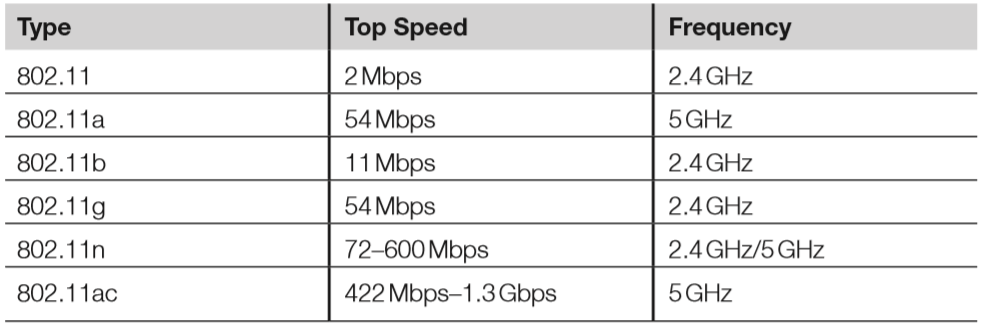
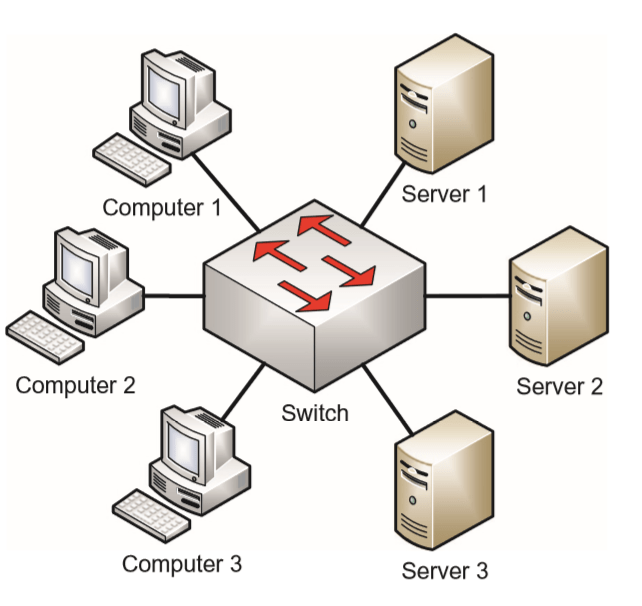
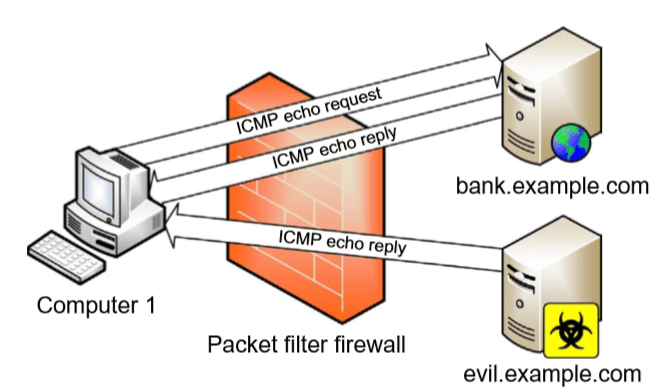
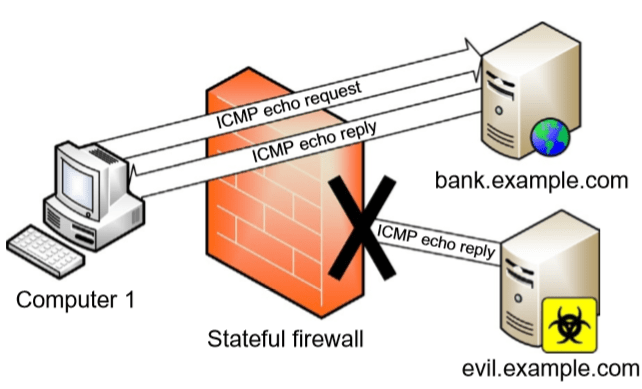
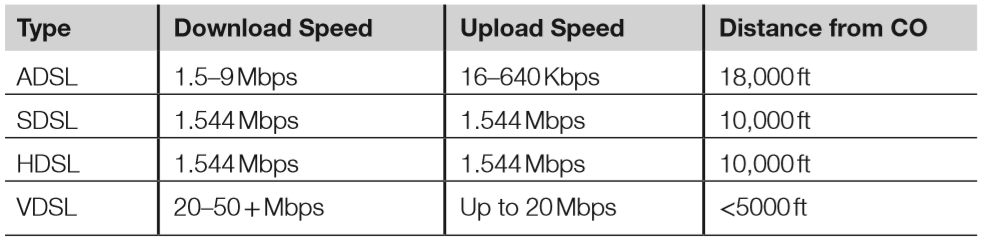
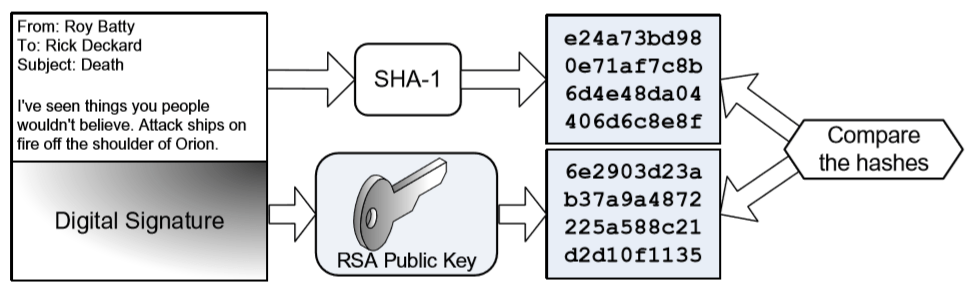
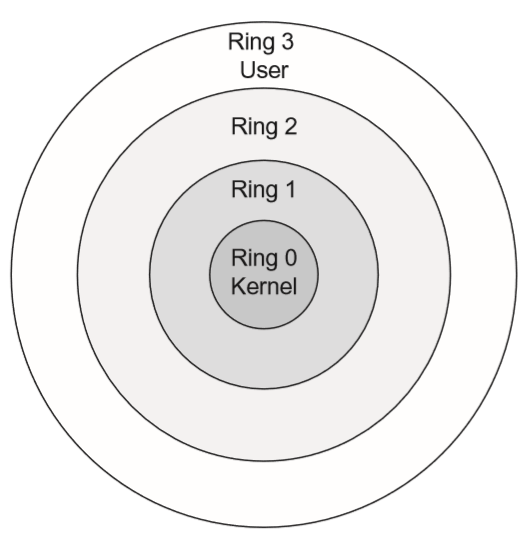
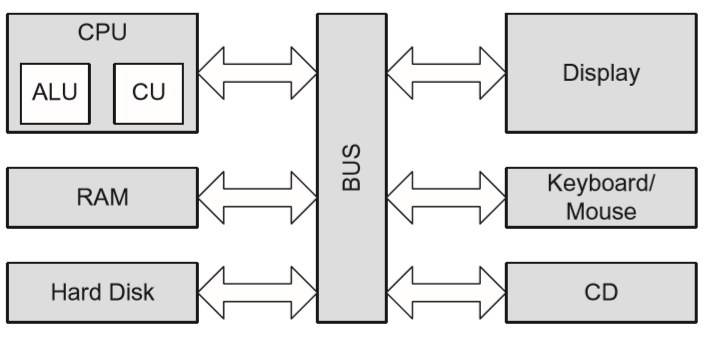
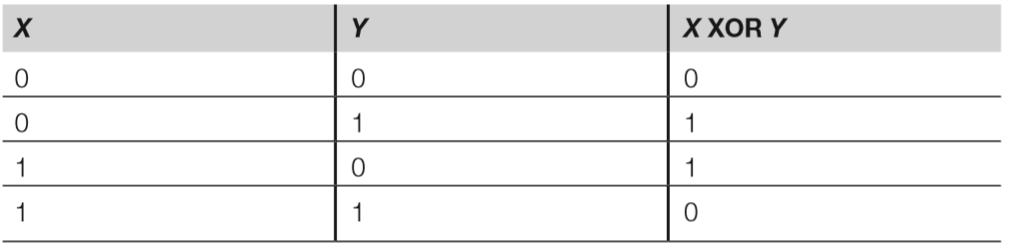

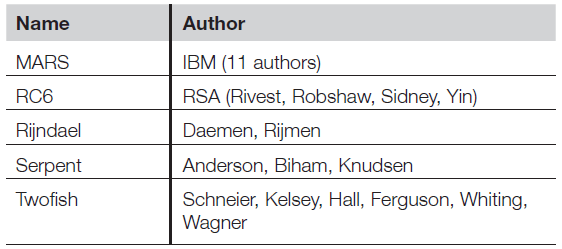

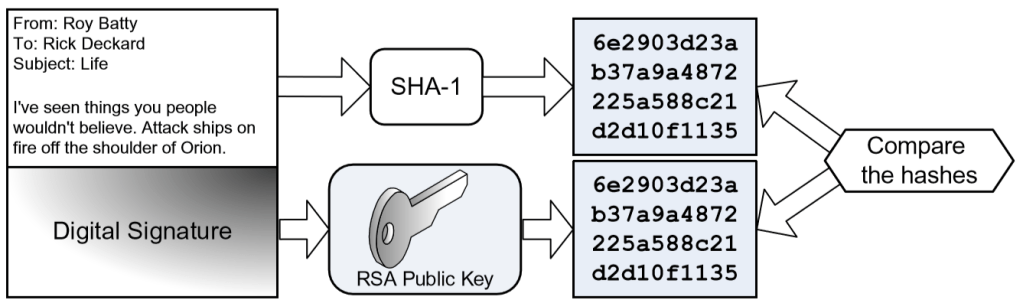
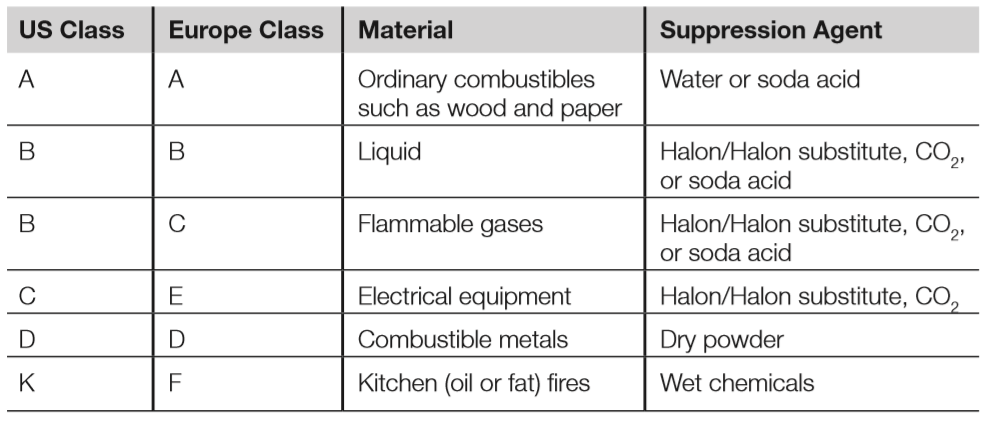
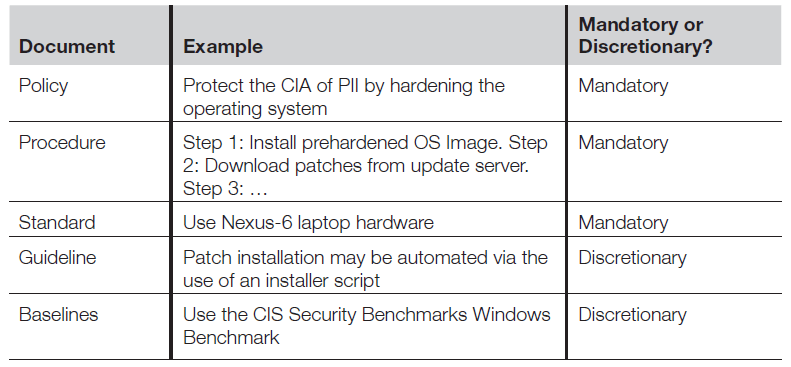
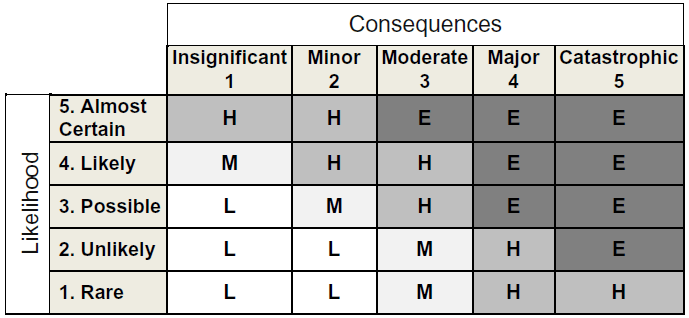
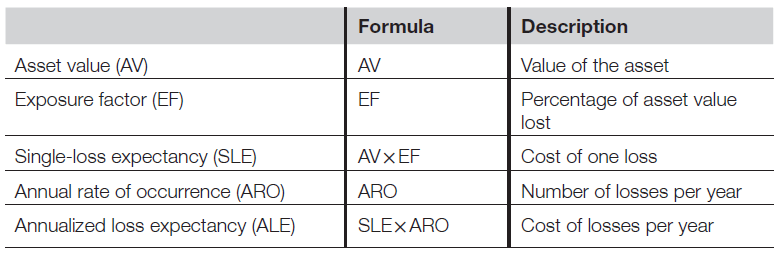
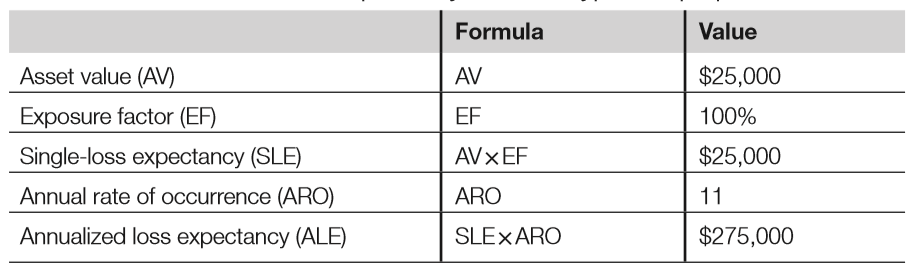
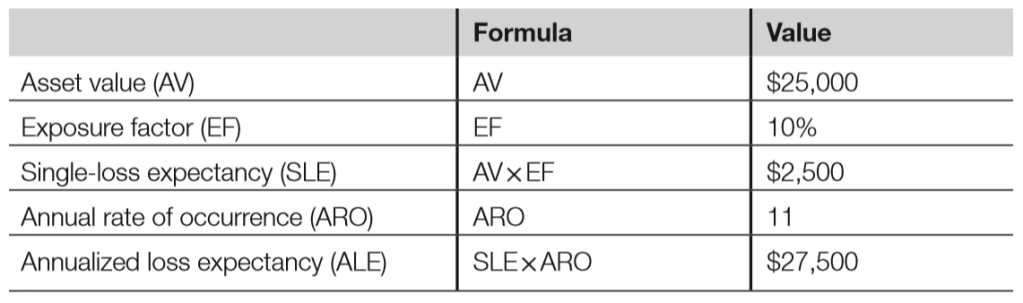
 My CISSP Notes