- COSO (Committee of Sponsoring Organisations of the Treadway Commission) was originally created in 1985 and is supported by five private sector organisations. What was the primary reason for COSO’s formation?
(a) To provide organisations with a framework for implementing secure information systems
(b) To define a set of techniques that allow organisations to self-regulate, independent of government controls
(c) Assisting with corporate alignment of IT with business objectives
(d) To provide thought leadership on management techniques for enterprise executives
(e) To define risk management processes for publicly-traded companies
(f) Addressing issues that lead to and allow for fraudulent financial reporting
Answer:
(f) Addressing issues that lead to and allow for fraudulent financial reporting
Explanation:
COSO is a joint initiative to combat comporate fraud.
- Kerberos, a network authentication protocol developed at MIT in the late 80s/early 90s, serves as the default authentication mechanism for Microsoft’s Active Directory. Kerberos has built-in protections against authentication replay attacks. Which of the following mechanisms provide that protection?
(a) SHA-256 hashes
(b) Time stamps
(c) Software tokens
(d) Pre-shared keys
(e) NTMLv2
(f) AES
Answer:
(b) Time stamps
- Which of the following operates at Layer 2 of the OSI model?
(a) TPM
(b) IP headers
(c) SDLC
(d) Logical Link Control
(e) Modulation
(f) Flow labels
Answer:
(d) LLC
Explanation:
The Ethernet concepts of LLC & MAC operates at Layer 2. Layer 3 is concerned with IP headers and flow labels (IPv6) . Modulation happens at the physical layer (Layer 1).
- COBIT (Control Objectives for Information & Related Technology) is comprised of four broad domains and 34 processes. COBIT’s purpose is to provide a framework for IT management & governance. What are the four domains of COBIT? (Choose four options)
(a) Deliver & support
(b) Acquire & implement
(c) Monitor & evaluate
(d) Inspect & analyse
(e) Design & develop
(f) Evaluate & assess
(g) Develop & test
(h) Plan & organise
Answers:
(a), (b), (c), (h)
Explanation:
The four domains of COBIT are (in order):- Plan & organise
- Acquire & implement
- Deliver & support
- Monitor & evaluate
- In software development, what is one of the primary differences between white-box & black-box testing?
(a) White-box testing provides testers with access to source code
(b) Black-box testers fully deconstruct the app to identify vulnerabilities
(c) White-box testers are limited to testing pre-defined use cases
(d) Black-box testers are typically more proficient & thorough
(e) White-box testing is done by the developers
(f) Black-box testing includes the line of business in the evaluation process
Answer:
(a) White-box testing provides testers with access to source code
Explanation:
Black-box testing, sometimes called functional testing, tests the operation of the software without looking at the code. White-box testing, sometimes called structural testing, requires access to source code. Grey-box testing is a combination of the two and involves partial knowledge.
- Software prototyping was introduced to overcome some limitations of the waterfall approach to software development. Prototyping builds successive iterations of an application that show its functionality, often focusing on systems that have a high level of user interaction. This approach to software development has many benefits. What are they? (Choose three)
(a) Missing functionality may be more quickly identified
(b) Prototypes can be reused to build the actual system
(c) Requirements analysis is reduced
(d) Defects can be identified earlier, reducing time & cost of development
(e) User feedback is quicker, allowing necessary changes to be identified sooner
(f) Flexibility of development allows project to easily expand beyond plans
Answers:
(a), (d), (e)
Explanation:
Prototyping is based on creating successive iterations of a piece of software, focusing on a handful of pieces of functionality at a time, and getting feedback from the user at each iteration. This feedback can then be taken on board as you create increasingly refined versions of the product. Benefits to this approach include gathering feedback from the user much earlier in the process, and discovering defects (things that aren’t going to work) much earlier in the process too, which reduces complexity and cost compared to discovering and fixing them right at the end of the development cycle. Increased user involvement can reduce miscommunications. Software prototyping does have some disadvantages, one of which is the potential for a lack of an understanding of the bigger picture; incomplete analysis of what the system needs to do as a whole because the focus is on delivering a prototype with a subset of features. Also there can be some confusion with the user about the difference between the prototype and the finished product; some features that appear in the prototype may not make it into the final version for various reasons, even features which the user liked, which can cause disappointment if not properly managed. One of the big disadvantages of software prototyping is the issue of feature creep; effectively you get too much feedback, and keep adding new features in at the whim of the user, which can distract from the core functionality of the product, and can have an extremely detrimental effect in terms of time & cost of development.
- A non-legally binding agreement between two or more parties agreeing to work together to achieve an objective where the responsibilities of each party is clearly defined is known as a:
(a) Contract
(b) Gentleman’s Agreement
(c) Service Level Agreement
(d) Memorandum of Understanding
(e) Treaty
Answer:
(d) Memorandum of Understanding
- In a Public Key Infrastructure (PKI), a certificate revocation list is a digitally-signed list of serial numbers of certificates that have been revoked by the issuing Certificate Authority (CA). There are several different methods by which the revocation status can be checked. Which of the following are revocation check methods? (Choose three)
(a) SNMPv3 query
(b) Syslog
(c) DNS TXT record query
(d) HTTP-based CRL distribution point
(e) OCSP
(f) SMTP
(g) An incremental CRL (aka Delta-CRL) issued by the CA
Answers:
(d), (e), (g)
- The Montreal Protocol, an international treaty put in place in the late 1980s, endeavours to protect the earth’s ozone layer from depletion. This includes the replacement of Halon-based fire suppression systems. Several alternative fire suppression mechanisms have been approved by the EPA. Which of the following are considered suitable Halon replacements according to the EPA’s SNAP (Significant New Alternatives Policy)? (Choose six)
(a) BFR (Brominated Flame Retardant)
(b) Carbon Dioxide (CO2)
(c) FM-200
(d) Aero K
(e) Argonite
(f) FM-100
(g) FE-13
(h) HFC-32
(i) Inergen
Answers:
(b), (c), (d), (f), (g), (i)
Explanation:
FM-100 is not approved by SNAP, and is banned by the Montreal protocol.
HFC-32 is a flammable refrigerant.
- One important critera in the selection of a biometric authentication system is how acceptable it will be to your workforce (i.e. whether they will resist its use because they perceive it as physically intrusive.) Of the following biometric types, which is the most likely to be met with strong resistance from the average user?
(a) Iris scan
(b) Hand geometry
(c) Palm scan
(d) Fingerprint scan
(e) Retina scan
(f) Voice analysis
(g) Signature dynamics
Answer:
(e) Retina scan
Explanation:
Can reveal certain health conditions, and also possibly involve transfer of bodily fluids. Users fear the safety of the “laser” light shining into their eye (actually a perfectly safe LED).
Questions for Domain 8: Software Development Security
- What describes a more agile development and support model, where developers directly support operations?
(a) DevOps
(b) Sashimi
(c) Spiral
(d) Waterfall
- Two objects with the same name have different data. What OOP concept does this illustrate?
(a) Delegation
(b) Inheritance
(c) Polyinstantiation
(d) Polymorphism
- What type of testing determines whether software meets various end-state requirements from a user or customer, contract, or compliance perspective?
(a) Acceptance testing
(b) Integration testing
(c) Regression testing
(d) Unit testing
- A database contains an entry with an empty primary key. What database concept has been violated?
(a) Entity integrity
(b) Normalisation
(c) Referential integrity
(d) Semantic integrity
- Which vulnerability allows a third party to redirect static content within the security context of a trusted site?
(a) Cross-site request forgery (CSRF)
(b) Cross-site scripting (XSS)
(c) PHP remote file inclusion (RFI)
(d) SQL injection
Answers in comments
Domain 8: Software Development Security
- Software is everywhere – not only in our computers, but also in our houses, our
cars, and our medical devices. - The problem is that all software programmers make mistakes. As software has grown in complexity, the number of mistakes has grown along with it, and the potential impact of a software crash has also grown.
- Many cars are now connected to the Internet and use “fly-by-wire” systems to control the vehicle (e.g. the gearstick is no longer mechanically connected to the transmission; instead, it serves as an electronic input device, like a keyboard.)
- What if a software crash interrupts I/O?
- What if someone remotely hacks into the
car and takes control of it?
- Developing software that is robust and secure is critical, and this domain discusses how to do that.
- We will cover programming fundamentals such as compiled versus interpreted languages, as well as procedural and object-oriented programming (OOP) languages.
- We will discuss application development models and concepts such as DevOps, common software vulnerabilities & ways to test for them, and frameworks that can be used to assess the maturity of the programming process and provide ways to improve it.
Programming concepts
Machine code, source code & assemblers
- Machine code, also called machine language, is software that is executed directly by
the CPU. Machine code is CPU dependent; it is a series of 1s and 0s that translate to instructions that are understood by the CPU. - Source code describes computer programming language instructions that are written in text that must be translated into machine code before execution by the CPU.
- High-level languages contain English-like instructions such as “printf” (print formatted).
- Assembly language is a low-level computer programming language. Instructions are short mnemonics, such as “ADD,” “SUB” (subtract), and “JMP” (jump), that match to machine language instructions.
- An assembler converts assembly language into machine language.
- A disassembler attempts to convert machine language into assembly.
Compilers, interpreters & bytecode
- Compilers take source code, such as C or Basic, and compile it into machine code.
- Interpreted languages differ from compiled languages; interpreted code, such as shell code, is compiled on the fly each time the program is run.
- Bytecode is a type of interpreted code. Bytecode exists as an intermediary form that is converted from source code, but still must be converted into machine code before it can run on the CPU; Java bytecode is platform-independent code that is converted into machine code by the Java virtual machine.
Computer-aided software engineering
- Computer-aided software engineering (CASE) uses programs to assist in the creation
and maintenance of other computer programs. - Programming has historically been performed by (human) programmers or teams, and CASE adds software to the programming “team.”
- There are three types of CASE software:
- Tools: support only a specific task in the software-production process.
- Workbenches: support one or a few software process activities by integrating
several tools in a single application. - Environments: support all or at least part of the software-production process
with a collection of Tools and Workbenches.
- Fourth-generation computer languages, object-oriented languages, and GUIs are
often used as components of CASE.
Types of publicly release software
- Once programmed, publicly released software may come in different forms, such as
with or without the accompanying source code, and released under a variety of licenses.
Open-source & closed-source software
- Closed-source software is software that is typically released in executable form,
while the source code is kept confidential. Examples include Oracle and Windows. - Open-source software publishes source code publicly; examples include
Ubuntu Linux and the Apache web server. - Proprietary software is software that is subject to intellectual property protections, such as patents or copyrights.
Free software, shareware & crippleware
- Free software is a controversial term that is defined differently by different groups.
“Free” may mean it is free of charge (sometimes called “free as in beer”), or “free”
may mean the user is free to use the software in any way they would like, including
modifying it (sometimes called “free as in liberty”). The two types are called gratis
and libre respectively. - Freeware is “free as in beer” (gratis) software, which is free of charge to use.
- Shareware is fully-functional proprietary software that may be initially used free of
charge. If the user continues to use the product for a specific period of time specified by the license, such as 30 days, the shareware license typically requires payment. - Crippleware is partially functioning proprietary software, often with key features disabled. The user is typically required to make a payment to unlock the full functionality.
Application development methods
Waterfall model
- The waterfall model is a linear application development model that uses rigid phases; when one phase ends, the next begins.
- Steps occur in sequence, and the unmodified waterfall model does not allow developers to go back to previous steps.
- It is called the waterfall because it simulates water falling; once water falls, it cannot go back up.
- A modified waterfall model allows a return to a previous phase for verification or validation, ideally confined to connecting steps.
Sashimi model
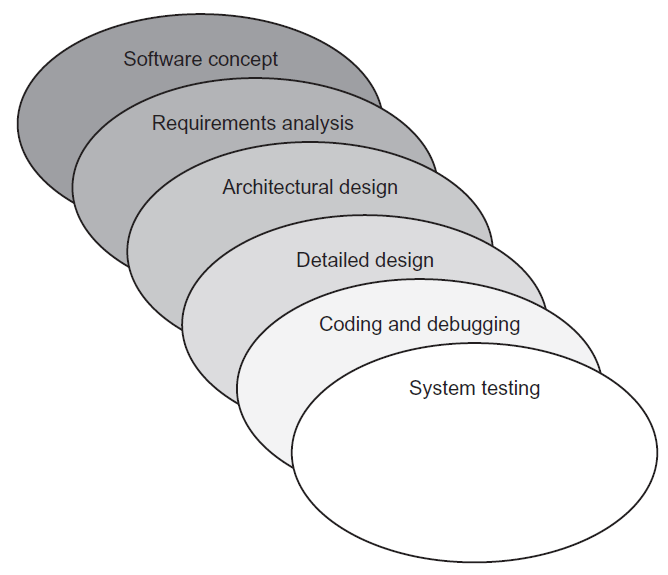
- The sashimi model has highly overlapping steps; it can be thought of as a real-world
successor to the waterfall model and is sometimes called the “sashimi waterfall model”. - It is named after the Japanese delicacy sashimi, which has overlapping layers of fish
(and also a hint for the exam). - Sashimi’s steps are similar to those of the waterfall model in that the difference is the explicit overlapping, shown below:
Agile software development
- Agile software development evolved as a reaction to rigid software development
models such as the waterfall model. - Agile methods include scrum and XP.
- The “Agile manifesto” values:
- Individuals and interactions over processes and tools
- Working software over comprehensive documentation
- Customer collaboration over contract negotiation
- Responding to change over following a plan
- Agile embodies many modern development concepts, including flexibility,
fast turnaround with smaller milestones, strong communication within the team, and
a high degree of customer involvement.
Scrum
- The Scrum development model is an Agile model.
- The idea is to replace the “relay race” approach of waterfall (teams handing off work to other teams as steps are completed) with a holistic or “rugby” approach, where the team works as a unit, passing the “ball” back & forth.
- Scrums contain small teams of developers, called the Scrum Team.
- The Scrum Master, a senior member of the organisation who acts like a coach for the team, supports the Scrum Team.
- Finally, the product owner is the voice of the business unit.
Extreme programming
- Extreme programming (XP) is an Agile development method that uses pairs of programmers who work from a detailed specification.
- There is a high level of customer involvement.
- XP improves a software project in five essential ways:
- communication
- simplicity
- feedback
- respect
- courage
- Extreme Programmers:
- constantly communicate with their customers and fellow programmers
- keep their design simple and clean
- get feedback by testing their software starting from day one
- deliver the system to the customers as early as possible and implement changes as suggested.
- XP core practices include:
- Planning: Specifies the desired features, which are called the user stories. They
are used to determine the iteration (timeline) and drive the detailed specifications. - Paired programming: Programmers work in teams.
- Forty-hour workweek: The forecast iterations should be accurate enough
to estimate how many hours will be required to complete the project. If
programmers must put in additional overtime, the iteration must be flawed. - Total customer involvement: The customer is always available and carefully
monitors the project. - Detailed test procedures: these are called unit tests.
- Planning: Specifies the desired features, which are called the user stories. They
Spiral
- The spiral model is a software development model designed to control risk.
- It repeats steps of a project, starting with modest goals, and expanding outwards in ever-wider spirals called rounds.
- Each round of the spiral constitutes a project, and each round may follow a traditional software development methodology, such as modified waterfall.
- A risk analysis is performed at each round.
- Fundamental flaws in the project or process are more likely to be discovered in the earlier phases, resulting in simpler fixes. This lowers the overall risk of the project; large risks should be identified and mitigated.
Rapid application development
- Rapid application development (RAD) develops software quickly via the use of prototypes, “dummy” GUIs, back-end databases, and more.
- The goal of RAD is quickly meeting the business need of the system, while technical concerns are secondary.
- The customer is heavily involved in the process.
SDLC
- The systems development life cycle (SDLC), also called the software development life cycle or simply the system life cycle, is a system development model.
- SDLC is used across the IT industry, but SDLC focuses on security when used in context of the exam. Think of “our” SDLC as the secure systems development life cycle; the security is implied.
Summary of secure systems development lifecycle
- Prepare a security plan: Ensure that security is considered during all phases of the IT system lifecycle, and that security activities are accomplished during each of the phases.
- Initiation: The need for a system is expressed and the purpose of the system is documented.
- Conduct a sensitivity assessment: Look at the security sensitivity of the system and the information to be processed.
- Development/acquisition: The system is designed, purchased, programmed, or developed.
- Determine security requirements: Determine technical features (like access controls), assurances (like background checks for system developers) or operational practices (like awareness and training).
- Incorporate security requirements in specifications: Ensure that the previously gathered information is incorporated in the project plan.
- Obtain the system and related security activities: May include developing the system’s security features, monitoring the development process itself for security problems, responding to changes, and monitoring threats.
- Implementation: The system is tested and installed.
- Install/enable controls: A system often comes with security features disabled. These need to be switched on and configured.
- Security testing: Used to certify a system; may include testing security management, physical facilities, personnel, procedures, the use of commercial or in-house services such as networking services, and contingency planning.
- Accreditation: The formal authorisation by the accrediting (management) official for system operation, and an explicit acceptance of risk.
- Operation/maintenance: The system is modified by the addition of hardware and software and by other events.
- Security operations and administration: Examples include backups, training, managing cryptographic keys, user administration, and patching.
- Operational assurance: Examines whether a system is operated according to its current security requirements.
- Audits and monitoring: A system audit is a one-time or periodic event to evaluate security. Monitoring refers to an ongoing activity that examines either the system or the users.
- Disposal: The secure decommissioning of a system.
- Information: Information may be moved to another system, or it could also be archived, discarded, or destroyed.
- Media sanitisation: There are three general methods of purging media: overwriting, degaussing (for magnetic media only), and destruction.
Integrated product teams
- An integrated product team (IPT) is a customer-focused group that spans the entire lifecycle of a project.
- It is an multi-disciplinary group of people who are collectively responsible for delivered a product or process.
- The IPT plans, executes and implements life cycle decisions for the system being acquired.
- The team includes the customer, together with empowered representatives (stakeholders) from all of the functional areas involved with the product, e.g. design, manufacturing, test & evaluation (T&E), and logistics personnel.
- IPTs are more agile than traditional hierarchical teams, breaking down institutional barriers and making decisions across organisational structures.
- Senior acquisition staff are receptive to ideas from the field, rather than dictating from on high – this helps obtain buy-in and ensure lasting change.
Software escrow
- Software escrow describes the process of having a third-party store an archive of computer software. This is often negotiated as part of a contract with a proprietary software vendor.
- The vendor may wish to keep the software source code secret, but the customer may be concerned that the vendor could go out of business and potentially orphan the software (orphaned software with no available source code will not receive future improvements or patches.)
Code repository security
- The security of private/internal code repositories largely falls under other corporate security controls discussed previously: defence in depth, secure authentication, firewalls, version control, etc.
- Public code third-party repositories such as GitHub raise additional security concerns. They provide the following list of security controls:
- System security
- Operational security
- Software security
- Secure communications
- File system and backups
- Employee access
- Maintaining security
- Credit card safety
Security of APIs
- An application programming interface (API) allows an application to communicate with another application (or an OS, database, network etc.)
- For example, the Google Maps API allows an application to integrate third-party content, such as restaurants overlaid on a map
- The OWASP Enterprise Security API Toolkits project includes these critical API controls:
- Authentication
- Access control
- Input validation
- Output encoding/escaping
- Cryptography
- Error handling and logging
- Communication security
- HTTP security
- Security configuration
Security change & configuration management
- Software change and configuration management provide a framework for managing changes to software as it is developed, maintained, and eventually retired.
- Some organisations treat this as one discipline; the exam treats configuration management and change management as separate but related disciplines.
- In regard to this domain, configuration management tracks changes to a specific piece of software; for example, changes to a content management system, including specific settings within the software.
- Change management is broader in that it tracks changes across an entire software development program. In both cases, both configuration and change management are designed to ensure that changes occur in an orderly fashion and do not harm information security; ideally, it would be improved.
DevOps
- Traditional software development was performed with strict separation of duties between the developers, quality assurance teams, and production teams.
- Developers had hardware that mirrored production models and test data. They would hand code off to the quality assurance teams, who also had hardware that mirrored production models, as well as test data.
- The quality assurance teams would then hand tested code over to production, who had production hardware and real data.
- In this rigid model, developers had no direct contact with production and in fact were strictly walled off from production via separation of duties.
- DevOps is a more agile development and support model, echoing the Agile programming methods we learned about previously in this chapter, including Sashimi and Scrum.
- DevOps is the practice of operations and development engineers participating together in the entire service lifecycle, from design through the development process to production support
Databases
- A database is a structured collection of related data.
- Databases allow queries (searches), insertions (updates), deletions, and many other functions.
- The database is managed by the database management system (DBMS), which controls all access to the database and enforces the database security.
- Databases are managed by database administrators. Databases may be searched with a database query language, such as SQL).
- Typical database security issues include the confidentiality and integrity of the stored data.
- Integrity is a primary concern when updating replicated databases.
Relational database
- The most common modern database is the relational database, which contain two- dimensional tables, or relations, of related data.
- Tables have rows and columns; a row is a database record, called a tuple, and a column is called an attribute.
- A single cell (i.e. intersection of a row and column) in a database is called a value.
- Relational databases require a unique value called the primary key in each tuple in a table.
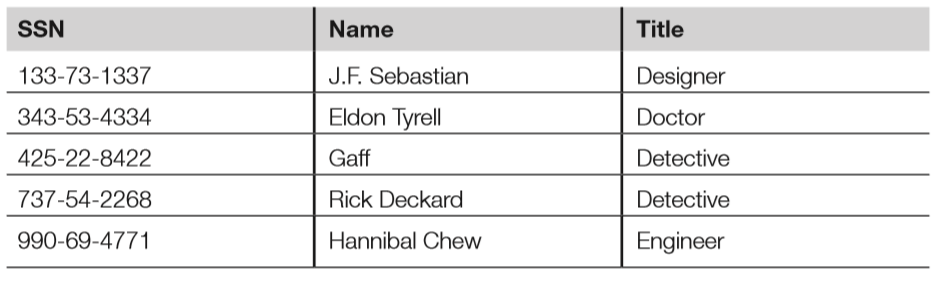
- Below is a relational database employee table, sorted by the primary key, which is the social security number (SSN).
- Attributes are SSN, name, and title.
- Tuples include each row: 133-731337, 343-53-4334, etc.
- “Gaff” is an example of a value (cell).
- Candidate keys are any attribute (column) in the table with unique values; candidate keys in the previous table include SSN and name.
- SSN was selected as the primary key because it is truly unique; two employees might have the same name, but not the same SSN.
- The primary key may join two tables in a relational database.
Foreign keys
- A foreign key is a key in a related database table that matches a primary key in a parent database table. Note that the foreign key is the local table’s primary key; it is called the foreign key when referring to a parent table.
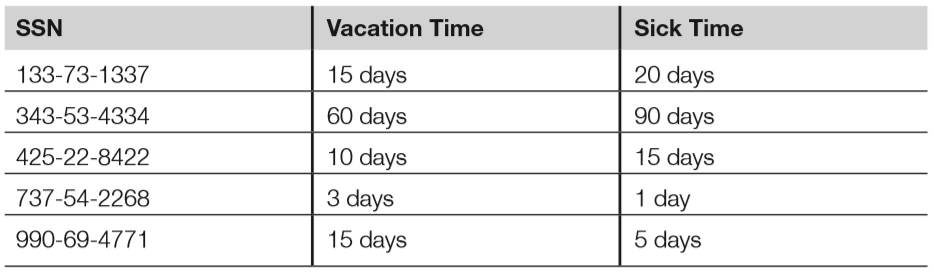
- Below is the HR database table that lists employee’s vacation time (in days) and sick time (also in days); it has a foreign key of SSN.
- The HR database table may be joined to the parent (employee) database table by connecting the foreign key of the HR table to the primary key of the employee table.
Referential, semantic & entity integrity
- Databases must ensure the integrity of the data in the tables; this is called data integrity, discussed in the corresponding section later.
- There are three additional specific integrity issues that must be addressed beyond the correctness of the data itself: referential, semantic, and entity integrity. These are tied closely to the logical operations of the DBMS.
- Referential integrity means that every foreign key in a secondary table matches a primary key in the parent table; if this is not true, referential integrity has been broken.
- Semantic integrity means that each attribute (column) value is consistent with the attribute data type.
- Entity integrity means each tuple has a unique primary key that is not null.
- The HR database table shown above has referential, semantic and entity integrity. The table below, on the other hand, has multiple problems:
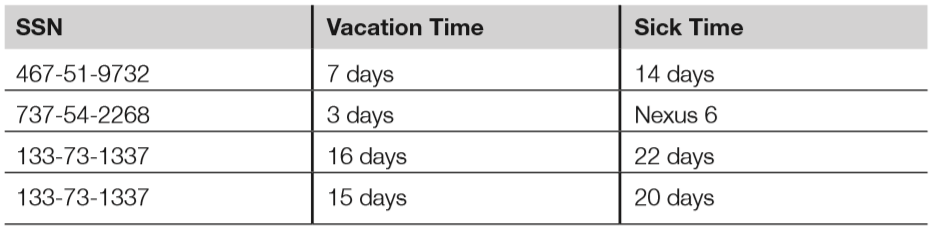
- The tuple with the foreign key 467-51-9732 has no matching entry in the employee database table. This breaks referential integrity, as there is no way to link this entry to a name or title.
- Cell “Nexus 6” violates semantic integrity; the sick time attribute requires values of days, and “Nexus 6” is not a valid amount of sick days.
- Finally, the last two tuples both have the same primary key; this breaks entity integrity.
Normalisation
- DB normalisation seeks to make the data in a table logically concise, organised & consistent.
- Normalisation removes redundant data and improves the integrity & availability of the DB.
Views
- Database tables may be queried; the results of a query are called a database view.
- Views may be used to provide a constrained user interface; for example, non-management employees can be shown only their individual records via database views.
- Below shows the database view resulting from querying the employee table “Title” attribute with a string of “Detective.”; while employees of the HR department may be able to view the entire employee table, this view may be authorised only for the captain of the detectives, for example.

DB query languages
- Database query languages allow the creation of database tables, read/write access to those tables, and many other functions.
- Database query languages have at least two subsets of commands: data definition language (DDL) and data manipulation language (DML).
- DDL is used to create, modify, and delete tables, while DML is used to query and update data stored in the tables.
Hierarchical databases
- Hierarchival DBs form a tree.
- The global DNS servers form a global tree: the root name servers are at the “root zone” at the base of the tree, while individual DNS entries form the leaves.
- The DNS name http://www.google.com points to the google.com DNS database, which is part of the .com top-level domain (TLD) which is part of the global DNS (root zone).
- From the root, you may go back down another branch, to the .gov TLD, then to the nist.gov domain, then finally to http://www.nist.gov.
Object-oriented databases
- While databases traditionally contain passive data, object-oriented databases combine data with functions (code) in an object-oriented framework.
- OOP is used to manipulate the objects and their data, which is managed by an object database management system.
Data integrity
- In addition to the previously discussed relational database integrity issues of semantic, referential, and entity integrity, databases must also ensure data integrity; that is, the integrity of the entries in the database tables.
- This treats integrity as a more general issue by mitigating unauthorised modifications of data. The primary challenge associated with data integrity within a database is simultaneous attempted modifications of data. A database server typically runs multiple threads (i.e. lightweight processes), each capable of altering data.
- What happens if two threads attempt to alter the same record? DBMSs may attempt to commit updates, which will make the pending changes permanent. If the commit is unsuccessful, the DBMSs can roll back (also called abort) and restore from a save point (clean snapshot of the database tables).
- A database journal is a log of all database transactions. Should a database become corrupted, the database can be reverted to a back-up copy and then subsequent transactions can be “replayed” from the journal, restoring database integrity.
Replication & shadowing
- Databases may be highly available, replicated with multiple servers containing multiple copies of tables.
- Database replication mirrors a live database, allowing simultaneous reads and writes to multiple replicated databases by clients.
- Replicated databases pose additional integrity challenges. A two-phase (or multi-phase) commit can be used to assure integrity.
- A shadow database is similar to a replicated database with one key difference: a shadow database mirrors all changes made to a primary database, but clients do not access the shadow.
- Unlike replicated databases, the shadow database is one-way.
Data warehousing & data mining
- As the name implies, a data warehouse is a large collection of data. Modern data warehouses may store many terabytes or even petabytes of data. This requires large, scalable storage solutions. The storage must be of a high performance level and allow analysis and searches of the data.
- Once data is collected in a warehouse, data mining is used to search for patterns.
- Commonly sought patterns include signs of fraud:
- Credit card companies manage some of the world’s largest data warehouses, tracking billions of transactions per year.
- Fraudulent transactions are a primary concern of credit card companies that lead to millions of dollars in lost revenue.
- No human could possibly monitor all of those transactions, so the credit card companies use data mining to separate the signal from noise.
- A common data mining fraud rule monitors multiple purchases on one card in different states or countries in a short period of time. A violation record can be produced when this occurs, leading to suspension of the card or a phone call to the card owner’s home.
Object-oriented programming
- Object-oriented programming (OOP) uses an object metaphor to design and write computer programs. An object is a “black box” that is able to perform functions, like sending and receiving messages.
- Objects contain data and methods (the functions they perform).
- The object provides encapsulation (also called data hiding), which means that we do not know, from the outside, how the object performs its function. This provides security benefits, so users should not be exposed to unnecessary details.
Key OOP concepts
- Cornerstone OOP concepts include objects, methods, messages, inheritance, delegation, polymorphism, and polyinstantiation. We will use an example object called “Addy” to illustrate these concepts.
- Addy is an object that adds two integers; it is an extremely simple object but has enough complexity to explain core OOP concepts. Addy inherits an understanding of numbers and math from his parent class, which is called mathematical operators. A specific object is called an instance. Note that objects may inherit from other objects, in addition to classes.
- In our case, the programmer simply needs to program Addy to support the method of addition (inheritance takes care of everything else Addy must know). The diagram below shows Addy adding two numbers.
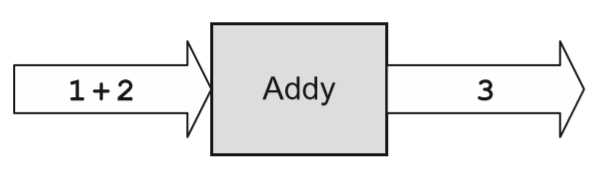
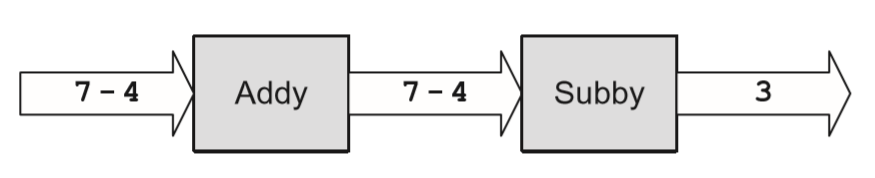
- 1 + 2 is the input message and 3 is the output message. Addy also supports delegation; if he does not know how to perform a requested function, he can delegate that request to another object (i.e. “Subby” in the diagram below.)
- Addy also supports polymorphism, a word (based on the Greek roots “poly” + “morph,” meaning “many forms”).
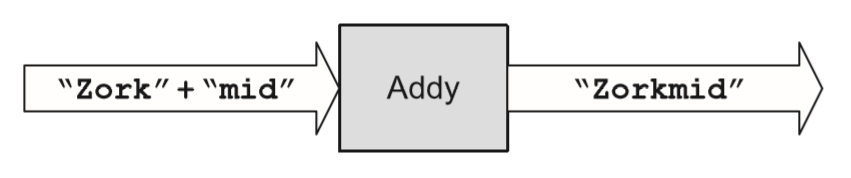
- Addy has the ability to overload his plus (+) operator, performing different methods depending on the context of the input message.
- For example, Addy adds when the input message contains “number+number”; polymorphism allows Addy to concatenate two strings when the input message contains “string+string,” as shown below:
- Finally, polyinstantiation means “many instances,” such as two instances or specific objects with the same names that contain different data (as we discussed in Domain 3). This may be used in multi-level secure environments to keep top-secret and secret data separate, for example.
- The diagram below shows two polyinstantiated Addy objects with the same name but different data; note that these are two separate objects. Also, to a secret-cleared subject, the Addy object with secret data is the only known Addy object.

- To summarise the OOP concepts illustrated by Addy:
- Object: Addy.
- Class: Mathematical operators.
- Method: Addition.
- Inheritance: Addy inherits an understanding of numbers and maths from his parent class mathematical operators. The programmer simply needs to program Addy to support the method of addition.
- Example input message: 1 + 2.
- Example output message: 3.
- Polymorphism: Addy can change behaviour based on the context of the input, overloading the + to perform addition or concatenation, depending on the context.
- Polyinstantiation: Two Addy objects (secret and top-secret), with different data.
Object request brokers
- As we have seen previously, mature objects are designed to be reused, as they lower risk and development costs.
- Object request brokers (ORBs) can be used to locate objects because they act as object search engines.
- ORBs are middleware, which connects programs to programs.
- Common object brokers include COM, DCOM, and CORBA.
Assessing the effectiveness of software security
- Once the project is underway and software has been programmed, the next steps include testing the software, focusing on the CIA of the system, as well as the application and the data processed by the application.
- Special care must be given to the discovery of software vulnerabilities that could lead to data or system compromise.
- Finally, organisations need to be able to gauge the effectiveness of their software creation process and identify ways to improve it.
Software vulnerabilities
- Programmers make mistakes; this has been true since the advent of computer programming.
- The number of average defects per line of software code can often be reduced, though not eliminated, by implementing mature software development practices.
Types of software vulnerabilities
- This section will briefly describe common application vulnerabilities.
- An additional source of up-to-date vulnerabilities can be found in the list CWE/SANS Top 25 Most Dangerous Programming Errors (CWE refers to Common Weakness Enumeration, a dictionary of software vulnerabilities by MITRE; SANS refers to the SANS Institute, a cooperative research & education organisation.)
- The following summary is based on this list:
- Hard-coded credentials: Backdoor username/passwords left by programmers in production code
- Buffer overflow: Occurs when a programmer does not perform variable bounds checking
- SQL injection: manipulation of a back-end SQL server via a front-end web server
- Directory Path Traversal: escaping from the root of a web server (such as /var/ www) into the regular file system by referencing directories such as “../..”
- PHP Remote File Inclusion (RFI): altering normal PHP URLs and variables such as http://good.example.com?file=readme.txt to include and execute remote content, such as http://good.example.com?file=http://evil.example.com/bad.php
Buffer overflows
- Buffer overflows can occur when a programmer fails to perform bounds checking.
- This technique can be used to insert and run shell code (machine code language that executes a shell, such as Microsoft Windows cmd.exe or a UNIX/Linux shell.)
- Buffer overflows are mitigated by secure application development, including bounds checking.
TOC/TOU race conditions
- Time of check/time of use (TOC/TOU) attacks are also called race conditions.
- This means that an attacker attempts to alter a condition after it has been checked by the operating system, but before it is used.
- TOC/TOU is an example of a state attack, where the attacker capitalises on a change in operating system state.
Cross-site scripting & cross-site request forgery
- Cross-site scripting (XSS) leverages the third-party execution of web scripting languages such as JavaScript within the security context of a trusted site.
- Cross-site request forgery (CSRF, or sometimes XSRF) leverages a third-party redirect of static content within the security context of a trusted site. XSS and CSRF are often confused because they both are web attacks; the difference is XSS executes a script in a trusted context:
<script>alert("XSS Test!");</script>
The previous code would pop up a harmless “XSS Test!” alert. A real attack would include more JavaScript, often stealing cookies or authentication credentials. - CSRF often tricks a user into processing a URL (sometimes by embedding the URL in an HTML image tag) that performs a malicious act; for example, tricking a white hat into rendering the following:
<img src="https://bank.com/transfer-funds?from=ALICE&to=BOB" />
Privilege escalation
- Privilege escalation vulnerabilities allow an attacker with typically limited access to be able to access additional resources.
- Improper software configurations and poor coding and testing practices often lead to privilege escalation vulnerabilities.
Backdoors
- Backdoors are shortcuts in a system that allow a user to bypass security checks, such as username/password authentication.
- Attackers will often install a backdoor after compromising a system.
Disclosure
- Disclosure describes the actions taken by a security researcher after discovering a software vulnerability.
- Full disclosure is the controversial practice of releasing vulnerability details publicly.
- Responsible disclosure is the practice of privately sharing vulnerability information with a vendor and withholding public release until a patch is available.
Software Capability Maturity Model
- The Software Capability Maturity Model (SW-CMM, or simply CMM) is a maturity framework for evaluating and improving the software development process.
- Carnegie Mellon University’s Software Engineering Institute originally developed the model. It is now managed by the CMMI Institute, part of Carnegie Innovations.
- The goal of CMM is to develop a methodical framework for creating quality software that allows measurable and repeatable results.
- The five levels of CMM are as follows:
- Initial: The software process is characterised as ad-hoc and occasionally even chaotic. Few processes are defined, and success depends on individual effort.
- Repeatable: Basic project management processes are established to track cost, schedule, and functionality. The necessary process discipline is in place to repeat earlier successes on projects with similar applications.
- Defined: The software process for both management and engineering activities is documented, standardised, and integrated into a standard software process for the organisation. Projects use an approved, tailored version of the organisation’s standard software process for developing and maintaining software.
- Managed: Detailed measures of the software process and product quality are collected, analysed, and used to control the process. Both the software process and products are quantitatively understood and controlled.
- Optimising: Continual process improvement is enabled by quantitative feedback from the process and from piloting innovative ideas and technologies.
Acceptance testing
- Acceptance testing examines whether software meets various end-state requirements, whether from a user or customer, contract, or compliance perspective.
- It is a formal testing process with respect to user needs, requirements, and business
processes; conducted to determine whether or not a system satisfies the acceptance criteria and to enable the user, customers or other authorised entity to determine whether or not to accept the system. - The International Software Testing Qualifications Board (ISTQB) lists four levels of acceptance testing:
- The User Acceptance test: Focuses mainly on the functionality, thereby validating the fitness-for-use of the system by the business user. The user acceptance test is performed by the users and application managers.
- The Operational Acceptance test (also known as Production Acceptance test): Validates whether the system meets the requirements for operation. In most organisations, the operational acceptance test is performed by the system administration before the system is released. The operational acceptance test may include testing of backup/restore, disaster recovery, maintenance tasks, and periodic check of security vulnerabilities.
- Contract Acceptance testing: Performed against the contract’s acceptance criteria for producing custom-developed software. Acceptance should be formally defined when the contract is agreed.
- Compliance Acceptance Testing (also known as Regulation Acceptance Testing): Performed against the regulations that must be followed, such as governmental, legal, or safety regulations.
Commercial Off-The-Shelf Software
- Vendor claims are more readily verifiable for Commercial Off-the-Shelf (COTS) Software.
- When considering purchasing COTS, perform a bake-off to compare products that already meet requirements. Don’t rely on product roadmaps to become reality.
- A particularly important security requirement is to look for integration with existing infrastructure and security products.
- While best-of-breed point products might be the organisation’s general preference, recognise that an additional administrative console with additional user provisioning will add to the operational costs of the products; consider the TCO of the product, not just the capital expense and annual maintenance costs.
Custom-developed third-party products
- An alternative to COTS is to employ custom-developed applications. These custom developed third-party applications provide both additional risks and potential benefits beyond COTS.
- Contractual language and SLAs are vital when dealing with third-party development shops. Never assume that security will be a consideration in the development of the product unless they are contractually obligated to provide security capabilities.
- Basic security requirements should be discussed in advance of signing the contracts and crafting the SLAs to ensure that the vendor will be able to deliver those capabilities.
- Much like COTS, key questions include:
- What happens if the vendor goes out of business?
- What happens if a critical feature is missing?
- How easy is it to find in-house or third-party support for the vendor’s products?
Summary of domain
- In the modern world, software is everywhere.
- The confidentiality, integrity, and availability of data processed by software are critical, as is the normal functionality (availability) of the software itself.
- This domain has shown how software works, and the challenges programmers face while trying to write error-free code that is able to protect data and itself in the face of attacks.
- Best practices include following a formal methodology for developing software, followed by a rigorous testing regimen.
- We have seen that following a software development maturity model such as the CMM can dramatically lower the number of errors programmers make.
Questions for Domain 7: Security Operations
- Which plan details the steps required to restore normal business operations after
recovering from a disruptive event?
(a) Business Continuity Plan (BCP)
(b) Business Resumption Plan (BRP)
(c) Continuity of Operations Plan (COOP)
(d) Occupant Emergency Plan (OEP)
- What metric describes how long it will take to recover a failed system?
(a) Minimum Operating Requirements (MOR)
(b) Mean Time Between Failures (MTBF)
(c) Mean Time to Repair (MTTR)
(d) Recovery Point Objective (RPO)
- What metric describes the moment in time in which data must be recovered and made available to users in order to resume business operations?
(a) Mean Time Between Failures (MTBF)
(b) Mean Time to Repair (MTTR)
(c) Recovery Point Objective (RPO)
(d) Recovery Time Objective (RTO)
- Maximum Tolerable Downtime (MTD) is comprised of which two metrics?
(a) Recovery Point Objective (RPO) and Work Recovery Time (WRT)
(b) Recovery Point Objective (RPO) and Mean Time to Repair (MTTR)
(c) Recovery Time Objective (RTO) and Work Recovery Time (WRT)
(d) Recovery Time Objective (RTO) and Mean Time to Repair (MTTR)
- Which level of RAID does NOT provide additional reliability?
(a) RAID 1
(b) RAID 5
(c) RAID 0
(d) RAID 3
Answers in comments
Domain 7: Security Operations
Introduction
- Security operations is concerned with threats to a production operating environment.
- Threat agents can be internal or external actors, and ops security must account for both of these in order to be effective.
- Security operations is about people, data, media & hardware, as well as the threats associated with each of them.
Administrative security
- All organisations contain people, data, and the means for people to use the data.
- A fundamental aspect of operations security is ensuring that controls are in place to inhibit people either inadvertently or intentionally compromising the confidentiality, integrity, or availability of data, or the systems and media holding that data.
- Administrative security provides the means to control people’s operational access to data.
Administrative personnel controls
- Administrative personnel controls represent fundamental & key operations security concepts that permeate multiple domains.
Least privilege or minimum necessary access
- One of the most important concepts in all of information security is that of the principle of least privilege.
- The principle of least privilege dictates that persons have no more than the access that is strictly required for the performance of their duties.
- The principle of least privilege may also be referred to as the principle of minimum necessary access.
- Regardless of name, adherence to this principle is a fundamental tenet of security and should serve as a starting point for administrative security controls.
Need to know
- In organisations with extremely sensitive information that leverage mandatory access control (MAC), a basic determination of access is enforced by the system. The access determination is based upon clearance levels of subjects and classification levels of objects.
- Though the vetting process for someone accessing highly sensitive information is stringent, clearance level alone is insufficient when dealing with the most sensitive of information.
- An extension to the principle of least privilege in MAC environments is the concept of compartmentalisation. This is a method for enforcing need to know, which goes beyond the mere reliance upon clearance level and necessitates simply that someone requires access to information.
- Compartmentalisation is best understood by considering a highly sensitive military operation; while there may be a large number of individuals, some of whom might be of high rank, only a subset will “need to know” specific information. The others have no “need to know,” and therefore will not be granted access.
Separation of duties
- Separation of duties prescribes that multiple people are required to complete critical or sensitive transactions.
- The goal of separation of duties is to ensure that in order for someone to abuse their access to sensitive data or transactions, they must convince another party to act in concert.
- Collusion is the term used for the two parties conspiring to undermine the security of the transaction.
Job rotation
- Job rotation, also known as rotation of duties or rotation of responsibilities, provides an organisation with a means to reduce the risk associated with any one individual having too many privileges.
- Rotation of duties simply requires that one person does not perform critical functions or responsibilities for an extended period of time.
- There are multiple issues that rotation of duties can help to begin to address.
- One issue addressed by job rotation is the “hit by a bus” scenario.
- If the operational impact of the loss of an individual would be too great, then perhaps one way to reduce this impact would be to ensure that there is additional depth of coverage for this individual’s responsibilities.
Mandatory leave
- An additional operational control that is closely related to rotation of duties is that of mandatory leave, also known as forced vacation.
- Though there are various justifications for requiring employees to be away from work, the primary security considerations are similar to that addressed by rotation of duties: reducing or detecting personnel single points of failure, and detecting and deterring fraud.
Non-disclosure agreements
- A non-disclosure agreement (NDA) is a work-related contractual agreement ensuring that, prior to being given access to sensitive information or data, an individual or organisation appreciates their legal responsibility to maintain the confidentiality of that sensitive information.
- Job candidates, consultants, or contractors often sign NDAs before they are hired.
- NDAs are largely a directive control.
Background checks
- Background checks (also known as background investigations) are an additional administrative control commonly employed by many organisations.
- The majority of background investigations are performed as part of a pre-employment screening process.
- Some organisations perform cursory background investigations that include a criminal record check. Others perform more in-depth checks, such as verifying employment history, obtaining credit reports, and, in some cases, requiring the submission of a drug screening.
Forensics
- Digital forensics provides a formal approach to dealing with investigations and evidence with special consideration of the legal aspects of this process.
- The forensic process must preserve the “crime scene” and the evidence in order to prevent the unintentional violation of the integrity of either the data or its environment.
- A primary goal of forensics is to prevent unintentional modification of the system.
- Live forensics includes taking a bit-by-bit (binary) image image of physical memory, gathering details about running processes, and gathering network connection data.
Forensic media analysis
- In addition to the valuable data gathered during the live forensic capture, the main source of forensic data typically comes from binary images of secondary storage and portable storage devices such as hard disk drives, USB flash drives, CDs, DVDs, and possibly associated mobile phones and MP3 players.
Types of disk-based forensic data
- Allocated space: Portions of a disk partition that are marked as actively containing data.
- Unallocated space: Portions of a disk partition that do not contain active data. This includes portions that have never been allocated, as well as previously allocated portions that have been marked unallocated. If a file is deleted, the portions of the disk that held the deleted file are marked as unallocated and made available for use.
- Slack space: Data is stored in specific-sized chunks known as clusters, which are sometimes referred to as sectors or blocks. A cluster is the minimum size that can be allocated by a file system. If a particular file (or final portion of a file) does not require the use of the entire cluster, then some extra space will exist within the cluster. This leftover space is known as slack space; it may contain old data, or it can be used intentionally by attackers to hide information
- “Bad” blocks/clusters/sectors: Hard disks routinely end up with sectors that cannot be read due to some physical defect. The sectors marked as bad will be ignored by the operating system since no data could be read in those defective portions. Attackers could intentionally mark sectors or clusters as being bad in order to hide data within this portion of the disk.
Network forensics
- Network forensics is the study of data in motion, with a special focus on gathering evidence via a process that will support admission into a court of law.
- This means the integrity of the data is paramount, as is the legality of the collection process.
- Network forensics is closely related to network intrusion detection; the difference is the former focuses on legalities, while the later focuses on operations.
Embedded device forensics
- One of the greatest challenges facing the field of digital forensics is the proliferation of consumer-grade electronic hardware and embedded devices.
- While forensic investigators have had decades to understand and develop tools and techniques to analyse magnetic disks, newer technologies such as solid-state drives lack both forensic understanding and forensic tools capable of analysis.
eDiscovery
- Electronic discovery, or eDiscovery, pertains to legal counsel gaining access to pertinent electronic information during the pre-trial “discovery” phase of civil legal proceedings.
- The general purpose of discovery is to gather potential evidence that will allow for building a case.
- Electronic discovery differs from traditional discovery simply in that eDiscovery seeks ESI, or electronically stored information, which is typically acquired via a forensic investigation.
- While the difference between traditional discovery and eDiscovery might seem miniscule, given the potentially vast quantities of electronic data stored by organisations, eDiscovery can become logistically and financially cumbersome.
- Some of the challenges associated with eDiscovery stem from the seemingly innocuous backup policies of organisations. While long-term storage of computer information has generally been thought to be a sound practice, this data is discoverable.
- Discovery does not take into account whether ESI is conveniently accessible or transferrable. Appropriate data retention policies, in addition to software and systems designed to facilitate eDiscovery, can greatly reduce the burden on the organisation when required to provide ESI for discovery.
- When considering data retention policies, consider not only how long information should be kept, but also how long the information needs to be accessible to the organisation. Any data for which there is no longer a need should be appropriately purged according to the data retention policy.
Incident response management
- Because of the certainty of security incidents eventually impacting all organisations, there is a great need to be equipped with a regimented and tested methodology for identifying and responding to these incidents.
Methodology
- Many incident-handling methodologies treat containment, eradication, and recovery as three distinct steps.
- We will therefore cover eight steps, mapped to the current exam:
- Preparation
- Detection (identification)
- Response (containment)
- Mitigation (eradication)
- Reporting
- Recovery
- Remediation
- Lessons learned (post-incident activity, postmortem, or reporting)
- Other names for each step are sometimes used; the current exam lists a seven-step lifecycle but curiously omits the first step (preparation) in most incident handling methodologies. Perhaps preparation is implied, like the identification portion of AAA systems.
Preparation
- The preparation phase includes steps taken before an incident occurs.
- These include:
- training
- writing incident response policies and procedures
- providing tools such as laptops with sniffing software, crossover cables, original OS media, removable drives, etc.
- Preparation should include anything that may be required to handle an incident or that will make incident response faster and more effective.
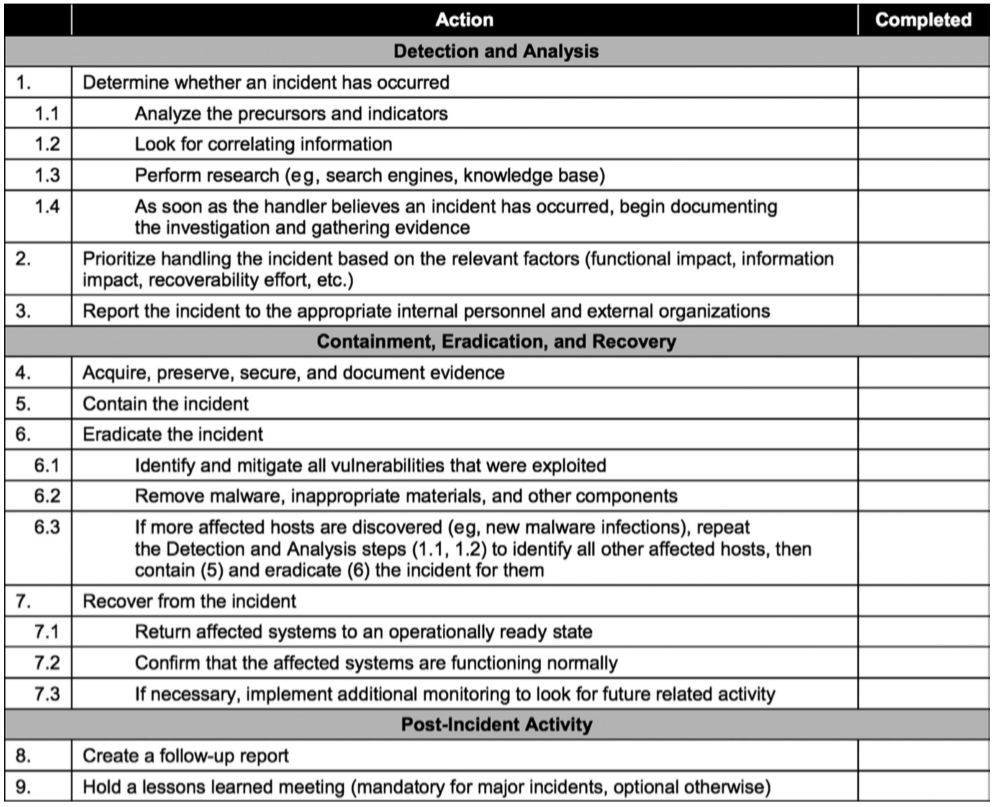
- One preparation step is preparing an incident handling checklist, an example of which is shown below:
Detection (identification)
- One of the most important steps in the incident response process is the detection phase.
- Detection, also called identification, is the phase in which events are analysed in order to determine whether these events might comprise a security incident.
- Without strong detective capabilities built into the information systems, the organisation has little hope of being able to effectively respond to information security incidents in a timely fashion.
Response (containment)
- The response phase, or containment, of incident response is the point at which the incident response team begins interacting with affected systems and attempts to keep further damage from occurring as a result of the incident.
- Responses might include:
- taking a system off the network
- isolating traffic
- powering off the system
- …or other items to control both the scope and severity of the incident.
- This phase is also typically where a binary (bit-by-bit) forensic backup is made of systems involved in the incident.
- An important trend to understand is that most organisations will now capture volatile data before pulling the power plug on a system.
Mitigation (eradication)
- The mitigation (or eradication) phase involves the process of understanding the cause of the incident so that the system can be reliably cleaned and ultimately restored to operational status later in the recovery phase.
- In order for an organisation to recover from an incident, the cause of the incident must be determined. This is so that the systems in question can be returned to a known good state without significant risk of the compromise persisting or reoccurring.
- A common occurrence is for organisations to remove the most obvious piece of malware affecting a system and think that is sufficient; when in reality, the obvious malware may only be a symptom and the cause may still be undiscovered.
- Once the cause and symptoms are determined, the system needs to be restored to a good state and should not be vulnerable to further impact. This will typically involve either rebuilding the system from scratch or restoring from a known good backup.
Reporting
- The reporting phase of incident handling occurs throughout the process, beginning with detection.
- Reporting must begin immediately upon detection of malicious activity.
- It contains two primary areas of focus: technical and non-technical reporting.
- The incident handling teams must report the technical details of the incident as they begin the incident handling process, while maintaining sufficient bandwidth to also notify management of serious incidents.
- A common mistake is forgoing the latter while focusing on the technical details of the incident itself. Non-technical stake holders including business and mission owners must be notified immediately of any serious incident and kept up to date as the incident-handing process progresses.
Recovery
- The recovery phase involves cautiously restoring the system or systems to operational status.
- Typically, the business unit responsible for the system will dictate when the
system will go back online. - Remember to be mindful of the possibility that the infection, attacker, or other threat agent might have persisted through the eradication phase. For this reason, close monitoring of the system after it returns to production is necessary.
- Further, to make the security monitoring of this system easier, strong preference is given to the restoration of operations occurring during off-peak production hours.
Remediation
- Remediation steps occur during the mitigation phase, where vulnerabilities within the impacted system or systems are mitigated.
- Remediation continues after that phase and becomes broader. For example, if the root-cause analysis (discussed shortly) determines that a password was stolen and reused, local mitigation steps could include changing the compromised password and placing the system back online.
- Broader remediation steps could include requiring dual-factor authentication for all systems accessing sensitive data.
Lessons learned
- The goal of this phase is to provide a final report on the incident, which will be delivered to management.
- Important considerations for this phase should include:
- detailing ways in which the compromise could have been identified sooner
- how the response could have been quicker or more effective,
- which organisational shortcomings might have contributed to the incident
- what other elements might have room for improvement.
- Output from this phase feeds directly into continued preparation, where the lessons learned are applied to improving preparation for the handling of future incidents.
Root-cause analysis
- To effectively manage security incidents, root-cause analysis must be performed. This attempts to determine the underlying weakness or vulnerability that allowed the incident to be realised.
- Without successful root-cause analysis, the victim organisation could recover systems in a way that still includes the particular weaknesses exploited by the adversary causing the incident.
- In addition to potentially recovering systems with exploitable flaws, another unfortunate possibility includes reconstituting systems from backups or snapshots that have already been compromised.
Operational preventive & detective controls
- Many preventive & detective controls require higher operational support and are the focus of daily operations security
- For example, routers and switches tend to have comparatively low operational expenses (OpEx).
- Other controls, such as NIDS and NIPS, antivirus, and application whitelisting have comparatively higher OpEx and are a focus in this domain.
Intrusion detection & prevention systems
- An intrusion detection system (IDS) detects malicious actions, including violations of policy.
- An intrusion prevention system (IPS) also prevents malicious actions. There are two basic types of IDSs and IPSs: network based and host based.
Event types
- There are four types of IDS/IPS events: true positive, true negative, false positive, and false negative. To illustrate these events, we will use two streams of traffic: a worm, and a user surfing the Web.
- True positive: A worm is spreading on a trusted network; NIDS alerts
- True negative: User surfs the Web to an allowed site; NIDS is silent
- False positive: User surfs the Web to an allowed site; NIDS alerts
- False negative: A worm is spreading on a trusted network; NIDS is silent
- The goal is to have only true positives and true negatives, but most IDSs have false positives and false negatives as well.
- False positives waste time and resources, as staff spend time investigating non-malicious events.
- A false negative is arguably the worst-case scenario because malicious network traffic is neither detected nor prevented.
NIDS & NIPS
- A network-based intrusion detection system (NIDS) detects malicious traffic on a network.
- NIDS usually require promiscuous network access in order to analyse all traffic, including all unicast traffic.
- NIDS are passive devices that do not interfere with the traffic they monitor; the diagram below shows a typical NIDS architecture.
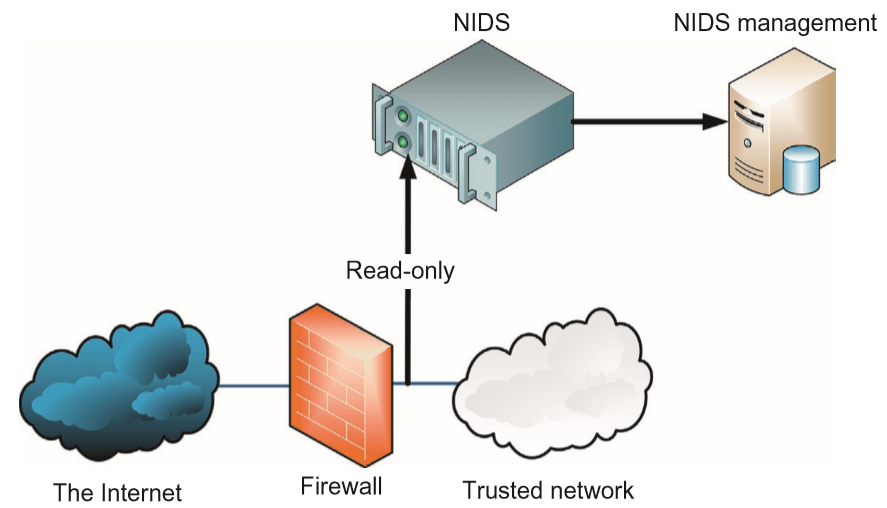
- The NIDS sniffs the internal interface of the firewall in read-only mode and sends alerts to a NIDS Management server via a different (i.e. read/write) network interface.
- The difference between a NIDS and a NIPS is that the NIPS alters the flow of network traffic.
- There are two types of NIPS: active response and inline.
- Architecturally, an active response NIPS is like the NIDS illustrated above; the difference is that the monitoring interface is read/write.
- The active response NIPS may “shoot down” malicious traffic via a variety of methods, including forging TCP RST segments to source or destination (or both), or sending ICMP port, host, or network unreachable to source.
- An inline NIPS operates in series (hence “in line”) with traffic, acting as a Layer 3–7 firewall by passing or allowing traffic, as shown below.
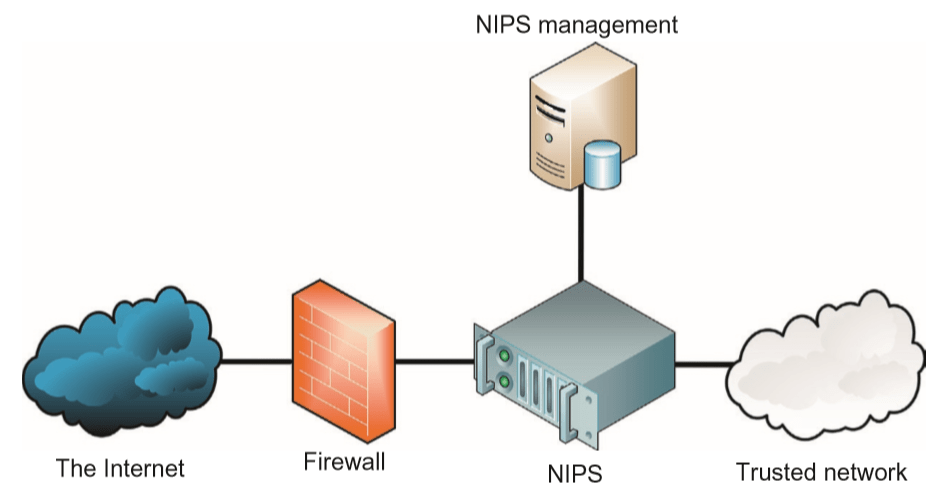
- Note that a NIPS provides defence-in-depth protection in addition to a firewall; it is not typically used as a replacement.
- Also, a false positive by a NIPS is more damaging than one by a NIDS because legitimate traffic is denied, which may cause production problems.
- A NIPS usually has a smaller set of rules compared to a NIDS for this reason, and only the most trustworthy rules are used.
- A NIPS is not a replacement for a NIDS; many networks use both.
HIDS & HIPS
- Host-based intrusion detection systems (HIDS) and host-based intrusion prevention systems (HIPS) are cousins to NIDS and NIPS.
- They process information within the host and may process network traffic as it enters the host, but the exam’s focus is usually on files and processes.
Security information & event management (SIEM)
- Correlation of security-relevant data is the primary utility provided by Security Information and Event Management (SIEM).
- The goal of data correlation is to better understand the context so as to arrive at a greater understanding of risk within the organisation due to activities that are noted across various security platforms.
- While SIEMs typically come with some built-in alerts that look for particular correlated data, custom correlation rules are typically created to augment the built-in capabilities
Data loss prevention
- As prominent and high-volume data breaches continue, the desire for solutions designed to address data loss has grown.
- Data loss prevention (DLP) is a class of solutions that are tasked specifically with trying to detect or preferably prevent data from leaving an organisation in an unauthorised manner.
- The approaches to DLP vary greatly. One common approach employs network-oriented tools that attempt to detect and/or prevent sensitive data being exfiltrated in cleartext.
- The above approach does nothing to address the potential for data exfiltration over an encrypted channel. Dealing with the potential for encrypted exfiltration typically requires endpoint solutions to provide visibility prior to encryption.
Endpoint security
- Because endpoints are the targets of attacks, preventive and detective capabilities on the endpoints themselves provide a layer beyond network-centric security devices.
- Modern endpoint security suites often encompass a variety of products beyond simple antivirus software. These suites can increase the depth of security countermeasures well beyond the gateway or network perimeter.
- An additional benefit offered by endpoint security products is their ability to provide preventive and detective control even when communications are encrypted all
the way to the endpoint in question. - Typical challenges associated with endpoint security are around volume; vast number of products/systems must be managed, while significant amounts of data must be analysed and potentially retained.
Antivirus
- The most commonly deployed endpoint security product is antivirus software.
- Antivirus is one of many layers of endpoint defence-in-depth security.
- Although antivirus vendors often employ heuristic or statistical methods for malware detection, the predominant means of detecting malware is still signature based.
Application whitelisting
- Application whitelisting is a more recent addition to endpoint security suites. The primary focus of application whitelisting is to determine in advance which binaries are considered safe to execute on a given system.
- Once this baseline has been established, any binary attempting to run that is not on the list of “known-good” binaries is prevented from doing so.
- A weakness of this approach is when a “known-good” binary is exploited by an attacker and used maliciously.
Removable media controls
- The need for better control of removable media has been felt on two fronts in particular.
- First, malware-infected removable media inserted into an organisation’s computers has been a method for compromising otherwise reasonably secure organisations.
- Second, the volume of storage that can be contained in something the size of a fingernail is astoundingly large and has been used to surreptitiously exfiltrate sensitive data.
Disk encryption
- Another endpoint security product found with increasing regularity is disk encryption software.
- Full disk encryption, also called whole disk encryption, encrypts an entire disk. This is superior to partially encrypted solutions, such as encrypted volumes, directories, folders, or files. The problem with the latter approach is the risk of leaving sensitive data on an unencrypted area of the disk.
Asset management
- A holistic approach to operational information security requires organisations to
focus on systems as well as people, data, and media. - Systems security is another vital component to operational security, and there are specific controls that can greatly improve security throughout the system’s lifecycle.
Configuration management
- Basic configuration management practices associated with system security will involve tasks such as:
- disabling unnecessary services
- removing extraneous programs
- enabling security capabilities such as firewalls, antivirus, and IDS/IPS systems
- configuring security and audit logs.
Baselining
- Security baselining is the process of capturing a snapshot of the current system security configuration.
- Establishing an easy means for capturing the current system security configuration can be extremely helpful in responding to a potential security inciden.t
Vulnerability management
- Vulnerability scanning is a way to discover poor configurations and missing patches in an environment.
- The term vulnerability management is used rather than just vulnerability scanning in order to emphasise the need for management of the vulnerability information.
- The remediation or mitigation of vulnerabilities should be prioritised based on both risk to the organisation and ease of remediation procedures.
Zero-day vulnerabilities/exploits
- A zero-day vulnerability is a vulnerability that is known before the existence of a patch.
- Zero-day (or 0-day) vulnerabilities are becoming increasingly important as attackers are becoming more skilled in discovery, and disclosure of zero-day vulnerabilities is being monetised.
- A zero-day exploit refers to the existence of exploit code for a vulnerability that has yet to be patched.
Change management
- In order to maintain consistent and known operational security, a regimented change management or change control process needs to be followed.
- The purpose of this process is to understand, communicate, and document any changes; the primary goal is to understand, control, and avoid direct or indirect negative impact that the change might impose.
- The general flow of the change management process includes:
- Identifying a change
- Proposing a change
- Assessing the risk associated with the change
- Testing the change
- Scheduling the change
- Notifying impacted parties of the change
- Implementing the change
- Reporting results of the change implementation
- All changes must be closely tracked and auditable; a detailed change record should be kept.
- Some changes can destabilise systems or cause other problems; change management auditing allows operations staff to investigate recent changes in the event of an outage or problem.
- Audit records also allow auditors to verify that change management policies and procedures have been followed.
Continuity of operations
- Continuity of operations is principally concerned with availability.
Service level agreements
- A service level agreement (SLA) stipulates all expectations regarding the behavior of the department or organisation that is responsible for providing services, and the quality of those services.
- SLAs will often dictate what is considered acceptable regarding things such as bandwidth, time to delivery, response times, etc.
Fault tolerance
- In order for systems and solutions within an organisation to be able to continually provide operational availability, they must be implemented with fault tolerance in mind.
- Availability is not solely focused on system uptime requirements; it requires that data be accessible in a timely fashion as well.
RAID
- Even if only one full backup tape is needed for recovery of a system due to a hard disk failure, the time to recover a large amount of data can easily exceed the recovery time dictated by the organisation.
- The goal of a redundant array of inexpensive disks (RAID) is to help mitigate the risk associated with hard disk failures.
- Three critical RAID terms are mirroring, striping & parity.
- Mirroring achieves full data redundancy by writing the same data to multiple hard disks.
- Striping focuses on increasing read and write performance by spreading data across multiple hard disks. Writes can be performed in parallel across multiple disks rather than serially on one disk. This parallelisation increases performance but does not contribute to data redundancy.
- Parity achieves data redundancy without incurring the same degree of cost as that of mirroring, in terms of disk usage and write performance.
- There are various RAID levels that consist of different approaches to disk array configurations, as summarised below.
- Warning: While the ability to quickly recover from a disk failure is a goal of RAID, there are configurations that do not have reliability as a capability. For the exam, understand that not all RAID configurations provide additional reliability.
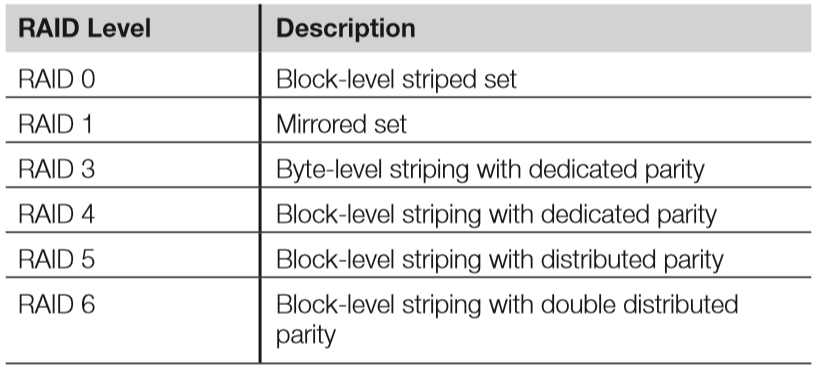
RAID 0: Striped set
- RAID 0, as shown below, employs striping to increase the performance of reads & writes.
- Striping offers no data redundancy, so RAID 0 is a poor choose if recovery of data is critical.
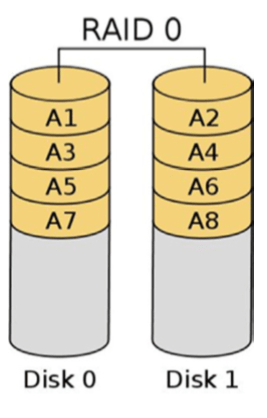
RAID 1: Mirrored set
- RAID 1 creates/writes an exact duplicate of all data to an additional disk, as shown below.
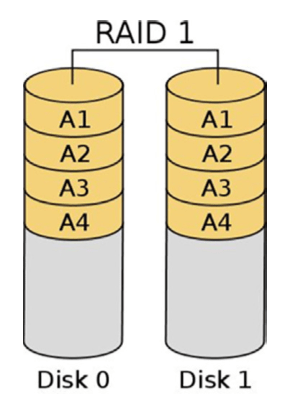
RAID 2: Hamming code
- RAID 2 is a legacy technology that requires either 14 or 39 hard disks and a specially designed hardware controller, making RAID 2 cost prohibitive.
- RAID 2 stripes at the bit level.
RAID 3: Striped set with dedicated parity (byte level)
- Striping is desirable due to the performance gains associated with spreading data across multiple disks. However, striping alone is not as desirable due to the lack of redundancy.
- With RAID 3, data at the byte level is striped across multiple disks, but an additional disk is leveraged for storage of parity information, which is used for recovery in the event of a failure.
RAID 4: Striped set with dedicated parity (block level)
- RAID 4 provides the same functionality as RAID 3, but stripes data at the block level instead of byte level.
- Like RAID 3, RAID 4 employs a dedicated parity drive (rather than having parity data distributed among all disks, as in RAID 5)
RAID 5: Striped set with distributed parity
- One of the most popular RAID configurations is that of RAID 5, striped set with
distributed parity (shown below). - Like RAIDs 3 and 4, RAID 5 writes parity information that is used for recovery purposes.
- RAID 5 writes at the block level, like RAID 4. However, unlike RAIDs 3 and 4, which require a dedicated disk for parity information, RAID 5 distributes the parity information across multiple disks.
- One of the reasons for RAID 5’s popularity is that the disk cost for redundancy is potentially lower than that of a mirrored set, while at the same time gaining performance improvements associated with RAID 0.
- RAID 5 allows for data recovery in the event that any one disk fails.
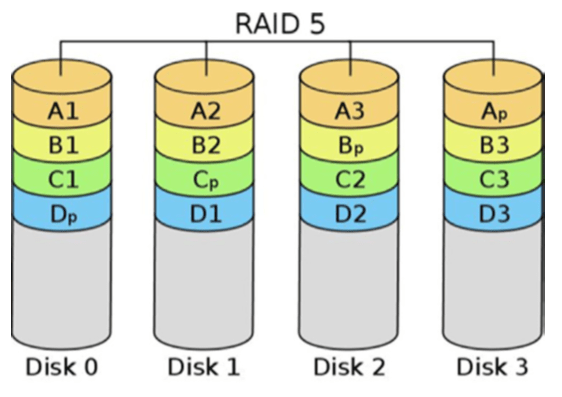
RAID 6: Striped set with dual-distributed parity
- While RAID 5 accommodates the loss of any one drive in the array, RAID 6 can allow for the failure of two drives and still function.
- This redundancy is achieved by writing the same parity information to two different disks.
RAID 10
- RAID 10, or more properly RAID 1+0, is an example of what is known as nested RAID or multi-RAID, which simply means that one standard RAID is encapsulated within another.
- With RAID 10, the configuration is that of a striped set of mirrors.
System redundancy
Redundant hardware & systems
- Many systems can provide internal hardware redundancy of components that are extremely prone to failure.
- The most common example of this built-in redundancy is systems or devices that have redundant onboard power in the event of a power supply failure.
- Sometimes systems simply have field replaceable modular versions of commonly failing components. Though physically replacing a power supply might increase downtime, having an inventory of spare modules to service all of the datacenter’s servers would be less expensive than having all servers configured with an installed redundant power supply.
- Redundant systems (i.e. alternative systems) make entire systems available in case of failure of the primary system.
High-availability clusters
- A high-availability (HA) cluster, also called a failover cluster, uses multiple systems that are already installed, configured, and plugged in, so that if a failure causes one of the systems to fail, another can be seamlessly leveraged to maintain the availability of the service or application being provided.
- Each member of an active-active HA cluster actively processes data in advance of a failure. This is commonly referred to as load balancing.
- Having systems in an active-active or load-balancing configuration is typically more costly than having the systems in an active-passive or hot standby configuration, in which the backup systems only begin processing when a failure is detected.
BCP & DR overview and process
- The terms and concepts associated with Business Continuity and Disaster Recovery Planning are very often misunderstood.
- Clear understanding of what is meant by both terms, and what they entail, is critical.
Business continuity planning
- Though many organisations will use the phrases Business Continuity Planning (BCP) or Disaster Recovery Planning (DRP) interchangeably, they are two distinct disciplines.
- Though both types of planning are essential to the effective management of disasters and other disruptive events, their goals are different.
- The overarching goal of BCP is to ensure that the business will continue to operate before, throughout, and after a disaster event is experienced.
- The focus of BCP is on the business as a whole, ensuring that those critical services or functions the business provides or performs can still be carried out both in the wake of a disruption and after the disruption has been weathered.
Disaster recovery planning
- The Disaster Recovery Plan (DRP) provides a short-term plan for dealing with specific IT-oriented disruptions.
- Mitigating a malware infection that shows risk of spreading to other systems is an example of a specific IT-oriented disruption that a DRP would address.
- The DRP focuses on efficiently attempting to mitigate the impact of a disaster by preparing the immediate response and recovery of critical IT systems.
- DRP is considered tactical rather than strategic, and provides a means for immediate response to disasters.
Relationship between BCP & DRP
- The BCP is an umbrella plan that includes multiple specific plans, most importantly the DRP.
- DRP serves as a subset of the overall BCP, which would be doomed to fail if it did not contain a tactical method for immediately dealing with disruption of information systems.
- The figure below visual means for understanding the inter-relatedness of BCP and DRP, as well as some related plans.
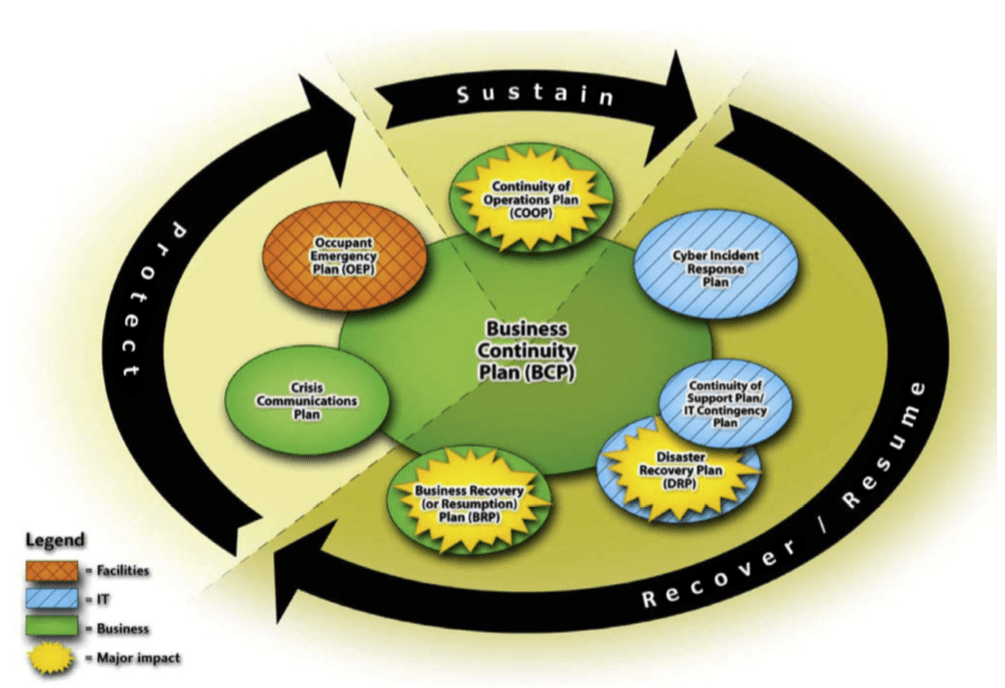
Disasters or disruptive events
- Given that BCP and DRP are created because of the potential of disasters impacting operations, it is vital that organisations understand the nature of disasters and disruptive events.
- The three common ways of categorising the causes for disasters are derived from whether the threat agent is natural, human or environmental:
- Natural — This category includes threats such as earthquakes, hurricanes, tornadoes, floods, and some types of fires. Historically, natural disasters have provided some of the most devastating disasters to which an organsation must respond.
- Human — The human category of threats represents the most common source of disasters. Human threats can be further classified by whether they constitute an intentional or unintentional threat.
- Environmental — Threats focused on information systems or data centre environments; includes items such as power issues (blackout, brownout, surge, spike, etc.), system component or other equipment failures, and application or software flaws.
- The analysis of threats and the determination of the associated likelihood of those threats are important parts of the BCP and DRP process. Below is a quick summary of some of the disaster events and what type of disaster they constitute.
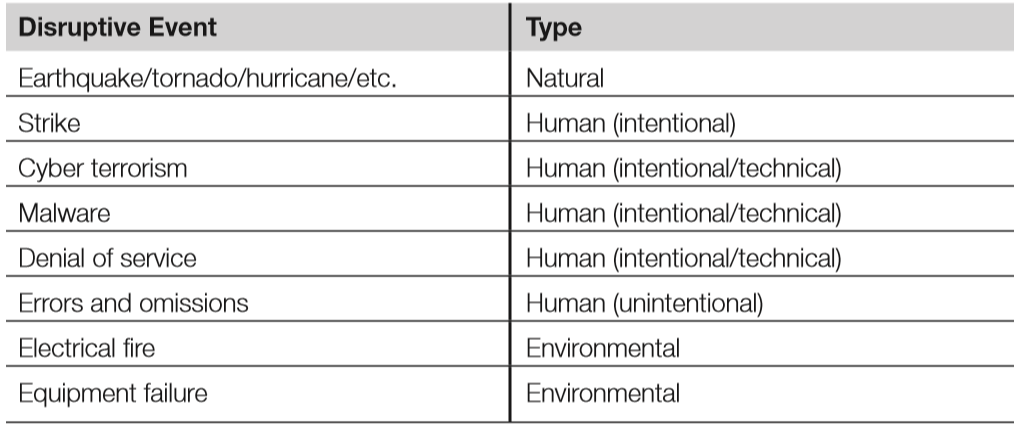
- Types of disruptive events include:
- Errors and omissions: Typically considered the most common source of disruptive events. This type of threat is caused by humans who unintentionally serve as a source of harm.
- Natural disasters: These include earthquakes, hurricanes, floods, tsunamis, etc.
- Electrical or power problems: Loss of power may cause availability issues, as well as integrity issues due to corrupted data.
- Temperature and humidity failures: These may damage equipment due to overheating, corrosion, or static electricity.
- Warfare, terrorism, and sabotage: These threats can vary dramatically based on geographic location, industry, and brand value, as well as the interrelatedness with other high-value target organisations.
- Financially motivated attackers: Attackers who seek to make money by attacking victim organisations, e.g. by exfiltration of cardholder data, identity theft, pump-and-dump stock schemes, bogus anti-malware tools, corporate espionage, and others.
- Personnel shortages: May be caused by strikes, pandemics, or transportation issues. A lack of staff may lead to operational disruption.
The disaster recovery process
- Having discussed the importance of BCP and DRP as well as examples of threats that justify this degree of planning, we will now focus on the fundamental steps involved in recovering from a disaster.
Respond
- In order to begin the disaster recovery process, there must be an initial response that begins the process of assessing the damage.
- Speed is essential during this initial assessment, which will determine if the event in question constitutes a disaster.
Activate team
- If a disaster is declared, then the recovery team needs to be activated. Depending on the scope of the disaster, this communication could prove extremely difficult.
- The use of call trees (detailed later) can help to facilitate this process to ensure that members can be activated as smoothly as possible.
Communicate
- One of the most difficult aspects of disaster recovery is ensuring that consistent & timely status updates are communicated back to the central team managing the response and recovery process.
- This communication must often occur out-of-band, meaning that the typical communication method of an office phone will generally not be a viable option.
- In addition to communication of internal status regarding the recovery activities, the organisation must be prepared to provide external communications, which involves disseminating details to the public.
Assess
- Though an initial assessment was carried out during the initial response portion of the disaster recovery process, a more detailed and thorough assessment will be performed by the disaster recovery team.
- The team will proceed to assessing the extent of the damage to determine the proper steps necessary to ensure the organisation’s ability to meet its mission.
Reconstitution
- The primary goal of the reconstitution phase is to successfully recover critical business operations at either a primary or secondary site.
- If an alternate site is leveraged, adequate safety and security controls must be in place in order to maintain the expected degree of security the organisation typically employs; the use of an alternate computing facility for recovery should not expose the organisation to further security incidents.
- In addition to the recovery team‘s efforts in reconstituting critical business functions at an alternate location, a salvage team will be employed to begin the recovery process at the primary facility that experienced the disaster.
- Ultimately, the expectation is that unless it is wholly unwarranted given the circumstances, the primary site will be recovered and that the alternate facility’s operations will “fail back” or be transferred again to the primary center of operations.
Developing a BCP/DRP
- Developing BCP/DRP is vital for an organisation’s ability to respond and recover from an interruption in normal business functions or catastrophic event.
- In order to ensure that all planning has been considered, the BCP/DRP has a specific set of requirements to review and implement.
- Below are listed these high-level steps, according to NIST SP800-34 (NIST’s Contingency Planning Guide for Federal Information Systems), to achieving a sound, logical BCP/DRP.
Project initiation
- In order to develop the BCP/DRP, the scope of the project must be determined & agreed upon.
- The project initiation step involves seven distinct milestones, as listed below:
- Develop the contingency planning policy statement: A formal department or agency policy provides the authority and guidance necessary to develop an effective contingency plan.
- Conduct the BIA: The BIA helps identify and prioritise critical IT systems and components. A template for developing the BIA is also provided to assist the user.
- Identify preventive controls: Measures taken to reduce the effects of system disruptions can increase system availability and reduce contingency life-cycle costs.
- Develop recovery strategies: Thorough recovery strategies ensure that the system may be recovered quickly and effectively following a disruption.
- Develop an IT contingency plan: The contingency plan should contain detailed guidance and procedures for restoring a damaged system.
- Plan testing, training, and exercises: Testing the plan identifies planning gaps, whereas training prepares recovery personnel for plan activation; both activities improve plan effectiveness and overall agency preparedness.
- Plan maintenance: The plan should be a living document that is updated regularly to remain current with system enhancements
Assessing the critical state
- Assessing the critical state can be difficult, because determining which pieces of the IT infrastructure are critical depends solely on the how it supports the users within the organisation.
- For example, without consulting all of the users, a simple mapping program may not seem to be a critical asset. However, if there is a user group that drives trucks and makes deliveries for business purposes, this mapping software may be critical for them to schedule pickups and deliveries.
Conduct BIA
- Business impact analysis (BIA) is the formal method for determining how a disruption to the IT system(s) of an organisation will impact requirements, processes, and interdependencies with respect to the business mission.
- It aims to identify and prioritise critical IT systems and components, which enables the BCP/DRP project manager to fully characterise the IT contingency requirements and priorities.
- The objective is to correlate each IT system component with the critical service it supports. It also aims to quantify the consequence of a disruption to the system component and how that will affect the organisation.
- The primary goal of the BIA is to determine the Maximum Tolerable Downtime (MTD) for a specific IT asset. This will directly impact what disaster recovery solution is chosen.
Identify critical assets
- The critical asset list is a list of those IT assets that are deemed business-essential by the organisation.
- These systems’ DRP/BCP must have the best available recovery capabilities assigned to them.
Conduct BCP/DRP-focused risk assessment
- The BCP/DRP-focused risk assessment determines what risks are inherent to which IT assets.
- A vulnerability analysis is also conducted for each IT system and major application. This is done because most traditional BCP/DRP evaluations focus on physical security threats, both natural and human.
Determine MTD
- The primary goal of the BIA is to determine the MTD (maximum tolerable downtime), which describes the total time a system can be inoperable before an organisation is severely impacted. MTD is comprised of two metrics: the Recovery Time Objective (RTO), and the Work Recovery Time (WRT) – described later.
- Depending on the business continuity framework that is used, other terms may be substituted for MTD. These include Maximum Allowable Downtime, Maximum Tolerable Outage, and Maximum Acceptable Outage.
Failure & recovery metrics
- A number of metrics are used to quantify how frequently systems fail, how long a system may exist in a failed state, and the maximum time to recover from failure.
- These metrics include the Recovery Point Objective (RPO), RTO, WRT, Mean Time Between Failures (MTBF), Mean Time to Repair (MTTR), and Minimum Operating Requirements (MOR).
Recovery point objective (RPO)
- The RPO is the amount of data loss or system inaccessibility (measured in time) that an organisation can withstand.
- e.g. If you perform weekly backups, someone made a decision that your company could tolerate the loss of a week’s worth of data. If backups are performed on Saturday evenings and a system fails on Saturday afternoon, you have lost the entire week’s worth of data. This is the RPO; in this case, the RPO is 1 week.
- The RPO represents the maximum acceptable amount of data/work loss for a given process because of a disaster or disruptive event
Recovery time objective (RTO) & work recovery time (WRT)
- The RTO describes the maximum time allowed to recover business or IT systems. RTO is also called the systems recovery time. This is one part of MTD; once the
system is physically running, it must be configured. - WRT describes the time required to configure a recovered system.
- Downtime consists of two elements, the systems recovery time and the WRT. Therefore, MTD = RTO + WRT.
Mean time between failures (MTBF)
- MTBF quantifies how long a new or repaired system will run before failing.
- It is typically generated by a component vendor and is largely applicable to hardware, as opposed to applications and software.
Mean time to repair (MTTR)
- The MTTR describes how long it will take to recover a specific failed system. It is the best estimate for reconstituting the IT system so that business continuity may occur.
Minimum operating requirements (MOR)
- MORs describe the minimum environmental and connectivity requirements in order to operate computer equipment.
- It is important to determine and document what the MOR is for each IT-critical asset because in the event of a disruptive event or disaster, proper analysis can be conducted quickly to determine if the IT assets will be able to function in the emergency environment.
Identify preventive controls
- Preventive controls can prevent disruptive events from having an impact.
- For example, HVAC systems are designed to prevent computer equipment from overheating & failing.
- The BIA will identify some risks that may be mitigated immediately; this is another advantage of performing BCP/DRP, as it can improve your security, even if no disaster occurs.
Recovery strategy
- Once the BIA is complete, the BCP team knows the MTD. This metric, as well as others including the RPO and RTO, is used to determine the recovery strategy.
- A cold site cannot be used if the MTD is 12 hours, for example. As a general rule, the shorter the MTD, the more expensive the recovery solution will be.
Redundant site
- A redundant site is an exact production duplicate of a system that has the capability to seamlessly operate all necessary IT operations without loss of services to the end user of the system.
- A redundant site receives data backups in real time so that in the event of a disaster, the users of the system have no loss of data. It is a building configured exactly like the primary site, and is the most expensive recovery option because it effectively more than doubles the cost of IT operations.
- To be fully redundant, a site must have real-time data backups to the redundant system and the end user should not notice any difference in IT services or operations in the event of a disruptive event.
Hot site
- A hot site is a location that an organisation may relocate to following a major disruption or disaster.
- It is a data centre with a raised floor, power, utilities, computer peripherals, and fully configured computers.
- The hot site will have all necessary hardware and critical applications data mirrored in real time.
- A hot site will have the capability to allow the organisation to resume critical operations within a very short period of time, sometimes in less than an hour.
- It is important to note the difference between a hot site and a redundant site. Hot sites can quickly recover critical IT functionality; it may even be measured in minutes instead of hours. However, a redundant site will appear as operating normally to the end user, no matter what the state of operations is for the IT program.
- A hot site has all the same physical, technical, and administrative controls implemented as at the production site.
Warm site
- A warm site has some aspects of a hot site; for example, readily accessible hardware and connectivity, but it will have to rely upon backup data in order to reconstitute a system after a disruption.
- It is a data centre with a raised floor, power, utilities, computer peripherals, and fully configured computers.
Cold site
- A cold site is the least expensive recovery solution to implement. It does not include backup copies of data, nor does it contain any immediately available hardware.
- After a disruptive event, a cold site will take the longest amount of time of all recovery solutions to implement and restore critical IT services for the organisation.
- Especially in a disaster area, it could take weeks to get vendor hardware shipments in place, so organisations using a cold site recovery solution will have to be able to withstand a significantly long MTD measured in weeks, not days.
- A cold site is typically a data centre with a raised floor, power, utilities, and physical security, but not much beyond that.
Reciprocal agreements
- A reciprocal agreement is a bidirectional agreement between two organisations in which one organisation promises another that it can move in and share space if it experiences a disaster.
- It is documented in the form of a contract written to gain support from outside organisations in the event of a disaster.
- They are also referred to as mutual aid agreements and they are structured so that each organisation will assist the other in the event of an emergency.
Mobile site
- Mobile sites, or rolling sites, are basically data centres on wheels: towable trailers that contain racks of computer equipment, as well as HVAC, fire suppression, and physical security.
- They are a good fit for disasters such as a data centre flood, where the data centre is damaged but the rest of the facility and surrounding property are intact.
- They may be towed on-site, supplied with power and a network, and brought online.
Related plans
- As discussed previously, the BCP is an umbrella plan encompassing other plans
- The table below, from NIST SP 800-34, summarises these:
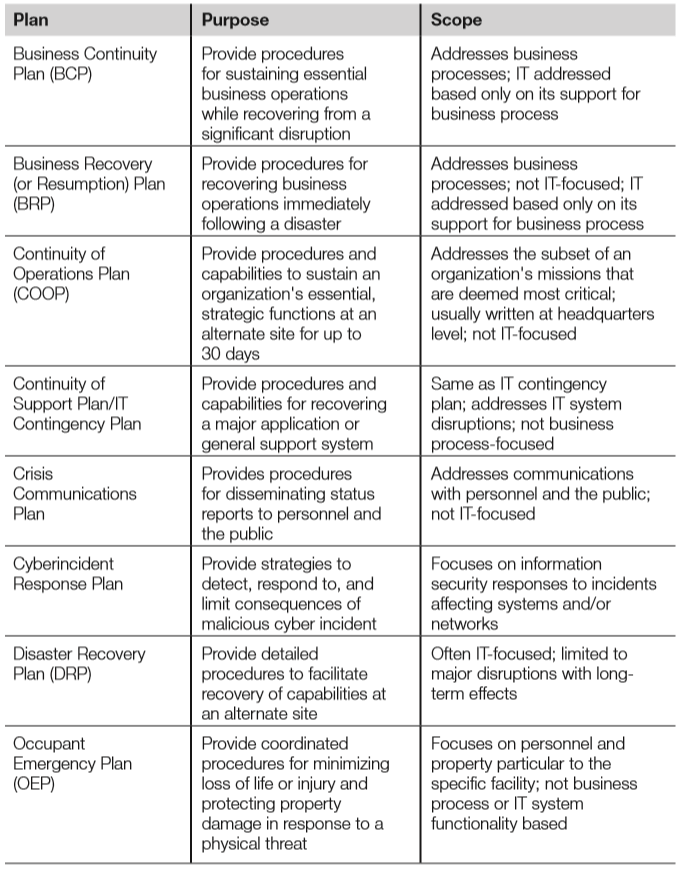
Continuity of operations plan (COOP)
- The COOP describes the procedures required to maintain operations during a disaster
- This includes transfer of personnel to an alternate DR site, and operations of that site
Business recovery plan (BRP)
- The BRP, also known as the Business Resumption Plan, details the steps required to restore normal business operations after recovering from a disruptive event.
- This may include switching operations from an alternate site back to a repaired primary site.
- The BRP picks up when the COOP is complete. This plan is narrow and focused: the BRP is sometimes included as an appendix to the BCP.
Continuity of support plan
- The Continuity of Support Plan focuses narrowly on support of specific IT systems and applications.
- It is also called the IT Contingency Plan, emphasising IT over general business support.
Cyberincident response plan
- The Cyberincident Response Plan is designed to respond to disruptive cyberevents, including network-based attacks, worms, computer viruses, Trojan horses, etc., that have the potential to disrupt networks.
- Loss of network connectivity alone may constitute a disaster for many organisations.
Occupant emergency plan (OEP)
- The OEP provides the response procedures for occupants of a facility in the event of a situation posing a potential threat to the health and safety of personnel, the environment, or property (such as a fire, hurricane, criminal attack, or a medical emergency.)
- This plan is facilities-focused, as opposed to business- or IT-focused.
- The OEP is focused on safety and evacuation, and should describe specific safety drills, including evacuation or fire drills.
- Specific safety roles should be described, including safety warden and meeting point leader, as described in Domain 3.
Crisis management plan (CMP)
- The CMP is designed to provide effective coordination among the managers of the organisation in the event of an emergency or disruptive event.
- The CMP details the actions that management must take to ensure that life and safety of personnel and property are immediately protected in case of a disaster.
Crisis communications plan
- A critical component of the CMP is the Crisis Communications Plan, which is sometimes simply called the communications plan; a plan for communicating to staff and the public in the event of a disruptive event.
- Instructions for notifying the affected members of the organisation are an integral part to any BCP/DRP.
- It is often said that bad news travels fast. Also, in the event of a post-disaster “information vacuum”, bad information will often fill the void.
- Public relations professionals understand this risk and know to consistently give the organisation’s “official story,” even when there is little to say.
- All communication with the public should be channelled via senior management or the PR team.
Call trees
- A key tool leveraged for staff communication by the Crisis Communications Plan is the Call Tree, which is used to quickly communicate news throughout an organisation without overburdening any specific person.
- The call tree works by assigning each employee a small number of other employees they are responsible for calling in an emergency event.
- For example, the organisation’s president may notify his board of directors of an emergency situation and they, in turn, will notify their top-tier managers. The top-tier managers will then call the people they have been assigned to call. The call tree continues until all affected personnel have been contacted.
- The call tree is most effective when there is a two-way reporting of successful communication. For example, each member of the board of directors would report back to the president when each of their assigned call tree recipients had been contacted and had made contact with their subordinate personnel.
- Remember that mobile phones and landlines may become congested or unusable during a disaster; the call tree should contain alternate contact methods in case the primary methods are unavailable.
Emergency Operations Centre
- The Emergency Operations Centre is the command post established during or just after an emergency event.
- Placement of the EOC will depend on resources that are available.
- For larger organisations, the EOC may be a long distance away from the physical emergency; however, protection of life and personnel safety is always of the utmost importance.
Backups & availability
- Though many organisations are diligent in the process of creating backups, verification of recoverability from those backup methods is at least as
important, but is often overlooked. - When the detailed recovery process for a given backup solution is thoroughly reviewed, some specific requirements will become obvious.
- One of the most important points to make when discussing backup with respect to disaster recovery and business continuity is to ensure that critical backup media is stored offsite.
- Further, that offsite location should be situated such that, during a disaster event, the organisation can efficiently access the media with the purpose of taking it to a primary or secondary recovery location.
Hard-copy data
- In the event that there is a disruptive event, such as a natural disaster that disables the local power grid, and power dependency is problematic, there is the potential to operate the organisation’s most critical functions using only hard-copy data.
- Hard-copy data is any data that are accessed through reading or writing on paper rather than processing through a computer system.
Electronic backups
- Electronic backups are archives that are stored electronically and can be retrieved in case of a disruptive event or disaster.
- Choosing the correct data backup strategy is dependent upon how users store data, the availability of resources and connectivity, and what the ultimate recovery goal is for the organisation.
- Preventative restoration is a recommended control; that is, restoring data to test the validity of the backup process.
- If a reliable system, such as a mainframe, copies data to tape every day for years, what assurance does the organisation have that the process is working? Do the tapes and the data they contain have integrity?
Full backups
- A full backup means that every piece of data is copied and stored on the backup repository.
- Conducting a full system backup is time consuming and a strain on bandwidth and resources. However, they will ensure that any and all necessary data is protected.
Incremental backups
- Incremental backups archive data that has changed since the last full or incremental backup.
- For example, a site performs a full backup every Sunday, with daily incremental backups from Monday through Saturday. If data is lost after the Wednesday incremental backup, four tapes are required for restoration: the Sunday full backup, as well as the Monday, Tuesday, and Wednesday incremental backups.
Differential backups
- Differential backups operate in a similar manner as the incremental backups except for one key difference: differential backups archive data that have changed since the last full backup.
- For example, the same site in our previous example switches to differential backups. They lose data after the Wednesday differential backup. Now only two tapes are required for restoration: the Sunday full backup and the Wednesday differential backup.
Tape rotation methods
- A common tape rotation method is called FIFO (First In, First Out). Assume you are performing full daily backups and have 14 rewritable tapes in total.
- FIFO (also called round robin) means you will use each tape in order, and cycle back to the first tape after the 14th is used. This ensures 14 days of data is archived.
- The downside of this plan is you only maintain 2 weeks of data; this schedule is not helpful if you seek to restore a file that was accidentally deleted 3 weeks ago.
- Grandfather-Father-Son (GFS) addresses this problem.
- There are 3 sets of tapes: 7 daily tapes (the son), 4 weekly tapes (the father), and 12 monthly tapes (the grandfather).
- Once per week, a son tape graduates to father.
- Once every 5 weeks a father tape graduates to grandfather.
- After running for a year, this method ensures there are backup tapes available for the past 7 days, weekly tapes for the past 4 weeks, and monthly tapes for the past 12 months.
Electronic vaulting
- Electronic vaulting is the batch process of electronically transmitting data that is to be backed up on a routine, regularly scheduled time interval.
- It is used to transfer bulk information to an offsite facility.
- There are a number of commercially available tools and services that can perform electronic vaulting for an organisation.
- Electronic vaulting is a good tool for data that need to be backed up on a daily or possibly even hourly rate.
- It solves two problems at the same time: it stores sensitive data offsite and it can perform the backup at very short intervals to ensure that the most recent data is backed up.
Remote journalling
- A database journal contains a log of all database transactions. Journals may be used to recover from a database failure.
- Assume a database checkpoint (snapshot) is saved every hour. If the database loses integrity 20 min after a checkpoint, it may be recovered by reverting to the checkpoint and then applying all subsequent transactions described by the database journal.
- Remote journalling saves the database checkpoints and database journal to a remote site. In the event of failure at the primary site, the database may be recovered.
Database shadowing
- Database shadowing uses two or more identical databases that are updated simultaneously.
- The shadow database(s) can exist locally, but it is best practice to host one shadow database offsite.
- The goal of database shadowing is to greatly reduce the recovery time for a database implementation. Database shadowing allows faster recovery when compared with remote journalling.
High availabity (HA) options
- Increasingly, systems are being required to have effectively zero downtime, or an MTD of zero.
- The immediate availability of alternate systems is required should a failure or disaster occur. Recovery of data on tape is certainly ill equipped to meet these demands.
- A common way to achieve this level of uptime requirement is to employ a high availability cluster. The goal of a high availability cluster is to decrease the recovery time of a system or network device so that the availability of the service is less affected than it would be by having to rebuild, reconfigure, or otherwise stand up a replacement system.
- Two typical deployment approaches exist:
- An active-active cluster involves multiple systems, all of which are online and actively processing traffic or data. This configuration is also commonly referred to as load balancing and is especially common with public facing systems, such as Web server farms.
- An active-passive cluster involves devices or systems that are already in place, configured, powered on, and ready to begin processing network traffic should a failure occur on the primary system. Active-passive clusters are often designed such that any configuration changes made on the primary system or device are replicated to the standby system. Also, to expedite the recovery of the service, many failover cluster devices will automatically begin to process services on the secondary system should a disruption impact the primary device. It can also be referred to as a hot spare, standby, or failover cluster configuration.
DRP testing, training & awareness
- Testing, training, and awareness must be performed for the “disaster” portion of a BCP/DRP. Skipping these steps is one of the most common BCP/DRP mistakes.
- Some organisations “complete” their DRP, consider the matter resolved, and put the big DRP binder on a shelf to collect dust. This mentality is wrong on numerous levels.
- First, a DRP is never complete but is rather a continually amended method for ensuring the ability for the organisation to recover in an acceptable manner.
- Second, while well-meaning individuals carry out the creation and update of a DRP, even the most diligent of administrators will make mistakes. To find and correct these issues prior to their hindering recovery in an actual disaster, testing must be carried out on a regular basis.
- Third, any DRP that will be effective will have some inherent complex operations and manoeuvres to be performed by administrators.
- There will always be unexpected occurrences during disasters, but each member of the DRP should be exceedingly familiar with the particulars of their role in a DRP, which is a call for training on the process.
- Finally, it is important to be aware of the general user’s role in the DRP, as well as
the organisation’s emphasis on ensuring the safety of personnel and business operations in the event of a disaster.
DRP testing
- In order to ensure that a DRP represents a viable plan for recovery, thorough testing
is needed. - Given the DRP’s detailed tactical subject matter, it should come as no surprise that routine infrastructure, hardware, software, and configuration changes will alter the way the DRP needs to be carried out.
- Organisations’ information systems are in a constant state of flux, but unfortunately, much of these changes do not readily make their way into an updated DRP.
- To ensure both the initial and continued efficacy of the DRP as a feasible recovery methodology, testing needs to be performed.
- Each DRP testing method varies in complexity & cost, and simpler tests are less expensive. Here are the plans, ranked in order of cost & complexity, from low to high:
- DRP review
- Read-through/Checklist/Consistency
- Structured walkthrough/Tabletop
- Simulation test/Walkthrough drill
- Parallel processing
- Partial interruption
- Complete business interruption
- These are discussed in more detail below.
DRP review
- The DRP review is the most basic form of initial DRP testing and is focused on simply reading the DRP in its entirety to ensure completeness of coverage.
- It is typically performed by the team that developed the plan and will involve team members reading the plan in its entirety to quickly review the overall plan for any obvious flaws.
- The DRP review is primarily just a sanity check to ensure that there are no glaring omissions in coverage or fundamental shortcomings in the approach.
Read-through
- Read-through (also known as checklist or consistency) testing lists all necessary
components required for successful recovery and ensures that they are or will be
readily available should a disaster occur. - For example, if the disaster recovery plan calls for the reconstitution of systems from tape backups at an alternate computing facility, the site in question should have an adequate number of tape drives on hand to carry out the recovery in the indicated window of time.
- The read-through test is often performed concurrently with the structured walkthrough or tabletop testing as a solid first-testing threshold.
- The read-through test is focused on ensuring that the organisation has or can acquire in a timely fashion sufficient levels of resources upon which successful recovery is dependent.
Walkthrough
- Another test that is commonly completed at the same time as the checklist test is that of the walkthrough, which is also often referred to as a structured walkthrough or
tabletop exercise. - During this type of DRP test, which is usually performed prior to more in-depth testing, the goal is to allow individuals who are knowledgeable about the systems and services targeted for recovery to thoroughly review the overall approach.
- The term structured walkthrough is illustrative, as the group will discuss the proposed recovery procedures in a structured manner to determine whether there are any noticeable omissions, gaps, erroneous assumptions, or simply technical missteps that would hinder the recovery process from successfully occurring.
Simulation test
- A simulation test, also called a walkthrough drill (not to be confused with the
discussion-based structured walkthrough), goes beyond talking about the process
and actually has teams to carry out the recovery process. - A simulated disaster to which the team must respond as they are directed to by the DRP.
- As smaller disaster simulations are successfully managed, the scope of simulations will vary significantly and tend to grow more complicated and involve more systems.
Parallel processing
- Another type of DRP test is parallel processing. This type of test is common in environments where transactional data is a key component of the critical business processing.
- Typically, this test will involve recovery of critical processing components at an alternate computing facility and then restore data from a previous backup. Note
that regular production systems are not interrupted. - The transactions from the day after the backup are then run against the newly restored data, and the same results achieved during normal operations for the date in question should be mirrored by the recovery system’s results.
- Organisations that are highly dependent upon mainframe and midrange systems will often employ this type of test.
Partial & complete business interruption
- Arguably, the highest fidelity of all DRP tests involves business interruption testing.
However, this type of test can actually be the cause of a disaster, so extreme caution
should be exercised before attempting an actual interruption test. - As the name implies, the business interruption style of testing will have the organisation actually stop processing normal business at the primary location and will instead leverage the alternate computing facility.
- These types of tests are more common in organisations where fully redundant, often load-balanced operations already exist.
Continued BCP/DRP maintenance
- Once the initial BCP/DRP plan is completed, tested, trained, and implemented, it
must be kept up to date. - Business and IT systems change quickly, and IT professionals are accustomed to adapting to that change.
- BCP/DRP plans must keep pace with all critical business and IT changes.
Change management
- Change management includes tracking and documenting all planned changes, including formal approval for substantial changes and documentation of the results of the completed change.
- All changes must be auditable.
- The change control board manages the change management process; the BCP team should be a member and attend all meetings.
- The goal of the BCP team’s involvement on the change control board is to identify any changes that must be addressed by the BCP/DRP plan.
BCP/DRP mistakes
- BCP and DRP are a business’ final line of defence against failure. If other controls
have failed, BCP/DRP is the last resort. - The success of BCP/DRP is critical, but many plans fail. If it fails, the business may fail.
- The BCP team should consider the failure of other organisations’ plans and view their own procedures under intense scrutiny. They should ask themselves this question: “Have we made mistakes that threaten the success of our plan?”
- Common BCP/DRP mistakes include:
- Lack of management support
- Lack of business unit involvement
- Lack of prioritisation among critical staff
- Improper (often overly narrow) scope
- Inadequate telecommunications management
- Inadequate supply chain management
- Incomplete or inadequate CMP
- Lack of testing
- Lack of training and awareness
- Failure to keep the BCP/DRP plan up to date
Specific BCP/DRP frameworks
- Given the patchwork of overlapping terms and processes used by various BCP/DRP
frameworks, we have focused on universal best practices without attempting to
map to a number of different (and sometimes inconsistent) terms and processes described by various BCP/DRP frameworks. - However, a handful of specific frameworks are worth discussing, including NIST SP 800-34, ISO/IEC-27031, and BCI.
NIST SP 800-34
- The National Institute of Standards and Technology (NIST) Special Publication
800-34 Rev. 1 “Contingency Planning Guide for Federal Information Systems” is of high quality and is in the public domain. - Plans can sometimes be significantly improved by referencing SP 800-34 when writing or updating a BCP/DRP.
ISO/IEC 27031
- ISO/IEC 27031 is a new guideline that is part of the ISO 27000 series, which also
includes ISO 27001 and ISO 27002. - It’s designed to:
- Provide a framework (methods and processes) for any organisation—private, governmental, and non-governmental
- Identify and specify all relevant aspects including performance criteria, design, and implementation details for improving ICT (information & communications technology) readiness as part of the organisation’s ISMS (information security management system), helping to ensure business continuity
- Enable an organisation to measure its continuity, security and hence readiness to survive a disaster in a consistent and recognised manner.
- ISO/IEC 27031 focuses on BCP. A separate ISO plan for disaster recovery is ISO/IEC 24762.
BS-25999 & ISO 22301
- The British Standards Institution originally released BS-25999, which is in two parts:
- Part 1, the Code of Practice, provides business continuity management best
practice recommendations, and is a guidance document only. - Part 2, the Specification, provides the requirements for a Business Continuity
Management System (BCMS) based on BCM best practice. This is the part of
the standard that can be used to demonstrate compliance via an auditing and
certification process.
- Part 1, the Code of Practice, provides business continuity management best
- BS-25999-2 has been replaced with ISO 22301, which specifies the requirements for setting up and managing an effective BCMS for any organisation, regardless of type or size.
BCI
- The Business Continuity Institute (BCI) published a six-step Good Practice Guidelines (GPG) document
- They represent current global thinking in good BC practice and now include terminology from ISO 22301:2012, the International Standard for Business Continuity management systems.
- GPG 2013 describes six Professional Practices (PP):
- Management Practices
- PP1: Policy and Program Management
- PP2: Embedding Business Continuity
- Technical Practices
- PP3: Analysis
- PP4: Design
- PP5: Implementation
- PP6: Validation
- Management Practices
Summary of domain
- Operations security concerns the security of systems and data while being actively used in a production environment.
- Ultimately, operations security is about people, data, media, and hardware, all
of which are elements that need to be considered from a security perspective. - The best technical security infrastructure in the world will be rendered powerless if an individual with privileged access decides to turn against the organisation and there are no preventive or detective controls in place within it.
- We also discussed Business Continuity and Disaster Recovery Planning, which
serve as an organisation’s last control to prevent failure. - Of all controls, a failed BCP or DRP can be most devastating, potentially resulting in organisational failure, injury or even loss of life.
Questions for Domain 6: Security Assessment & Testing
- What can be used to ensure that software meets the customer’s operational requirements?
(a) Integration testing
(b) Installation testing
(c) Acceptance testing
(d) Unit testing
- What term describes a black-box testing method that seeks to identify and test all unique combinations of software inputs?
(a) Combinatorial software testing
(b) Dynamic testing
(c) Misuse case testing
(d) Static testing
Use the following scenario to answer questions 3–5:
You are the CISO (chief information security officer) of a large bank and have hired a company to provide an overall security assessment, as well as complete a penetration test of your organization. Your goal is to determine overall information security effectiveness. You are specifically interested in determining if theft of financial data is possible. Your bank has recently deployed a custom-developed, three-tier web application that allows customers to check balances, make transfers, and deposit checks by taking a photo with their smartphone and then uploading the check image. In addition to a traditional browser interface, your company has developed a smartphone app for both Apple iOS and Android devices. The contract has been signed, and both scope and rules of engagement have been agreed upon. A 24/7 operational IT contact at the bank has been made available in case of any unexpected developments during the penetration test, including potential accidental disruption of services. - Assuming the penetration test is successful, what is the best way for the penetration testing firm to demonstrate the risk of theft of financial data?
(a) Instruct the penetration testing team to conduct a thorough vulnerability assessment of the server containing financial data.
(b) Instruct the penetration testing team to download financial data, redact it, and report accordingly.
(c) Instruct the penetration testing team that they may only download financial data via an encrypted and authenticated channel.
(d) Place a harmless “flag” file in the same location as the financial data, and inform the penetration testing team to download the flag.
- You would like to have the security firm test the new web application, but have decided not to share the underlying source code. What type of test could be used to help determine the security of the custom web application?
(a) Secure compiler warnings
(b) Fuzzing
(c) Static testing
(d) White-box testing
- During the course of the penetration test, the testers discover signs of an active compromise of the new custom-developed, three-tier web application. What is the best course of action?
(a) Attempt to contain and eradicate the malicious activity
(b) Continue the test
(c) Quietly end the test, immediately call the operational IT contact, and escalate the issue
(d) Shut the server down
Answers in comments
Domain 6: Security Assessment & Testing
Introduction
- Security assessment and testing are critical components of any information security program. Organizations must accurately assess their real-world security, focus on the most critical components, and make necessary changes to improve.
- In this domain, we will discuss two major components of assessment and testing: overall security assessments, including vulnerability scanning, penetration testing, and security audits; and testing software via static and dynamic methods.
Assessing access control
- A number of processes exist to assess the effectiveness of access control.
- Tests with a narrower scope include penetration tests, vulnerability assessments, and security audits.
- A security assessment is a broader test that may include narrower tests, such as penetration tests, as subsections.
Penetration testing
- A penetration tester is a white hat hacker who receives authorization to attempt to break into an organization’s physical or electronic perimeter (sometimes both).
- Pen tests are designed to determine whether black hat hackers could do the same. They are a narrow but often useful test, especially if the penetration tester is successful.
- Pen tests may include the following elements:
- Network (Internet)
- Network (internal or DMZ)
- War dialling
- Wireless
- Physical (attempt to gain entrance into a facility or room)
- Network attacks may leverage client-side attacks, server-side attacks, or Web application attacks.
- War dialling uses a modem to dial a series of phone numbers, looking for an answering modem carrier tone. The pen tester then attempts to access the answering system.
- Social engineering is a no-tech or low-tech method that uses the human mind to bypass security controls. Social engineering may be used in combination with many types of attacks, especially client-side attacks or physical tests.
- An example of a social engineering attack combined with a client-side attack is emailing malware with a subject line of “Category 5 Hurricane is about to hit Florida!”
- A zero-knowledge test, also called black-box test, is “blind”; the pen tester begins with no external or trusted information and begins the attack with public information only.
- A full-knowledge test (also called crystal-box test) provides internal information to the pen tester, including network diagrams, policies and procedures, and sometimes reports from previous pen testers.
- Partial-knowledge tests are in between zero and full knowledge; the pen tester receives some limited trusted information.
Pen testing tools & methodology
- Pen testers often use tools such as the open-source Metasploit and closed-source Core Impact & Immunity Canvas.
- They also use custom tools, as well as malware samples and code posted to the Internet.
- Pen testers use the following methodology:
- Planning
- Reconnaissance
- Scanning (also called enumeration)
- Vulnerability assessment
- Exploitation
- Reporting
- Black hat hackers typically follow a similar methodology although they may perform less planning, and obviously omit reporting. Black hats will also cover their tracks by erasing logs and other signs of intrusion, and they frequently violate system integrity by installing back doors in order to maintain access.
- A pen tester should always protect data and system integrity.
Assuring confidentiality, data integrity & system integrity
- Pen testers must ensure the confidentiality of any sensitive data that is accessed during the test.
- If the target of a pen test is a credit card database, the pen tester may have no legal right to view or download the credit card details. Testers will often request that a dummy file containing no regulated or sensitive data be placed in the same area of the system as the credit card data and protected with the same permissions. If the tester can read and/or write to that file, then they prove they could have done the same to the credit card data.
- Pen testers must ensure the system integrity and data integrity of their client’s systems. Any active attack, as opposed to a passive read-only attack, against a system could potentially cause damage; this can be true even for an experienced pen tester. This risk must be clearly understood by all parties, and tests are often performed during change maintenance windows for this reason.
- One potential issue that should be discussed before the pen test commences is the risk of encountering signs of a previous or current successful malicious attack.
- Pen testers sometimes discover that they are not the first attacker to compromise a system and that someone has beaten them to it.
- Attackers will often become more malicious if they believe they have been discovered, sometimes violating data and system integrity.
- The integrity of the system is at risk in this case, and the pen tester should end the test and immediately escalate the issue.
- Finally, the final pen test report should be protected at a very high level, as it contains a roadmap to attack the organization.
Vulnerability testing
- Vulnerability scanning or vulnerability-testing scans a network or system for a list of predefined vulnerabilities such as system misconfiguration, outdated software, or a lack of patching.
- A vulnerability-testing tool such as Nessus or OpenVAS, or a cloud service such as Qualys, may be used to identify the vulnerabilities.
Security audits
- A security audit is a test against a published standard.
- Organizations may be audited for PCI DSS compliance, for example. PCI DSS includes many required controls, such as firewalls, specific access control models, and wireless encryption.
- An auditor then verifies that a site or organization meets the published standard.
Security assessments
- Security assessments are a holistic approach to assessing the effectiveness of access control.
- Instead of looking narrowly at pen tests or vulnerability assessments, security assessments have a broader scope.
- Security assessments view many controls across multiple domains and may include the following:
- Policies, procedures, and other administrative controls
- Assessing the real world-effectiveness of administrative controls
- Change management
- Architectural review
- Pen tests
- Vulnerability assessments
- Security audits
- As the above list shows, a security assessment may include other distinct tests, such as a pen test. The goal is to broadly cover many other specific tests to ensure that all aspects of access control are considered.
Log reviews
- Reviewing security audit logs within an IT system is one of the easiest ways to verify that access control mechanisms are performing adequately.
- Reviewing audit logs is primarily a detective control.
- The intelligence gained from proactive audit log management and monitoring can be very beneficial; the collected antivirus logs of thousands of systems can give a very accurate picture of the current state of malware.
- Antivirus alerts combined with a spike in failed authentication alerts from authentication servers or a spike in outbound firewall denials may indicate that a password-guessing worm is attempting to spread across a network.
Software testing methods
- In addition to testing the features and stability of the software, testing increasingly focuses on discovering specific programmer errors leading to vulnerabilities that risk system compromise, including a lack of bounds checking.
- Two general approaches to automated code review exist: static and dynamic testing.
Static & dynamic testing
- Static testing tests the code passively; the code is not running.
- This includes walkthroughs, syntax checking, and code reviews.
- Static analysis tools review the raw source code itself looking for evidence of known insecure practices, functions, libraries, or other characteristics used in the source code.
- The Unix lint program performs static testing for C programs.
- Dynamic testing tests the code while executing it.
- With dynamic testing, security checks are performed while actually running or executing the code or application under review.
- Both approaches are valid and complement each other.
- Static analysis tools might uncover flaws in code that have not even yet been fully implemented in a way that would expose the flaw to dynamic testing.
- However, dynamic analysis might uncover flaws that exist in the particular implementation and interaction of code that static analysis missed.
- White-box software testing gives the tester access to program source code, data structures, variables, etc.
- Black-box testing gives the tester no internal details; the software is treated as a black box that receives inputs.
Traceability matrix
- A traceability matrix, sometimes called a requirements traceability matrix (RTM), can be used to map customers’ requirements to the software testing plan; it traces the requirements and ensures that they are being met. It does this by mapping customer usage to test cases.
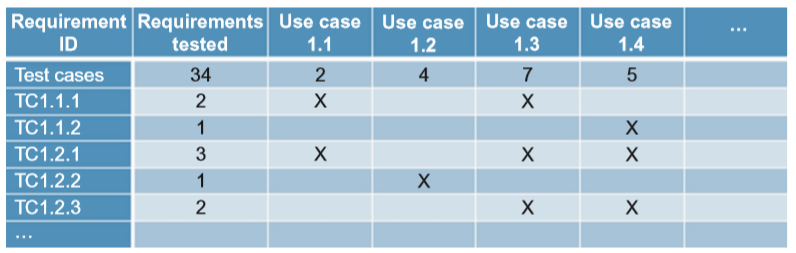
Synthetic transactions
- Synthetic transactions, or synthetic monitoring, involve building scripts or tools that simulate activities normally performed in an application.
- The typical goal of using synthetic transactions/monitoring is to establish expected norms for the performance of these transactions.
- These synthetic transactions can be automated to run on a periodic basis to ensure the application is still performing as expected.
- These types of transactions can also be useful for testing application updates prior to deployment to ensure that functionality and performance will not be negatively impacted.
- This type of testing or monitoring is most commonly associated with custom-developed web applications.
Software testing levels
- It is usually helpful to approach the challenge of testing software from multiple angles, addressing various testing levels from low to high.
- The software testing levels designed to accomplish that goal are unit testing, installation testing, integration testing, regression testing, and acceptance testing.
- Unit testing: Low-level tests of software components, such as functions, procedures, or objects.
- Installation testing: Testing software as it is installed and first operated.
- Integration testing: Testing multiple software components as they are combined into a working system. Subsets may be tested, or Big Bang integration testing is used for all integrated software components.
- Regression testing: Testing software after updates, modifications, or patches.
- Acceptance testing: Testing to ensure that the software meets the customer’s operational requirements. When this testing is done directly by the customer, it is called user acceptance testing.
Fuzzing
- Fuzzing (or fuzz testing) is a type of black-box testing that submits random, malformed data as inputs into software programs to determine if they will crash.
- A program that crashes when receiving malformed or unexpected input is likely to suffer from a boundary-checking issue and may be vulnerable to a buffer overflow attack.
- Fuzzing is typically automated (with tools such as zzuf), repeatedly presenting random input strings as command line switches, environment variables, and program inputs. Any program that crashes or hangs has failed the fuzz test.
Combinatorial software testing
- Combinatorial software testing is a black-box testing method that seeks to identify and test all unique combinations of software inputs.
- An example of combinatorial software testing is pairwise testing, also called all-pairs testing.
Misuse case testing
- Misuse case testing leverages use cases for applications, which spell out how various functionalities will be leveraged within an application.
- Formal use cases are typically built as a flow diagram written in UML (Unified Modeling Language) and are created to help model expected behavior and functionality.
- Misuse case testing models how a security impact could be realized by an adversary abusing the application.
- This can be seen simply as a different type of use case, but the reason for calling out misuse case testing specifically is to highlight the general lack of attacks against the application.
Test coverage analysis
- Test or code coverage analysis attempts to identify the degree to which code testing applies to the entire application.
- The goal is to ensure that there are no significant gaps where a lack of testing could allow for bugs or security issues to be present that otherwise should have been discovered.
Interface testing
- Interface testing is primarily concerned with appropriate functionality being exposed across all the ways users can interact with the application.
- From a security-oriented vantage point, the goal is to ensure that security is uniformly applied across the various interfaces.
- This type of testing exercises the various attack vectors an adversary could leverage.
Summary of exam objectives
- Vulnerability scanning determines one half of the Risk = Threat × Vulnerability equation.
- Pen tests seek to match those vulnerabilities with threats in order to demonstrate real-world risk.
- Assessments provide a broader view of the security picture, and audits demonstrate compliance with a published specification, such as PCI DSS.
- We discussed testing code security, including static methods such as source code analysis, walkthroughs, and syntax checking.
- We discussed dynamic methods used on running code, including fuzzing and various forms of black-box testing.
- We also discussed synthetic transactions, which attempt to emulate real-world use of an application through the use of scripts or tools that simulate activities normally performed in an application.
Questions for Domain 5: Identity & Access Management
- What access control method weighs additional factors, such as time of attempted access, before granting access?
(a) Content-dependent access control
(b) Context-dependent access control
(c) Role-based access control
(d) Task-based access control - What service is known as cloud identity, which allows organisations to leverage cloud service for identity management?
(a) IaaS
(b) IDaaS
(c) PaaS
(d) SaaS - What is an XML-based framework for exchanging security information, including authentication data?
(a) Kerberos
(b) OpenID
(c) SAML
(d) SESAME - What protocol is a common open protocol for interfacing and querying directory service information provided by network operating systems using port 389 via TCP or UDP?
(a) CHAP
(b) LDAP
(c) PAP
(d) RADIUS - What technique would raise the false accept rate (FAR) and lower the false
reject rate (FRR) in a fingerprint scanning system?
(a) Decrease the amount of minutiae that is verified
(b) Increase the amount of minutiae that is verified
(c) Lengthen the enrollment time
(d) Lower the throughput time
Answers in comments
Domain 5: Identity & Access Management
Introduction
- Identity & access management (also known as controlling access & managing identity) is the basis for all security disciplines, not just InfoSec
- The purpose of access management is to allow authorised users access to appropriate data, and deny access to unauthorised users
Authentication methods
- A key concept for implementing any type of access control is the proper authentication of subjects.
- A subject first identifies himself or herself; however, this identification cannot be trusted alone.
- The subject then authenticates by providing an assurance that the claimed identity is valid.
- A credential set is the term used for the combination of both the identification and authentication of a user.
- There are three basic authentication methods: Type 1 (something you know), Type
2 (something you have), and Type 3 (something you are). A fourth type of authentication is “somewhere you are”.
Type 1: Something you know
- Requires testing the subject with some sort of challenge and response where the subject must respond with a knowledgeable answer.
- The subject is granted access on the basis of something they know, such as a password or personal identification number (PIN), which is a number-based password.
- This is the easiest and therefore often weakest form of authentication.
Passwords
- There are four types of passwords to consider when implementing access controls:
static passwords, passphrases, one-time passwords, and dynamic passwords. - Static passwords are reusable passwords that may or may not expire. They are typically user-generated and work best when combined with another authentication type, such as a smart card or biometric control.
- Passphrases are long static passwords, comprised of words in a phrase or sentence. Passphrases may be made stronger by using nonsense words, by mixing lowercase with uppercase letters, and by using additional numbers and symbols.
- One-time passwords may be used for a single authentication. They are very secure
but difficult to manage. A one-time password is impossible to reuse and is valid
for just a one-time use. - Dynamic passwords change at regular intervals. RSA Security makes a synchronous
token device called SecurID that generates a new token code every 60 seconds.
The user combines their static PIN with the RSA dynamic token code to create one
dynamic password that changes every time it is used. One drawback to using dynamic passwords is the expense of the tokens themselves.
Password guessing
- Password guessing is an online technique that involves attempting to authenticate a
particular user to the system. - As we will learn in the next section, password cracking refers to an offline technique in which the attacker has gained access to the password hashes or database.
- Note that most web-based attacks on passwords are of the password guessing variety, so web applications should be designed with this in mind from a detective and preventive standpoint.
- Preventing successful password guessing attacks is typically done with account lockouts.
Password hashes & password cracking
- In most cases, clear text passwords are not stored within an IT system; only the hashed outputs of those passwords are stored. Hashing is one-way encryption using an algorithm and no key.
- When a user attempts to log in, the password they type (sometimes combined with a salt) is hashed, and that hash is compared against the hash stored on the system. The hash function cannot be reversed; it is impossible to reverse the algorithm and produce a password from a hash.
- While hashes may not be reversed, an attacker may run the hash algorithm forward many times, selecting various possible passwords, and comparing the output to a desired hash, hoping to find a match (and therefore deriving the original password). This is called password cracking.
Dictionary attacks
- A dictionary attack uses a word list, which is a predefined list of words, each of which
is hashed. - If the cracking software matches the hash output from the dictionary attack to the password hash, the attacker has successfully identified the original password.
Hybrid attacks
- A hybrid attack appends, prepends, or changes characters in words from a dictionary
before hashing in order to attempt the fastest crack of complex passwords. - For example, an attacker may have a dictionary of potential system administrator passwords, but also replaces each letter “o” with the number “0”.
Brute-force attacks
- Brute-force attacks take more time, but are more effective.
- The attacker calculates the hash outputs for every possible password.
- Just a few years ago, basic computer speed was still slow enough to make this a daunting task. However, with the advances in CPU speeds and parallel computing, the time required to execute brute-force attacks on complex passwords has been considerably reduced.
Rainbow tables
- A rainbow table acts as a database that contains the precomputed hashed output for most or all possible passwords.
- Rainbow tables take a considerable amount of time to generate and are not always complete: they may not include all possible password/hash combinations.
- Though rainbow tables act as a database, they are more complex under the hood, relying on a time/memory tradeoff to represent and recover passwords and hashes.
Salts
- A salt allows one password to hash multiple ways.
- Some systems (like modern UNIX/Linux systems) combine a salt with a password before hashing.
- While storing password hashes is superior to storing plaintext passwords, the use of a random value called called a ‘salt’ improves security further.
- A salt value ensures that the same password will encrypt differently when used by different users.
- This method offers the advantage that an attacker must encrypt the same word multiple times (once for each salt or user) in order to mount a successful password-guessing attack.
- As a result, rainbow tables are far less effective, if not completely ineffective, for systems using salts. Instead of compiling one rainbow table for a system that does not uses salts, such as Microsoft LAN Manager (LM) hashes, thousands, millions, billions, or more rainbow tables would be required for systems using salts, depending on the salt length.
Type 2: Something you have
- Requires that users possess something, such as a token, which proves they are an authenticated user.
- A token is an object that helps prove an identity claim.
Synchronous dynamic token
- Synchronous dynamic tokens use time or counters to synchronize a displayed token
code with the code expected by the authentication server (AS). - Time-based synchronous dynamic tokens display dynamic token codes that change frequently, such as every 60 seconds. The dynamic code is only good during
that window. - The AS knows the serial number of each authorized token, as well as the user with whom it is associated and the time. It can predict the dynamic code of each token using these three pieces of information.
- Counter-based synchronous dynamic tokens use a simple counter; the AS expects
token code 1, and the user’s token displays the same code 1. Once used, the token
displays the second code, and the server also expects token code 2.
Asynchronous dynamic token
- Asynchronous dynamic tokens are not synchronized with a central server. The most
common variety is challenge-response tokens. - Challenge-response token authentication systems produce a challenge or input for the token device. The user manually enters the information into the device along with their PIN, and the device produces an output, which is then sent to the system.
Type 3: Something you are
- Type 3 authentication is biometrics, which uses physical characteristics as a means of identification or authentication.
- Biometrics may be used to establish an identity or to authenticate or prove an identity claim.
- For example, an airport facial recognition system may be used to establish the identity of a known terrorist, and a fingerprint scanner may be used to authenticate the identity of a subject who makes the identity claim, and then swipes his/her finger
to prove it.
Biometric enrollment & throughput
- Enrollment describes the process of registering with a biometric system, which involves creating an account for the first time.
- Users typically provide their username (identity) and a password or PIN followed by biometric information, such as swiping fingerprints on a fingerprint reader or having a photograph taken of their irises.
- Enrollment is a one-time process that should take 2 minutes or less.
- Throughput describes the process of authenticating to a biometric system. This is
also called the biometric system response time. A typical throughput is 6–10 seconds.
Accuracy of biometric systems
- The accuracy of biometric systems should be considered before implementing a biometric control program. Three metrics are used to judge biometric accuracy: the false reject rate (FRR), the false accept rate (FAR), and the crossover error rate (CER).
False reject rate
- A false rejection occurs when an authorised subject is rejected by the biometric system as unauthorised.
- False rejections are also called a Type I error.
- False rejections cause frustration for the authorised users, reduction in work due to poor access conditions, and expenditure of resources to revalidate authorised users.
False accept rate
- A false acceptance occurs when an unauthorised subject is accepted as valid.
- If an organisation’s biometric control is producing a lot of false rejections, the overall control might have to lower the accuracy of the system by lessening the amount of data it collects when authenticating subjects.
- When the data points are lowered, the organization risks an increase in the false acceptance rate. The organization risks an unauthorized user gaining access. This type of error is called a Type II error (remember as TOO FAR)
- A false accept is worse than a false reject because most organizations would prefer to reject authentic subjects to accepting impostors. You can remember this since false acceptance is Type II and false rejection is Type I (2 > 1).
Crossover error rate
- The CER describes the point where the FRR and FAR are equal. CER is also known as the equal error rate (EER).
- The CER describes the overall accuracy of a biometric system.
- As the sensitivity of a biometric system increases, FRRs will rise and FARs will drop. Conversely, as the sensitivity is lowered, FRRs will drop and FARs will rise.
- The graph below depicts the FAR versus the FRR. The CER is the intersection of the two lines of the graph.
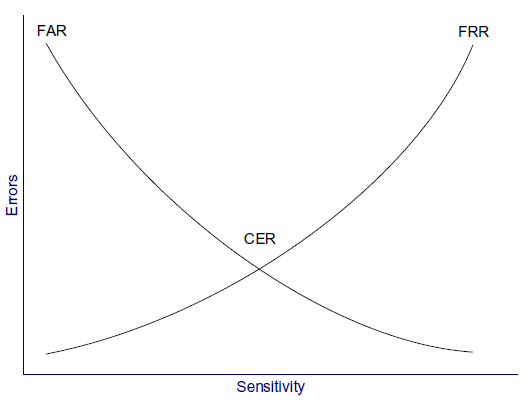
Types of biometric controls
Fingerprints
- Fingerprints are the most widely used biometric control available today.
- Smartcards can carry fingerprint information.
- Many US government office buildings rely on fingerprint authentication for physical access to the facility.
- An example of fingerprint-based authentication is smart keyboards, which require users to present a fingerprint to unlock the computer.
- The data used for storing each person’s fingerprint must be of a small enough
size to be used for authentication. This data is a mathematical representation of fingerprint minutiae, which include specific details of fingerprint friction ridges like
whorls, ridges, and bifurcation, among others, as shown below.
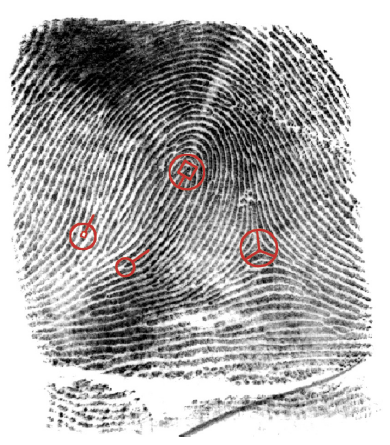
Retina scan
- A retina scan is a laser scan of the capillaries that feed the retina of the back of the
eye. - This can seem personally intrusive because the light beam must directly enter
the pupil, and the user usually needs to press their eye up to a laser scanner eyecup. - The laser scan maps the blood vessels of the retina.
- Health information of the user can be gained through a retina scan. Conditions such as pregnancy and diabetes can be determined, which may raise legitimate privacy issues.
- Also, because of the need for close proximity of the scanner in a retina scan, exchange of bodily fluids is possible when using retina scanning as a means of access control.
- Warning: Retina scans are rarely used because of health risks and privacy issues. Alternatives should be considered for biometric controls that risk exchange of bodily fluid or raise legitimate privacy concerns.
Iris scan
- An iris scan is a passive biometric control.
- A camera takes a picture of the iris, the coloured portion of the eye, and then compares photos within the authentication database.
- This scan is able to work even if the individual is wearing contact lenses or glasses.
- Each person’s irises are unique, including twins’ irises.
- Benefits of iris scans include high accuracy and passive scanning, which may be accomplished even without the subject’s knowledge.
- There is no exchange of bodily fluids with iris scans.
Hand geometry
- In hand geometry biometric control, measurements are taken from specific points on the subject’s hand.
- Hand geometry devices are fairly simple and can store information using as few as 9 bytes.
Keyboard dynamics
- Keyboard dynamics refer to how hard a person presses each key and the rhythm in
which the keys are pressed. - Surprisingly, this type of access control is cheap to implement and can be effective.
- As people learn how to type and use a computer keyboard, they develop specific habits that are difficult to impersonate, although not impossible.
Dynamic signature
- Dynamic signatures measure the process by which someone signs their name.
- This process is similar to keyboard dynamics, except that this method measures handwriting rather than keypresses.
- Measuring time, pressure, loops in the signature, and beginning and ending points all help to ensure the user is authentic.
Voiceprint
- A voiceprint measures the subject’s tone of voice while stating a specific sentence
or phrase. - This type of access control is vulnerable to replay attacks (replaying a recorded voice), so other access controls must be implemented along with the voiceprint.
- One such control requires subjects to state random words, which protects against an attacker playing prerecorded specific phrases.
- Another issue is that people’s voices may substantially change due to illness, resulting in a false rejection.
Facial scan
- Facial scanning (also called facial recognition) is the process of passively taking a picture of a subject’s face and comparing that picture to a list stored in a database.
- Although not frequently used for biometric authentication control due to the high cost, law enforcement, and security agencies use facial recognition and scanning technologies for biometric identification to improve security of high-valued, publicly accessible targets.
Somewhere you are
- This is a fourth type of factor that describes location-based access control using technologies such as the global positioning system (GPS), IP address-based geolocation, or the physical location for a point-of-sale purchase.
- These controls can deny access if the subject is in the incorrect location.
Access control technologies
- There are several technologies used for the implementation of access controls.
- As each technology is presented, it is important to identify what is unique about each solution.
Centralised access control
- Centralised access control concentrates access control in one logical point for a system or organisation. Instead of using local access control databases, systems authenticate via third-party ASs.
- Centralised access control can be used to provide single sign-on (SSO), where a subject may authenticate once, then access multiple systems.
- Centralised access control can centrally provide the three As of access control: authentication, authorisation, and accountability:
- Authentication: proving an identity claim.
- Authorisation: actions-authenticated subjects are allowed to perform on a
system. - Accountability: the ability to audit a system and demonstrate the actions of
subjects.
Decentralised access control
- Decentralised access control allows IT administration to occur closer to the mission
and operations of the organization. - In decentralized access control, an organisation spans multiple locations, and the local sites support and maintain independent systems, access control databases, and data.
- Decentralised access control is also called distributed access control.
- This model provides more local power because each site has control over its data.
- This is empowering, but it also carries risks. Different sites may employ different
access control models, different policies, and different levels of security, leading to
an inconsistent view. - Even organizations with a uniform policy may find that adherence varies per site.
- An attacker is likely to attack the weakest link in the chain; for example, a small office with a lesser-trained staff makes a more tempting target than a central data centre with a more experienced staff.
Single sign-on
- Single sign-on (SSO) allows multiple systems to use a central AS. This allows users
to authenticate once and have access to multiple different systems. - It also allows security administrators to add, change, or revoke user privileges on one central system.
- The primary disadvantage to SSO is that it may allow an attacker to gain access to multiple resources after compromising one authentication method, such as a password.
- For this reason, SSO should always be used with multifactor authentication.
User entitlement, access review & audit
- Access aggregation occurs as individual users gain more access to more systems.
- This can happen intentionally, as a function of SSO.
- It can also happen unintentionally, because users often gain new entitlements, also called access rights, as they take on new roles or duties.
- This can result in authorisation creep (or privilege creep), in which users gain more entitlements without shedding the old ones.
- The power of these entitlements can compound over time, defeating controls such as least privilege and separation of duties.
- User entitlements must be routinely reviewed and audited.
- Processes should be developed that reduce or eliminate old entitlements as new ones are granted.
Federated identity management
- Federated identity management (FIdM) applies SSO at a much wider scale: ranging
from cross-organization to Internet scale. - It is sometimes simply called identity management (IdM).
- It refers to the policies, processes & technologies that establish user identities and enforce rules about access to digital resources.
- Rather than having separate credentials for each system, a user can employ a single digital identity to access all resources to which the user is entitled.
- FIdM permits extending this approach above the organisation level, creating a trusted authority for digital identities across multiple institutions.
- In a federated system, participating institutions share identity attributes based on agreed-upon standards, facilitating authentication from other members of the federation and granting appropriate access to online resources. This approach
streamlines access to digital assets while protecting restricted resources.
SAML
- FIdM may use OpenID or SAML (Security Association Markup Language).
- SAML is an XML-based framework for exchanging security information, including authentication data.
- One goal of SAML is to enable web SSO at an Internet scale.
- Other forms of SSO also use SAML to exchange data.
Identity as a service
- With identity being a required precondition to effectively manage confidentiality, integrity, and availability, it is evident that identity plays a key role in security.
- Identity as a service (IDaaS), or cloud identity, allows organizations to leverage cloud service for IdM.
- The idea can be disconcerting, however, as with all matters of security, there are elements of cloud identity that can increase or decrease risk.
- One of the most significant justifications for leveraging IDaaS stems from organisations’ continued adoption and integration of cloud-hosted applications and
other public facing third-party applications. Many of the IDaaS vendors can directly integrate with these services to allow for more streamlined IdM and SSO. Microsoft Accounts, formerly Live ID, are an example of cloud identity increasingly found within many enterprises.
LDAP
- Lightweight Directory Access Protocol (LDAP) provides a common open protocol for interfacing and querying directory service information provided by network operating systems.
- LDAP is widely used for the overwhelming majority of internal identity services including, most notably, Active Directory.
- Directory services play a key role in many applications by exposing key user, computer, services, and other objects to be queried via LDAP.
- LDAP is an application layer protocol that uses port 389 via TCP or user datagram protocol (UDP).
- LDAP queries can be transmitted in cleartext and, depending upon configuration, can allow for some or all data to be queried anonymously.
- Naturally, LDAP does support authenticated connections and also secure communication channels leveraging TLS.
Kerberos
- Kerberos is a third-party authentication service that may be used to support SSO.
- Kerberos uses symmetric encryption and provides mutual authentication of both clients and servers.
- It protects against network sniffing and replay attacks.
- The current version of Kerberos is Version 5, described by RFC 4120.
- Kerberos has the following components:
- Principal: Client (user) or service.
- Realm: A logical Kerberos network.
- Ticket: Data that authenticates a principal’s identity.
- Credentials: A ticket and a service key.
- KDC: Key Distribution Centre, which authenticates principals.
- TGS: Ticket Granting Service.
- TGT: Ticket Granting Ticket.
- C/S: Client/Server, regarding communications between the two.
Kerberos operational steps
- By way of example, a Kerberos principal, a client run by user Alice, wishes to access a printer. Alice may print after taking these five (simplified) steps:
- Kerberos Principal Alice contacts the Key Distribution Center (KDC), which acts as an AS, requesting authentication.
- The KDC sends Alice a session key, encrypted with Alice’s secret key. The KDC
also sends a TGT (Ticket Granting Ticket), encrypted with the Ticket Granting
Service’s (TGS) secret key. - Alice decrypts the session key and uses it to request permission to print from
the TGS. - Seeing Alice has a valid session key (and therefore has proven her identity
claim), the TGS sends Alice a C/S session key (second session key) to use for
printing. The TGS also sends a service ticket, encrypted with the printer’s key - Alice connects to the printer. The printer, seeing a valid C/S session key, knows
Alice has permission to print and also knows that Alice herself is authentic.
- This process is summarised below:
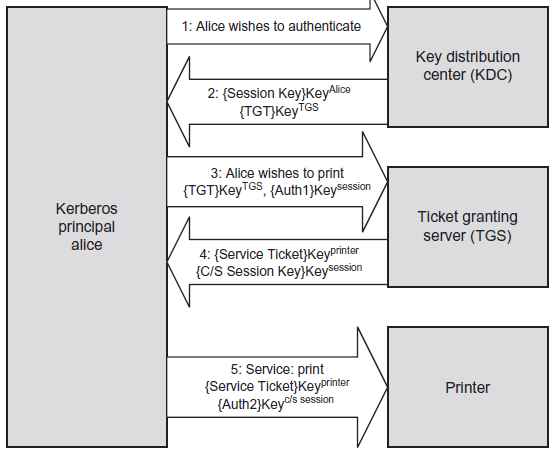
- The session key in Step 2 above is encrypted with Alice’s key, which is
represented as { Session Key } KeyAlice. - Also note that the TGT is encrypted with the TGS’s key; this means that Alice cannot decrypt the TGT (only the TGS can), so she simply sends it to the TGS.
- The TGT contains a number of items, including a copy of Alice’s session key. This is how the TGS knows that Alice has a valid session key, which proves Alice is authenticated.
SESAME
- SESAME (Secure European System for Applications in a Multivendor Environment) is an SSO system that supports heterogeneous environments.
- SESAME can be thought of as a sort of sequel to Kerberos, providing improved access control & scalability, as well as better manageability, audit and delegation.
- The key improvement is the addition of public key (asymmetric) encryption. which addresses one of the biggest weaknesses in Kerberos: the plaintext storage of symmetric keys.
- SESAME uses privilege attribute certificates (PACs) in place of Kerberos’ tickets.
Access control protocols & frameworks
- Both centralised and decentralised models may support remote users authenticating
to local systems. - A number of protocols and frameworks may be used to support this need, including RADIUS, Diameter, TACACS/TACACS+, PAP, and CHAP, as discussed below.
RADIUS
- The Remote Authentication Dial In User Service (RADIUS) protocol is a third-party
authentication system. - RADIUS is described in RFCs 2865 and 2866, and it uses the UDP ports 1812 (authentication) and 1813 (accounting).
- RADIUS formerly used the unofficially assigned ports of 1645 and 1646 for the same respective purposes, and some implementations continue to use those ports.
- RADIUS is considered an AAA system comprised of three components: authentication, authorisation, and accounting.
- It authenticates a subject’s credentials against an authentication database. It authorises users by allowing specific users to access specific data objects.
- It accounts for each data session by creating a log entry for each RADIUS connection made.
Diameter
- Diameter is the successor to RADIUS (in geometry, diameter = radius * 2)
- It’s designed to provide an improved & more flexible AAA framework.
- RADIUS provides limited accountability and has problems with flexibility, scalability,
- reliability, and security.
TACACS & TACACS+
- The Terminal Access Controller Access Control System (TACACS) is a centralised access control system that requires users to send an ID and static (reusable) password for authentication.
- However, reusable passwords are a vulnerability; the improved TACACS+ provides better password protection by allowing a two-factor strong authentication.
- TACACS uses UDP port 49 and may also use TCP.
- TACACS+ is not backwards compatible with TACACS. TACACS+ uses TCP port 49 for authentication with the TACACS+ server.
PAP & CHAP
- The Password Authentication Protocol (PAP) is insecure: a user enters a password
and it is sent across the network in clear text. When received by the PAP server,
it is authenticated and validated. Sniffing the network may disclose the plaintext
passwords. - The Challenge-Handshake Authentication Protocol (CHAP) provides protection
against playback attacks.- It uses a central location that challenges remote users.
- CHAP depends upon a ‘secret’ known only to the server & the client.
- The secret itself is not sent over the link.
- Although the authentication is only one-way, the same secret set may easily be used for mutual authentication by negotiating CHAP in both directions.
Access control models
Discretionary access control (DAC)
- DAC gives subjects full control of objects they have created or have been given access to, including sharing the objects with other subjects.
- Subjects are empowered and control their data.
- Standard UNIX and Windows operating systems use DAC for file systems; subjects can grant other subjects access to their files, change their attributes, alter them, or delete them.
Mandatory access control (MAC)
- MAC is system-enforced access control based on a subject’s clearance and an object’s labels.
- Subjects and objects have clearances and labels, respectively, such as confidential,
secret, and top-secret. - A subject may access an object only if the subject’s clearance is equal to or greater than the object’s label.
- Subjects cannot share objects with other subjects who lack the proper clearance, or “write down” objects to a lower classification level (such as from top-secret to secret).
- MAC systems are usually focused on preserving the confidentiality of data.
Non-discretionary access control
- Role-based access control (RBAC) defines how information is accessed on a system
based on the role of the subject. A role could be a nurse, a backup administrator, a
help desk technician, etc. Subjects are grouped into roles, and each defined role has
access permissions based upon the role, not the individual. - RBAC is a type of nondiscretionary access control because users do not have discretion regarding the groups of objects they are allowed to access, and they are unable to transfer objects to other subjects.
- Task-based access control is another non-discretionary access control model related to RBAC. It is based on the tasks each subject must perform, such as writing prescriptions, restoring data from a backup tape, or opening a help desk ticket. It attempts to solve the same problem that RBAC solves, except it focuses on specific tasks instead of roles.
Rule-based access control
- As the name suggests, a rule-based access control system (sometimes abbreviated to RuBAC) uses a series of defined rules, restrictions, and filters for accessing objects within a system. The rules are in the form of “if/then” statements.
- An example of a rule-based access control device is a proxy firewall that allows users to surf the web with predefined approved content only. The statement may read, “If the user is authorized to surf the web and the site is on the approved list, then allow access.” Other sites are prohibited, and this rule is enforced across all authenticated users.
Content-dependent & context-dependent access control
- Content-dependent and context-dependent access controls are not full-fledged access control methods in their own right as MAC and DAC are, but they typically
play a defence-in-depth supporting role. They may be added as an additional control, typically to DAC systems. - Content-dependent access control adds additional criteria beyond identification
and authentication; that is, the actual content the subject is attempting to access.- For example, all employees of an organization may have access to the HR database to view their accrued sick time and vacation time. Should an employee attempt to access the content of the CIO’s HR record, access is denied.
- Context-dependent access control applies additional context before granting access.
A commonly used context is time.- After identification and authentication, a help desk worker who works Monday to Friday from 9am to 5pm will be granted access at noon on a Tuesday. A context-dependent access control system could deny access on Sunday at 1am, which is the wrong time and therefore the wrong context.
Summary of exam objectives
- If one thinks of the castle analogy for security, then access control would be the moat and castle walls; identity and access management ensures that the border protection mechanisms, in both a logical and physical viewpoint, are secured.
- The purpose of access control is to allow authorised users access to appropriate data and deny access to unauthorized users; this is also known as limiting subjects’ access to objects.
- Even though this task is a complex and involved one, it is possible to implement a strong access control program without overburdening the users who rely on access to the system.
- Protecting the CIA triad is another key aspect to implementing access controls. which means enacting specific procedures for data access. These procedures will change depending on the functionality the users require and the sensitivity of the data stored on the system.
Questions for Domain 4: Communication & Network Security
- Restricting Bluetooth device discovery relies on the secrecy of what?
(a) MAC address
(b) Symmetric key
(c) Private key
(d) Public key - What are the names of the OSI model layers in order from bottom to top?
(a) Physical, Data Link, Transport, Network, Session, Presentation, Application
(b) Physical, Network, Data Link, Transport, Session, Presentation, Application
(c) Physical, Data Link, Network, Transport, Session, Presentation, Application
(d) Physical, Data Link, Network, Transport, Presentation, Session, Application - What is the most secure type of EAP?
(a) EAP-TLS
(b) EAP-TTLS
(c) LEAP
(d) PEAP - What is the most secure type of firewall?
(a) Packet filter
(b) Stateful firewall
(c) Circuit-level proxy firewall
(d) Application-layer proxy firewall - Accessing an IPv6 network via an IPv4 network is called what?
(a) CIDR
(b) NAT
(c) Translation
(d) Tunnelling
Answers in comments
 My CISSP Notes