Introduction
- Identity & access management (also known as controlling access & managing identity) is the basis for all security disciplines, not just InfoSec
- The purpose of access management is to allow authorised users access to appropriate data, and deny access to unauthorised users
Authentication methods
- A key concept for implementing any type of access control is the proper authentication of subjects.
- A subject first identifies himself or herself; however, this identification cannot be trusted alone.
- The subject then authenticates by providing an assurance that the claimed identity is valid.
- A credential set is the term used for the combination of both the identification and authentication of a user.
- There are three basic authentication methods: Type 1 (something you know), Type
2 (something you have), and Type 3 (something you are). A fourth type of authentication is “somewhere you are”.
Type 1: Something you know
- Requires testing the subject with some sort of challenge and response where the subject must respond with a knowledgeable answer.
- The subject is granted access on the basis of something they know, such as a password or personal identification number (PIN), which is a number-based password.
- This is the easiest and therefore often weakest form of authentication.
Passwords
- There are four types of passwords to consider when implementing access controls:
static passwords, passphrases, one-time passwords, and dynamic passwords. - Static passwords are reusable passwords that may or may not expire. They are typically user-generated and work best when combined with another authentication type, such as a smart card or biometric control.
- Passphrases are long static passwords, comprised of words in a phrase or sentence. Passphrases may be made stronger by using nonsense words, by mixing lowercase with uppercase letters, and by using additional numbers and symbols.
- One-time passwords may be used for a single authentication. They are very secure
but difficult to manage. A one-time password is impossible to reuse and is valid
for just a one-time use. - Dynamic passwords change at regular intervals. RSA Security makes a synchronous
token device called SecurID that generates a new token code every 60 seconds.
The user combines their static PIN with the RSA dynamic token code to create one
dynamic password that changes every time it is used. One drawback to using dynamic passwords is the expense of the tokens themselves.
Password guessing
- Password guessing is an online technique that involves attempting to authenticate a
particular user to the system. - As we will learn in the next section, password cracking refers to an offline technique in which the attacker has gained access to the password hashes or database.
- Note that most web-based attacks on passwords are of the password guessing variety, so web applications should be designed with this in mind from a detective and preventive standpoint.
- Preventing successful password guessing attacks is typically done with account lockouts.
Password hashes & password cracking
- In most cases, clear text passwords are not stored within an IT system; only the hashed outputs of those passwords are stored. Hashing is one-way encryption using an algorithm and no key.
- When a user attempts to log in, the password they type (sometimes combined with a salt) is hashed, and that hash is compared against the hash stored on the system. The hash function cannot be reversed; it is impossible to reverse the algorithm and produce a password from a hash.
- While hashes may not be reversed, an attacker may run the hash algorithm forward many times, selecting various possible passwords, and comparing the output to a desired hash, hoping to find a match (and therefore deriving the original password). This is called password cracking.
Dictionary attacks
- A dictionary attack uses a word list, which is a predefined list of words, each of which
is hashed. - If the cracking software matches the hash output from the dictionary attack to the password hash, the attacker has successfully identified the original password.
Hybrid attacks
- A hybrid attack appends, prepends, or changes characters in words from a dictionary
before hashing in order to attempt the fastest crack of complex passwords. - For example, an attacker may have a dictionary of potential system administrator passwords, but also replaces each letter “o” with the number “0”.
Brute-force attacks
- Brute-force attacks take more time, but are more effective.
- The attacker calculates the hash outputs for every possible password.
- Just a few years ago, basic computer speed was still slow enough to make this a daunting task. However, with the advances in CPU speeds and parallel computing, the time required to execute brute-force attacks on complex passwords has been considerably reduced.
Rainbow tables
- A rainbow table acts as a database that contains the precomputed hashed output for most or all possible passwords.
- Rainbow tables take a considerable amount of time to generate and are not always complete: they may not include all possible password/hash combinations.
- Though rainbow tables act as a database, they are more complex under the hood, relying on a time/memory tradeoff to represent and recover passwords and hashes.
Salts
- A salt allows one password to hash multiple ways.
- Some systems (like modern UNIX/Linux systems) combine a salt with a password before hashing.
- While storing password hashes is superior to storing plaintext passwords, the use of a random value called called a ‘salt’ improves security further.
- A salt value ensures that the same password will encrypt differently when used by different users.
- This method offers the advantage that an attacker must encrypt the same word multiple times (once for each salt or user) in order to mount a successful password-guessing attack.
- As a result, rainbow tables are far less effective, if not completely ineffective, for systems using salts. Instead of compiling one rainbow table for a system that does not uses salts, such as Microsoft LAN Manager (LM) hashes, thousands, millions, billions, or more rainbow tables would be required for systems using salts, depending on the salt length.
Type 2: Something you have
- Requires that users possess something, such as a token, which proves they are an authenticated user.
- A token is an object that helps prove an identity claim.
Synchronous dynamic token
- Synchronous dynamic tokens use time or counters to synchronize a displayed token
code with the code expected by the authentication server (AS). - Time-based synchronous dynamic tokens display dynamic token codes that change frequently, such as every 60 seconds. The dynamic code is only good during
that window. - The AS knows the serial number of each authorized token, as well as the user with whom it is associated and the time. It can predict the dynamic code of each token using these three pieces of information.
- Counter-based synchronous dynamic tokens use a simple counter; the AS expects
token code 1, and the user’s token displays the same code 1. Once used, the token
displays the second code, and the server also expects token code 2.
Asynchronous dynamic token
- Asynchronous dynamic tokens are not synchronized with a central server. The most
common variety is challenge-response tokens. - Challenge-response token authentication systems produce a challenge or input for the token device. The user manually enters the information into the device along with their PIN, and the device produces an output, which is then sent to the system.
Type 3: Something you are
- Type 3 authentication is biometrics, which uses physical characteristics as a means of identification or authentication.
- Biometrics may be used to establish an identity or to authenticate or prove an identity claim.
- For example, an airport facial recognition system may be used to establish the identity of a known terrorist, and a fingerprint scanner may be used to authenticate the identity of a subject who makes the identity claim, and then swipes his/her finger
to prove it.
Biometric enrollment & throughput
- Enrollment describes the process of registering with a biometric system, which involves creating an account for the first time.
- Users typically provide their username (identity) and a password or PIN followed by biometric information, such as swiping fingerprints on a fingerprint reader or having a photograph taken of their irises.
- Enrollment is a one-time process that should take 2 minutes or less.
- Throughput describes the process of authenticating to a biometric system. This is
also called the biometric system response time. A typical throughput is 6–10 seconds.
Accuracy of biometric systems
- The accuracy of biometric systems should be considered before implementing a biometric control program. Three metrics are used to judge biometric accuracy: the false reject rate (FRR), the false accept rate (FAR), and the crossover error rate (CER).
False reject rate
- A false rejection occurs when an authorised subject is rejected by the biometric system as unauthorised.
- False rejections are also called a Type I error.
- False rejections cause frustration for the authorised users, reduction in work due to poor access conditions, and expenditure of resources to revalidate authorised users.
False accept rate
- A false acceptance occurs when an unauthorised subject is accepted as valid.
- If an organisation’s biometric control is producing a lot of false rejections, the overall control might have to lower the accuracy of the system by lessening the amount of data it collects when authenticating subjects.
- When the data points are lowered, the organization risks an increase in the false acceptance rate. The organization risks an unauthorized user gaining access. This type of error is called a Type II error (remember as TOO FAR)
- A false accept is worse than a false reject because most organizations would prefer to reject authentic subjects to accepting impostors. You can remember this since false acceptance is Type II and false rejection is Type I (2 > 1).
Crossover error rate
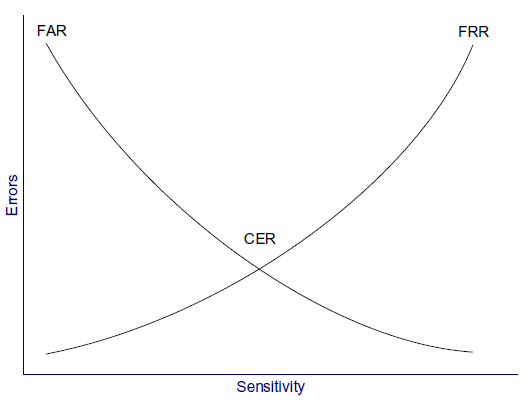
- The CER describes the point where the FRR and FAR are equal. CER is also known as the equal error rate (EER).
- The CER describes the overall accuracy of a biometric system.
- As the sensitivity of a biometric system increases, FRRs will rise and FARs will drop. Conversely, as the sensitivity is lowered, FRRs will drop and FARs will rise.
- The graph below depicts the FAR versus the FRR. The CER is the intersection of the two lines of the graph.
Types of biometric controls
Fingerprints
- Fingerprints are the most widely used biometric control available today.
- Smartcards can carry fingerprint information.
- Many US government office buildings rely on fingerprint authentication for physical access to the facility.
- An example of fingerprint-based authentication is smart keyboards, which require users to present a fingerprint to unlock the computer.
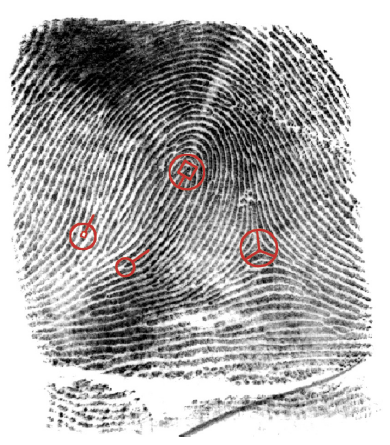
- The data used for storing each person’s fingerprint must be of a small enough
size to be used for authentication. This data is a mathematical representation of fingerprint minutiae, which include specific details of fingerprint friction ridges like
whorls, ridges, and bifurcation, among others, as shown below.
Retina scan
- A retina scan is a laser scan of the capillaries that feed the retina of the back of the
eye. - This can seem personally intrusive because the light beam must directly enter
the pupil, and the user usually needs to press their eye up to a laser scanner eyecup. - The laser scan maps the blood vessels of the retina.
- Health information of the user can be gained through a retina scan. Conditions such as pregnancy and diabetes can be determined, which may raise legitimate privacy issues.
- Also, because of the need for close proximity of the scanner in a retina scan, exchange of bodily fluids is possible when using retina scanning as a means of access control.
- Warning: Retina scans are rarely used because of health risks and privacy issues. Alternatives should be considered for biometric controls that risk exchange of bodily fluid or raise legitimate privacy concerns.
Iris scan
- An iris scan is a passive biometric control.
- A camera takes a picture of the iris, the coloured portion of the eye, and then compares photos within the authentication database.
- This scan is able to work even if the individual is wearing contact lenses or glasses.
- Each person’s irises are unique, including twins’ irises.
- Benefits of iris scans include high accuracy and passive scanning, which may be accomplished even without the subject’s knowledge.
- There is no exchange of bodily fluids with iris scans.
Hand geometry
- In hand geometry biometric control, measurements are taken from specific points on the subject’s hand.
- Hand geometry devices are fairly simple and can store information using as few as 9 bytes.
Keyboard dynamics
- Keyboard dynamics refer to how hard a person presses each key and the rhythm in
which the keys are pressed. - Surprisingly, this type of access control is cheap to implement and can be effective.
- As people learn how to type and use a computer keyboard, they develop specific habits that are difficult to impersonate, although not impossible.
Dynamic signature
- Dynamic signatures measure the process by which someone signs their name.
- This process is similar to keyboard dynamics, except that this method measures handwriting rather than keypresses.
- Measuring time, pressure, loops in the signature, and beginning and ending points all help to ensure the user is authentic.
Voiceprint
- A voiceprint measures the subject’s tone of voice while stating a specific sentence
or phrase. - This type of access control is vulnerable to replay attacks (replaying a recorded voice), so other access controls must be implemented along with the voiceprint.
- One such control requires subjects to state random words, which protects against an attacker playing prerecorded specific phrases.
- Another issue is that people’s voices may substantially change due to illness, resulting in a false rejection.
Facial scan
- Facial scanning (also called facial recognition) is the process of passively taking a picture of a subject’s face and comparing that picture to a list stored in a database.
- Although not frequently used for biometric authentication control due to the high cost, law enforcement, and security agencies use facial recognition and scanning technologies for biometric identification to improve security of high-valued, publicly accessible targets.
Somewhere you are
- This is a fourth type of factor that describes location-based access control using technologies such as the global positioning system (GPS), IP address-based geolocation, or the physical location for a point-of-sale purchase.
- These controls can deny access if the subject is in the incorrect location.
Access control technologies
- There are several technologies used for the implementation of access controls.
- As each technology is presented, it is important to identify what is unique about each solution.
Centralised access control
- Centralised access control concentrates access control in one logical point for a system or organisation. Instead of using local access control databases, systems authenticate via third-party ASs.
- Centralised access control can be used to provide single sign-on (SSO), where a subject may authenticate once, then access multiple systems.
- Centralised access control can centrally provide the three As of access control: authentication, authorisation, and accountability:
- Authentication: proving an identity claim.
- Authorisation: actions-authenticated subjects are allowed to perform on a
system. - Accountability: the ability to audit a system and demonstrate the actions of
subjects.
Decentralised access control
- Decentralised access control allows IT administration to occur closer to the mission
and operations of the organization. - In decentralized access control, an organisation spans multiple locations, and the local sites support and maintain independent systems, access control databases, and data.
- Decentralised access control is also called distributed access control.
- This model provides more local power because each site has control over its data.
- This is empowering, but it also carries risks. Different sites may employ different
access control models, different policies, and different levels of security, leading to
an inconsistent view. - Even organizations with a uniform policy may find that adherence varies per site.
- An attacker is likely to attack the weakest link in the chain; for example, a small office with a lesser-trained staff makes a more tempting target than a central data centre with a more experienced staff.
Single sign-on
- Single sign-on (SSO) allows multiple systems to use a central AS. This allows users
to authenticate once and have access to multiple different systems. - It also allows security administrators to add, change, or revoke user privileges on one central system.
- The primary disadvantage to SSO is that it may allow an attacker to gain access to multiple resources after compromising one authentication method, such as a password.
- For this reason, SSO should always be used with multifactor authentication.
User entitlement, access review & audit
- Access aggregation occurs as individual users gain more access to more systems.
- This can happen intentionally, as a function of SSO.
- It can also happen unintentionally, because users often gain new entitlements, also called access rights, as they take on new roles or duties.
- This can result in authorisation creep (or privilege creep), in which users gain more entitlements without shedding the old ones.
- The power of these entitlements can compound over time, defeating controls such as least privilege and separation of duties.
- User entitlements must be routinely reviewed and audited.
- Processes should be developed that reduce or eliminate old entitlements as new ones are granted.
Federated identity management
- Federated identity management (FIdM) applies SSO at a much wider scale: ranging
from cross-organization to Internet scale. - It is sometimes simply called identity management (IdM).
- It refers to the policies, processes & technologies that establish user identities and enforce rules about access to digital resources.
- Rather than having separate credentials for each system, a user can employ a single digital identity to access all resources to which the user is entitled.
- FIdM permits extending this approach above the organisation level, creating a trusted authority for digital identities across multiple institutions.
- In a federated system, participating institutions share identity attributes based on agreed-upon standards, facilitating authentication from other members of the federation and granting appropriate access to online resources. This approach
streamlines access to digital assets while protecting restricted resources.
SAML
- FIdM may use OpenID or SAML (Security Association Markup Language).
- SAML is an XML-based framework for exchanging security information, including authentication data.
- One goal of SAML is to enable web SSO at an Internet scale.
- Other forms of SSO also use SAML to exchange data.
Identity as a service
- With identity being a required precondition to effectively manage confidentiality, integrity, and availability, it is evident that identity plays a key role in security.
- Identity as a service (IDaaS), or cloud identity, allows organizations to leverage cloud service for IdM.
- The idea can be disconcerting, however, as with all matters of security, there are elements of cloud identity that can increase or decrease risk.
- One of the most significant justifications for leveraging IDaaS stems from organisations’ continued adoption and integration of cloud-hosted applications and
other public facing third-party applications. Many of the IDaaS vendors can directly integrate with these services to allow for more streamlined IdM and SSO. Microsoft Accounts, formerly Live ID, are an example of cloud identity increasingly found within many enterprises.
LDAP
- Lightweight Directory Access Protocol (LDAP) provides a common open protocol for interfacing and querying directory service information provided by network operating systems.
- LDAP is widely used for the overwhelming majority of internal identity services including, most notably, Active Directory.
- Directory services play a key role in many applications by exposing key user, computer, services, and other objects to be queried via LDAP.
- LDAP is an application layer protocol that uses port 389 via TCP or user datagram protocol (UDP).
- LDAP queries can be transmitted in cleartext and, depending upon configuration, can allow for some or all data to be queried anonymously.
- Naturally, LDAP does support authenticated connections and also secure communication channels leveraging TLS.
Kerberos
- Kerberos is a third-party authentication service that may be used to support SSO.
- Kerberos uses symmetric encryption and provides mutual authentication of both clients and servers.
- It protects against network sniffing and replay attacks.
- The current version of Kerberos is Version 5, described by RFC 4120.
- Kerberos has the following components:
- Principal: Client (user) or service.
- Realm: A logical Kerberos network.
- Ticket: Data that authenticates a principal’s identity.
- Credentials: A ticket and a service key.
- KDC: Key Distribution Centre, which authenticates principals.
- TGS: Ticket Granting Service.
- TGT: Ticket Granting Ticket.
- C/S: Client/Server, regarding communications between the two.
Kerberos operational steps
- By way of example, a Kerberos principal, a client run by user Alice, wishes to access a printer. Alice may print after taking these five (simplified) steps:
- Kerberos Principal Alice contacts the Key Distribution Center (KDC), which acts as an AS, requesting authentication.
- The KDC sends Alice a session key, encrypted with Alice’s secret key. The KDC
also sends a TGT (Ticket Granting Ticket), encrypted with the Ticket Granting
Service’s (TGS) secret key. - Alice decrypts the session key and uses it to request permission to print from
the TGS. - Seeing Alice has a valid session key (and therefore has proven her identity
claim), the TGS sends Alice a C/S session key (second session key) to use for
printing. The TGS also sends a service ticket, encrypted with the printer’s key - Alice connects to the printer. The printer, seeing a valid C/S session key, knows
Alice has permission to print and also knows that Alice herself is authentic.
- This process is summarised below:
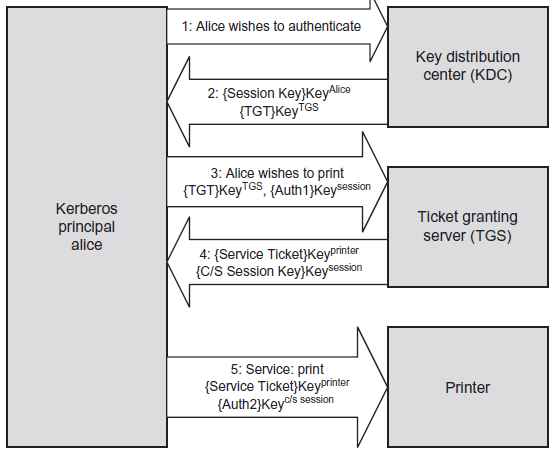
- The session key in Step 2 above is encrypted with Alice’s key, which is
represented as { Session Key } KeyAlice. - Also note that the TGT is encrypted with the TGS’s key; this means that Alice cannot decrypt the TGT (only the TGS can), so she simply sends it to the TGS.
- The TGT contains a number of items, including a copy of Alice’s session key. This is how the TGS knows that Alice has a valid session key, which proves Alice is authenticated.
SESAME
- SESAME (Secure European System for Applications in a Multivendor Environment) is an SSO system that supports heterogeneous environments.
- SESAME can be thought of as a sort of sequel to Kerberos, providing improved access control & scalability, as well as better manageability, audit and delegation.
- The key improvement is the addition of public key (asymmetric) encryption. which addresses one of the biggest weaknesses in Kerberos: the plaintext storage of symmetric keys.
- SESAME uses privilege attribute certificates (PACs) in place of Kerberos’ tickets.
Access control protocols & frameworks
- Both centralised and decentralised models may support remote users authenticating
to local systems. - A number of protocols and frameworks may be used to support this need, including RADIUS, Diameter, TACACS/TACACS+, PAP, and CHAP, as discussed below.
RADIUS
- The Remote Authentication Dial In User Service (RADIUS) protocol is a third-party
authentication system. - RADIUS is described in RFCs 2865 and 2866, and it uses the UDP ports 1812 (authentication) and 1813 (accounting).
- RADIUS formerly used the unofficially assigned ports of 1645 and 1646 for the same respective purposes, and some implementations continue to use those ports.
- RADIUS is considered an AAA system comprised of three components: authentication, authorisation, and accounting.
- It authenticates a subject’s credentials against an authentication database. It authorises users by allowing specific users to access specific data objects.
- It accounts for each data session by creating a log entry for each RADIUS connection made.
Diameter
- Diameter is the successor to RADIUS (in geometry, diameter = radius * 2)
- It’s designed to provide an improved & more flexible AAA framework.
- RADIUS provides limited accountability and has problems with flexibility, scalability,
- reliability, and security.
TACACS & TACACS+
- The Terminal Access Controller Access Control System (TACACS) is a centralised access control system that requires users to send an ID and static (reusable) password for authentication.
- However, reusable passwords are a vulnerability; the improved TACACS+ provides better password protection by allowing a two-factor strong authentication.
- TACACS uses UDP port 49 and may also use TCP.
- TACACS+ is not backwards compatible with TACACS. TACACS+ uses TCP port 49 for authentication with the TACACS+ server.
PAP & CHAP
- The Password Authentication Protocol (PAP) is insecure: a user enters a password
and it is sent across the network in clear text. When received by the PAP server,
it is authenticated and validated. Sniffing the network may disclose the plaintext
passwords. - The Challenge-Handshake Authentication Protocol (CHAP) provides protection
against playback attacks.- It uses a central location that challenges remote users.
- CHAP depends upon a ‘secret’ known only to the server & the client.
- The secret itself is not sent over the link.
- Although the authentication is only one-way, the same secret set may easily be used for mutual authentication by negotiating CHAP in both directions.
Access control models
Discretionary access control (DAC)
- DAC gives subjects full control of objects they have created or have been given access to, including sharing the objects with other subjects.
- Subjects are empowered and control their data.
- Standard UNIX and Windows operating systems use DAC for file systems; subjects can grant other subjects access to their files, change their attributes, alter them, or delete them.
Mandatory access control (MAC)
- MAC is system-enforced access control based on a subject’s clearance and an object’s labels.
- Subjects and objects have clearances and labels, respectively, such as confidential,
secret, and top-secret. - A subject may access an object only if the subject’s clearance is equal to or greater than the object’s label.
- Subjects cannot share objects with other subjects who lack the proper clearance, or “write down” objects to a lower classification level (such as from top-secret to secret).
- MAC systems are usually focused on preserving the confidentiality of data.
Non-discretionary access control
- Role-based access control (RBAC) defines how information is accessed on a system
based on the role of the subject. A role could be a nurse, a backup administrator, a
help desk technician, etc. Subjects are grouped into roles, and each defined role has
access permissions based upon the role, not the individual. - RBAC is a type of nondiscretionary access control because users do not have discretion regarding the groups of objects they are allowed to access, and they are unable to transfer objects to other subjects.
- Task-based access control is another non-discretionary access control model related to RBAC. It is based on the tasks each subject must perform, such as writing prescriptions, restoring data from a backup tape, or opening a help desk ticket. It attempts to solve the same problem that RBAC solves, except it focuses on specific tasks instead of roles.
Rule-based access control
- As the name suggests, a rule-based access control system (sometimes abbreviated to RuBAC) uses a series of defined rules, restrictions, and filters for accessing objects within a system. The rules are in the form of “if/then” statements.
- An example of a rule-based access control device is a proxy firewall that allows users to surf the web with predefined approved content only. The statement may read, “If the user is authorized to surf the web and the site is on the approved list, then allow access.” Other sites are prohibited, and this rule is enforced across all authenticated users.
Content-dependent & context-dependent access control
- Content-dependent and context-dependent access controls are not full-fledged access control methods in their own right as MAC and DAC are, but they typically
play a defence-in-depth supporting role. They may be added as an additional control, typically to DAC systems. - Content-dependent access control adds additional criteria beyond identification
and authentication; that is, the actual content the subject is attempting to access.- For example, all employees of an organization may have access to the HR database to view their accrued sick time and vacation time. Should an employee attempt to access the content of the CIO’s HR record, access is denied.
- Context-dependent access control applies additional context before granting access.
A commonly used context is time.- After identification and authentication, a help desk worker who works Monday to Friday from 9am to 5pm will be granted access at noon on a Tuesday. A context-dependent access control system could deny access on Sunday at 1am, which is the wrong time and therefore the wrong context.
Summary of exam objectives
- If one thinks of the castle analogy for security, then access control would be the moat and castle walls; identity and access management ensures that the border protection mechanisms, in both a logical and physical viewpoint, are secured.
- The purpose of access control is to allow authorised users access to appropriate data and deny access to unauthorized users; this is also known as limiting subjects’ access to objects.
- Even though this task is a complex and involved one, it is possible to implement a strong access control program without overburdening the users who rely on access to the system.
- Protecting the CIA triad is another key aspect to implementing access controls. which means enacting specific procedures for data access. These procedures will change depending on the functionality the users require and the sensitivity of the data stored on the system.
 My CISSP Notes