Security models
- Provide “rules of the road” for security in operating systems
- Many governments are primarily concerned with confidentiality, while most businesses desire to ensure that the integrity of information is protected at the highest level.
Reading down & writing up
- The concepts of reading down and writing up apply to mandatory access control (MAC) models such as Bell-LaPadula
- Reading down occurs when a subject reads an object at a lower sensitivity level, such as a top-secret object reading a secret object
- There are instances when a subject has information and passes it up to an object with a higher sensitivity than the subject has permission to access – this is called writing up
Bell-LaPadula model
- Originally developed for the US DoD
- Focused on maintaining the confidentiality of objects
- Protecting confidentiality means users at a lower security level are denied access to objects at a higher security level
- Includes the following rules & properties:
- Simple Security Property: “No read up”: a subject at a specific clearance level cannot read an object at a higher classification level (subjects with a Secret clearance cannot access Top Secret objects, for example) – “simple” because it is clear why subjects should not be able to “read up”
- *-Security (Star-Security) Property: “No write down”: a subject at a higher clearance level cannot write to a lower classification level (subjects who are logged into a Top Secret system cannot send emails to a Secret system) – prevents leakage of information to a lower classification level
- Strong Tranquility Property: Security labels will not change while the system is operating
- Weak Tranquility Property: Security labels will not change in a way that conflicts with defined security properties.
Lattice-based access controls
- Allow security controls for complex environments
- For every relationship between a subject and an object, there are defined upper and lower access limits implemented by the system
- This lattice, which allows reaching higher and lower data classification, depends on the need of the subject, the label of the object & the role the subject has been assigned
- Subjects have a least upper bound (LUB) and greatest lower bound (GLB) of access to the objects based on their lattice position
Integrity models
- Models such as Bell-LaPadula focus on confidentiality, sometimes at the expense of integrity: the “no write down” rule means subjects can write up (e.g. a Secret subject can write to a Top Secret object). What if a Secret subject writes erroneous information to a Top Secret object? Integrity models such as Biba address this issue.
Biba model
- The model of choice when integrity protection is vital
- Often used where integrity is more important than confidentiality
- Has two primary rules (note axioms, not properties):
- Simple Integrity Axiom: “No read down”: a subject at a specific clearance level cannot read data at a lower classification. This prevents subjects from accessing information at a lower integrity level; protecting integrity by preventing bad information from moving up from lower integrity levels
- * Integrity Axiom: “No write up”: a subject at a specific clearance level cannot write data to a higher classification. This prevent subjects from passing information up to a higher integrity level that they have clearance to change; protecting integrity by prevening bad information from moving up to higher integrity levels
- Extends the concepts of Bell-LaPadula into the integrity domain – in fact, it takes the Bell-LaPadula rules and reverses them, showing how confidentiality & integrity are often at odds
- If you understand Bell-LaPadula (no read up, no write down), you can extrapolate Biba by simply reversing the rules (no read down, no write up)
- To remember that Biba is related to integrity, imagine the “i” in “Biba” stands for “integrity” (it doesn’t!)
Clark-Wilson
- A real-world integrity model that protects integrity by requiring subjects to access objects via programs
- Because the programs have specific limitations to what they can and cannot do to objects, Clark-Wilson effectively limits the capabilities of the subject
- Clark-Wilson uses two primary concepts to ensure that security policy is enforced:
- Well-formed transactions: a series of operations that transition a system from one consistent state to another
- Separation of duties: the certifier and a transaction and the implementer must be different entities
- The process is comprised of what is known as the access control triple:
- User
- Transformation procedure (TP)
- Constrained data item (CDI)
- A TP takes as input a CDI or an Unconstrained Data Item (UDI) and produces a CDI
- UDIs represent system input (such as that provided by a user or adversary)
- A TP must guarantee (via certification) that it transforms all possible values of a UDI to a “safe” CDI
- An integrity verification procedure (IVP) ensures that all CDIs in the system are valid at a certain state
Brewer-Nash
- Also known as the Chinese Wall model
- Is designed to avoid conflicts of interest by prohibiting one person, such as a consultant, from accessing multiple conflict of interest categories (COIs)
- For example, a database containing data for multiple clients: AmEx, Mastercard & Visa. The first time a user access the system, they will be able to access data for any of the three clients, but the first time they access a record for one of the clients (e.g. for Mastercard), they will be locked out from ever reading any of the other client records (i.e. Visa & AmEx)
- Useful in legal offices employing multiple solicitors – consider the theoretical situation of a divorce, where the husband engages the services a solicitor and the wife chooses a different solicitor working for the same firm. Although the paperwork is all held on the same electronic system, once a solicitor accesses a piece of data belonging to the husband, he will be prevented from ever accessing any of the wife’s data.
Access control matrix
- An access control matrix is a table that defines the access permissions that exist between specific subjects & objects
- Acts as a lookup table for the operating system
- The table’s rows, or capability list, show the capabilities of each subject (i.e. which objects each subject can access)
- The columns of the table show the access control list (ACL) for each object/application (i.e. which subjects can access each object)
Secure system design concepts
Secure system design represents universal best practices, and is agnostic of specific hardware & software implementations.
Layering
- Separates hardware & software into modular tiers
- The complexity of an issue, such as reading a sector from a disk, is contained to one layer (in this case, the hardware layer)
- One layer is not directly affected by a change to another
- A generic list of security architecture layers is as follows:
- Hardware
- Kernel & device drivers
- Operating system (OS)
- Applications
Abstraction
- Hides unnecessary details from the user
- “Complexity is the enemy of security” (Schneier) – the more complex a process, the less secure it is
- Computers are tremendously complex machines, and abstraction provides a way to manage that complexity
Security domains
- A security domain is the list of objects a subject is allowed to access
- More broadly defined, domains are groups of subjects & objects with similar security requirements
- Confidential, Secret & Top Secret are three security domains used by the US DoD, for example
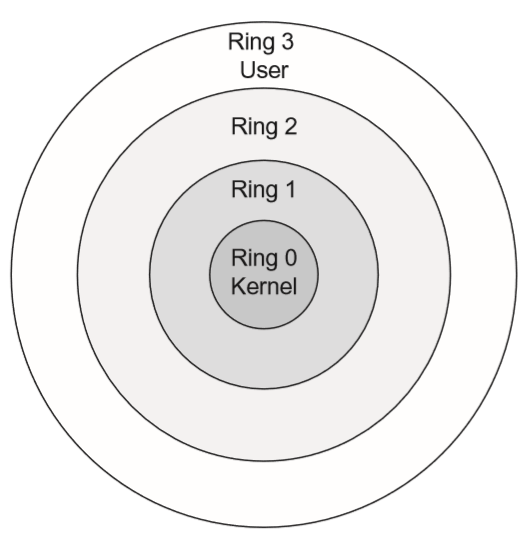
Ring model
- The ring model is a form of CPU hardware layering that separates & protections domains (such as kernel mode & user mode) from each other
- Many CPUs, such as the Intel x86 family, have four (theoretical) rings:
- Ring 0: Kernel
- Ring 1: Other OS components that do not fit into Ring 0
- Ring 2: Device drivers
- Ring 3: User applications
- The innermost ring is the most trusted, and each successive outer ring is less trusted
- Processes communicate between rings via system calls, which allow processes to communicate with the kernel & provide a window between the rings
- Most x86 operating systems, including Linux & Windows, use Rings 0 & 3 only
- A new mode called hypervisor mode (and informally called “Ring -1”) allows virtual guests to operate in Ring 0, controlled by the hypervisor one ring “below”
- Intel VT (Virtualisation Technology) and AMD-V (Virtualisation) both support a hypervisor
Open & closed systems
- An open system uses open hardware & standards, using standard components from a variety of vendors
- An IBM-compatible PC is an open system, using a standard motherboard, memory, BIOS, CUP etc
- You may build an IBM-compatible PC by purchasing components from a multitude of vendors
- A closed system uses proprietary hardware or software
- Note that an open system is not the same as open source, and does not necessarily make source code publicly available.
Secure hardware architecture
- Focuses on the physical computer hardware required to have a secure system
- The hardware must provide CIA for processes, data and users
System unit & motherboard
- The system unit is the computer’s case, which contains the motherboard, internal disk drivers, power supply etc
- The motherboard contains hardware including the CPU, memory slots, firmware & peripheral slots, such as PCI Express slots
Bus
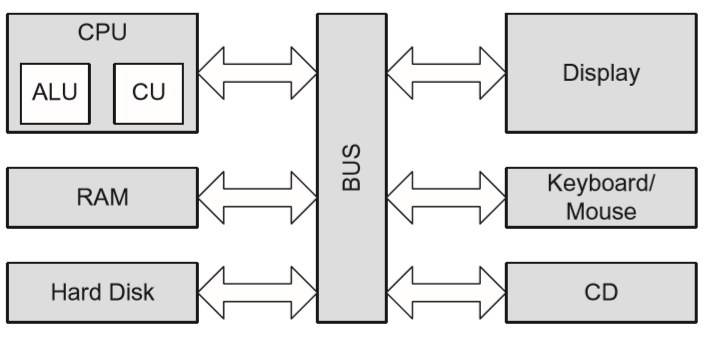
- A computer bus is the primary communication channel on a computer system
- Communication between the CPU, memory and I/O devices such as keyboard, mouse & display occurs via the bus
CPU
- The CPU is the brains of the computer, capable of controlling & performing mathematical calculations
- Ultimately, everything a computer does is mathematical:
- Adding numbers (which can be extended to subtraction, multiplication, division etc)
- Performing logical operations
- Accessing memory locations by address
- etc.
- CPUs are rated by the number of clock cycles per second: a 3 GHz CPU has three billion clock cycles per second
Arithmetic logic unit & control unit
- The arithmetic logic unit (ALU) performs mathematical calculations; it is the part that computes
- It is fed instructions by the control unit, which acts as a “traffic cop”, sending instructions to the ALU
Fetch & execute
- CPUs fetch machine language instructions (such as “add 1 + 1”) and execute them (add the numbers, for an answer of “2”)
- The “fetch and execute” process (also called the fetch-decode-execute cycle, or FDX) actually takes four steps:
- Fetch instruction 1
- Decode instruction 1
- Execute instruction 1
- Write (save) result 1
- These four steps take one clock cycle to complete
Pipelining
- Pipelining combines multiple CPU steps into one process, allowing simultaneous FDX & write steps for different instructions
- Each part is called a pipeline stage; the pipeline depth is the number of simultaneous stages that may be completed at once
- Give our previous fetch-execute example of adding 1 + 1, a CPU without pipelining would have to wait an entire cycle before performing another computation.
- A four-stage pipeline can combine the stages of four other instructions:
- Fetch Instruction 1
- Fetch Instruction 2, Decode Instruction 1
- Fetch Instruction 3, Decode Instruction 2, Execute Instruction 1
- Fetch Instruction 4, Decode Instruction 3, Execute Instruction 2, Write (save) result 1
- Fetch Instruction 5, Decode Instruction 4, Execute Instruction 3, Write (save) result 2, etc.
- Pipelining is like a car assembly line; instead of building one car at a time, from start to finish, lots of cars enter the assembly pipeline, and discrete phases (like installing tyres) occur on one car after another, increasing the throughput.
Interrupts
- An interrupt indicates that an asynchronous event has occurred
- A CPU interrupt is a form of hardware signal that causes the CPU to stop processing its current task, save the state & begin processing a new request
- When the new task is complete, the CPU will complete the prior task
Processes & threads
- A process is an executable program & its associated data, loaded & running in memory
- A heavyweight process (HWP) is also called a task
- A parent process may spawn additional child processes called threads
- A thread is a lightweight process (LWP)
- Threads are able to share memory, resulting in lower overhead compared to HWPs
Multitasking & multiprocessing
- Applications run as processes in memory, comprised of executable code & data
- Multitasking allows multiple tasks (HWPs) to run simultaneously on one CPU
- Older and simpler OSes, such as MS-DOS, are non-multitasking (run one process at a time), but most modern OSes (including Linux, Windows & OS X) support multitasking
- Multiprocessing has a fundamental difference from multitasking: it runs multiple processes on multiple CPUs
- Two types of multiprocessing are:
- symmetric multiprocessing (SMP), with one OS to manage all CPUs
- asymmetric multiprocessing (AMP or ASMP), with one OS per CPU, essentially acting as independent systems
CISC & RISC
- CISC (complex instruction set computer) and RISC (reduced instruction set computer) are two forms of CPU design
- CISC uses a large set of complex machine language instructions
- RISC uses a reduced set of simpler instructions
- x86 CPUs, among many others, are CISC
- ARM (used in many mobile devices), PowerPC & Sparc are examples of RISC
Memory protection
- Prevents one process from affecting the confidentiality, integrity or availability of another
- This is a require for secure multi-user (i.e. more than one user logged in simultaneously) and multi-tasking (i.e. more than one process running simultaneously) systems
Process isolation
- A logical control that attempts to prevent one process from interfering with another
- This is a common feature among multi-user OSes such as Linux, Unix or recent versions of Windows
- Older OSes such as MS-DOS and early versions of Windows provide no process isolation, meaning a crash in any one application could take down the entire system
Hardware segmentation
- Takes process isolation one step further by mapping processes to specific memory locations
- This provides more security than logical process isolation alone
Virtual memory
- Provides virtual address mapping between applications & physical memory
- Provides many functions, including multi-tasking, swapping, and allowing multiple processes to access the shared library in memory, among others
- Swapping uses virtual memory to copy contents of primary memory (RAM) to or from secondary memory (on disk and not directly addressable by the CPU)
- Swap space is often a dedicated disk partition that is used to extend the amount of available memory
- If the kernel accepts to access a page (a fixed-length block of memory) stored in swap space, a page fault occurs and the page is “swapped” from disk to RAM
BIOS
- The IBM PC-compatible basic input/output system (BIOS) contains code in firmware that is executed when a PC is powered on
- It first runs the power-on self-test (POST) which performs basic tests including verifying the integrity of the BIOS itself, testing the memory & identifying system devices, among other tasks
- Once the POST process is successfully completed, it locations the boot sector (for systems that boot from disk), which contains the machine code for the OS kernel. The kernel then loads & executes, and the OS boots up
WORM storage
- WORM (write-once, read-many) storage, as its name suggests can be written to once and read many times
- It is often used to support record retention for legal/regulatory compliance
- Helps assure the integrity of the data it contains, since there is some confidence that it has not been (and cannot be) altered, short of destroying the media itself
Trusted platform module
- A trusted platform module (TPM) chip is a processor that can provide additional security capabilities at the hardware level, and is typically found on a system’s motherboard
- Not all computer manufacturers employ TPM chips, but adoption has steadily increased
- Allows for hardware-based cryptographic operations:
- Random number generation
- Use of symmetric, asymmetric & hashing algorithms
- Secure storage of crypto keys & message digests
- The most common use case for the TPM chip is to ensure boot integrity: by operating at the HW level, it can reduce the likelihood of kernel-mode rootkits being able to undermine OS security
- TPMs are also commonly associated with some implementations of full-disk encryption
DEP & ASLR
- One of the main goals in attempting to exploit software vulnerabilities is to achieve some form of code execution capability
- The two most prominent protections against this attack are data execution prevention (DEP) and address space location randomisation (ASLR)
- DEP, which can be enabled within hardware and/or software, aims to prevent code execution in memory locations that are not pre-defined to contain executable content
- ASLR seeks to make exploitation more difficult by randomising memory addresses. For example, imagine an adversary develops a successful working exploit on his or her own test machine. When the code is run on a different system using ASLR, the addresses will change, probably causing the exploit to fail.
Secure operating system & software architecture
- Secure OS & software architecture builds upon the secure hardware described in the previous section, providing a secure interface between hardware and the applications, as well as users, that access the hardware
- OSes provide memory, resource & process management
- The kernel, which usually runs in ring 0, is the heart of the OS
- It provides the interface between hardware & the rest of the OS, including applications
- As discussed previously, when a PC is started/rebooted, the BIOS locates the boot sector of a storage device, such as a hard drive, and executes the kernel from there
- The reference monitor is a core function of the kernel
- Mediates all access between subjects & objects
- Enforces the system’s security policy, such as preventing a normal user from writing to a restricted file (like a system password file)
Virtualisation & distributed computing
Virtualisation
- Adds a software layer between an OS and the underlying hardware
- Allows multiple “guest” OSes to run simultaneously on one physical “host” computer
- The key to virtualisation security is the hypervisor, which controls access between virtual guests & host hardware
- A Type 1 hypervisor (also called bare metal) runs directly on host hardware
- A Type 2 hypervisor runs as an application on a normal OS such as Windows
- Many virtualisation exploits target the hypervisor, including hypervisor-controlled resources shared between host and guests, or guest and guest (such as copy-and-paste, shared drives & shared network connections)
- Remembering that “complexity is the enemy of security”, the sheer complexity of virtualisation software may cause security problems
- Combining multiple guests onto one host may also raise security issues. Virtualisation is no replacement for a firewall; never combine guests with different security requirements (such as DMZ & internal) onto one host.
- The risk of virtualisation escape is called VMEscape, where an attacker exploits the host OS or a guest from another guest
- Many network-based security tools, such as network intrusion detection systems, can be blinded by virtualisation
Cloud computing
- Public cloud computing outsources IT infrastructure, storage or applications to a third-party provider
- A cloud also implies geographic diversity of computer resources
- The goal of cloud computing is to allow large providers to leverage their economies of scale to provide computing resources to other companies that typically pay for these services based on their usage
- Three commonly-available levels of service offered by cloud providers are:
- Infrastructure as a Service (IaaS)
- Provides an entire virtualised OS, which the customer configures from OS up
- e.g. Linux server hosting
- Platform as a Service (PaaS)
- Provides a preconfigured OS, and the customer configures the applications
- e.g. Web service hosting
- Software as Service (SaaS)
- Completely configured, from the OS to applications, and the system simply uses the application
- e.g. Web mail
- Infrastructure as a Service (IaaS)
- In all three cases, the cloud provider manages hardware, virtualisation software, network, backups etc.
- Private clouds house data for a single organisation and may be operated by a third party or by the organisation itself
- Government clouds keep data & resources geographically contained within the borders of one country, and are designed for the government of the respective country
- Benefits of cloud computing include:
- Reduced maintenance costs
- Robust levels of service
- Overall operational cost savings
- From a security perspective, taking advantage of public cloud computing services requires strict SLAs and an understanding of new sources of risk. One concern is that if multiple organisations’ guests are running on the same host, the compromise of one cloud customer could lead to the compromise of others
- Organisations should also negotiate specific rights before signing a contract with a cloud provider, including:
- The right to audit
- The right to conduct a vulnerability assessment
- The right to conduct a pen test, both electronic & physical, of data & systems placed in the cloud
Grid computing
- Represents a distributed computing approach that attempts to achieve high computational performance by non-traditional means
- Rather than achieving high-performance computational needs by having large clusters of similar computing resources or a single high-performance system, grid computing attempts to harness the computational resouces of a large number of dissimilar devices
Large-scale parallel data systems
- The primary purpose of large-scale parallel systems is to allow for increased performance through economies of scale
- One of the key security concerns with parallel systems is ensuring the maintenance of data integrity throughout the processing
- Often, parallel systems will leverage some degree of shared memory on which they operate. If not appropriately managed, this can expose potential race conditions that introduce integrity challenges.
Peer-to-peer networks
- Peer-to-peer (P2P) networks alter the classic client/server computer model
- Any system may act as a client, a server or both, depending on the data needs
- Decentralised P2P networks are resilient; there are no central servers that can be taken offline
- Integrity is a key concern: with no central repository of data, what assurance do users have of receiving legitimate data? Cryptographic hashes are a critical control and should be used to verify the integrity of data downloaded from a P2P network.
Thin clients
- Thin clients are simpler than normal computer systems which have hard drives, full OSes, locally installed applications etc
- They rely on central servers to serve applications and store the associated data
- Thin clients allow centralisation of applications & their data, as well as the associated security costs of upgrades, patching, data storage etc.
- Thin clients may be hardware based (such as diskless workstations) or software based (such as thin client applications)
System vulnerabilities, threats & countermeasures
System threats & vulnerabilities describe security architecture & design weaknesses, as well as the corresponding exploits that may compromise system security. Countermeasures are mitigating actions that reduce the associated risk.
Covert channels
- A covert channel is any communication that violates security policy
- The communication channel used by malware installed on a system that locates PII such as credit card information and sends it to a malicious server is an example of a covert channel
- Two specific types of covert channels are storage channels and timing channels
Backdoors
- A backdoor is a shortcut in a system that allows a user to bypass security checks, such as username/password authentication, to log in
- Attackers will often install a backdoor after compromising a system
- Maintenance hooks are a type of backdoor; they are shortcuts installed by system designers & programmers to allow developers to bypass normal system checks (such as requiring users to authenticate) during development
Malware
- Malicious code or malware are generic terms for any type of software that attacks an application or system
- Zero-day exploits are malicious code threats for which there is no vendor-supplied patch (i.e. there is an unpatched vulnerability)
- Some common types of malware include
- Viruses: Malware that does not spread automatically; they require a host (such as a file) and a carrier (usually a human) to spread the virus from system to system. Types of viruses include:
- Macro virus: Virus written in macro language (e.g. Word/Excel macros)
- Boot sector virus: Virus that infects the boot sector of a PC, ensuring that the virus loads upon system startup
- Stealth virus: A virus that hides itself from the OS & other protective software, such as AV software
- Polymorphic virus: A virus that changes its signature upon infection of a new system, in an attempt to evade signature-based AV software
- Multipartite (or multi-part) virus: A virus that spreads via multiple vectors
- Worms: Malware that self-propagates (spreads independently). Worms typically cause damage in two ways: first by the malicious code they carry, and then the loss of network availability due to aggressive self-replication across the network
- Trojans (or Trojan horses): Malware that performs two functions: one benign (such as a game) and one malicious.
- Rootkits: Malware that replaces portions of the kernel and/or OS.
- A user-mode rootkit operates in ring 3 on most systems, replacing OS components in “userland”
- A kernel-mode rootkit operates in ring 0 on most systems, and either replaces the kernel or loads malicious kernel modules.
- Packers: Provide runtime compression of executables. The original executable is compressed, and a small decompressor is prepended to it. Upon execution, the decompressor unpacks the compressed executable code at runs it. Packers in themselves are not malicious, but many types of malware use them to evade signature-based malware detection.
- Logic bombs: A malicious program that is triggered when a logical condition is met, such as after a number of transactions have been processed, or on a specific data (also called a time bomb). Malware such as worms often contain logic bombs, first behaving in one manner, then changing tactics on a specific date & time.
- Antivirus software: AV software is designed to prevent & detect malware infections.
- Signature-based AV software uses static signatures of known malware.
- Heuristic-based AV software uses anomaly-based detection to attempt to identify behavioural characteristics of malware, such as altering the boot sector
- Viruses: Malware that does not spread automatically; they require a host (such as a file) and a carrier (usually a human) to spread the virus from system to system. Types of viruses include:
Server-side attacks
- Server-side attacks (also called service-side attacks) are launched directly from an attacker (the client) to a listening service
- Can be mitigated by patching, system hardening, firewalls & other forms of defence-in-depth
- Organisations should not allow direct access to server ports from untrusted networks such as the Internet, unless the systems are hardened & placed on DMZ networks
Client-side attacks
- Client-side attacks occur when a user downloads malicious content
- The flow of data is reversed compared to server-side attacks: client-side attacks initiate from the victim, who downloads content from the attacker
- Clients include word processing software, spreadsheets, media players and more, not just Web browsers
- Client-side attacks are difficult to mitigate for organisations that allow Internet access
- Most firewalls are far more restrictive inbound than outbound – they were designed to “keep the bad guys out” and mitigate server-side attacks originating from untrusted networks, while often failing to prevent client-side attacks.
Web architecture & attacks
- The Web of 10+ years ago was much simpler: most web pages were static, rendered in HTML
- The advent of “Web 2.0”, with dynamic content, multimedia and user-created data has increased the attack surface of the Web, creating more attack vectors
Applets
- Applets are small pieces of executable code that are embedded in other software such as Web browsers
- The primary security concern is that applets are downloaded from servers, then run locally: malicious applets may be able to compromise the security of the client
- Applets can be written in a variety of programming languages; two prominent applet languages are Java (by Oracle, and formerly Sun Microsystems) and ActiveX (by Microsoft)
- Java is an object-oriented language used not only for applets, but also as a general-purpose programming language
- Platform-independent bytecode is interpreted by the Java Virtual Machine (JVM), which is available for a variety of OSes (including Linux, FreeBSD & Windows)
- Java applets run in a sandbox, which segregates the code from the OS. The sandbox is designed to prevent an attacker, who is able to comprise a Java applet, from accessing system files.
- ActiveX controls are the functional equivalent of Java applets
- The use digital certificates instead of a sandbox to provide security
- ActiveX is a Microsoft technology that works on Windows only
- Java is an object-oriented language used not only for applets, but also as a general-purpose programming language
OWASP
- The Open Web Application Security Project (OWASP) provides a tremendous number of free resources dedicated to improving organisations’ application security posture
- One of their best-known project is the OWASP Top 10 project, which provides guidance on what are considered to be the ten most significant application security risks, currently:
- Injection
- Broken Authentication
- Sensitive Data Exposure
- XML External Entities (XXE)
- Broken Access Control
- Security Misconfiguration
- Cross-Site Scripting (XSS)
- Insecure Deserialisation
- Using Components with Known Vulnerabilities
- Insufficient Logging & Monitoring
- In addition to the wealth of info about app security threats, vulns & defences, OWASP also provides a number of free security tools free, including a leading interception proxy called the Zed Attack Proxy (ZAP)
XML
- Extensible Markup Language (XML) is a markup language designed as a stadnard way to encode documents & data
- Similar to HTML, but is more universal and not tied to the Web – it can be used to store application config, and output from auditing tools, for example.
SOA
- Service-oriented architecture (SOA) attempts to reduce application architecture down to a functional unit of a service
- It is intended to allow multiple heterogeneous apps to be consumer of services
- The service can be used and reused throughout an organisation rather than bult with each individual app that needs the functionality
- Services are expected to be platform independent and able to be called in a generic way that is also independent of a particular programming language; the intent is that any app may leverage the service simply by using standard means available within their programming language of choice
- Services are typically published in some form of directory that provides details about how the service can be used and what it provides
- Web services are the most common example of SOA model usage:
- XML or JSON (JavaScript Object Notation) is commonly used for the underlying data structures of web services
- SOAP (originally an acronym of Simple Object Access Protocol) or REST (Representational State Transfer) provides the connectivity
- WSDL (Web Services Description Language) provides details about how the web services are to be invoked
Database security
- DBs present unique security challenges and require special consideration due to the sheer amount of data that may be housed in them
- The logical connections database users may make by creating, viewing & comparing records may lead to inference and aggregation attacks, which occur when users are able to use lower-level access to learn restricted information
- Inference requires deduction: there is a mystery to be solved, and lower-level details provide the clues
- Aggregation is a mathematical process: a user asks every question, receives every answer and thereby derives restricted information
- Polyinstantation allows two different objects to have the same name. When applied to databases, it means that two rows may have the same key. This can be used to defend against inference and aggregation.
- Data mining searches large amounts of data to determine patterns that would otherwise get “lost in the noise”
- Credit card issuers have become experts in data mining, searching millions of transactions to uncover signs of fraud
- Simple data mining rules, such as “X or more purchases, in Y time, in Z places” are useful in discovering stolen credit cards
Mobile device attacks
- A recent info sec challenge is the number of mobile devices ranging from USB flash drives to laptops that are infected with malware outside of a security perimeter, then carried into an organisation
- Traditional network-based protection, such as firewalls and NIDSs, are powerless to prevent the initial attack
- Defences include:
- Administrative controls such as restricting the use of mobile devices via policy
- Technical controls to mitigate infected mobile computers include requiring authentication at OSI Layer 2 (Data Link) via 802.1x, and additional security functionality such as verification of current patches and AV signatures
- Another concern is the loss or theft of a mobile device, which threatens the CIA of the device and the data that resides on it
- Backups can assure the availability & integrity of mobile data, and full-disk encryption ensures its confidentiality
- Another critical control is remote wipe, which describes the ability to erase and sometimes disable a mobile device that is lost or stolen
Cryptographic concepts
- Cryptography is a type of secure communication understood by the sender & intended recipient only
- While it may be known that the data is being transmitted, the content of that data should remain unknown to third parties
- Data in motion & data at rest may be encrypted for security
Key terms
- Cryptology is the science of secure communications, and encompasses both cryptography and cryptanalysis
- Cryptography creates messages with hidden meaning; cryptanalysis is the science of breaking those encrypted messages to uncover their meaning
- A cipher is a cryptographic algorithm
- A plaintext is an unencrypted message
- Encryption converts a plaintext to a ciphertext
- Decryption turns a ciphertext back into a plaintext
CIA & non-repudiation
- Cryptography can provide confidentiality and integrity, but does not directly provide availability
- Can also provide authentication (i.e. proving an identity claim)
- Additionally, crypto can provide non-repudation (an assurance that specific user performed a specific transaction that did not change)
Confusion, diffusion, substitution & permutation
- Diffusion means the order of the plaintext should be “diffused” or dispersed in the ciphertext
- Confusion means that the relationship between the plaintext & ciphertext should be as confused (or random) as possible)
- Cryptographic substitution replaces one character for another; this provides the confusion
- Caesar cipher (ROT3) shifts each letter three places to the right to encrypt (A -> D, B -> E, X -> A etc) , and three places to the left to decrypt – vulnerable to frequency analysis
- Encryption function for the Caesar cipher is:
C = (P + 3) mod 26
The “mod 26” accounts for the wrap-around at the end of the alphabet. - Corresponding decryption function is:
P = (C + 3) mod 26 - In formulas, C means ciphertext and P means plaintext
- Vigenère cipher is a polyalphabetic substitution cipher uses a single encryption decryption chart:
A B C D E F G H I J K L M N O P Q R S T U V W X Y Z
Note that the chart is simply the alphabet written 26 times under the master heading, shifting by one letter each time. The steps for encrypting using Vigenère are as follows (using the key “secret” and the plaintext “attack at dawn”):
A B C D E F G H I J K L M N O P Q R S T U V W X Y Z
B C D E F G H I J K L M N O P Q R S T U V W X Y Z A
<snip>
Y Z A B C D E F G H I J K L M N O P Q R S T U V W
Z A B C D E F G H I J K L M N O P Q R S T U V W X- Write out the plaintext
- Underneath, write out the encryption key, repeating the key as many times as needed to establish a line of text that is the same length as the plaintext
- Convert each letter position from plaintext to ciphertext:
- Locate the column headed by the first plaintext character (a)
- Next, locate the row headed by the first character of the key (s)
- Finally, locate where these two items intersect, and write down the letter that appears there (s). This is the ciphertext for that letter position.
- Repeat steps 1-3 for each letter in the plaintext version:
Plaintext:    a t t a c k a t d a w n
Key:          s e c r e t s e c r e t
Ciphertext:   s x v r g d s x f r a g
- Polyalphabetic substitution ciphers are protected against direct frequency analysis, but vulnerable to a second-order form called period analysis, which is an examination of frequency based on the repeated use of the key.
- One-time pads (aka Vernam ciphers) are an extremely powerful type of substitution cipher using a different substitution alphabet for each letter of the plaintext message:
C = (P + K) mod 26 - Usually, one-time pads are written as very long series of numbers to be plugged into the function
- They are ususually written as very long series of numbers to be plugged into the formula
- Considered unbreakable as long as:
- The one-time pad must be randomly generated – not a phrase/passage from a book, and also should not have a pattern (this is what caused the Russian VENONA cryptosystem to be broken!)
- The one-time pad must be physically protected against disclosure
- Each one-time pad must be used only once
- The key must be at least as long as the message to be encrypted
- Caesar shift cipher, Vigenère and one-time pads are very similar – the only difference is the key length. Caesar cipher uses a key of length one, Vigenère using a longer key (usually a word or sentence) and one-time pad uses a key as long as the message.
- Running key cipher uses a passage from a book or newspaper as the key. It assigns a numeric value to the plaintext and the key and performs modulo 26 addition to determine the ciphertext.
- Permutation, or transposition, provides diffusion by rearranging the characters of the plaintext, as in an anagram. For example, “ATTACKATDAWN” can be rearranged to “CAAKDTANTATW”
- Columnar transposition:
- Select a key word: example “ATTACKER”
- Take the letters of the keyword and number them in alphabetical order (the first appearance of A receives number 1, the second appearance receives 2, C receives 3 etc)
- Write down the letters of the message (example “Strike enemy bases at midday”) underneath the letters/numbers of the keyword
A T T A C K E R
1 7 8 2 3 5 4 6
S T R I K E E N
E M Y B A S E S
A T M I D D A Y - The sender enciphers the message by reading down each column in the order corresponding to the numbers assigned in the first step: “SEATMTRYMIBIKADESDEEANSY”
- The recipient is able to reverse the process at the other end.
- Columnar transposition:
Historical/basic encryption
Cryptographic strength
- Good encryption is strong
- For key-based encryption, it should be difficult (ideally impossible) to convert a ciphertext back to a plaintext without a key; the work factor describes how long it will take to break a cryptosystem (i.e. decrypt a ciphertext without a key)
- Secrecy of the cryptographic algorithm does not provide strength; in fact, secret algorithms are often proven quite weak. Kerckhoff’s principle states that only the key (not the algorithm) should be secret. Strong crypto relies on maths, not secrecy, to provide strength. Ciphers that have stood the test of time are public algorithms such as 3DES (also known as TDES, the Triple Data Encryption Standard) and AES.
- Strong encryption destroys patterns. If a single bit of plaintext changes, the odds of every bit of resulting ciphertext changing should be 50/50. Any signs of non-randomness can be clues for a cryptanalyst, hinting at the underlying order of the original plaintext or key.
Monoalphabetic & polyalphabetic ciphers
- A monoalphabetic cipher uses one alphabet, in which a specific letter substitutes for another
- A polyalphabetic cipher uses multiple alphabets; for example, E substitutes for X in one round, then S the next round
- Monoalphabetic ciphers are susceptible to frequency analysis, an issue which polyalphabetic ciphers attempt to address through their use of multiple alphabets
XOR
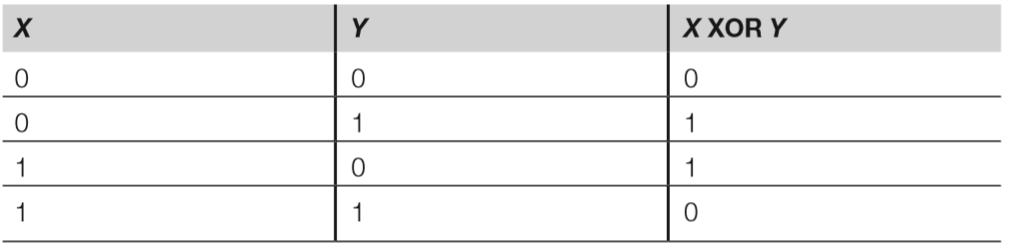
- Exclusive OR is the basis of modern encryption
- Combining a key with a plaintext via XOR creates a ciphertext; XORing the same key to the ciphertext restores the original plaintext
- XOR maths is fast and simple: the result of XORing two bits is true (or 1) if one or the other (exclusively, not both) is 1, as depicted in the truth table below:
Data at rest & data in motion
- Crypto protects data at rest and data in motion (or data in transit)
- Full-disk encryption of a hard drive using software such as BitLocker or PGP Whole Disk Encryption is an example of encrypting data at rest
- An SSL or IPsec VPN is an example of encrypting data in motion.
Protocol governance
- Cryptographic protocol governance describes the process of selecting the right method (i.e. cipher) and implementation for the right job, typically on an organisation-wide scale
- For example, a digital signature provides authentication & integrity, but not confidentiality; symmetric ciphers are primarily used for confidentiality, with AES preferred over DES due to its strength & performance
Types of cryptography
- There are three primary types of modern encryption: symmetric, asymmetric & hashing. Symmetric uses a single key to encrypt and decrypt; asymmetric uses two keys (one to encrypt, the other to decrypt). Hashing is a one-way cryptographic transformation using an algorithm, but no key.
Symmetric encryption
- Symmetric encryption uses a single key to encrypt and decrypt. If you encrypt a ZIP
file, then decrypt with the same key, you are using symmetric encryption. - Symmetric encryption is also called “secret key” encryption because the key must be kept secret from third parties.
- Strengths of this method include speed and cryptographic strength per bit of key; however, the major weakness is that the key must be securely shared before two parties may communicate securely.
Stream & block ciphers
- Symmetric encryption may have stream and block modes.
- Stream mode means each bit is independently encrypted in a “stream.”
- Block mode ciphers encrypt blocks of data each round; for example, 64 bits for the Data Encryption Standard (DES), and 128 bits for AES.
- Some block ciphers can emulate stream ciphers by setting the block size to 1 bit; they are still considered block ciphers.
Initialisation vectors & chaining
- Some symmetric ciphers use an initialisation vector (IV) to ensure that the first encrypted block of data is random. This ensures that identical plaintexts encrypt to different ciphertexts.
- Also, as Schneier notes, “two messages that begin the same will encrypt the same way up to the first difference. Some messages have a common header: a letterhead, or a ‘From’ line…” – IVs solve this problem
- Chaining (called feedback in stream modes) seeds the previous encrypted block
into the next block ready for encryption. This destroys patterns in the resulting ciphertext. - DES Electronic Code Book mode (as described below) does not use an IV or chaining, and patterns can be clearly visible in the resulting ciphertext.
DES
- DES is the Data Encryption Standard, which describes the data encryption algorithm
(DEA) – remember for exam that DES is the standard and DEA is the algorithm! - IBM designed DES, based on their older Lucifer symmetric cipher, which
uses a 64-bit block size (ie, it encrypts 64 bits each round) and a 56-bit key. - DES can use five different modes to encrypt data, the main differences being block vs (emulated) stream, the use of IVs, and whether errors in encryption will propagate to subsequent blocks
- Electronic code book (ECB) is the original, simplest and weakest form of DES.
- Uses no initialization vector or chaining.
- Identical plaintexts with identical keys encrypt to identical ciphertexts.
- Two plaintexts with partial identical portions, such as the header of a letter, encrypted with the same key will have partial identical ciphertext portions.
- Cipher block chaining (CBC) is a block mode of DES that XORs the previous encrypted block of ciphertext to the next block of plaintext to be encrypted.
- The first encrypted block is an IV vector that contains random data. This “chaining” destroys patterns.
- One limitation of the CBC mode is that encryption errors will propagate; an encryption error in one block will cascade through subsequent blocks due to the chaining, therefore destroying their integrity.
- Cipher feedback (CFB) mode is very similar to CBC, but the primary difference is that CFB is a stream mode.
- It uses feedback (the name for chaining when used in stream modes)
- Like CBC, CFB uses an IV, and destroys patterns, and so errors propagate.
- Output feedback (OFB) differs from CFB in the way feedback is accomplished.
- CFB uses the previous ciphertext for feedback. The previous ciphertext is the subkey XORed to the plaintext.
- OFB uses the subkey before it is XORed to the plaintext. Since the subkey is not affected by encryption errors, errors will not propagate.
- Counter (CTR) is the newest mode, described in NIST Special Publication 800-38a.
- Similar to OFB; the difference again is the feedback.
- CTR mode uses a counter, so this mode shares the same advantages as OFB in that patterns are destroyed and errors do not propagate.
- However, there is an additional advantage: since the feedback can be as simple as an ascending number, CTR mode encryption can be executed in parallel.
- Electronic code book (ECB) is the original, simplest and weakest form of DES.

- Single DES is the original implementation of DES, encrypting 64-bit blocks of data with a 56-bit key, using 16 rounds of encryption.
- The work factor required to break DES was reasonable in 1976, but advances in CPU speed and parallel architecture have made DES weak to a brute-force key attack today, where every possible key is generated and attempted.
- Triple DES applies single DES encryption three times per block.
- Formally called the “triple data encryption algorithm” (TDEA) and commonly called “TDES” (or “3DES”) it became a recommended standard in 1999.
IDEA
- The International Data Encryption Algorithm (IDEA) is a symmetric block cipher designed as an international replacement to DES.
- It uses a 128-bit key and 64-bit block size. The IDEA has patents in many countries.
AES
- The Advanced Encryption Standard (AES) is the current US standard in symmetric block ciphers.
- AES uses 128-bit (with 10 rounds of encryption), 192-bit (with 12 rounds of encryption), or 256-bit (with 14 rounds of encryption) keys to encrypt 128-bit blocks of data.
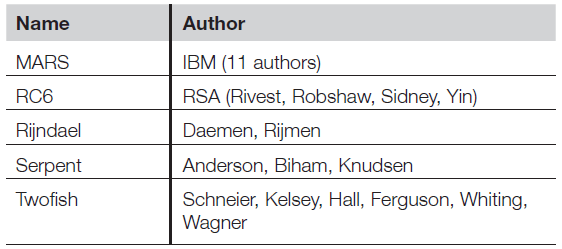
- NIST solicited input on a replacement for DES in the Federal Register in January 1997. Fifteen AES candidates were announced in August 1998, and the list was reduced to five in August 1999. Rijndael was chosen and became AES.
- AES has four functions: SubBytes, ShiftRows, MixColumns, and AddRoundKey.
Blowfish & Twofish
- Blowfish and Twofish are symmetric block ciphers created by teams lead by Bruce
Schneier - Blowfish uses keys from 32- to 448-bit keys (the default is 128-bit) to encrypt 64-bit blocks of data.
- Twofish was an AES finalist, encrypting 128-bit blocks using 128- to 256-bit keys and employing pre- & post-whitening techniques.
- Both Bluefish & Twofish are open algorithms, meaning they are unpatented & freely available.
RC5 & RC6
- RC5 and RC6 are symmetric block ciphers by RSA Laboratories.
- RC5 uses 32-bit (testing purposes), 64-bit (replacement for DES), or 128-bit blocks. The key size ranges from zero to 2040 bits.
- RC6 was an AES finalist. RC6 is based on RC5 and is altered to meet the AES requirements. It is also stronger than RC5, encrypting 128-bit blocks using 128-,
192-, or 256-bit keys.
Asymmetric encryption
- Asymmetric encryption uses two keys, one for encryption and the other for decryption.
- The public key, as its name indicates, is made public, and asymmetric encryption is
also called public key encryption for this reason. - Anyone who wants to communicate with you may simply download your posted public key and use it to encrypt their plaintext.
- Once encrypted, your public key cannot decrypt the plaintext, but your private
key can do so. As the name implies, your private key must be kept private and secure. - Additionally, any message encrypted with the private key may be decrypted with
the public key, as it is for digital signatures, as we will see shortly.
Asymmetric methods
- Maths lie behind the asymmetric breakthrough.
- Asymmetric methods use one-way functions, which are easy to compute one way but are difficult to compute in the reverse direction.
- Factoring prime numbers: An example of a one-way function is factoring a composite number into its primes.
- Multiplying the prime number 6269 by the prime number 7883 results in the composite number 49,418,527. That way is quite easy to compute, as it takes just milliseconds on a calculator.
- However, answering the question “Which prime number times which prime number equals 49,418,527” is much more difficult. That computation is called factoring, and no shortcut has been found for hundreds of years. Factoring is the basis of the RSA algorithm.
- Discrete logarithm: A logarithm is the opposite of exponentiation.
- Computing 7 to the 13th power (exponentiation) is easy on a modern calculator: 96,889,010,407.
- Asking the question “96,889,010,407 is 7 to what power,” which means to find the logarithm, is more difficult.
- Discrete logarithms apply logarithms to groups, which is a much harder problem to solve.
- This one-way function is the basis of the Diffie-Hellman and ElGamal asymmetric algorithms.
- Diffie-Hellman key agreement protocol: Key agreement allows two parties the security with which to agree on a symmetric key via a public channel, such as the Internet, with no prior key exchange. An attacker who is able to sniff the entire conversation is unable to derive the exchanged key.
- Whitfield Diffie and Martin Hellman created the Diffie-Hellman Key Agreement Protocol (also called the Diffie-Hellman Key Exchange) in 1976.
- Diffie-Hellman uses discrete logarithms to provide security.
- Elliptic curve cryptography: ECC leverages a one-way function that uses discrete logarithms as applied to elliptic curves.
- Solving this problem is harder than solving discrete logarithms, so algorithms based on elliptic curve cryptography (ECC) are much stronger per bit than systems using discrete logarithms (and also stronger than factoring prime numbers).
- ECC requires fewer computational resources because it uses shorter keys comparison to other asymmetric methods. Lower-power devices often use ECC for this reason.
- Factoring prime numbers: An example of a one-way function is factoring a composite number into its primes.
- Tradeoff: Asymmetric encryption is far slower than symmetric encryption, and it is weaker per bit of key length (a 64-bit symmetric key is as strong as a 512-bit asymmetric key).
- The strength of asymmetric encryption is the ability to communicate securely without pre-sharing a key.
Hash functions
- A hash function provides encryption using an algorithm and no key.
- They are called one-way hash functions because there is no way to reverse the encryption.
- A variable-length plaintext is “hashed” into a fixed-length hash value, which is often called a “message digest” or simply a “hash.” Hash functions are primarily used to provide integrity: if the hash of a plaintext changes, the plaintext itself has changed.
- Common older hash functions include secure hash algorithm 1 (SHA-1), which creates a 160-bit hash and Message Digest 5 (MD5), which creates a 128-bit hash.
- There are weaknesses in both MD5 and SHA-1, so newer alternatives such as SHA-2 are recommended.
- Collisions:
- Hashes are not unique because the number of possible plaintexts is far larger than the number of possible hashes.
- Assume you are hashing documents that are a megabit long with MD5. Think of the documents as strings that are 1,000,000 bits long, and think of the MD5 hash as a string 128 bits long. The universe of potential 1,000,000- bit strings is clearly larger than the universe of 128-bit strings.
- Therefore, more than one document could have the same hash’: this is called a collision.
- MD5 is now fairly vulnerable to collisions. MD6, published in 2008, is the newest version of the MD family of hash algoriths.
- Secure Hash Algorithm (SHA) is a series of hash algorithms
- SHA-1 creates a 160-bit hash value
- SHA-2 includes SHA-224, SHA-256, SHA-384, and SHA-512, each named after the length of the message digest it creates.
Cryptographic attacks
- Cryptanalysts use cryptographic attacks to recover the plaintext without the key.
- Remember that recovering the key (which is sometimes called “stealing” the
key) is usually easier than breaking modern encryption. - This is what law enforcement officials typically do when tracking a suspect who used cryptography: they obtain a search warrant and attempt to recover the key.
Brute force
- Generates the entire key space, which is every possible key.
- Given enough time, the plaintext will be recovered.
Social engineering
- Uses the human mind to bypass security controls.
- This technique may recover a key by tricking the key holder into revealing the key.
- Techniques are varied; one way is to impersonate an authorized user when calling a help desk to request a password reset.
Known plaintext
- Relies on recovering and analysing a matching plaintext and ciphertext pair; the goal is to derive the key that was used.
- You may be wondering why you would need the key if you already have the plaintext, but recovering the key would allow you to also decrypt other ciphertexts encrypted with the same key.
Chosen plaintext/adaptive chosen plaintext
- A cryptanalyst chooses the plaintext to be encrypted in a chosen plaintext attack; the
goal is to derive the key. - Encrypting without knowing the key is accomplished via an encryption oracle, or a device that encrypts without revealing the key.
- Adaptive-chosen plaintext begins with a chosen plaintext attack in the first round.
The cryptanalyst then “adapts” further rounds of encryption based on the previous
round.
Chosen ciphertext/adaptive chosen ciphertext
- Chosen ciphertext attacks mirror chosen plaintext attacks; the difference is that the
cryptanalyst chooses the ciphertext to be decrypted. - This attack is usually launched against asymmetric cryptosystems, where the cryptanalyst may choose public documents to decrypt that are signed (encrypted) with a user’s private key.
- Adaptive-chosen ciphertext also mirrors its plaintext cousin: it begins with a chosen
ciphertext attack in the first round. The cryptanalyst then adapts further rounds
of decryption based on the previous round.
Known key
- The term “known-key attack” is misleading, becuase if the cryptanalyst knows the key, the attack is over
- Known key actually means the cryptanalyst knows something about the key, and can use that knowledge to reduce the efforts needed to attack it.
- For example, if the cryptanalyst knows that the key is an uppercase letter followed by a number, other characters can be omitted in the attack.
Differential cryptanalysis
- Differential cryptanalysis seeks to find the difference between related plaintexts that are encrypted; the plaintexts may differ by a few bits
- It launches as an adaptive chosen plaintext attack; the attacker chooses the plaintext to be encrypted though he or she does not know the key and then encrypts related plaintexts
Linear cryptanalysis
- Linear cryptanalysis is a known-plaintext attack where the cryptanalyst finds large amounts of plaintext/ciphertext pairs created with the same key
- The pairs are studied to derive info about the key used to create them
- Both differential & linear analysis can be combined as differential linear analysis
Side-channel attacks
- Side-channel attacks use physical data to break a cryptosystem, such as monitoring CPU cycles or power consumption used while encrypting or decrypting
Implementing cryptography
Symmetric, asymmetric & hash-based cryptography all have real-world applications, often in combination with each other, in which they can provide CIA as well as non-repudiation.
Digital signatures
- Digital signatures are used to cryptographically sign documents.
- They provide non-repudiation, which includes authentication of the identity of the signer, and proof of the document’s integrity (proving the document did not change). This means the sender cannot later deny or repudiate signing the document.
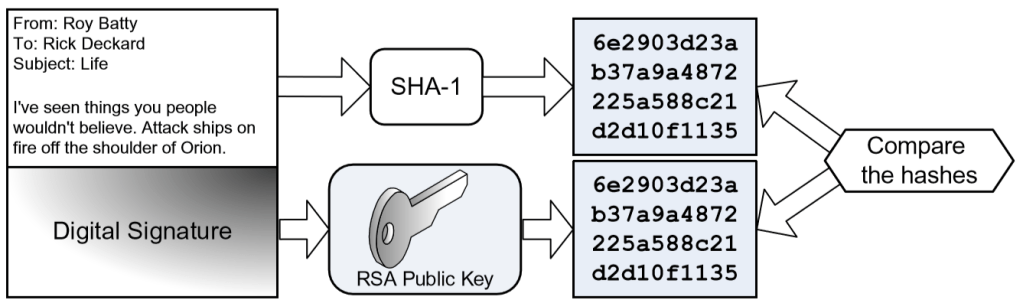
- Scenario: Roy wants to send a digitally signed email to Rick.
- Roy writes the email, which is the plaintext. He then uses the SHA-1 hash function to generate a hash value of the plaintext. He then creates the digital signature by encrypting the hash with his RSA private key. Roy then attaches the signature to his plaintext email and hits send. See diagram “Creating a digital signature”
- Rick receives Roy’s email and generates his own SHA-1 hash value of the plaintext email. Rick then decrypts the digital signature with Roy’s RSA public key, recovering the SHA-1 hash Roy generated. Rick then compares his SHA-1 hash with Roy’s. See diagram “Verifying a digital signature”
- If the two hashes match, Rick knows two things:
- Roy must have sent the email (only Roy knows his private key) – this authenticates Roy as the sender
- The email did not change – this proves the integrity of the email
- If the hashes match, Roy cannot later deny having signed the email – this is non-repudiation.
- If the hashes do not match, Rick knows that either Roy did not send it, or that the email’s integrity was violated.

Public key infrastructure
- Public Key Infrastructure (PKI) leverages all three forms of encryption to provide & manage digital certificates.
- A digital certificate is a public key signed with a digital signature.
- Digital certs may be server- or client-based.
- If client & server certificates are used together, they provide mutual authentication & encryption.
- The standard digital certificate format is X.509.
Certificate authorities & organisational registration authorities
- Digital certificates are issued by certificate authorities (CAs)
- Organisational registration authorities authenticate the identity of a certificate holder before issuing a certificate to them
- An organisation may operate as a CA or ORA, or both.
Certificate revocation lists
- CAs maintain certificate revocation lists (CRLs) – lists of revoked certificates
- Certs may be revoked if the private key has been stolen, an employee is terminated etc.
- However, a CRL is a flat file and does not scale well
- The Online Certificate Status Protocol (OCSP) is a replacement for CRLs, using a client-server design that scales better
Key management issues
- CAs issue certificates & distribute them to cert holders. The confidentiality & integrity of the holder’s private key must be assured during the distribution process.
- Public/private key pairs used in PKI should be stored centrally & securely. Users may lose their private key as easily as they may forget their password. A lost private key means that anything encrypted with the matching public key will be lost, short of cryptanalysis.
- Key storage means that the organisation that issued the public/private key pairs retains a copy. Key escrow means that a copy is retained by a third-party organisation (or sometimes multiple organisations), often for law enforcement purposes.
- A retired key may not be used for new transactions, but one may be used to decrypt previously encrypted plaintexts. A destroyed key no longer exists, and therefore cannot be used for any purpose.
SSL & TLS
- Secure Sockets Layer (SSL) brought the power of PKI to the web, using it to authenticate & provide confidentiality to web traffic.
- Transport Layer Security (TLS) is the successor to SSL.
- Both were commonly used as part of HTTPS (although all versions of SSL and some early TLS versions are now deprecated)
- SSL was developed for the Netscape browser in the 1990s. SSL 2.0 was the first released version, and SSL 3.0 fixed a number of security issues with v2.
- TLS was based on SSL 3.0, and is very similar to that version, with some security improvements.
- Although typically used for HTTPS, TLS may also be used for other applications, such as Internet chat & email access.
IPsec
- Internet Protocol Security (IPsec) is a suite of protocols that provide a cryptographic
layer to both IPv4 and IPv6. - It is one of the methods used to provide virtual private networks (VPN), which allow you to send private data over an insecure network, such as the Internet; the data crosses a public network, but is “virtually private.”
- IPsec includes two primary protocols: Authentication Header (AH) and Encapsulating Security Payload (ESP). AH and ESP provide different and sometimes overlapping functionality.
- AH provides authentication and integrity for each packet of network data.
- It provides no confidentiality; it acts as a digital signature for the data.
- It also protects against replay attacks, where data is sniffed off a network and re-sent, often in an attempt to fraudulently reuse encrypted authentication credentials.
- ESP primarily provides confidentiality by encrypting packet data. It may also optionally provide authentication and integrity.
- AH & ESP may be used separately or in combination
- AH provides authentication and integrity for each packet of network data.
- Supporting IPsec protocols include Internet Security Association and Key
Management Protocol (ISAKMP) and Internet Key Exchange (IKE).- An IPsec Security Association (SA) is a simplex (one-way) connection that may be used to negotiate ESP or AH parameters.
- If two systems communicate via ESP, they use two SAs, one for each direction. If the systems leverage AH in addition to ESP, they use two more SAs for a total of four.
- A unique 32-bit number called the security parameter index (SPI) identifies each simplex SA connection.
- ISAKMP manages the SA creation process.
- IPsec is used in tunnel mode or transport mode
- Security gateways use tunnel mode because they can provide point-to-point IPsec tunnels. Remember that if one end (or both ends) of a connection is a gateway (as opposed to a host), tunnel mode MUST be used
- ESP tunnel mode encrypts the entire packet, including the original packet headers. ESP transport mode only encrypts the data, not the original headers; this is commonly used when the sending and receiving system can “speak” IPsec natively.
- In transport mode, the original IP headers are not encrypted, so AH is often used (along with ESP) to authenticate the original headers; in tunnel mode, ESP is typically used alone, as the original headers are already encrypted and thus protected.
- IPsec can use a variety of encryption algorithms, such as MD5 or SHA-1 for integrity, and 3DES or AES for confidentiality.
- IKE (Internet Key Exchange) negotiations the algorithm selection process.
- Two sides of an IPsec tunnel will typically use the highest & fastest level of security, e.g. selecting AES over single DES for confidentiality, if both sides support AES
PGP
- Pretty Good Privacy (PGP), created by Phil Zimmerman in 1991, brought asymmetric
encryption to the masses. - PGP provides the modern suite of cryptography: confidentiality, integrity, authentication, and nonrepudiation.
- PGP can encrypt emails, documents, or an entire disk drive.
- PGP uses a web of trust model to authenticate digital certificates, instead of relying on a central CA.
S/MIME
- MIME (Multipurpose Internet Mail Extensions) provides a standard way to format
email, including characters, sets, and attachments. - Secure MIME (S/MIME) leverages PKI to encrypt and authenticate MIME-encoded email.
- The client or client’s email server, called an S/MIME gateway, may perform the encryption.
Escrowed encryption
- Escrowed encryption means a third-party organization holds a copy of a public/private key pair.
- The private key is often divided into two or more parts, each held in escrow by different trusted third-party organizations, which will only release their portion of the key with proper authorization, such as a court order.
- This provides separation of duties.
Perimeter defences
- Perimeter defences help prevent, detect, and correct unauthorised physical access.
- Buildings, like networks, should employ defence in depth. Any one defence can fail, so critical assets should be protected by multiple physical security controls, such as fences, doors, walls, locks, etc.
- The ideal perimeter defence is safe, prevents unauthorized ingress, and offers both authentication and accountability, where applicable.
Fences
- Fences may range from simple deterrents (such as 3-4ft tall fences, enough to deter casual trespassers) to preventive devices, such as an 8ft tall fence with barbed wire on top.
- Fences should be designed to steer ingress and egress to controlled points, such as exterior doors and gates.
Gates
- The four strength classes of gates are:
- Class I: Residential (home use, considered ornamental)
- Class II: Commercial/General Access (e.g. parking garage)
- Class III: Industrial/Limited Access (e.g. truck loading dock)
- Class IV: Restricted Access (e.g. airport, prison – designed to prevent a car crashing through)
Lights
- Lights are the most common physical control and can act as both a detective and deterrent control (their presence alone can deter potential attackers, but they can also be used to enable a guard to see an intruder)
- Fresnel lights use lenses to aim light in a specific direction (originally used in lighthouses)
- Some light measurement terms include:
- Lumen: the amount of light created by one candle
- Foot-candles: one foot-candle = one lumen per square foot
- Lux: based on the metric system and more commonly used now – one lux = one lumen per square metre
- NIST recommendation is that lighting be at least 8ft high and provide 2 foot-candles (approx 21.5 lumen)
CCTV
- Closed-circuit television (CCTV) is a detective device used to aid guards in detecting the presence of intruders in restricted areas.
- CCTVs using the normal light spectrum require sufficient visibility to illuminate the field of view that is visible to the camera.
- Infrared devices can “see in the dark” by displaying heat.
- Older “tube cameras” are analogue devices. Modern cameras use charge-coupled discharge (CCD), which is digital.
- Cameras have mechanical irises that act as human irises, controlling the amount of light that enters the lens by changing the size of the aperture.
- Key issues include depth of field, which is the area that is in focus, and field of view, which is the entire area viewed by the camera.
- More light allows a larger depth of field because a smaller aperture places more of the image in focus. Correspondingly, a wide aperture (used in lower light conditions) lowers the depth of field.
- CCTV cameras may also have other typical camera features such as pan and tilt (moving horizontally and vertically).
Locks
- Locks are a preventive physical security control, used on doors and windows to prevent unauthorised physical access.
- May be mechanical, such as key locks or combination locks, or electronic locks which are often used with smart cards or magnetic stripe cards.
- Key locks require a physical key to unlock.
- Keys are shared or sometimes copied, which lowers the accountability of key locks.
- A common type is the pin tumbler lock, which has driver pins and key pins. The correct key makes the pins line up with the shear line, allowing the lock tumbler (plug) to turn.
- Ward or warded locks must turn a key through channels, or wards. A skeleton (master) key can open varieties of warded locks.
- Combination locks have dials that must be turned to specific numbers in a specific order (i.e. alternating clockwise and counterclockwise turns) to unlock. Button or keypad locks also use numeric combinations.
- Limited accountability due to shared combinations is the primary security issue concerning these types of locks.
Smart cards & magnetic stripe cards
- A smart card is a physical access control device that is often used for electronic locks, credit card purchases, or dual-factor authentication systems.
- “Smart” means the card contains a computer circuit; another term for a smart card is integrated circuit card (ICC).
- Smart cards may be “contact” or “contactless.” Contact cards use a smart card reader, while contactless cards are read wirelessly.
- One type of contactless card technology is radio-frequency identification (RFID). These cards contain RFID tags (also called transponders) that are read by RFID transceivers.
- A magnetic stripe card contains a magnetic stripe that stores information.
- Unlike smart cards, magnetic stripe cards are passive devices that contain no circuits.
- These cards are sometimes called swipe cards because they are read when swiped through a card reader.
Tailgating & piggybacking
- Tailgating or piggybacking occurs when an unauthorised person follows an authorised person into a building.
- Piggybacking implies that the authorised person has given consent for the unauthorised person to follow them, while tailgating means that it occurs without the authorised person’s knowledge
- Policy should forbid employees from allowing tailgating or piggybacking, and security awareness should describe this risk.
Mantraps & turnstiles
- A mantrap is a preventive physical control with two doors.
- The first door must close and lock before the second door may be opened.
- Each door typically requires a separate form of authentication to open, such as biometrics or a personal identification number (PIN).
- Without authentication, the intruder is trapped between the doors after entering the mantrap.
- Turnstiles are designed to prevent tailgating by enforcing a “one person per authentication” rule, just as they do in train stations and the Tube.
- Secure data centers often use floor-to-ceiling turnstiles with interlocking blades to prevent an attacker from going over or under the turnstile. Secure revolving doors perform the same function.
Contraband checks
- Contraband checks seek to identify objects that prohibited from entering a secure area.
- These checks often detect metals, weapons, or explosives.
- Contraband checks are casually thought to be detective controls, but their presence makes them a viable deterrent to actual threats.
Motion detectors & other perimeter alarms
- Ultrasonic and microwave motion detectors work like Doppler radar used to predict the weather.
- A wave of energy is emitted, and the “echo” is returned when it bounces off an object.
- A motion detector that is 20 ft away from a wall will consistently receive an echo in the time it takes for the wave to hit the wall and bounce back to the receiver, for example. The echo will return more quickly when a new object, such as a person walking in range of the sensor, reflects the wave.
- A photoelectric motion sensor sends a beam of light across a monitored space to a photoelectric sensor. The sensor alerts when the light beam is broken.
- Ultrasonic, microwave, and infrared motion sensors are active sensors, which means they actively send energy.
- Consider a passive sensor as a “read-only” device; an example is a passive infrared (PIR) sensor, which detects infrared energy created by body heat.
Doors & windows
- Always consider the relative strengths and weaknesses of doors, windows, walls, floors, ceilings, etc. All should be equally strong from a defensive standpoint, as attackers will target the weakest spot.
- Egress must be unimpeded in case of emergency, so a simple push button or motion detectors are frequently used to allow egress.
- Outward-facing emergency doors should be marked for emergency use only and equipped with panic bars, which will trigger an alarm when used.
- Glass windows are structurally weak and can be dangerous when shattered. Bullet-proof or explosive-resistant glass can be used for secured areas. Wire mesh or security film can lower the danger of shattered glass and provide additional strength.
- Alternatives to glass windows include polycarbonate such as Lexan, and acrylic such as Plexiglas.
Walls, floors & ceiling
- The walls around any internal secure perimeter, such as a data center, should start at the floor slab and run to the ceiling slab. These are called slab-to-slab (or floor-to-ceiling) walls.
- Raised floors and drop ceilings can obscure where the walls truly start and stop.
- An attacker should not be able to crawl under a wall that stops at the top of the raised floor, or climb over a wall that stops at the drop ceiling.
Guards
- Guards are a dynamic control in a variety of situations.
- They can inspect access credentials, monitor CCTVs and environmental controls, respond to incidents, and act as a general deterrent.
- All things being equal, criminals are more likely to target an unguarded building over a guarded building.
- Professional guards have attended advanced training and/or schooling; amateur guards have not.
- The term pseudo guard means an unarmed security guard.
Dogs
- Dogs provide perimeter defence duties, particularly in controlled areas, such as between the exterior building wall and a perimeter fence.
- The primary drawback to using dogs as a perimeter control is the legal liability.
Site selection, design & configuration
Site selection issues
- Site selection is simply the process of choosing a suitable site to construct a building or data centre
- Issues to consider include:
- Utility reliability: The reliability of local utilities is a critical concern.
- Electrical outages are among the most common of all failures & disasters
- Uninterruptible power supply (UPS) will provide protection against electrical failure (usually several hours or less)
- Generators provide longer protection, but require refuelling in order to operate for extended periods
- Crime: Local crime rates also factor into site selection. The primary issue is employee safety, but additional issues include theft of company assets.
- Utility reliability: The reliability of local utilities is a critical concern.
Site design & configuration issues
Site marking
- Many data centres are not externally marked in order to avoid drawing attention to the facility and its expensive contents
- A modest building design might be an effective way to avoid attention
Shared tenancy & adjacent buildings
- Other tenants in a building can pose security issues, as they are already within the physical security perimeter; a tenant’s poor practices in visitor security can endanger your security
- Adjacent building pose a similar risk; attackers can enter a less secure adjacent building and use that as a base to attack an adjacent building, often breaking in through a shared wall
Shared demarc
- A demarc is the demarcation point at which an ISP’s responsibility end and the customer’s begins
- Most buildings have a single demarc area where all external circuits enter the building
- This is a crucial issue to consider in a building with shared tenancy and therefore a shared demarc; access to the demarc allows attacks over the CIA of all circuits & the data flowing over them
Media storage facilities
- Offline storage of media for disaster recovery, potential legal proceedings or other legal/regulatory purposes is commonplace
- An off-site media storage facility will ensure that the data is accessible even after a physical disaster at the primary facility
- The purpose of the media being stored offsite is to ensure continued access, which means the facility should be far enough away to avoid the likelihood of a physical disaster affecting both the primary facility & the offsite storage location
- Licensed & bonding couriers should transfer the media to and from the offsite storage facility
System defences
- System defences are one of the last lines of protection in a defence-in-depth strategy
- These defences assume that an attacker has physical to the device or media containing sensitive information
- In some cases, other controls may have failed, and these controls are the final resort
Asset tracking
- Detailed asset tracking databases enhance physical security; you cannot protect your data unless you know what & where it is
- Asset tracking supports regulatory compliance by identifying where all regulated is within the system
- In case of employee termination, the asset DB will show the exact equipment & data that the employee must return to the company
- Data such as serial numbers & model numbers are useful in cases of loss due to theft or disaster
Port controls
- Computers contain multiple ports that may allow copying data to or from a system
- Port controls are critical because large amounts of information can be placed on a device small enough to evade perimeter contraband checks (e.g. a USB flash drive)
- Ports can be physically disabled by disabling ports on the system’s motherboard, disconnecting case wires that connect the port to the system, or physically obstructing the port itself
Environmental controls
- Environmental controls provide a safe environment for personnel & equipment
Electricity
- Reliable electricity is critical for any data centre, and is one of the top priorities when selecting, building & designing a site
- The following are common types of electrical faults:
- Blackout: prolonged loss of power
- Brownout: prolonged low voltage
- Fault: short loss of power
- Surge: prolonged high voltage
- Spike: temporary high voltage
- Sag: temporarily low voltage
Surge protectors, UPS & generators
- Surge protectors protect equipment from damage due to electrical surges. They contain a circuit or fuse that is tripped during a power spike or surge, shorting the power or regulating it down to acceptable levels.
- UPS provides temporary backup power in the event of a power outage. It may also “clean” the power, protecting against surges, spikes, and other forms of electrical faults.
- Generators provide power longer than UPS and will run as long as fuel for the generator is available on site. Disaster recovery strategies should consider any negative impact on fuel supply and delivery.
EMI
- Electricity generates magnetism, so any electrical conductor emits electromagnetic interference (EMI). This includes circuits, power cables, network cables, and many others.
- Network cables that are shielded poorly or are installed too closely together may suffer crosstalk, where magnetism from one cable crosses over to another nearby cable. This primarily affects the integrity of the network or voice data, but it might also affect the confidentiality.
- Proper network cable management can mitigate crosstalk; never route power cables close to network cables.
- The type of network cable used can also lower crosstalk. For example, unshielded twisted pair (UTP) cabling is far more susceptible than shielded twisted pair (STP) or coaxial cable.
- Fibre optic cable uses light instead of electricity to transmit data, and so is not susceptible to EMI
Heating, ventilation & air conditioning
- Heating, ventilation and air conditioning (HVAC) controls keep the air at a reasonable temperature and humidity. They operate in a closed loop and recirculate treated air to help reduce dust and other airborne contaminants.
- HVAC units should employ positive pressure and drainage.
- Data centre HVAC units are designed to maintain optimum heat and humidity levels for computers.
- Humidity levels of 40–55% are recommended.
- The proper level of humidity can mitigate static electricity, as long as all circuits are grounded properly, and measures such as anti-static sprays, wrist straps and work surfaces are employed. All personnel working with sensitive computer equipment such as boards, modules or memory chips should ground themselves before performing any work.
- High humidity levels can allow the moisture in the air to condense onto/into equipment, leading to corrosion; this is another reason for maintaining proper humidity levels
- A commonly recommended set point temperature range for a data center is 68–77°F (20–25°C).
Heat, flame & smoke detectors
- Heat detectors emit alerts when temperature exceeds an established safe baseline. They may trigger when a specific temperature is exceeded or when temperature changes at a specific rate (such as “10°F in less than 5 minutes”).
- Smoke detectors work through two primary methods: ionisation and photoelectric.
- Ionisation-based smoke detectors contain a small radioactive source that creates a small electric charge.
- Photoelectric sensors work in a similar fashion, except that they contain an LED (light-emitting diode) and a photoelectric sensor that generates a small charge while receiving light.
- Both types of alarms will sound when smoke interrupts the radioactivity or light by lowering or blocking the electric charge.
- Flame detectors detect infrared or ultraviolet light emitted in fire. One drawback to this type of detection is that the detector usually requires line of sight to detect the flame; smoke detectors do not have this limitation.
Personnel safety, training & awareness
- Personnel safety is the primary goal of physical security.
- Safety training provides a skill set for personnel, such as learning to operate an emergency power system.
- Safety awareness can change user behavior in a positive manner.
- Both safety training and awareness are critical to ensure the success of a physical security program because, without it, you can never assume that personnel will know what to do and when to do it.
Evacuation routes
- Evacuation routes should be posted in a prominent location, as they are in hotel rooms
- Advise all personnel & visitors of the quickest evacuation route from their areas
- All sites should designate a meeting point, where all personnel with gather in the event of an emergency. Meeting points are critical; tragedies have occurred when a person does not know another has already left the building, and so re-enters the building for an attempted rescue
Evacuation roles and procedures
- The two primary evacuation roles are safety warden and meeting point leader
- The safety warden ensures that all personnel evacuate the building safely in the event of an emergency (or drill)
- The meeting point leader assures that all personnel are accounted for at the emergency meeting point
- All personnel must adhere to emergency procedures, including following the posted evacuation route.
Duress warning systems
- Duress warning systems are designed to provide immediate alerts in the event of emergencies, such as severe weather, threat of violence, chemical contamination etc.
- Duress systems may be local and include technologies such as use of overhead speakers, or automated communications such as email or text messaging
Travel safety
- Personnel must remain safe while working in all phases of business, including authorised work from home and business travel.
- Telecommuters should have the proper equipment, including ergonomically-safe workstations.
- Business travel to certain areas can be dangerous. When organisations such as the US State Dept Bureau of Consular Affairs issue travel warnings, they should be heeded by personnel before embarking on any travel to affected countries.
Fires & suppression
- The primary safety issue in case of fire is safe evacuation, with fire suppression as a secondary concern
- However, suppression systems are typically designed with personnel safety as the primary concern
- Different types of fire require different suppressive agents
Classes of fire
- Class A fires are common combustibles such as wood & paper. This type of fire is the most common, and should be extinguished with water or soda acid.
- Class B fires are burning alcohol, oil & other petroleum products. They are extinguished with gas or soda acid. Water should never be used to extinguish a Class B fire.
- Class C fires are electrical fires which may ignite in equipment or wiring. The extinguishing agent must be non-conductive, such as any type of gas. Soda acid is not suitable as it can conduct electricity.
- Class D fires involve burning metals; use dry powder to extinguish them
- Class K fires are kitchen fires, such as burning oil or grease; use wet chemicals to extinguish them
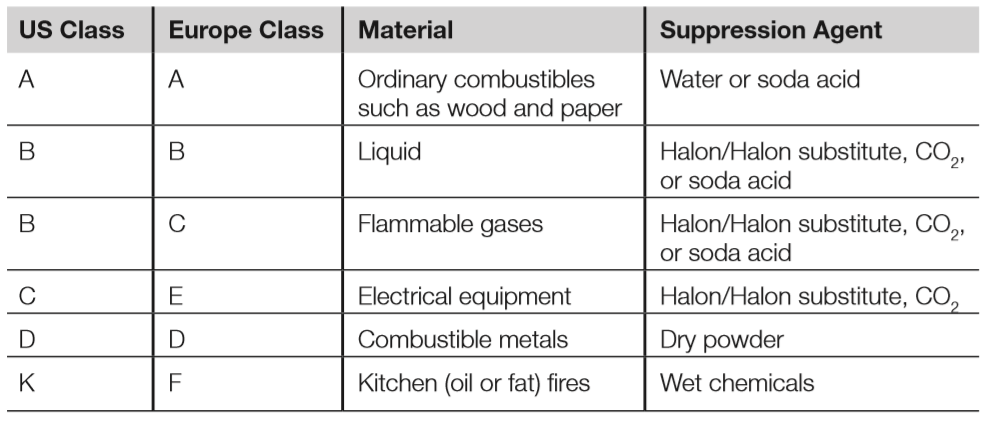
Suppression agents
- All fire suppression agents work to interrupt the combustion triangle of heat, fuel & oxygen, and work via four possible methods (sometimes in combination:
- Reducing the temperature of the fire
- Reducing the supply of fuel
- Reducing the supply of oxygen
- Interfering with the chemical reaction within fire
- Water suppresses fire by lowering the temperature below the kindling point (or ignition point).
- The safest of all suppression agents and therefore recommended for extinguishing common combustible (Class A) fires.
- However, it’s important to cut electrical power when extinguishing a fire with water, to reduce the risk of electrocution.
- Soda acid extinguishers are an older technology that use soda (sodium bicarbonate) mixed with water. There is a glass vial of acid suspended inside the extinguisher, and an external lever to break the vial.
- In addition to suppressing fire by lowing temperature by lowering temperature, soda acid has additional suppressive properties beyond plain water, as it creates foam that can float on the surface of some liquid fires, cutting off the oxygen supply
- Extinguishing a fire with dry powder (such as sodium chloride) works by lowering temperature and smothering the fire, starving it of oxygen.
- Dry powder is often used to extinguish metal (Class D) fires.
- Combustible metals include sodium, magnesium and many others.
- Wet chemicals are primarily used to extinguish kitchen fires (Class K in the US and Type F in Europe), but may also be used on Class A fires.
- The chemical is usually potassium acetate mixed with water.
- This covers a grease or oil fire in a soapy film that lowers the temperature.
- CO2 fire suppression smothers fires by removing oxygen
- A major risk associated with CO2 is that is odourless and colourless, and our bodies will breathe it like air. By the time we begin suffocating due to lack of oxygen, it is often too late.
- This makes it a dangerous suppression agent, so it is only recommended for use in unstaffed areas, such as electric substations.
- Halon extinguishes fire via a chemical reaction that consumes energy & lowers the temperature of the fire.
- Because of its ozone-depleting properties, the 1989 Montreal Protocol banned production & consumption of new halon in developed countries as of 1994
- However, existing Halon systems may be used, and while new Halon is not being produced, recycled Halon may still be used.
- Recommended replacements for Halon include the following:
- Argon
- FE-13
- FM-200
- Inergen
- FE-13 is the newest Halon replacement agent as is comparatively safe: breathing it in is safe in concentrations of up to 30% (other Halon replacements are usually only safe up to 10-15%)
Sprinkler systems
- Wet pipes have water right up to the sprinkler heads, hence “wet pipe”
- The sprinkler head contains a metal (common in older sprinklers) or small glass bulb designed to melt/break at a specific temperature, allowing water to flow.
- Each head will open independently as the trigger temperature is reached.
- Dry pipes also have closed sprinkler heads, but the difference is that compressed air fills the pipes.
- A valve holds the water back, and will continue to do so as long as sufficient air pressure remains in the pipes.
- As the dry pipe sprinkler heads open, the air pressure drops in each pipe, allowing the valve to open and send water to that head.
- Deluge systems are similar to dry pipes, except the sprinkler heads are permanently open, as well as larger than dry pipe heads. The pipes remain empty at normal air pressure; a deluge valve holds the water back until triggered by a fire alarm.
- Pre-action systems are a combination of wet, dry or deluge systems, and require two separate triggers to release water.
- Single-interlock systems release water into the pipes when a fire alarm triggers, which is releases once the head opens.
- Double-interlock systems use compressed air, the same as dry pipes. However, the water will not fill pipes until both the fire alarm triggers and the sprinkler head opens.
Portable fire extinguishers
- All portable fire extinguishers should be marked with the type of fire they can extinguish
- Portable extinguishers should be small enough so that any personnel who may need to use one can do so.
Summary of exam objectives
- Understanding fundamental logical hardware, OSes and software security components, as well as how to use those components to design, architect & evaluate secure systems is critical
- Cryptography provides security for data in motion and at rest
- Systems such as PKI use multiple cryptographic elements (symmetric, asymmetric & hash-based encryption) to provide confidentiality, integrity, availability & non-repudiation
- Slower & weaker asymmetric ciphers such as RSA & Diffie-Hellman are used to exchange faster symmetric keys such as AES and DES, which are used as short-term session keys e.g. for HTTPS.
- Digital signatures employ public key encryption and hash algorithms such as MD5 and SHA-1 to provide non-repudiation, authentication of the sender & integrity of the message
- Though often overlooked, physical security is implicit in most other controls, often as a last line of defence
- We must always seek balance when implementing controls from all 8 domains of knowledge; all assets should be protected by multiple defence-in-depth controls that span multiple domains
- For example, a file server can be protected by policy, procedures, access control, patching, AV, OS hardening, locks, walls, HVAC & fire suppression systems, among other controls.
- A thorough & accurate risk assessment should be conducted for all assets needing protection
 My CISSP Notes