Our job is to evaluate risks against our assets and deploy safeguards to mitigate those risks.
Domain agenda
- Understand business continuity requirements
- Contribute to personnel security policies
- Understand & apply risk management concepts
- Understand & apply threat modelling
- Integrate security risk considerations into acquisitions strategy & practice
- Establish & manage security education, training & awareness
Key InfoSec concepts
- CIA Triad
- DAD (Disclosure, Alteration & Destruction)
- Disclosure is the inverse of Confidentiality
- Alteration is the inverse of Integrity
- Destruction is the inverse of Availability
- (I)AAA(A) services
- Identification: claiming an identity
- Authentication of the idneity
- Authorisation: the actions you can perform on a system once identified & authenticated
- Accountability holds user accountable for their actions, usually through Auditing
- For some users, knowing that data is logged is not enough to provide accountability: they must know that data is logged & audited, and that sanctions may result from violation of policy
- Nonrepudiation: user cannot deny (repudiate) having performed a transaction
- Combines authentication & integrity (authenticates the identity of the user, and ensures integrity of the tranaction
- Cannot have nonrepudiation without both authentication & integrity: proving you signed a contract to buy a car (by authenticating your identity as the purchaser) is not useful if the dealer can change the price from £20k to £40k (violate the integrity of the contract)
- Least privilege & need to know
- Least privilege: Users should be granted the minimum amount of access (authorisation) required to do their jobs, and no more
- Need to know is more granular than least privilege: the user must need to know a specific piece of information before accessing it
- Subjects & objects
- Subject is the active entity – usually a person accessing a file, but can be a computer program too (e.g. one that updates data files with new information) – subjects manipulate objects
- Object is the passive entity, i.e. data (documents on physical paper, database tables, text files…) – objects do not manipulate objects
- Defence in depth (aka layered defence)
- Applying multiple safeguards in series to protect an asset
- Safeguards (or controls) are measures taken to reduce risk
- Improves the CIA of your data as you’re protected against the failure of any single security control
Assurance
Operational assurance
- Focus on features & architecture of a system
- System integrity, trusted recovery, covert channels
- Software development & functionality issues
- Consistently performed & documented change management & maintenance processes
Lifecycle assurance
- Ensures that the TCB (Trusted Computer Base) is designed, developed & maintained with formally controlled standards that enforce protection at each stage in the system’s lifecycle.
- Requires security testing, trusted distribution & configuration management
Legal & regulatory issues
Compliance with laws & regulations is a priority.
Major legal systems
- Civil law (as a legal system)
- Most common legal system, employed by many countries
- Uses laws or statutes to determine what is within the bounds of legality
- Legislative branch creates laws, judicial branch interprets them
- Main difference: under civil law, judicial precedents and particular case rulings do not carry the weight that would have under common law
- Common law
- Legal system used in North America, the UK and most former British colonies
- Significant emphasis on past cases setting judicial precedents which determine the interpretation of laws
- Legislative branch typically creates new statutes and laws, judicial rulings can at times
- Relies on interpretation by judges, which can change over time as society changes
- Religious law
- Religious doctrine or interpretation is the primary source of legal understanding
- While other religions have had significant influence on national legal systems, Islamic Sharia law is the most well-known religious legal system, using the Qur’an and Hadith as its foundation
- Customary law refers to customs/practices that are so commonly accepted by a group, that they are treated as law (can be later codified as laws, but the emphasis on the prevailing acceptance of a group is quite important)
Branches of common law
- Criminal law
- For situations where the victim can be seen as society itself
- May seem odd to consider society the victim when an individual is murdered, for example, however the goal of criminal goal is for an orderly society made up of law-abiding citizens
- Aims to deter crime and punish offenders
- Can include penalties that remove an individual from society by incarceration or even death
- Burden of proof is beyond all reasonable doubt due to the severity of punishment
- Civil law (as a branch of the common law system)
- Primary component is tort law, which deals with “injury” (not necessarily physical) resulting from someone violating their responsibility to provide a duty of care
- Tort law is the most significant source of lawsuits that seek damages
- Burden of proof is the preponderance of evidence (i.e. more likely than not)
- Administrative law (or regulatory law)
- Enacted by government agencies
- In the US, the executive branch (deriving from the Office of the President) enacts administrative law
- Government-mandated compliance measures are administrative laws, e.g.
- FCC regulations
- HIPAA security mandates
- FDA regulations
- FAA regulations
Legal liability
- The question of whether an organisation is legally liable for specific actions (or inactions) can prove costly
- Often turns into a question regarding potential negligence: the prudent man rule is often applied in this case
- Damages can be:
- Statutory damages, which are prescribed by law and can be awarded to the victim even if they incurred no actual loss/injury
- Compensatory damages, which are intended to financially compensate the victim for the loss/injury occurred as a direct result of the wrongdoing
- Punitive damages, which seek to punish an individual an individual or organisation, and are typically awarded to discourage a particularly serious violation where statutory or compensatory damages alone would not act as a deterrent
Due care & due diligence
- Due care
- Due care is doing what a reasonable person would do in a given situation
- It also describes the legal duty of an individual or organisation
- The term is derived from “duty of care”, e.g. parents have a duty to care for their children
- Sometimes called the prudent man rule
- Due diligence
- Due diligence is the management of due care
- Performance of tasks that ensure full investigation & full disclosure of all relevant & quantifiable risk elements
- Often confused with due care itself, which is informal; due diligence follows a process and can be considered a step beyond due care
- Expecting your staff to keep their systems patched is an expectation of due care, while verifying that this has actually happened is an example of due diligence.
- Gross negligence
- Gross negligence is the opposite of due care, and a legally important concept
- For example, if you suffer loss of PII, but can demonstrate due care in protecting the PII, you are in a stronger legal position
- If you cannot demonstrate due care (i.e. you acted with gross negligence), your legal position is much weaker
Legal aspects of investigations
- Types of evidence
- Real evidence consists of tangible or physical objects, e.g. a knife or blood-stained glove
- Direct evidence is testimony provided by witnesses regarding what they actually saw/heard/experienced
- Circumstantial evidence helps establish the circumstances relating to particular points, or to other evidence
- Corroborative evidence provides additional support for a fact that may have been called into question
- Hearsay evidence involves indirect/second-hand information
- Secondary evidence consists of copies of original documents & oral descriptions
- Best evidence rule
- Original documents are preferred over copies
- Conclusive documents preferred over oral testimony
- Best evidence rule prefers evidence that meets these criteria
- Computer-generated logs & documents might constitute secondary rather than best evidence
- Evidence integrity
- Evidence must be reliable
- Forensic & incident response commonly analyse digital media – critical to maintain the integrity of the data during acquisition & analysis
- Checksums using one-way hash functions such as MD5 or SHA-1 are commonly used to verify that no data changes occurred
- Chain of custody requires that once evidence is acquired, full documentation must be maintained regarding who or what handled the evidence and when and where it was handled
- Entrapment and enticement
- Entrapment is when (an agent of) law enforcement persuades someone to commit a crime when the person otherwise had no intention to do so
- Enticement involves causing someone to commit a further act (such as attacking a honeypot that records further evidence of a crime) after the person has already committed an crime (such as hacking into the network where the honeypot is located)
- Entrapment is illegal; enticement is not, however evidence collected through enticement may or may not be admissible
Computer crime
- Computer crimes can be based upon the way in which computer systems relate to the wrong doing
- As targets of crime, such as
- disrupting online commerce by means of DDoS attacks
- installing malware on systems for the distribution of spam
- exploiting vulnerabilities on a system in order to store illegal content
- Or as tools used to perpetrate crime, as in:
- leveraging computers to steal cardholder data from payment systems
- conducting computer-based reconnaissance to target an individual for information disclosure/espionage
- using computer systems for the purpose of harrassment
- As targets of crime, such as
Intellectual property (IP)
- Term refers to intangible property created as the result of a creative act
- The following IP concepts effectively create a monopoly on their use
- Trademark
- Associated with marketing: allows for the creation of a brand in order to distinguish the source of products/services
- Commonly a name, logo or image
- In the US, two different symbols can be used by individuals or organisations in order to protect distinctive marks
- “™” can be used freely to indicate an unregistered mark
- “®” is used with marks that have been formally registered with the US Patent & Trademark Office
- Can be registered for an initial 10 year term and renewed for an unlimited number of additional 10 year terms
- Patent
- In exchange for the patent holder’s promise to make the invention public, they receive exclusive rights to use, make or sell an invention for a period of time
- During the life of the patent, the patent holder can exclude others from leveraging the patented invention (through the use of civil litigation)
- In order for an invention to be patented, it should be novel & unique
- Patent term (length that a patent is valid) varies by region and also by the type of invention being patents, but is generally 20 years from the initial filing date (in both Europe and the US)
- Copyright
- Protects a form of expression in creative works and is typically denoted by the © symbol
- Precludes unauthorised duplication, distribution or modification of a work
- Only the form of expression is protected, not the subject matter or ideas represented
- Licenses
- Software licences are a contract between the provider and the consumer
- Most commercial licenses provide explicit limits on use & distribution of the software
- Software licenses such as end-user licence agreeements (EULAs) are an unusual form of contract, because using the software typically constitutes contractual agreement, even though a very small miniority of users actually read the lengthy EULA wording
- Trade secrets
- Trade secrets are proprietary information that provide organisation’s with a competive edge
- The organisation must exercise both due care and due diligence in the protection of their trade secrets
- Non-compete and non-disclosure agreements (NDAs) are two of the most common protections used
- Trademark
Privacy
- The protection of the confidentiality of personal information
- Many organisations host PII such as Social Security numbers, financial information (such as annual salary and bank account information), and health care information (for insurance purposes)
- The confidentiality of PII must be assured
- EU Data Protection Directive
- The EU has taken a strongly pro-privacy stance while balancing the needs of business
- Commerce would be impacted if member states had different regulations regarding collection & use of PII, so the EU DPD allows free flow of information while still maintaining consistent protection of citizen data in each member nation
- The principles of the EU DPD are:
- Notifying individuals how their personal data is collected & used
- Allowing individuals to opt out of sharing their personal data with third parties
- Granting individuals the right to choose into opt into sharing the most sensitive personal data (as opposed to automatic opt-in)
- Providing reasonable protections for personal data
- Other privacy laws include the Privacy Act (Australia), Personal Data Protection Law (Argentina), PIPEDA: the Personal Information Protection & Electronic Documents Act (Canada), PECR: Privacy & Electronic Communications Regulations (UK), ECS: Regulation for Electronic Communication Service (EU), and in the US: HIPAA (for healthcare information) and GLBA (for financial information)
- OECD privacy guidelines
- The Organisation for Economic Co-operation & Development consists of 30 member nations from around the world, including the US, Mexico, Australia, Japan and prominent European countries
- Provides a forum in which countries can focus on issues impacting the global economy
- The OECD routinely issue recommendations that can serve as an impetus to change policies & legislation in member countries and beyond
- The current OECD guidelines reference the following eight core principles of individual privacy:
- Purpose Specification: Data Controller (DC) is plainspoken about intended use(s)
- Use Limitation: DC will use only for purpose stated
- Collection Limitation: DC will collect minimum to meet stated need
- Data Quality: Once collected, DC will guard against contamination
- Data Controller Accountability: DC is responsible for protection of data holdings, regulatory requirements & breach response
- Security Safeguards: DC will provide reasonable protections as required by law
- Openness: DC will be transparent about holdings & actions taken/planned
- Individual Participation: Encourage & engage with subject
- These principles are embodied in the majority of privacy laws worldwide
- EU-US Safe Harbor
- EU DPD states that personal data may not be transmitted, even when permitted by the individual, to countries outside of the EU unless the receiving country is perceived by the EU to adequately protect their data
- This presents a challenge regarding the sharing of data with the US, which is perceived to have less stringent privacy protections
- To help resolve this issue, the US and the EU created the Safe Harbor framework which will give US-based organisations the benefit of authorised sharing, by voluntarily consenting to data privacy principles consistent with the EU DPD
International cooperation
- The Council of Europe Convention on Cybercrime is the most significant progress towards international cooperation in computer crime to date
- Signed and ratified by the US and the majority of the 47 EU member countries
- Establishes standards in cybercrime policy in order to promote international cooperation in investigation & prosecution of cybercrime
Import/export restrictions
- Many nations have limited the import and/or export of cryptosystems and associated hardware
- Some countries would prefer their citizens to be denied the use of any crypto that their intelligence agencies cannot cract
- CoCom (the Coordinating Committe for Multilateral Export Controls) was a multi-national agreement established during the Cold War, restricting the export of certain technologies, including encryption, to many Communist countries
- After the Cold War, the Wassenaar Arrangement became the standard for export controls – far less restrictive than the former CoCom, but still suggests significant limitations on the export of cryptographic algorithms & technologies not included in the Arrangement
Security & third parties
Organisations are increasingly reliant upon third parties to provide significant (and sometimes business-critical) services. This warrants specific attention towards an organisation’s Info Sec department.
Service provider contractual security
- Contracts are the primary control for ensuring security when dealing with third-party services
- The surge in outsourcing and ongoing shift towards cloud services have made contractual security measures much more prominent
- Service level agreements
- SLAs identify key expectations that the vendor is contractually obliged to meet
- Widely used for general performance expectations, but increasingly now for security purposes too
- SLAs primarily address availability
- Attestation
- Info sec attestation involves having a third-party organisation review the practices of the service provider and make a statement about the organisation’s security posture
- The goal of the SP is to provide evidence that they can, and should, be trusted
- A third party typically provides attestation after performing an audit of the SP against a known baseline
- Right to audit
- The right to pen test & right to audit documents provide the originating organisation with approval to perform their own testing (or have a trusted provider perform the assessment on their behalf)
- An alternative is for the SP to present the originating organisation with a third-party audit, or a pen test that the SP had performed
Procurement
- The process of acquiring products or services from a third party
- Involving the security dept early and often can serve as a preventive control that can allow risk-based decisions to be made even prior to vendor or solution acceptance
Vendor governance
- Goal is to ensure that the business continually receives sufficient quality from its third-party supplieres
- Professionals performing this function will often be employed at both the originating organisation and the providing organisation
Acquisitions & divestitures
- Acquisitions can be disruptive to business and may impact aspects of both organisations – doubly true for info sec
- Due diligence requires a thorough risk assessment of any acquired company’s info sec program, including an assessment of network security (e.g. performing vulnerability assessment and penetration testing prior to any merger of networks)
- Divestitures (aka demergers/de-acquisitions) represent the flip-side, in that one company becomes two or more
- Can represent more risk than acquisitions, with important questions around how to split up sensitive data, and how to divide IT systems
- Fairly common for formerly unified companies to split off and inadvertently maintain duplicate accounts and passwords within the two companies, which can allow (former) insider attacks, in which an employee of the formerly unified company hacks into the divested company by reusing old credentials
- Similars risk exist with the reuse of physical security controls, including keys and badges
- All forms of access for former employees must be revoked
Ethics
- The practice of doing what is morally right
- Of paramount concern for info sec professionals, who are often trusted with highly sensitive information, and whose employers, clients and customers need assurance that this will be treated with utmost integrity
- (ISC)2 Code of Ethics
- Introductory preamble:
- Safety of the commonwealth, duty to our principals, and to each other requires that we adhere, and be seen to adhere, to the highest ethical standards of behavior. Therefore, strict adherence to this Code is a condition of certification.
- Mandatory canons:
- Protect society, the commonwealth, and the infrastructure
- Focus is on the public and their understanding & faith in information systems
- Security professionals are charged with the promotion of safe security practices and the improvement of the security of systems and infrastructure for the public good
- Act honorably, honestly, justly, responsibly & legally
- Where laws from different jurisdictions are found to be in conflict, priority should be given to the jurisdiction in which services are being provided
- Provide prudent advice and avoid unnecessarily promoting fear, uncertaintity & doubt
- Provide diligent & competent services to principals
- Focus on ensuring that the security professional provides competent service for which he is qualified and which maintains the value & confidentiality of information & associated systems
- Also important to ensure that the professional does not have a conflict of interest in providing quality services
- Advance & protect the profession
- Requires that info sec professionals maintain their skills and advance the skills & knowledge of others
- Also requires individuasl protect the integrity of the security profession by avoiding any association with those who might harm the profession
- Protect society, the commonwealth, and the infrastructure
- Also includes advisory guidance which provides supporting information for each of the canons
- Code of Ethics is highly testable, including applying the canons in order
- Remember that the canons go from longest to shortest
- You may be asked for the “best” ethical answer as per the canons, even though all answers are ethical
- Also, the most ethical answer is usually the best, so hold yourself to a very high level of ethics for questions posed during the entire exam
- Introductory preamble:
- Computer Ethics Institute
- Provides their own Ten Commandments of Computer Ethics:
- Thou shalt not use a computer to harm other people
- Thou shalt not interfere with other people’s computer work
- Thou shalt not snoop around in other people’s computer files
- Thou shalt not use a computer to steal
- Thou shalt not use a computer to bear false witness
- Thou shalt not copy or use proprietary software for which you have not paid
- Thou shalt not use other people’s computer resources with authorisation or proper compensation
- Thou shalt not appropriate other people’s intellectual ouput
- Thou shalt think about the social consequences of the program you are writing, or the system you are designing
- Thou shalt always use a computer in ways that ensure consideration & respect for your fellow humans
- Internet Activities Board’s Ethics and the Internet
- Published in 1987 as RFC 1087
- Provides 5 basic ethical principles
- According to the IAB, the folllowing practices would be considered unethical behaviour if someone purposely:
- Seeks to gain unauthorised access to the resources of the Internet
- Disrupts the intended use of the Internet
- Wastes resources (people/capacity/computer) through such actions
- Destroys the integrity of computer-based information
- Compromises the privacy of users
- Provides their own Ten Commandments of Computer Ethics:
Governance
- Info sec governance considers security at the organisational level (senior management, policies, processes and staffing)
- Also encompasses the organisational priority provided by senior leadership, which is essential for a succcessful info sec program
- Security exists to support & enable the vision, mission & business objectives of the organisation
- Governance is the first element in the GRC (Governance, Risk Management & Compliance) triad
ISMS guidance hierarchy
- A common configuration of the Information Security Management System (ISMS) is as follows:
- Top level:
- Business drivers (the “why”)
- Middle level:
- Enterprise policy & standards hierarchy (the “what”)
- Defined roles & responsibilities (the “who”)
- Bottom level:
- Procedures, specifications & implementation guidance (together, the “how-to”)
- Top level:
Security policy & related documents
- Documents such as policies & procedures are vital to any info sec program
- Should be grounded in reality, not idealistic documents that are never referred to
- Should mirror the real world and provide guidance on the correct (& sometimes required) way of doing things
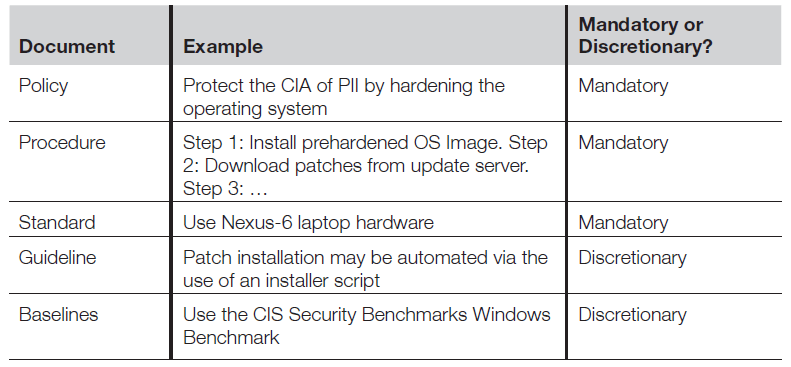
- Policies
- High-level management directives which do not focus on specifics
- Mandatory, e.g. even if you don’t agree with a policy, you must still follow it
- Consider a server security policy:
- Would discuss protecting CIA of the system
- May discuss software updates and patching at a high level
- Would not use low level terms or specific operating systems/tools
- If you changed your servers from Windows to Linux, your server policy would not change, but other lower-level documents would
- Procedures
- A procedure is a step-by-step guide for accomplishing a task
- Low-level and specific, but still mandatory
- Consider a simple procedure for creating a new user:
- Receive a new user request form and verify its completeness
- Verify that the user’s manager has signed the form
- Verify that the user has read & agreed to the user account security policy
- Classify the user’s role by following role assignment procedure NX-103
- Verify that the user has selected a secret word, such as his mother’s maiden name, and enter it into the helpdesk account profile
- Create the account & assign the proper role
- Assign the secret word as the initial password, and set “Force user to change password on next login”
- Email the new account document to the user & their manager
- The steps of this procedure are mandatory – security admins don’t have the option of skipping Step 1, for example, and creating an account without a form
- Other safeguards depend on this procedure: for example, when a user calls the helpdesk as a result of a forgotten password, the helpdesk will ask for the user’s secret word, which relies on Step 5 of the above procedure. This mitigates the risk of a social engineering/masquerading attack by an imposter.
- Standards
- Describes the specific use of technology, often applied to hardware & software, and are also mandatory
- “All employees will receive a Dell Latitude E6500 laptop with an Intel Core i7-6850K CPU, 8GB of RAM and a 500GB SSD” is an example of a hardware standard
- “The laptops will run Windows 10 Enterprise 64-bit” is an example of a software (OS) standard
- Standards lower the TCO of a safeguard and also support disaster recovery
- Describes the specific use of technology, often applied to hardware & software, and are also mandatory
- Guidelines
- Discretionary recommendations
- A guideline can be a useful piece of advice, such as how to create a strong password, or how to automate patch installation
- Baselines
- Uniform ways of implementing a standard
- “Harden the system by applying the Center for Internet Security Windows benchmarks” is an example of a baseline
- Baselines are discretionary, e.g. it is acceptable to harden the system without following the aforementioned benchmarks, as long as it is secure as a system hardened using those benchmarks (i.e. still meets the standard)
- Formal exceptions to baselines require senior management sign-off
- Top-down approach vs bottom-up approach to security management
- In the top-down approach, security practices are directed downward and supported at the senior management level
- Senior Management -> Middle Management -> Staff
- However, this only addresses half of the cycle
- In the bottom-up approach, the IT department tries to implement security measures through discovery & escalation
- Staff -> Middle Management -> Senior Management
- This a complement to top-down approach (rather than alternative or competitor to it)
- Thefore, this completes the security management cycle.
- In the top-down approach, security practices are directed downward and supported at the senior management level
Personnel security
Users can pose the biggest security risk to an organisation, so there is a need for background checking, secure management of contractors, and user awareness & training.
Security awareness & training
- Awareness & training often confused: awareness changes user behaviour (by bringing security to the forefront), while training provides a skillset
- Reminding users to never share accounts or write passwords down is an example of awareness – it’s assumed that some users are doing the wrong thing, and awareness is designed to change that behaviour.
- Examples of security training include training new helpdesk personnel how to open/modify/close service tickets, training network engineers to configure a router, or training a security admin to create a new account
- Education goes beyond awareness and training, and teaches an employee skills not needed for their current role. Often undertaken by individuals persuing certification or promotion.
Background checks
- Organisations should conduct a thorough background check before hiring an indivudidual
- This includes a criminal records check & verification of experience, education and certifications – lying or exaggerating about these is one of the most common examples of dishonesty in the hiring process
Employee termination
- Termination should result in immediate revocation of all employee access
- Beyond account revocation, termination should be a fair process
- For ethical & legal reasons…
- But gives an additional info sec advantage, since an organisation’s worst enemy can be a disgruntled former employee who, even without legitimate account access, knows where the weak spots are (especially true for IT personnel)
Vendor/consultant/contractor security
- Vendors, consultants & contractors can introduce risks since they are not direct employees, and sometimes have access to systems at multiple organisations
- If allowed to, they may place an organisation’s sensitive data on devices not controlled (or secured) by the organisation
- Third-party personnel with access to sensitivie data must be trained and made aware of risks, just as employees are, and the same info sec policies, procedures and other guidance should apply as well
- Additional policies regarding ownership of data and intellectual property should be developed, along with clear rules dictating when a third party may access or store data
- Background checks may also be necessary, depending on level of access
Outsourcing & offshoring
- Outsourcing is the use of a third party to provide IT services that were previously performed in house; offshoring is outsourcing to another country
- Both can lower TCO by providing IT services at a reduced cost
- May also enhance the IT resources available to a smaller company, which can improve CIA of data
- Offshoring can raise privacy & regulatory issues. For example, for a US company that offshores data to Australia, where there is no HIPAA for healthcare data, SOX for publicly-traded data, GLBA for financial info.
- Always consult with legal staff before offshoring data, and ensure that contracts are in place that require protection for all data, regardless of its physical location
Access control defensive categories & types
In order to understand and properly implement access controls, it’s vital to understand what benefits each control can bring, in terms of how it can add to the security of the system.
Preventive
- A preventive control prevents actions from occurring
- Applies restrictions to what a potential user, either authorised or unauthorised, can do
- An example of an preventive control is a pre-employment drug screening. It is designed to prevent an organisation from hiring an employee who is using illegal drugs.
Detective
- Detective controls are controls that send alerts during or after a successful attack
- Examples are intrusion detection systems that send alerts after a successful attack, CCTV cameras that alert guards to an intruder, and building alarm system that is triggered by an intruder.
Corrective
- Corrective controls work by “correcting” a damaged system/process
- The corrective access control typically works hand-in-hand with detective access controls, for example in antivirus software:
- First, the AV software runs a scan & uses its definition file to detect whether there is any software that matches its virus list – a detective control.
- If it detecrs a virus, the corrective controls take over and either places the suspicious software in quarantine or deletes it.
Recovery
- After a security incident has occurred, recovery controls may be needed in order to restore the functionality of the system & organisation
- Recovery means that the system must be restored, which involves reinstallation from OS media, data restored from backup etc.
Deterrent
- Deterrent controls deter users from performing certain actions on a system
- For example, a thief encountering two buildings, one with guard dogs (signified with a “Beware of the Dog” sign) and one without, is more likely to choose the building without.
- Another example is large fines for drivers caught speeding
- A sanction policy that makes users understand that they will be fired if caught surfing inappropriate websites is also a deterrent control
Compensating
- A compensating control is an additional security control put in place to compensate for weaknesses in other controls
Access control categories
- The six access control types described above can fall into one of three categories:
- Administrative (or directive) controls are implemented by creating & following organisation policy, procedure or regulation. User training & awareness also fall into this category. The example of a preventive control given above (pre-employment drug screening) is an administrative preventive control.
- Technical (or logical) controls are implemented using software, hardware or firmware that restricts logical access on an IT system. Examples include firewalls, routers, encryption etc.
- Physical controls are implemented with physical devices such as locks, fences, gates & security guards.
Risk analysis
Accurate risk analysis is a critical skill for an info sec professional. Our risk decisions will dictate which safeguards we should deploy in order to protect our assets, and the amount of money & resources we will spend doing so. Poor decisions will result in wasted money, or even worse, compromised data.
Assets
- Assets are valuable resources that need protection
- Can be data, systems, people, buildings, property etc.
- The value or criticality of the asset will dictate the safeguards you deploy.
Threats & vulnerabilities
- A threat is a potentially harmful occurrence, e.g. earthquake, power outage or network-based worm
- A vulnerability is a weakness that can allow a threat to cause harm, e.g. buildings not built to withstand earthquakes, a data centre without backup power, or a computer that has not been patched in a long time.
Risk = Threat × Vulnerability
- To have risk, a threat must connect to a vulnerability. This relationship is stated by the formula:
Risk = Threat × Vulnerability - You can assign a value to specific risks using this formula, by assigning a number to both threats & vulnerabilities (the range can be whichever you choose, as long as it is kept consistent when comparing different risks)
Impact
- The Risk = Threat × Vulnerability equation sometimes uses an added impact variable:
Risk = Threat × Vulnerability × Impact - Impact, or consequences, is the severity of the damage, sometimes expressed as a dollar amount (Risk = Threat × Vulnerability × Cost is sometimes used, for that reason)
Always protect human life!
- For the purposes of the exam (as well as in reality), loss of human life has a near-infinite impact
- When calculating risk using the R = T × V × I formula, any risk involving the loss of human life is extremely high and must be mitigated
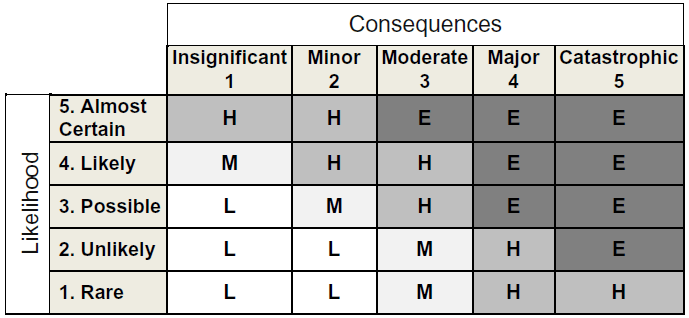
Risk analysis matrix
- Uses a quadrant to map the likelihood of a risk occuring against the consequences (impact) the risk would have
- Allows you to perform qualitative risk analysis based on likelihood (from “rare” to “almost certain”) and consequences/impact (from “insignificant” to “catastrophic”), to give a resulting risk score of Low, Medium, High and Extreme.
- Low risks are handled via normal processes, moderate risks require management notification, high risks require senior management notification & extreme risks require immediate action including a detailed mitigation plan, as well as senior management notification
- The goal of the matrix is to identify high likelihood/high impact risks (upper right quadrant of the table below) and drive them down to low likelihood/low consequence risks (lower left quadrant)
Calculating annualised loss expectancy
- The annualised loss expectancy (ALE) calculation allows you to determine the annual cost of a loss due to a risk, and make informed decisions to mitigate this risk.
- Example scenario: You are the security officer at a company that has 1,000 laptops. You are concerned about the risk of exposure to PII due to lost/stolen laptops. You would like to purchase & deploy a laptop encryption solution, but the solution is expensive, so you need to confidence management that the investment is worthwhile.
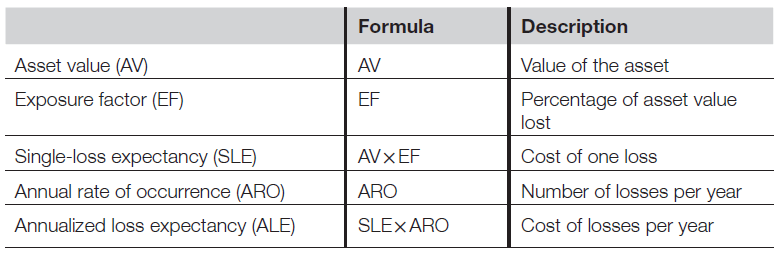
- The asset value (AV) is the value of the asset you are trying to protect
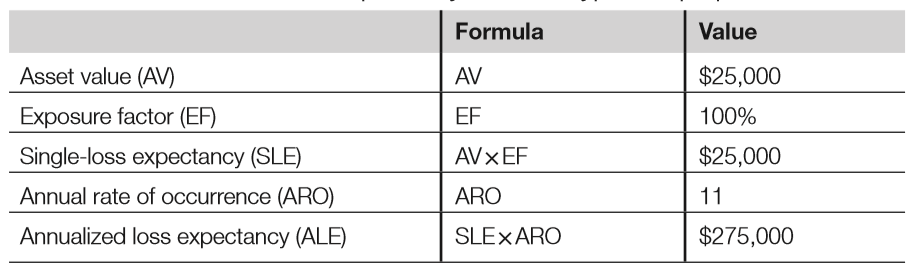
- In this example, each laptop costs $2,500, but the real value is the PII. Theft of unencrypted PII has occurred previously and has cost the company many times the value of the laptop in regulatory fines, bad publicity, legal fees, staff hours spent investigating etc. The true average of a laptop with PII for this example is $25,000 ($2,500 for the hardware plus $22,500 for the exposed PII)
- Tangible assets, such as computers or buildings, are straightforward to calculate, but intangible assets are more challenging: for example, what is the value of brand loyalty
- Methods for calculating the value of intangible assets:
- Market approach assumes that the fair value of an asset reflects the price at which comparable assets have been purchased in transactions under similar circumstances
- Income approach is based on the premise that the value of an asset is the present value of the future earning capacity that an asset will generate over its remaining useful life
- Cost approach estimates the fair value of an asset by reference to the costs that would be incurred in order to recreate or replace the asset
- The exposure factor (EF) is the percentage of value an asset loses due to an incident. In the case of a stolen laptop with unencrypted PII, the EF is 100% because the laptop and all of the data are gone
- The single-loss expectency is the cost of a single loss and is calculated by multiplying the AV by the EF. In our case, SLE is $25,000 (AV) times 100% (EF), so $25,000.
- The annual rate of occurrence (ARO) is the number of losses suffered per year. For example, when looking through past events, you discover that you have suffered 11 lost or stolen laptops per year on average. Your ARO is 11.
- The annualised loss of expectancy is the yearly cost due to risk. It is calculated by multiplying the SLE by the ARO. In our case, it is $25,000 (SLE) multiplied by 11 (ARO), so $275,000.
- The asset value (AV) is the value of the asset you are trying to protect
Total cost of ownership
- The TCO is the total cost of a mitigating safeguard
- It combines upfront costs (often a one-off capital expense) with the annual cost of maintenance (including staff hours, vendor maintenance fees, software subscriptions etc) which are usually considered operational expenses.
- Using our laptop encryption example, the upfront cost of laptop encryption software is $100/laptop (so $100K for all 1,000 laptops). The vendor charges a 10% annual support fee ($10K per year). You estimate that it will take four staff hours per laptop to install the software (4,000 staff hours). The staff members performing this work make $50/hour plus $20/hour of benefits ($70 x 4,000 = $280,000).
- Your company uses a 3-year technology refresh cycle, so you calculate the TCO over 3 years:
- Software cost: $100,000
- 3 years of vendor support: $30,000
- Staff cost: $280,000
- TCO over 3 years: $410,000
- TCO per year: $136,667
Return on investment
- ROI is the amount of money saved by implementing a safeguard
- If your annual TCO is less than your ALE, you have a positive ROI and have made a good choice with your safeguard implementation; if the RTO is higher than your ALE, you have made a poor choice
- In our example, the annual TCO of laptop encryption is $275K
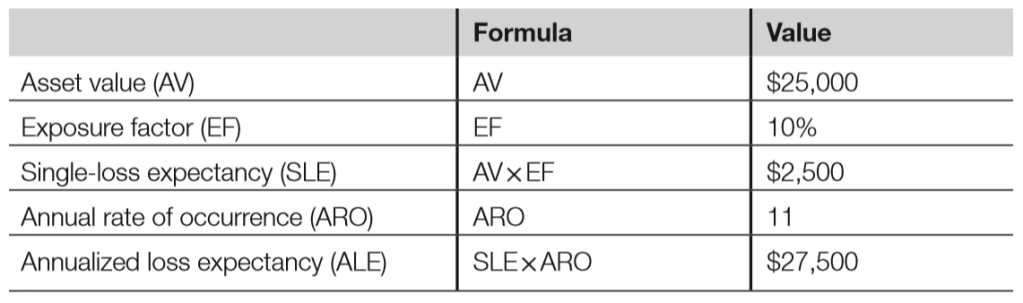
- Implementing laptop encryption will change the EF. The laptop hardware is worth $25,000, and the exposed PII costs an addition $22.5K, for a total $25K AV.
- If an unecrypted laptop is lost/stolen, the EF is 100% because all the hardware & data are exposed. Laptop encryption mitigates the PIIIexposure risk, lowering the EF from 100% (the laptop & all data) to 10% (just the laptop hardware)
- The lower EF reduces the ALE from $275K to $27.5K. You will save $247,5K per year (the old ALE minus the new ALE) by making an investment of $136,667.
- Your ROI is $110,833 per year ($247,500 – $136,667): the laptop encryption project has a positive ROI and is a wise investment
Budget & metrics
- When combined with risk analysis, the TCO & ROI calculations factor into proper budgeting
- Metrics can greatly assist the info sec budgeting process: they help illustrate potentially costly risks and demonstrate the effectiveness & potential cost savings of exisiting controls
- Metrics can also help champion the cause of info sec, but they must be chosen with care to ensure they contribute to operational management and “actionable intelligence”
- As a general point, security is potentially less expensive, easier to justify and more simple to integrate with operations when built into the design (Secure by Design) vs added as an afterthought
Risk choices
- Once we’ve assessed risk, we must decide what to do
- Valid options include:
- Accept the risk: Some risks may be accepted. In some cases, it is cheaper to leave an asset unprotected due to a specific risk, rather than make the effort & spend the money required to protect in. This cannot be an ignorant decision; all options must be considereed before accepting the risk
- Risk acceptance criteria: Low likelihood/low impact risks are candidates for risk acceptance. High & extreme risks cannot be accepted. There are other cases where accepting risk is not an option, such as data protected by laws or regulations, and of course risk to human life or safety.
- Mitigating risk means lowering the risk to an acceptable level. Lowering risk is also called risk reduction, and the processs of lowering risk is known as reduction analysis. The previous laptop encryption example given in the ALE section is an example of mitigating the risk.: the risk of lost PII due to stolen laptops was mitigatwed by encrypting the data on the laptops. Note that the risk has not been eliminated entirely; a weak or expoed encryption password could expose the PIII but the risk has been resuced to an acceptable level.
- In some cases, it is possible to remove specific risks entirely; this is called eliminating the risk
- Accept the risk: Some risks may be accepted. In some cases, it is cheaper to leave an asset unprotected due to a specific risk, rather than make the effort & spend the money required to protect in. This cannot be an ignorant decision; all options must be considereed before accepting the risk
- The insurance model depicts transferring risk (or assigning risk). Most homeowners do not assume the risk of fire for their houses; they pay an insurance company to assume that risk for them. The insurance companies are experts in risk analysis; buying risk is their business.
- Risk avoidance: A thorough risk analysis should be carried out before taking on a new project. If the risk analysis uncovers high or extreme risks that cannot be easily mitigated, avoiding the risk (and the project) may be the best option.
- Note that denying risk is never an option!
Quantititative & qualitative risk analysis
- Quantitative RA uses hard metrics, such as dollar amounts, while qualitatitive RA uses simple approximate values
- Quantititative is more objective, qualitative is more subjective
- Hybrid risk analysis combines the two by using quantitative analysis for risks that may be easily expressed in hard numbers, and qualititative analysis for the remainder
- Calculating the ALE is an example of quantitative RA. The risk analysis matrix is an example of qualititive RA.
The risk management process
NIST Special Publication 800-30, Risk Management Guide for Information Technology Systems describes a 9-step risk analysis process:
- System Characterisation
- Threat Identification
- Vulnerability Identification
- Control Analysis
- Likelihood Determination
- Impact Analysis
- Risk Determination
- Control Recommendations
- Results Documentation
Control frameworks
- There are various control frameworks, each with different objectives
- The traits that they share are:
- They must be consistent in the way they are applied
- They must be measurable so we know whether they are achieving the goals effectively
- They must be considered comprehensive in the area that they address
- Ideally, they should be modular, allowing you to “plug-and-play” to meet your needs
- Control frameworks come in various forms & seek the achievement of different but compatible objectives
- Examination for integrity
- Strategy for delivery of services and capabilities
- Assurance of operational conformance to standards
- Verification of the performance of technical security controls
- Some common control frameworks include ISO 27000, COSO, COBIT & ITIL.
Types of attackers
Controlling access is not limited to that of authorised users; it also includes preventing unauthorised attackers. Systems may be attacked by a variety of attackers (ranging from script kiddies to worms to militarised attacks) using a variety of methods in their attempts to compromise the CIA of systems.
Hackers
- Term often used in the media to describe a malicious attacker
- Originally described a non-malicious explorer who used technologies in ways its creator did not intend; a malicious person would be called a “cracker”
- Better terms include “malicious hacker” or black hat. White hat hackers are the good guys, including professional pen testers who break into systems with permission, and malware researchers who disclose vulnerabiliities to vendors in an ethical manner
- A hacktivist is a hacker activist who attacks computer systems for political reasons: “hactivism”
- Script kiddies attack computer systems with tools of which they have little or no understanding
Outsiders
- Attackers with no authroised privileged access to a system or organisation
- The outsider seeks to gain unauthorised access
- Outsiders launch the majority of attacks, but most are usually mitigated by defence-in-depth perimeter controls
Insiders
- Insider attacks are launched by internal users who may be authorised to use the system that is attacked
- Attack may be deliberate or accidental
- Attackers range from poorly-trainined admins who make mistakes, to bad actors who intentionally compromise the security of systems
- An authorised insider who attacks a system may be in a position to cause significant impact
Bots & botnets
- A bot or zombie is a computer system running malware that is controlled via a botnet
- A botnet contains a central command & control (C&C) network, managed by humans called bot herders
Phishers
- Phishing is a malicious attack which attempts to trick users into divulging account credentials or PII
- A social engineering attack that sometimes include other attacks, including client-side attacks & theft of credentials
- Simply clicking a phishing link is daengrous, as the client may be automatically compromised
- Phishing is indiscriminate, while spear phishing targets a specific group of individuals (such as employees of a single organisation) and whaling targets high-level executives
Summary of exam objectives
- Info sec governance ensures that an organisation has the correct info sec structure, leadership & guidance, and that the proper administrative controls are in place to mitigate risk
- Risk analysis helps ensure that an organisation properly identifies, analyses & mitigates risk
- Accurately assessing risk and understanding terms such as ALE, TCO & ROI is essential
- An understanding and appreciation of legal systems, concepts & terms are required; the ubiquity of information systems has caused the creation of new laws, reinterpretation of existing ones and a new apprecation of the unique aspects that computers bring to the courts, no matter what the major legal system is
- The nature of info sec and its inherent sensitivity makes ethical frameworks an additional point requiring attention, with the exam likely to emphasise the ISCS(2)’s own Code of Ethics and its four ordered canons focusing on matters of the public, the individual’s behaviour, the provision of competent service & the profession as a whole.
 My CISSP Notes